1. Introduction
This manual provides instructions for the YAOHUIMI Replacement Remote Control, designed for use with various DAIKIN AC Air Conditioner models. This remote offers direct compatibility without programming for the specified models, featuring an English interface, Fahrenheit and Celsius display options, and a green backlight for enhanced visibility.
2. Compatibility Information
This replacement remote control is compatible with a wide range of DAIKIN AC Air Conditioner remote models, including but not limited to:
- ARC480A1, ARC480A2, ARC480A3, ARC480A4, ARC480A5, ARC480A6, ARC480A7, ARC480A8, ARC480A9, ARC480A10, ARC480A11, ARC480A12, ARC480A13, ARC480A14, ARC480A15, ARC480A16, ARC480A17, ARC480A18, ARC480A19, ARC480A20, ARC480A21, ARC480A22, ARC480A23, ARC480A24, ARC480A25, ARC480A26, ARC480A27, ARC480A28, ARC480A29, ARC480A30, ARC480A31, ARC480A32, ARC480A33, ARC480A34, ARC480A35, ARC480A36, ARC480A37, ARC480A38, ARC480A39, ARC480A40, ARC480A41, ARC480A42, ARC480A43, ARC480A44, ARC480A45, ARC480A46, ARC480A47, ARC480A48, ARC480A49, ARC480A50, ARC480A51, ARC480A52, ARC480A53, ARC480A54, ARC480A55.
- DAIKIN AC Air Conditioner models: FTX09NMVJU, FTX12NMVJU, FTX15NMVJU, FTX18NMVJU, FTX24NMVJU, FTXN09NMVJU, FTXN12NMVJU, FTXN15NMVJU, FTXN18NMVJU, FTXN24NMVJU, RK09NMVJU, RX12NMVJU, RK12NMVJU, RX18NMVJU, RK18NMVJU, RX24NMVJU, RK24NMVJU, FTXP60K3V1B, FTXP71K3V1B, RXN09NMVJU, RKN09NMVJU, RKN12NMVJU, RXN12NMVJU, RXN18NMVJU, RKN18NMVJU, RXN24NMVJU, RKN24NMVJU, FTK09NMVJU, FTK12NMVJU, FTK18NMVJU, FTK24NMVJU, FTKN09NMVJU, FTKN12NMVJU, FTKN18NMVJU, FTKN24NMVJU, CTXF20TVMA, CTXF35TVMA, CTXF25TVMA, CTXF50TVMA, FTXF20TVMA, FTXF25TVMA, FTXF35TVMA, FTXF46TVMA, FTXF50TVMA, FTXF60TVMA, FTXF71TVMA, DTXF25TVMA, DTXF35TVMA, DTXF50TVMA, DTXF60TVMA, DTXF71TVMA, FTXF25QVMA, FTXF35QVMA, FTXF50QVMA, FTXF50TV16, FTXF60QVMA, FTXF60TV16, FTXF71QVMA, FTXF71TV16, ATX20K2V1B, ATX20K5V1B, ATX25K2V1B, ATX25K5V1B, ATX35K2V1B, ATX35K5V1B, ATXP20K2V1B, ATXP20K5V1B, ATXP25K2V1B, ATXP25K5V1B, ATXP35K2V1B, ATXP35K5V1B, FTX20K2V1B, FTX20K5V1B, FTX25K2V1B, FTX25K5V1B, FTX35K2V1B, FTX35K5V1B, FTX50K2V1B, FTX60K2V1B, FTX71K2V1B, FTXP20K2V1B, FTXP20K3V1B, FTXP25K2V1B, FTXP25K3V1B, FTXP35K2V1B, FTXP35K3V1B, FTXP50K3V1B.
Important Note on Incompatibility:
This remote control is NOT compatible with the following DAIKIN remote control series:
- FTNK Series (e.g., FTNK20AV1K, FTNK25AV1K)
- FTNK-9 Series (e.g., FTNK20AV1K9, FTNK25AV1K9)
- FTKB Series (e.g., FTKB09AXVJU, FTKB12AXVJU, FTKB18AXVJU, FTKB24AXVJU, FTXB09AXVJU, FTXB12AXVJU, FTXB18AXVJU, FTXB24AXVJU, FTKN09AXVJU, FTKN12AXVJU, FTKN18AXVJU, FTKN24AXVJU)

If you are unsure about compatibility, please consult your air conditioner's manual or contact customer support.
3. Setup
3.1 Battery Installation
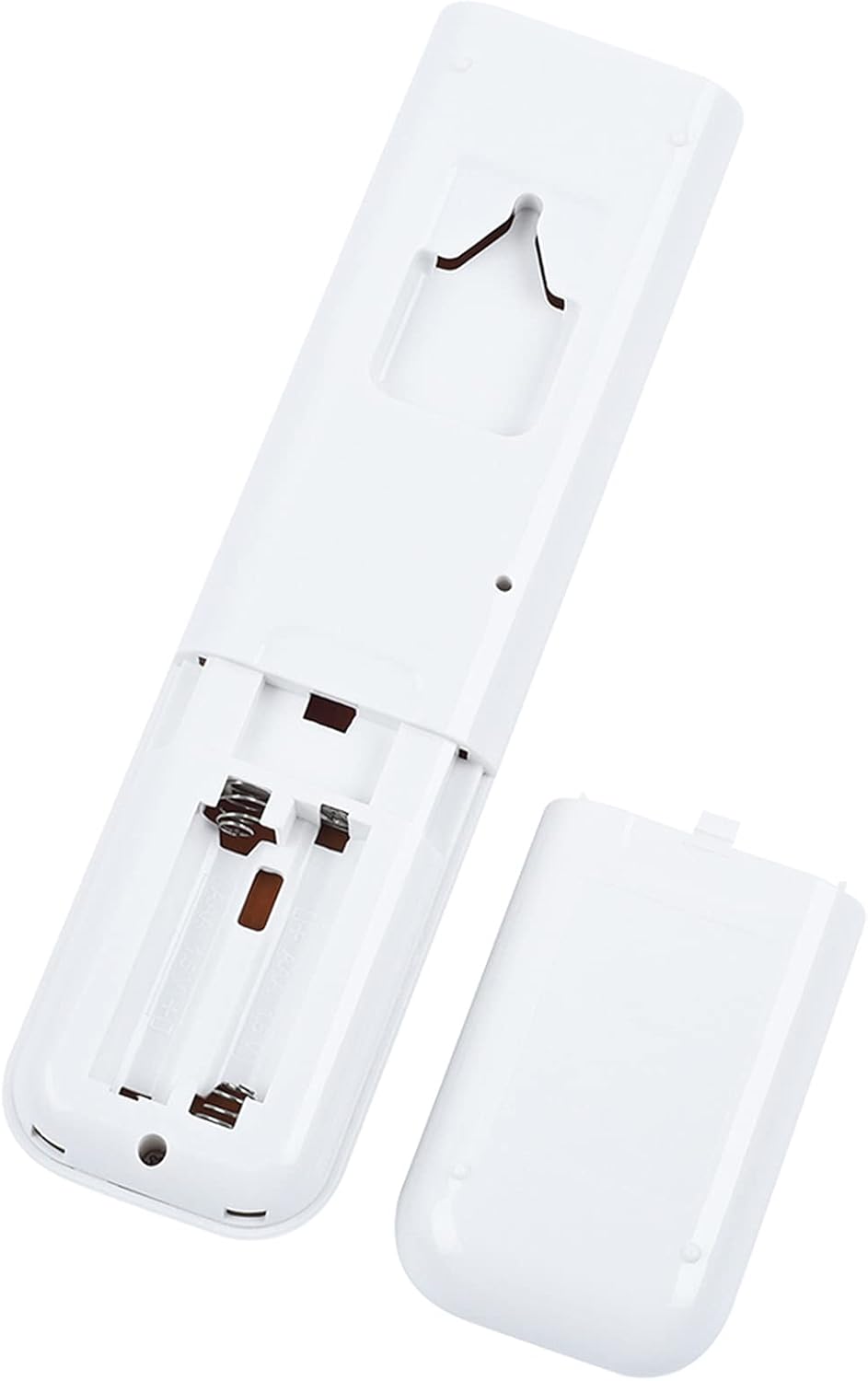
- Locate the battery compartment on the back of the remote control.
- Slide the battery cover downwards to open it.
- Insert two AAA batteries (not included), ensuring the positive (+) and negative (-) terminals align correctly with the markings inside the compartment.
- Slide the battery cover back into place until it clicks securely.
3.2 Initial Use
No programming is required. Once batteries are installed, the remote control is ready for immediate use with compatible DAIKIN AC units.
4. Operating Instructions
Familiarize yourself with the buttons and their functions:

- ON/OFF: Press to turn the air conditioner unit on or off.
- AUTO: Selects automatic operation mode, where the unit adjusts settings based on room temperature.
- COOL: Activates cooling mode.
- HEAT: Activates heating mode.
- DRY: Activates dehumidification mode.
- FAN ONLY: Operates the fan without cooling or heating.
- TEMP ▲/▼ (Temperature Up/Down): Adjusts the desired temperature setting. This button also toggles between Fahrenheit (°F) and Celsius (°C) display.
- FAN: Cycles through fan speed settings (e.g., Low, Medium, High, Auto).
- ECONO: Activates economy mode for reduced power consumption.
- COMFORT: Engages comfort airflow mode.
- POWERFUL: Activates powerful operation for rapid cooling or heating.
- SWING: Controls the vertical louver swing function.
- TIMER ON/OFF/CANCEL: Sets or cancels the timer for automatic unit operation.
4.1 Display Features
The remote control features a clear display with several indicators:
- Temperature Display: Shows the set temperature in either Fahrenheit or Celsius.
- Green Backlight: The display illuminates with a green backlight for easy reading in low-light conditions.


5. Maintenance
5.1 Battery Replacement
Replace batteries when the remote's response becomes sluggish or the display dims. Always replace both batteries simultaneously with new AAA batteries.
5.2 Cleaning
Wipe the remote control with a soft, dry cloth. Do not use liquid cleaners or abrasive materials, as these can damage the remote's surface or internal components.
5.3 Storage
If the remote control will not be used for an extended period, remove the batteries to prevent leakage and potential damage.
6. Troubleshooting
- Remote not responding:
- Check if the batteries are inserted correctly with the correct polarity.
- Replace old batteries with new ones.
- Ensure there are no obstructions between the remote control and the air conditioner's receiver.
- Confirm the remote is pointed directly at the air conditioner unit.
- Air conditioner not responding to commands:
- Verify that your specific DAIKIN AC model is listed as compatible in Section 2.
- Ensure the air conditioner unit is powered on at the main switch.
- Display is dim or blank:
- Replace the batteries.
7. Specifications
| Brand | YAOHUIMI |
| Model Number | A420210721-480ALIGHT-04 |
| Compatible AC Brands | DAIKIN |
| Power Source | 2 x AAA Batteries (not included) |
| Special Features | Ergonomic design, Green Backlight, Fahrenheit/Celsius Display |
| Max Number of Supported Devices | 1 |
8. Warranty and Support
For warranty information or technical support, please refer to the product packaging or contact the seller directly. Keep your purchase receipt for any warranty claims.


