
1. Introduction
Thank you for choosing the Lanteso S21 Bluetooth 5.2 TWS Wireless Earbuds. This manual provides detailed instructions on how to set up, operate, and maintain your earbuds to ensure optimal performance and longevity. Please read this manual carefully before use and retain it for future reference.
2. Package Contents
Please check the package for the following items:
- Lanteso S21 Wireless Earbuds (Left and Right)
- Portable Charging Case
- USB Type-C Charging Cable
- Multiple Sizes of Ear Tips (S, M, L)
- User Manual
3. Product Overview
The Lanteso S21 earbuds are designed for comfort and high-quality audio, featuring advanced Bluetooth 5.2 technology and intuitive touch controls.

Image 3.1: Lanteso S21 Wireless Earbuds securely placed within their charging case, illustrating the compact design and charging contacts.
Key features include:
- Advanced Bluetooth 5.2: Ensures stable connection, long transmission range, low power consumption, and minimal latency.
- High-Definition Audio: 6mm drivers deliver deep bass, clear vocals, and crisp treble.
- Automatic Pairing: Earbuds connect automatically to your device upon removal from the charging case.
- Intuitive Touch Control: Manage music playback, volume, calls, and voice assistant with simple taps.
- Ultra-Lightweight Design: Each earbud weighs only 4.1g for comfortable, extended wear.
- Extended Battery Life: Up to 4 hours of continuous playback, with an additional 20 hours provided by the portable charging case.
- Water Resistance: Designed to be waterproof for various activities.

Image 3.2: An exploded view diagram showcasing the internal components responsible for bass sound production and call noise reduction.

Image 3.3: A visual representation of the ergonomic design, demonstrating how the lightweight earbuds (4.1g) fit stably and comfortably within the ear canal.
4. Setup
4.1. Charging the Earbuds and Charging Case
Before first use, ensure both the earbuds and the charging case are fully charged.
- Place the earbuds into the charging case. Ensure the charging contacts align.
- Connect the USB Type-C charging cable to the charging port on the case and the other end to a USB power adapter (not included) or a computer's USB port.
- The indicator lights on the charging case will show the charging status. A full charge for the case takes approximately 1 hour.
- Once fully charged, the earbuds provide up to 4 hours of continuous playback, and the charging case provides an additional 20 hours of battery life.

Image 4.1: Illustration of the Lanteso S21's battery capabilities, highlighting 4 hours of continuous playback and an additional 20 hours from the portable Type-C fast charging case.
4.2. Pairing with Your Device
The Lanteso S21 earbuds feature automatic pairing for convenience.
- Ensure your device's Bluetooth is turned on.
- Open the charging case and remove both earbuds. They will automatically power on and enter pairing mode.
- On your device, search for Bluetooth devices and select "S21" from the list.
- Once connected, you will hear a confirmation tone, and the earbuds will be ready for use.
- For single earbud use, simply remove one earbud from the case; it will connect independently.
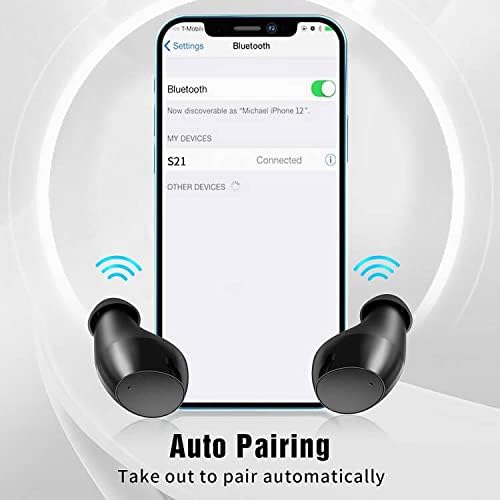
Image 4.2: A smartphone display illustrating the Bluetooth settings menu, with "S21" listed as a connected device, demonstrating the automatic pairing process.
5. Operating Instructions
The Lanteso S21 earbuds utilize touch controls for various functions. The touch sensitive area is located on the outer surface of each earbud.

Image 5.1: A visual guide to the touch control functions on the Lanteso S21 earbuds, including play/pause, skip tracks, volume adjustment, call control, voice assistant activation, and mute.
| Action | Function |
|---|---|
| Single Tap (L/R) | Play/Pause Music, Answer/End Call |
| Double Tap (Right) | Next Track |
| Double Tap (Left) | Previous Track |
| Triple Tap (Right) | Volume Up |
| Triple Tap (Left) | Volume Down |
| Long Press (2s) (L/R) | Activate Voice Assistant, Reject Call |
6. Maintenance
Proper maintenance ensures the longevity and performance of your Lanteso S21 earbuds.
- Cleaning: Regularly clean the earbuds and charging case with a soft, dry, lint-free cloth. Do not use abrasive cleaners or solvents.
- Ear Tips: Remove and clean the ear tips periodically with water and mild soap. Ensure they are completely dry before reattaching.
- Charging Contacts: If charging issues occur, gently clean the charging contacts on both the earbuds and the case with a cotton swab.
- Storage: When not in use, store the earbuds in their charging case to protect them and keep them charged. Store in a cool, dry place away from extreme temperatures.
- Water Resistance: The earbuds are waterproof. However, avoid prolonged submersion in water and ensure they are dry before placing them back in the charging case to prevent damage to the charging contacts.
7. Troubleshooting
If you encounter any issues with your Lanteso S21 earbuds, please refer to the following common solutions:
- Earbuds not pairing:
- Ensure both earbuds are fully charged.
- Place earbuds back into the charging case, close the lid, wait a few seconds, then open and remove them again.
- Turn off and on your device's Bluetooth.
- Forget "S21" from your device's Bluetooth list and attempt to pair again.
- No sound from one earbud:
- Ensure both earbuds are charged.
- Try placing both earbuds back in the case and taking them out again to re-establish the connection between them.
- Check your device's audio balance settings.
- Earbuds not charging:
- Ensure the charging cable is securely connected to both the case and the power source.
- Clean the charging contacts on the earbuds and inside the case with a dry cotton swab.
- Try a different USB cable or power adapter.
- Low volume or poor sound quality:
- Adjust the volume on both your device and the earbuds.
- Ensure the ear tips are properly sealed in your ear canal. Try different sized ear tips for a better fit.
- Clean any debris from the earbud speaker mesh.
8. Specifications
| Feature | Detail |
|---|---|
| Brand | Lanteso |
| Model Name | S21 |
| Connectivity Technology | Wireless (Bluetooth 5.2) |
| Form Factor | In-Ear |
| Ear Placement | In-Ear |
| Control Method | Touch |
| Charging Time | Approximately 1 hour (for charging case) |
| Continuous Playback Time | Up to 4 hours (earbuds) |
| Total Battery Life (with case) | Up to 24 hours |
| Item Weight | 45 Grams (total) |
| Earbud Weight | 4.1 Grams (per earbud) |
| Water Resistance Level | Waterproof |
| Material | Plastic |
| Compatible Devices | Bluetooth Compatible Devices |
| Battery Composition | Lithium-polymer |
| Components Included | Charging case |
9. Warranty and Support
Lanteso is committed to providing professional and satisfactory after-sales services. Your feedback and suggestions are important to us.
If you have any questions or require assistance with your Lanteso S21 earbuds, please do not hesitate to contact us through Amazon. We aim to respond to all inquiries within 24 hours.
For more information, please visit the official Lanteso support page or contact customer service directly.