
Rechargeable B099YV4LHL
Living Glow Rechargeable LED Bulbs 6-Pack User Manual
Model: B099YV4LHL
1. Introduction
The Living Glow Rechargeable LED Bulbs are designed to provide reliable illumination, functioning as standard light bulbs during normal operation and automatically activating their built-in battery during power outages. These bulbs are suitable for multi-socket applications in various lamps and light fixtures. They are designed to charge automatically with everyday use.

Figure 1: Six Living Glow Rechargeable LED Bulbs, showcasing their standard bulb shape and design.
2. Product Features
- Emergency Lighting: Built-in battery activates automatically during power outages, providing up to 6 hours of illumination in low mode.
- Easy Installation: Screws into any standard lamp or light fixture like a typical light bulb.
- Long Lifespan: Approximately 50,000 hours of LED life, equivalent to about 45 years of typical use.
- Automatic Charging: Bulbs charge automatically during everyday use when connected to a powered fixture.
- Portable Lantern Function: Includes a power cap accessory that allows the bulb to function as a portable lantern.
3. Package Contents
Verify that all items are present in your package:
- 6 x Living Glow Rechargeable LED Bulbs
- 6 x Power Caps with Hooks (for lantern function)
- 3 x Wall Adapters (for direct charging or alternative use)

Figure 2: Power caps with integrated hooks, enabling the bulbs to be used as portable lanterns.
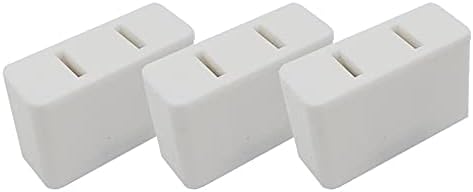
Figure 3: Three wall adapters, likely for direct charging or alternative power supply for the bulbs.
4. Setup Instructions
- Initial Installation: Screw the Living Glow Rechargeable LED Bulb into any standard E26/E27 lamp socket or light fixture. Ensure the fixture's power is off before installation.
- First Charge: For optimal performance, allow the bulbs to charge for at least 24 hours in a powered fixture before relying on their emergency function. The bulb charges automatically when the fixture's switch is in the "on" position.
- Using the Power Cap: To use a bulb as a portable lantern, carefully unscrew it from the fixture. Screw the bulb into one of the provided power caps. The power cap has a button or switch to turn the bulb on/off independently.

Figure 4: Example setup showing a Living Glow bulb installed in a desk lamp and other bulbs with their power cap accessories.
5. Operating Instructions
5.1. Normal Operation
When installed in a powered fixture, the Living Glow LED bulb functions like a regular light bulb. Turn the fixture's switch on or off to control the light. While the fixture is on, the bulb's internal battery will charge.
5.2. Emergency Mode
In the event of a power outage, the bulb's internal battery will automatically activate, providing light. The bulb will remain lit as long as the fixture's switch is in the "on" position. If the switch is off, the bulb will not illuminate during an outage. To conserve battery life, the bulb may operate at a reduced brightness in emergency mode.
5.3. Portable Lantern Mode
Once a bulb is screwed into a power cap, use the button or switch on the power cap to turn the bulb on or off. The integrated hook allows for easy hanging. This mode is ideal for camping, outdoor activities, or as a handheld light source during an outage.

Figure 5: Visual representation of different light temperatures (Daylight vs. Soft Light) that these bulbs may produce, depending on the specific model variant.
6. Maintenance
- Cleaning: Ensure the bulb is cool and the power is off before cleaning. Wipe the bulb with a soft, dry cloth. Do not use liquid cleaners or abrasive materials.
- Battery Health: To maintain optimal battery life, ensure the bulbs are regularly used in a powered fixture to allow for consistent charging. Avoid prolonged storage of uncharged bulbs.
- Storage: If storing bulbs for an extended period, ensure they are fully charged. Store in a cool, dry place.
7. Troubleshooting
| Problem | Possible Cause | Solution |
|---|---|---|
| Bulb does not light up in normal operation. | Fixture is not powered; bulb is loose; bulb is faulty. | Check power supply to fixture; tighten bulb in socket; test bulb in another working fixture. |
| Bulb does not light up during power outage. | Fixture switch is off; bulb battery is not charged; bulb is faulty. | Ensure fixture switch is in the "on" position; allow bulb to charge for at least 24 hours in a powered fixture; test bulb in another working fixture. |
| Bulb flickers or dims unexpectedly. | Low battery charge; unstable power supply; loose connection. | Allow bulb to fully charge; check power supply stability; tighten bulb in socket. |
| Bulb does not work with power cap. | Bulb not fully screwed into cap; cap battery (if applicable) is dead; bulb is faulty. | Ensure bulb is securely screwed into power cap; check power cap's internal battery (if applicable, some caps may have their own power); test bulb in a fixture. |
8. Specifications
| Feature | Detail |
|---|---|
| Brand | Rechargeable |
| Light Type | LED |
| Special Feature | Rechargeable |
| Wattage (Equivalent) | 60 watts |
| Bulb Shape Size | A15 |
| Bulb Base | B15D (Note: Product description implies E26/E27 compatibility, B15D is a different base. User should verify their socket type.) |
| Brightness | 800 Lumen |
| Voltage | 1 Volts (DC) - This seems to be for internal battery, not mains. Mains voltage is 100-240V. |
| Accepted Voltage Frequency | 100 to 240 Volts and 50 Hertz to 60 Hertz |
| Unit Count | 6 Count |
| Average Life | 45.6 Years (50,000 hours) |
| Indoor/Outdoor Usage | Indoor |
| ASIN | B099YV4LHL |
| UPC | 707785298515 |
Note: Some specifications provided may refer to internal battery voltage or general product characteristics. Always refer to the product packaging for the most accurate and up-to-date information regarding specific bulb base compatibility (e.g., E26/E27 vs. B15D) and operating voltage.
9. Warranty and Support
For warranty information and customer support, please refer to the documentation included with your product packaging or visit the manufacturer's official website. Keep your purchase receipt as proof of purchase for any warranty claims.
For further assistance, you may contact the seller through the platform where the product was purchased.
Ask a question about this manual
Ask about setup, troubleshooting, compatibility, parts, safety, or missing instructions. Manuals+ will review the question and use this page’s manual context to help answer it.