Introduction
The TELEPROMPTER PAD iPresent PRO is an advanced portable teleprompter system designed for live events, public speaking, corporate conferences, and academic seminars. It allows presenters to read scripts while maintaining direct eye contact with their audience or camera, enhancing delivery and confidence. This manual provides comprehensive instructions for setting up, operating, and maintaining your iPresent PRO teleprompter.

Figure 1: iPresent PRO Teleprompter with included hardcase and remote control.
Setup and Assembly
Follow these steps to assemble your iPresent PRO teleprompter. Ensure all components are present before beginning.
1. Unpacking and Component Identification
Carefully remove all items from the transport hardcase. The hardcase is designed to protect your teleprompter during transport and storage.
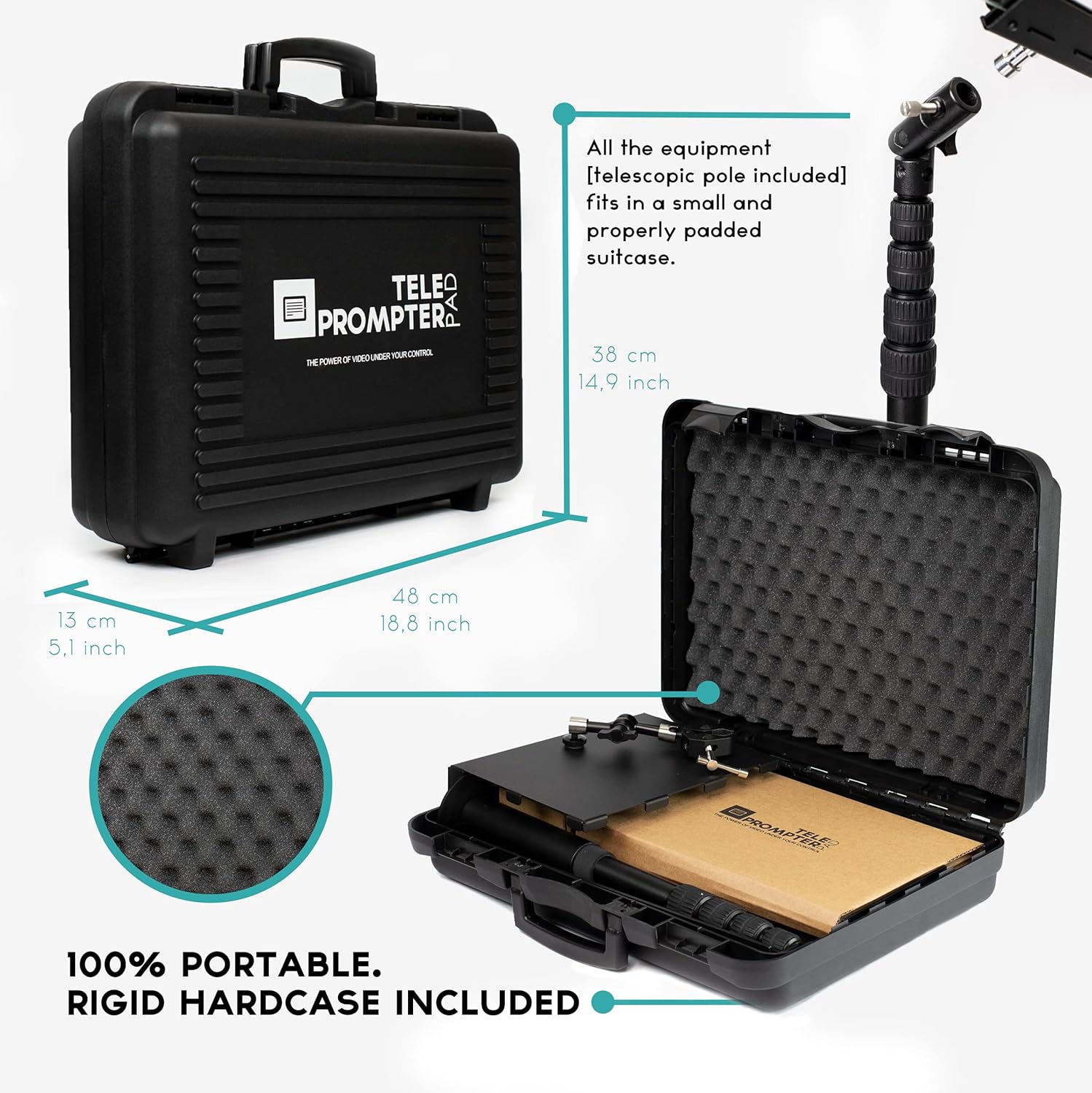
Figure 2: The iPresent PRO hardcase, measuring approximately 48 cm (18.8 inches) in width and 38 cm (14.9 inches) in height, with all equipment fitting inside.
- Teleprompter Base Unit
- Telescopic Pole
- Beam Splitter Glass with Holder
- Tablet Tray (for iPad/Tablet use)
- Monitor Base (for external monitor use)
- Bluetooth Remote Control
- Mounting Screws (for VESA compatible monitors)
2. Assembling the Main Unit
- Place the teleprompter base unit on a stable, flat surface.
- Insert the telescopic pole into the designated slot on the base unit. Secure it by tightening the locking mechanism.
- Attach the beam splitter glass holder to the top of the telescopic pole.
- Carefully slide the beam splitter glass into its holder. Ensure it is securely seated. The glass is made of premium optical quality material for clear reflection.
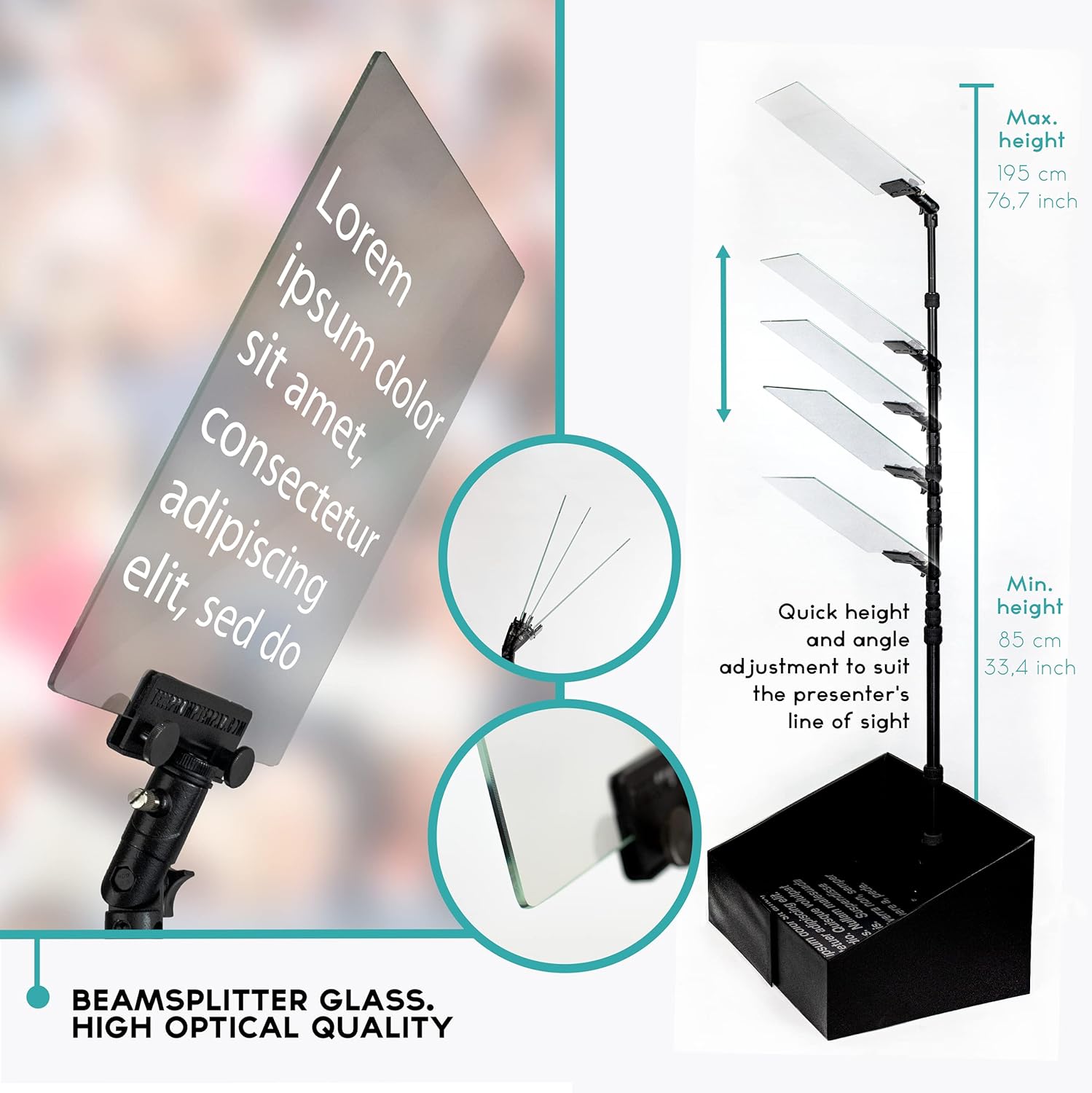
Figure 3: Detail of the high optical quality beamsplitter glass and its adjustable mounting, allowing for quick height and angle adjustments.
3. Device Integration (Tablet or Monitor)
The iPresent PRO is compatible with both tablets/iPads and external monitors.
For Tablets/iPads:
- Attach the tablet tray to the telescopic pole using the adjustable clamp.
- Place your iPad or tablet (up to 10.2" W x 7.8" H [26x20cm]) onto the tablet tray.
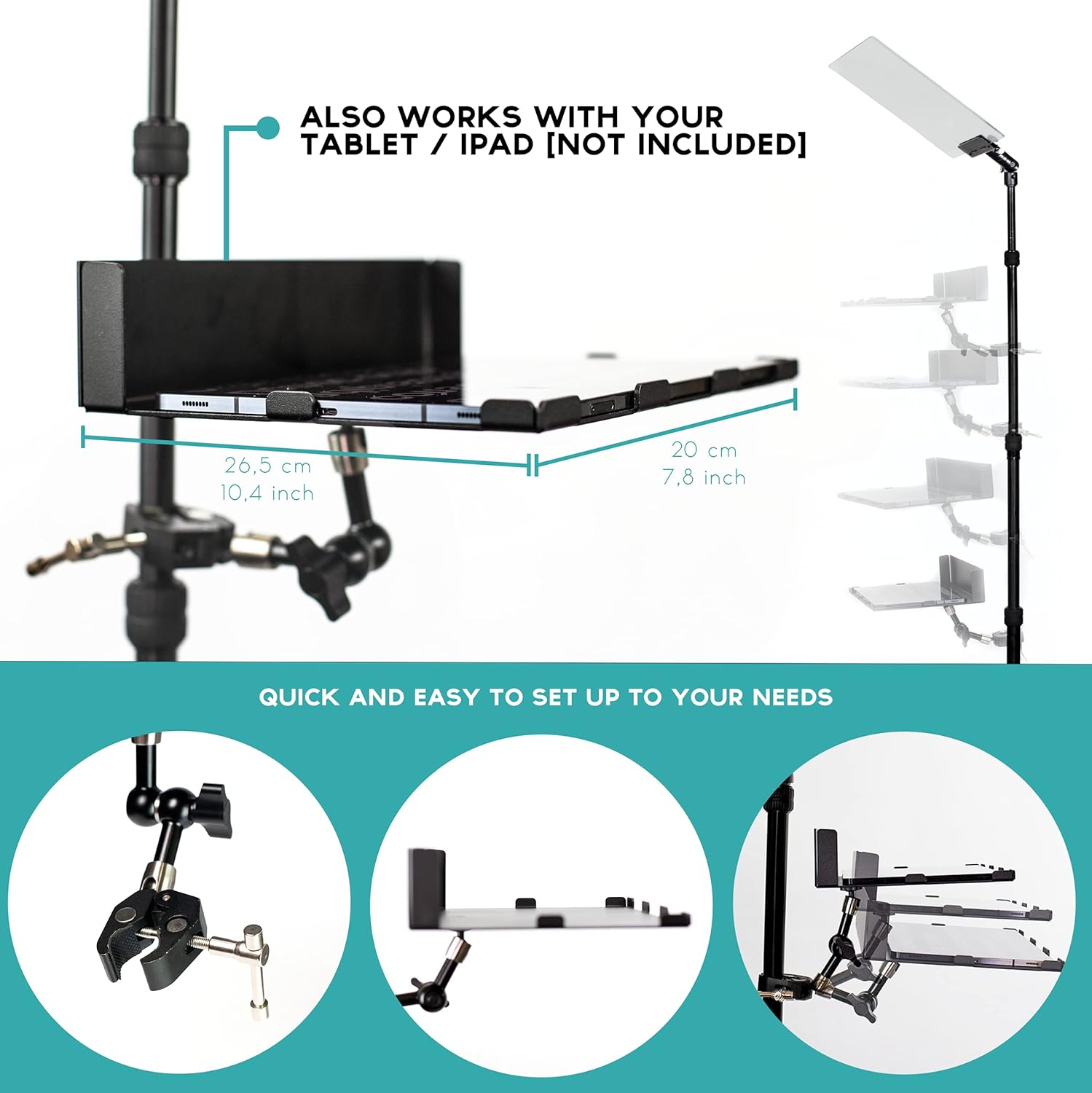
Figure 4: The teleprompter configured for tablet/iPad use, demonstrating the adjustable tray and ease of setup.
For External Monitors:
- Place your monitor (up to 21.6" W x 15.7" H [55x40cm]) onto the monitor base.
- Secure the monitor using the universal VESA slots and included screws.
- Utilize the integrated hiding system within the base to manage and conceal cables for a clean setup.
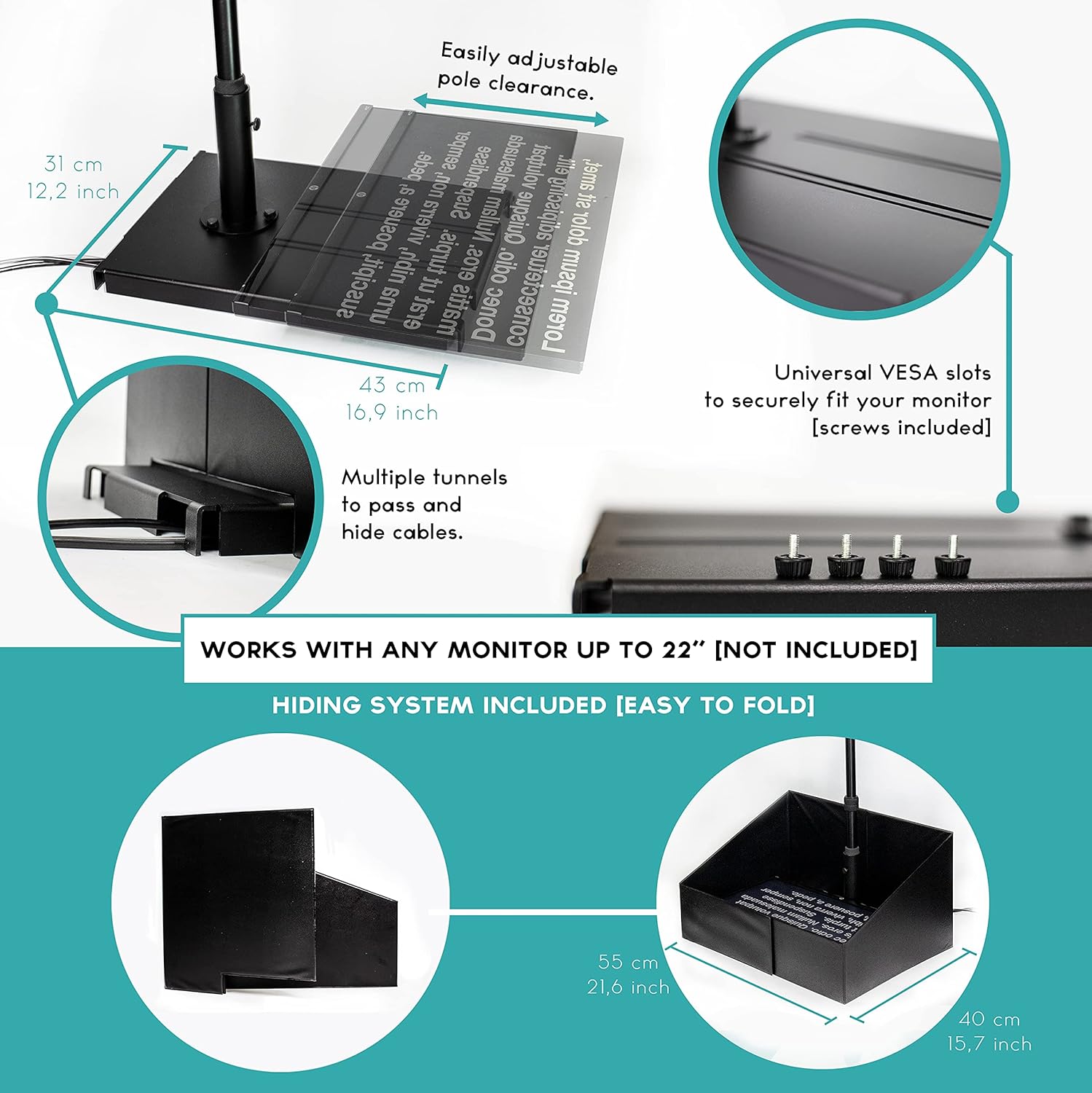
Figure 5: The teleprompter base, featuring universal VESA slots for monitor attachment and multiple tunnels for cable routing and hiding.
4. Adjustments
Adjust the height of the telescopic pole and the angle of the beam splitter glass to align with the presenter's line of sight and comfort. The system is designed for full adjustability to suit various users and environments.
Video 1: Demonstrates the assembly and adjustability of the iPresent PRO teleprompter for live speech.
Operating the Teleprompter
The iPresent PRO is operated using the dedicated TeleprompterPAD APP and the included Bluetooth remote control.
1. TeleprompterPAD APP
Download the official TeleprompterPAD APP from your device's app store (available for iOS, Android, Windows, and Mac). The app is designed for plug & play remote control use without complex configuration.

Figure 6: The TeleprompterPAD APP interface, showing options for remote control, text size, speed, and mirror mode.
- Script Management: Import text files, edit and copy-paste text directly within the app.
- Text Customization: Adjust font size, colors, and add rich text formatting.
- Markers: Create script markers to easily jump to specific sections.
- Display Modes: Utilize mirror mode for teleprompter reflection and portrait mode for vertical display.
Video 2: Overview of the FREE Teleprompter APP features, including remote control integration and script customization.
2. Bluetooth Remote Control
The included Bluetooth remote control provides seamless control over your script playback. Pair the remote with your device via Bluetooth settings.
- Playback Control: Use buttons for play/pause, fast forward, and rewind.
- Speed Adjustment: Increase or decrease the scrolling speed of the text.
- Font Size: Adjust the font size on the fly.
- Marker Navigation: Jump between predefined script markers.
For additional learning and tips, consider downloading the comprehensive teleprompter guide:

Figure 7: Access the exclusive, complimentary teleprompter course for video and eBook content on setting up, lighting, audio, script preparation, and troubleshooting. Download Course Here
Maintenance
Proper care ensures the longevity and optimal performance of your iPresent PRO teleprompter.
- Beamsplitter Glass: Handle the glass with care. Clean with a soft, lint-free cloth and a specialized glass cleaning solution. Avoid abrasive materials that could scratch the surface.
- General Cleaning: Wipe down the metal and plastic components with a dry or slightly damp cloth. Do not use harsh chemicals.
- Storage: Always store the teleprompter in its provided hardcase when not in use to protect it from impacts, dust, and scratches.
Troubleshooting
This section addresses common issues you might encounter with your iPresent PRO teleprompter.
| Problem | Possible Cause | Solution |
|---|---|---|
| Text appears blurry or dim on the glass. | Incorrect device brightness, dirty glass, or improper angle. | Increase your device's screen brightness. Clean the beamsplitter glass. Adjust the angle of the glass for optimal reflection. |
| Remote control not responding. | Remote not paired, low battery, or out of range. | Ensure the remote is paired via Bluetooth. Check and replace batteries if necessary. Move closer to your device. |
| Text not scrolling smoothly. | App settings (speed), or device performance. | Adjust the scrolling speed in the TeleprompterPAD APP. Close other applications on your device to free up resources. |
| Difficulty assembling a component. | Component misalignment or missing part. | Refer to the "Setup and Assembly" section. Ensure all parts are correctly oriented. If a part is missing or damaged, contact customer support. |
Specifications
| Feature | Detail |
|---|---|
| Model Number | TP-iPresent |
| Brand | TELEPROMPTER PAD |
| Package Dimensions | 18 x 15 x 5.2 inches |
| Item Weight | 13.2 pounds (6 Kilograms) |
| Screen Size Compatibility | Tablets/iPads up to 10.2" W x 7.8" H [26x20cm]; Monitors up to 21.6" W x 15.7" H [55x40cm] |
| Beamsplitter Glass | Premium optical quality |
| Connectivity | Bluetooth (for remote control) |
| Included Accessories | Bluetooth Remote Control, Transport Hardcase, TeleprompterPAD APP |
Warranty and Support
TELEPROMPTER PAD is committed to providing high-quality products and excellent customer service.
Technical Support
Your iPresent PRO teleprompter comes with multilingual technical support. If you encounter any issues or have questions, please reach out to our support team. We offer a video help center and a knowledge base to assist you.
For support, please visit the official TELEPROMPTER PAD website or refer to the contact information provided with your product packaging.
Product Protection
The included rigid hardcase is designed to protect your teleprompter from impacts and scratches, ensuring its durability and portability for years to come.


