
1. Introduction
The Fractal Design Torrent is engineered to deliver maximum cooling performance. This E-ATX mid-tower computer case features an innovative component layout, an open front grille, and five pre-installed fans, including two 180 x 38 mm Dynamic PWM or Prisma RGB fans. These fans are specifically designed to achieve superior air cooling while maintaining low noise levels. The Torrent is suitable for high-end systems requiring efficient cooling for various hardware configurations, including those with water-cooling solutions.

Figure 1.1: Overview of the Fractal Design Torrent case with components installed.
Key Features:
- Optimized Air Intake: Features an open grille design and large 180 mm front fans for maximum air intake.
- High-Performance Fans: Equipped with newly developed 180 x 38 mm Dynamic X2 PWM or Prisma AL PWM ARGB fans (RGB version) for significant air movement.
- Included Fans: Comes with five PWM fans (three 140 mm and two 180 mm) for balanced performance, cooling, and noise control.
- Enhanced GPU Cooling: New layout with expansive base intakes and extra-large bottom fan support ensures exceptional GPU cooling.
- Flexible Filtration: Optional front and bottom nylon filters are included, allowing users to choose between dust filtration or higher airflow.
- Spacious Interior: Streamlined open interior provides ample space for components and supports both air and water cooling solutions.
2. Setup and Installation
This section outlines the general steps for installing components into your Fractal Design Torrent case. Ensure all power is disconnected before beginning installation.
2.1 Preparing the Case
- Accessing the Interior: Remove the side panels to gain access to the case interior. The panels are typically secured with thumbscrews or a latch mechanism.
- Fan Configuration: The case comes with five pre-installed PWM fans. Two 180mm fans are located at the front, and three 140mm fans are at the bottom. Adjust their positions or add additional fans/radiators as needed for your cooling setup.
- Filter Installation: Decide whether to install the optional front and bottom nylon filters based on your preference for dust filtration versus maximum airflow.

Figure 2.1: Exploded view illustrating removable components for easy access.
2.2 Motherboard and CPU Cooler Installation
- Install your E-ATX or ATX motherboard onto the standoffs provided.
- Mount your CPU cooler (air or liquid) according to its specific instructions. The case offers ample clearance for large air coolers.
2.3 Power Supply Unit (PSU) Installation
- The Torrent features a top-mounted PSU design. Install your ATX power supply in the designated compartment at the top of the case.
- Route necessary cables through the provided cutouts.

Figure 2.2: Top-mounted PSU area for efficient cable management.
2.4 Storage Drive Installation
- The case supports up to four 2.5" SSDs and two 3.5" HDDs. Utilize the drive cages and mounting points behind the motherboard tray.

Figure 2.3: Rear panel with cable management and storage drive mounting options.
2.5 Graphics Card (GPU) Installation
- Install your graphics card into the appropriate PCIe slot. The case supports large GPUs up to 461mm.
- Utilize the extra-large bottom fan support for enhanced GPU cooling.

Figure 2.4: Bottom fan placement designed for optimal GPU cooling.
2.6 Cable Management
- Route all cables through the designated channels and use the integrated Velcro straps to secure them behind the motherboard tray. This ensures a clean interior and unobstructed airflow.
Video 2.1: Official Fractal Design video demonstrating the installation and cable management features of the Torrent case.
3. Operation
The Fractal Design Torrent is designed for optimal airflow and quiet operation. Once your system is assembled, power it on and observe the fan performance.
3.1 Airflow Management
- The large front and bottom fans are configured to draw cool air into the case, directly cooling the GPU and other components.
- Ensure the case has adequate clearance around its front and bottom intakes for unrestricted airflow.
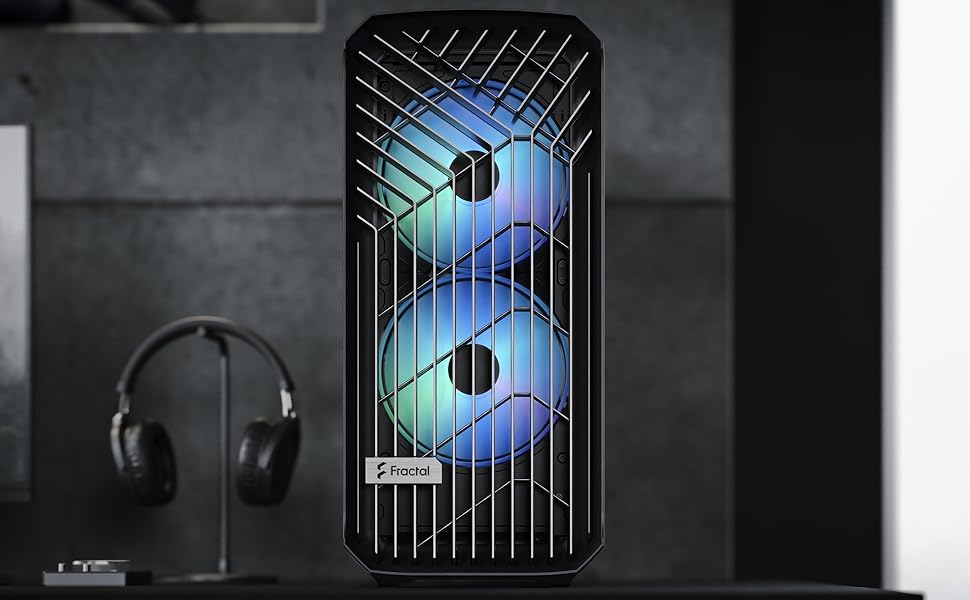
Figure 3.1: The open front grille and large fans ensure maximum air intake.
3.2 Fan Control
- The included PWM fans can be controlled via your motherboard's fan headers and BIOS settings, or through fan control software.
- Adjust fan curves to balance cooling performance with desired noise levels.

Figure 3.2: Internal view highlighting the pre-installed 180mm front and 140mm bottom fans.
4. Maintenance
Regular maintenance ensures optimal performance and longevity of your computer case and components.
4.1 Dust Filter Cleaning
- If installed, regularly check and clean the optional front and bottom nylon dust filters.
- To clean, gently remove the filters and use compressed air or a soft brush to remove accumulated dust. Reinstall once clean.
4.2 Interior Cleaning
- Periodically use compressed air to clear dust from internal components, especially fan blades and heatsinks.
- Ensure the system is powered off and unplugged before performing any interior cleaning.
5. Troubleshooting
This section addresses common issues you might encounter with your computer case.
5.1 High Temperatures
- Check Fan Operation: Ensure all case fans are spinning correctly and connected to appropriate headers.
- Verify Airflow: Confirm that the front and bottom intakes are not obstructed. Clean any dust filters if present.
- Cable Management: Poor cable management can impede airflow. Re-route cables to ensure a clear path for air.
5.2 Excessive Fan Noise
- Adjust Fan Speed: Use your motherboard's BIOS or fan control software to reduce fan RPMs.
- Inspect Fans: Check for any cables or obstructions hitting fan blades. Ensure fans are securely mounted.
- Dust Buildup: Clean fan blades and grilles to prevent noise caused by dust accumulation.
5.3 Side Panel Not Closing Properly
- Cable Management: The most common cause is excessive cable bulk behind the motherboard tray. Re-organize and flatten cables as much as possible.
- Component Clearance: Ensure no components (e.g., large CPU coolers, GPU power cables) are obstructing the panel's path.
6. Specifications
| Feature | Detail |
|---|---|
| Model Name | Fractal Design Torrent E-ATX Black Solid High-Airflow Mid Tower Computer Case |
| Model Number | FD-C-TOR1A-05 |
| Case Type | Mid Tower |
| Motherboard Compatibility | E-ATX, ATX |
| Dimensions (D x W x H) | 7.87"D x 19.29"W x 19.69"H |
| Item Weight | 28.7 pounds |
| Material | Nylon (filters), Steel (frame) |
| Cooling Method | Air |
| Included Fans | 2x 180mm front, 3x 140mm bottom (PWM) |
| Total Expansion Slots | 8 |
| Internal Bays | 4x 2.5" SSD, 2x 3.5" HDD |
| Front I/O Ports | 2x USB 2.0, 1x USB 3.0 |
| Power Supply Mounting | Top-mounted |
7. Warranty and Support
7.1 Product Warranty
The Fractal Design Torrent computer case comes with a 5-year warranty from the date of purchase. This warranty covers defects in materials and workmanship under normal use. Please retain your proof of purchase for warranty claims.
For detailed warranty terms and conditions, please refer to the official Fractal Design website or contact their customer support.
7.2 Customer Support
For technical assistance, troubleshooting, or inquiries regarding your Fractal Design Torrent case, please visit the official Fractal Design support page or contact their customer service team. Contact information can typically be found on the manufacturer's website.
Online Resources: Fractal Design Support


