
Product Overview
This manual provides instructions for the HCDZ Replacement Remote Control, designed for use with various UBERHAUS window-mounted air conditioner models. This remote control is a direct replacement and requires no programming.
Compatible UBERHAUS Air Conditioner Models: 87795010, MWK-12CRN1-BJ8, 87795012, MWL-10CRN1-BI5, 87795037, MWL-12CRN1-BI5, 87795041, MWK-06CRN1-BK2.

Image: Comparison showing an original remote control being replaced by the HCDZ replacement remote control. The replacement remote is on the right.
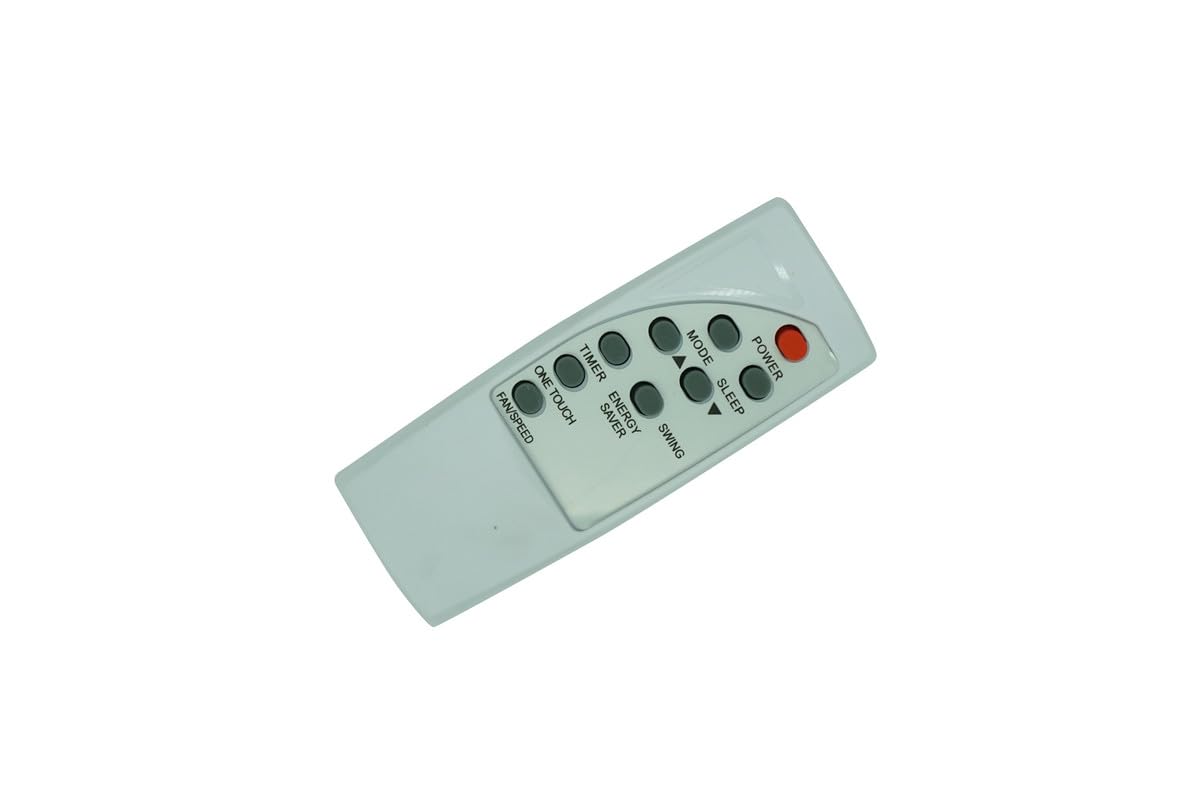
Image: Front view of the HCDZ replacement remote control, displaying buttons for Power, Mode, Timer, Speed, Sleep, One Touch, Swing, Energy Saver, and Fan/Speed.
Setup and Battery Installation
The remote control requires two AAA batteries (not included). No programming is necessary; the remote will function immediately upon battery insertion.
Battery Installation Steps:
- Locate the battery compartment on the back of the remote control.
- Slide open the battery compartment cover.
- Insert two AAA batteries, ensuring correct polarity (+ and - ends align with the markings inside the compartment).
- Close the battery compartment cover securely.
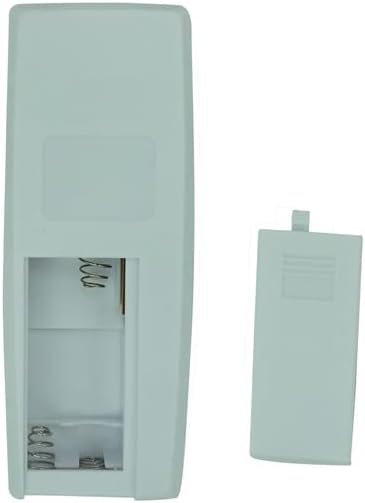
Image: Back view of the remote control with the battery compartment cover removed, showing the battery terminals.

Image: Back view of the remote control with the battery compartment cover securely closed.
Operating Instructions
This replacement remote control is designed to replicate the functions of your original UBERHAUS air conditioner remote. Point the remote control directly at the air conditioner's infrared (IR) receiver for optimal performance.
Key Functions:
- POWER: Turns the air conditioner unit on or off.
- MODE: Cycles through available operating modes (e.g., Cool, Fan, Dry, Heat).
- TIMER: Used to set the automatic on/off timer for the air conditioner.
- SPEED: Adjusts the fan speed settings.
- SLEEP: Activates sleep mode, often for quieter operation and energy saving during sleep.
- ONE TOUCH: May activate a pre-set or automatic comfort setting (functionality can vary by AC model).
- SWING: Controls the horizontal or vertical movement of the air conditioner's louvers.
- ENERGY SAVER: Engages an energy-saving operating mode.
- FAN/SPEED: Likely a combined control for fan operation and speed adjustment.
No programming or pairing is required for this remote control; it is ready to use once batteries are installed.
Care and Maintenance
To ensure the longevity and proper function of your remote control, please observe the following guidelines:
- Avoid exposing the remote control to extremely hot or humid environments.
- Do not mix new and old batteries, or different types of batteries.
- Keep the remote control sensor away from direct sunlight or strong lighting apparatuses, as this may cause malfunction.
- If the remote control will not be used for an extended period, remove the batteries to prevent potential damage from leakage and corrosion.
- Clean the remote control with a soft, dry cloth. Do not use liquid cleaners or abrasive materials.
Troubleshooting
If you experience issues with your remote control, consider the following steps:
- Remote Control Malfunctions: Replace the batteries with fresh ones.
- Battery Terminals: Check that the battery terminals are clean and making proper contact with the batteries.
- Out of Range: Move closer to the air conditioner. The maximum effective range is approximately 10 meters.
- Obstructions: Ensure there are no objects blocking the line of sight between the remote control and the air conditioner's IR sensor.
- Air Conditioner Power: Verify that the air conditioner's power cord is plugged in and the unit is turned on.
If problems persist after following these steps, please refer to the warranty and support section for further assistance.
Product Specifications
| Brand: | HCDZ |
| Compatible Devices: | UBERHAUS Air Conditioners (Models: 87795010, MWK-12CRN1-BJ8, 87795012, MWL-10CRN1-BI5, 87795037, MWL-12CRN1-BI5, 87795041, MWK-06CRN1-BK2) |
| Connectivity Technology: | Infrared (IR) |
| Controller Type: | Button Control |
| Power Source: | 2 x AAA Batteries (not included) |
| Maximum Range: | 10 Meters |
| Special Feature: | No Programming Required |
| Color: | As shown |
Warranty and Support
This HCDZ Replacement Remote Control comes with a 90-day warranty from the date of purchase.
For warranty claims or technical assistance, please contact your retailer or the manufacturer, HCDZ.
Manufacturer: HCDZ