Introduction
The MARS HYDRO FC-E8000 is a high-efficiency, full-spectrum LED grow light designed for optimal plant growth across all stages. Featuring a foldable design, precise dimming capabilities, and advanced heat dissipation, this grow light is suitable for both personal and commercial cultivation environments. This manual provides essential information for safe setup, operation, and maintenance of your FC-E8000 grow light.
Safety Information
- Always disconnect the power supply before installation, cleaning, or maintenance.
- Do not look directly at the LED lights when they are operating to avoid eye strain.
- Ensure proper ventilation in the grow area to maintain optimal operating temperatures.
- Keep the light fixture away from water and other liquids. This product is IP65 rated for water resistance, but direct exposure to high-pressure water jets should be avoided.
- Do not attempt to modify or disassemble the light fixture. This will void the warranty and may cause electrical hazards.
- Keep out of reach of children and pets.
Package Contents
Upon opening your MARS HYDRO FC-E8000 package, you should find the following items:
- 1 x FC-E8000 LED Grow Light Fixture
- 1 x LED Driver
- 1 x Hanging Kits (ropes, carabiners)
- 1 x User Manual

Image: Contents of the MARS HYDRO FC-E8000 package.
Setup
1. Assembling the Light Fixture
The FC-E8000 features a foldable design for easier setup. If your unit requires initial assembly of the light bars, follow these general steps:
- Carefully unfold the light fixture.
- Connect the individual light bars to the main frame using the provided screws and connectors. Ensure all connections are secure.
- Attach the LED driver to the designated mounting bracket on the fixture or mount it remotely.

Image: Illustration of connecting light bars.

Image: Illustration of attaching the LED driver.
2. Hanging the Light
Use the provided hanging kits to suspend the light fixture securely above your plants. Adjust the hanging height according to the growth stage of your plants (refer to the Operating Instructions section for PPFD recommendations).

Image: Illustration of hanging the grow light.
Operating Instructions
1. Full Spectrum Light
The FC-E8000 provides a full spectrum light (2800k-5000k, 660-665nm enhanced Deep Red) suitable for all plant growth stages, from seedling to flowering. This spectrum is designed to mimic natural sunlight, promoting healthy and vigorous plant development.

Image: Full spectrum light distribution of the FC-E8000.
2. Dimming Control
The light intensity can be adjusted using the dimmer knob on the LED driver. For smart control, the iConnectu Controller (sold separately) allows remote monitoring and equipment control via the MARS HYDRO App.

Image: Manual dimming knob and daisy chain ports.

Image: App-based dimming control via iConnectu Controller (sold separately).
Video: Demonstrates the MARS HYDRO Smart grow light APP User Guide, showing how to control the light settings via the mobile application.
Video: Overview of Mars Hydro FC-E6500 Smart Light with Wifi/Bluetooth APP Control, highlighting smart features.
3. PPFD Recommendations
Adjust the hanging height and dimming level to achieve the recommended PPFD (Photosynthetic Photon Flux Density) for each plant growth stage:
- Seedling Stage: 100-300 µmol/m²/S
- Vegetation Stage: 400-600 µmol/m²/S
- Flower Stage: 800-1000 µmol/m²/S
The bar-style design ensures even light distribution, promoting uniform plant growth and avoiding hotspots.
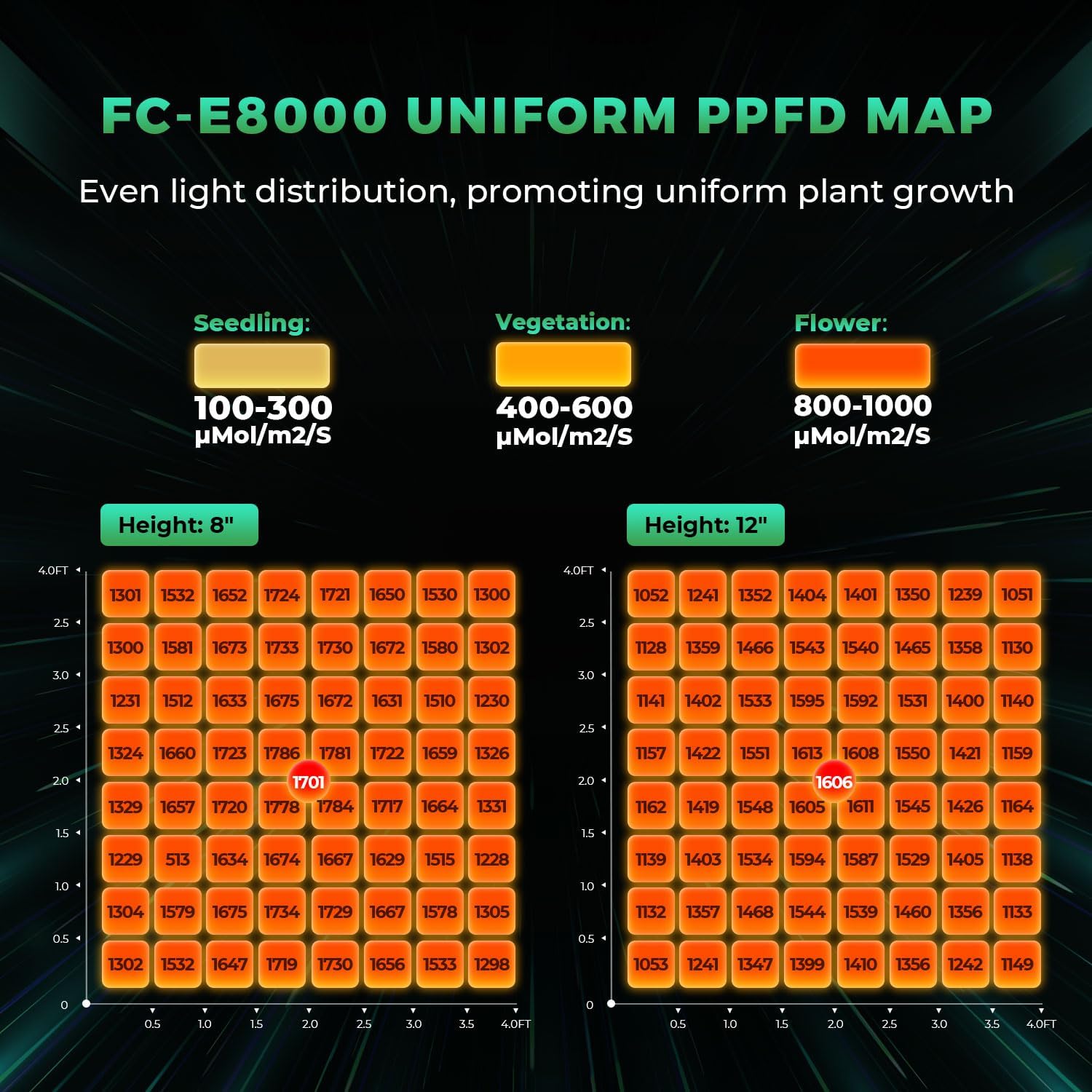
Image: FC-E8000 PPFD map for various hanging heights.
4. Daisy Chain Functionality
The FC-E8000 supports daisy-chaining up to 30 lights, allowing a single master light to control the dimming of all connected units. This is ideal for larger grow operations.
Maintenance
1. Heat Dissipation
The FC-E8000 features an aluminum heatsink with slim profile passive-cooled bars, designed to reduce heat and maintain optimal temperatures in your grow space. The detachable power supply can be mounted remotely to further remove heat from the immediate grow area.

Image: Heat dissipation features of the FC-E8000.
2. Cleaning
To ensure optimal performance and longevity, regularly clean the light fixture. Use a soft, dry cloth to gently wipe away any dust or debris from the LED bars and heatsink. Do not use abrasive cleaners or immerse the unit in water.
Troubleshooting
- Light not turning on: Check all power connections, ensure the power outlet is functional, and verify the dimmer knob is not set to 'OFF' or minimum.
- Inconsistent dimming: If using the iConnectu Controller, ensure it is properly connected and the app settings are correctly configured. For manual dimming, check the knob for any physical obstruction.
- Overheating: Ensure adequate airflow around the fixture and in the grow space. Verify the detachable driver is not covered and is positioned to dissipate heat effectively.
- Plants showing stress: Adjust hanging height and dimming levels according to the PPFD recommendations for the current growth stage. Ensure other environmental factors (temperature, humidity, nutrients) are optimal.
Specifications
| Feature | Specification |
|---|---|
| Model Number | FC-E8000 |
| Brand | MARS HYDRO |
| Wattage | 800 Watts |
| Voltage | 277 Volts |
| Amperage | 6.62 Amps |
| Light Source Type | LED (BridgeLux Diodes) |
| PPE | 2.8 µmol/J |
| Coverage (Personal) | 5x5 ft |
| Coverage (Commercial) | 4x4 ft |
| Spectrum | Full Spectrum (2800k-5000k, 660-665nm Deep Red) |
| Material | Detachable Aluminum + Metal |
| Finish Type | Aluminum |
| Item Weight | 29.3 pounds (13.34 Kilograms) |
| Product Dimensions | 45.1"L x 44"W x 3.5"H |
| Ingress Protection (IP) Rating | IP65 (Waterproof) |
| Certifications | ETL, CE, UKCA, RoHS |
Warranty and Support
MARS HYDRO offers a comprehensive warranty for their products. Based on customer feedback, the company is known for standing behind its products and providing good customer service.
- For specific warranty details, including duration and coverage, please refer to the official MARS HYDRO website or the warranty card included with your product.
- In case of any issues or questions, contact MARS HYDRO customer support directly. Contact information is typically available in the user manual or on their official website.


