
Introduction
This manual provides comprehensive instructions for the safe and effective use of your Kynup Digital Caliper. Designed for precision measurement, this tool offers versatile functionality for various applications. Please read this manual thoroughly before operation to ensure optimal performance and longevity of the device.

Image: The Kynup Digital Caliper, an 8-inch measuring tool, shown alongside its blue protective storage case. The caliper features a large LCD screen and is made of stainless steel.
Product Features
- 3 Units Conversion: Easily switch between inch, millimeter (mm), and fractional measurements with a single button press.
- Precise & Accurate: Offers a measurement range of 0-8 inches (0-200mm) with an accuracy of ±0.001”/0.02mm and a resolution of 0.0005”/0.01mm.
- 4 Measuring Ways: Equipped with two sets of jaws and a depth probe for measuring external diameter, internal diameter, depth, and step.
- Splash Proof & Stainless Steel Material: Constructed from first-class stainless steel with IP54 splash-proof protection, ensuring durability, dust protection, and resistance to splash water and rust.
- Large LCD Screen: Features a clear, large LCD display for easy reading of measurements.
- Zero Calibration: Allows setting to zero at any position for relative measurements.
- Auto Shut-Off: Automatically turns off after approximately 6 minutes of inactivity to conserve battery life.

Image: A composite image highlighting four key features: extended battery life with 3V CR2032 battery, high-strength stainless steel construction, accurate measurement capabilities, and IP54 waterproof, dustproof, and oil-proof design.
Components Overview
Familiarize yourself with the main components of your Kynup Digital Caliper:

Image: A detailed diagram of the Kynup Digital Caliper, illustrating and labeling its various parts including the external and internal measuring jaws, depth blade, thumb roller, slider clamp screw, LCD display, unit conversion button, zero button, On/Off switch, and battery compartment.
- Outside Diameter Jaws: Used for measuring external dimensions.
- Inside Diameter Jaws: Used for measuring internal dimensions.
- Depth Blade: Used for measuring depth.
- Step Measurement Edge: Used for measuring step dimensions.
- Thumb Roller: For fine adjustment of the slider.
- Slider Clamp Screw: To lock the slider in position.
- LCD Display: Digital readout of measurements.
- mm/in/F Button: Toggles between millimeter, inch, and fractional units.
- ON/OFF Button: Powers the caliper on or off.
- ZERO Button: Resets the display to zero at any point.
- Battery Compartment: Houses the CR2032 battery.
Setup
Battery Installation
Your Kynup Digital Caliper requires a 3V CR2032 button cell battery. Three batteries are provided with the product: one pre-installed and two spare batteries.
- Locate the battery compartment on the back of the LCD display unit.
- Use the small screwdriver provided to open the battery compartment cover.
- Insert the CR2032 battery with the positive (+) side facing upwards.
- Replace the battery compartment cover and secure it with the screw.

Image: This image illustrates the ergonomic design of the caliper's metal housing and highlights the inclusion of two spare CR2032 button cell batteries in the package.
Operating Instructions
Basic Operation
- Press the ON/OFF button to power on the caliper.
- Slide the digital caliper to any position. The values will appear on the display.
- To reset the display to zero at any point, press the ZERO button. This is useful for relative measurements.
- To switch between measurement units (inch, mm, fraction), press the mm/in/F button.
Measuring Techniques
The Kynup Digital Caliper supports four primary measurement types:
- External Diameter Measurement: Use the large jaws to measure the outside dimension of an object. Place the object between the jaws and close them until they firmly contact the object. Read the measurement on the LCD.
- Internal Diameter Measurement: Use the small jaws to measure the inside dimension of a hole or opening. Insert the small jaws into the opening and expand them until they firmly contact the inner walls. Read the measurement on the LCD.
- Depth Measurement: Use the depth blade at the end of the slider to measure the depth of a hole or step. Place the end of the main beam on the surface and extend the depth blade into the hole until it touches the bottom. Read the measurement on the LCD.
- Step Measurement: Use the step measurement edge (the end of the fixed jaw) to measure the height of a step or shoulder. Place the fixed jaw on the higher surface and extend the slider until the step measurement edge rests on the lower surface. Read the measurement on the LCD.

Image: A visual guide demonstrating the four measurement capabilities of the caliper: measuring outside diameter of a bearing, inside diameter of a bearing, depth of a hole, and step height.
Maintenance
- Cleaning: After each use, wipe the caliper clean with a dry, soft cloth. Avoid using solvents or harsh chemicals, as they may damage the display or the stainless steel finish.
- Storage: Store the caliper in its protective case when not in use to prevent dust accumulation and physical damage. Keep it in a dry environment.
- Battery Care: If the caliper will not be used for an extended period, it is recommended to remove the battery to prevent leakage and damage to the electronic components.
- Lubrication: Periodically apply a small amount of light machine oil to the sliding surfaces to ensure smooth operation.

Image: The Kynup Digital Caliper is shown with water splashing around it, emphasizing its IP54 waterproof, anti-dust, and anti-corrosion properties, attributed to its stainless steel construction.
Troubleshooting
| Problem | Possible Cause | Solution |
|---|---|---|
| Inaccurate Readings | Caliper not properly zeroed; debris on measuring surfaces. | Slide the LCD screen to the left end ("0" on the scale), then press the ZERO button. Clean the measuring jaws thoroughly. |
| Display Not Turning On | Dead battery; battery incorrectly installed. | Replace the CR2032 battery. Ensure the battery is inserted with the correct polarity (+ side up). |
| Display Flickering or Unstable | Low battery; electromagnetic interference. | Replace the battery. Move the caliper away from strong electromagnetic fields. |
| Slider Movement is Not Smooth | Lack of lubrication; dust or debris on the rail. | Clean the rail and apply a small amount of light machine oil. |
Specifications
| Feature | Detail |
|---|---|
| Brand | Kynup |
| Model Number | 170-3 |
| Material | Stainless Steel |
| Measurement Range | 0-8 inches / 0-200 mm |
| Accuracy | ±0.02mm/0.001” (<100mm); ±0.03mm/0.001” (>100-200mm) |
| Resolution | 0.01mm/0.0005” |
| Protection Rating | IP54 (Splash Proof, Dust Protected) |
| Power Source | 3V CR2032 Lithium Metal Battery (included) |
| Auto Shut-Off | After approximately 6 minutes of inactivity |
| Product Dimensions | 12.28 x 4.72 x 1.3 inches (approximate) |
| Item Weight | 17.6 oz (approximate) |
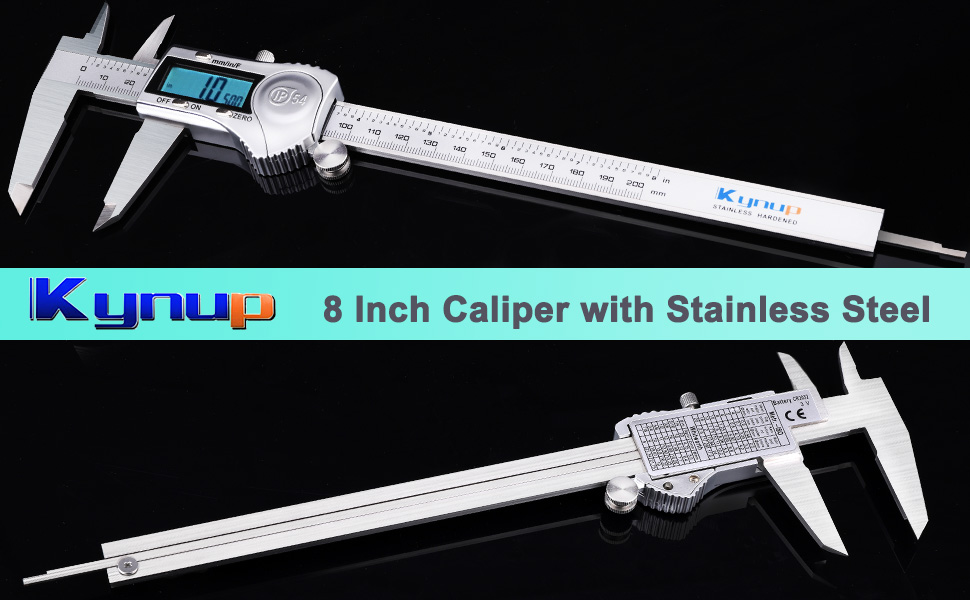
Image: The Kynup Digital Caliper displayed with its overall length (11.73 inches) and jaw dimensions (3.55 inches height, 0.92 inches jaw depth, 1.98 inches jaw opening) indicated.
Warranty & Support
Specific warranty details for the Kynup Digital Caliper are typically provided at the point of purchase or within the product packaging. For any product support, technical assistance, or warranty claims, please refer to the contact information provided by your retailer or visit the official Kynup brand store online.
Note: No official seller videos were available for embedding in this manual.