
Homepointe MDUDP-50AEN1-BA9
Contents
Homepointe MDUDP-50AEN1-BA9 Dehumidifier User Manual
Model: MDUDP-50AEN1-BA9
Introduction
This user manual provides essential information for the safe and efficient operation, maintenance, and troubleshooting of your Homepointe MDUDP-50AEN1-BA9 Dehumidifier. Please read this manual thoroughly before using the appliance and retain it for future reference.
Safety Instructions
Always follow basic safety precautions when using electrical appliances to reduce the risk of fire, electric shock, and injury to persons.
- Ensure the power supply matches the voltage requirements specified on the dehumidifier's rating label.
- Do not operate the dehumidifier with a damaged cord or plug.
- Keep the appliance away from water and other liquids. Do not immerse the unit.
- Do not block air inlets or outlets. Maintain at least 8 inches (20 cm) clearance from walls and furniture.
- Unplug the dehumidifier before cleaning, moving, or performing any maintenance.
- This appliance is designed for residential use only.
- Do not allow children to play with or operate the dehumidifier.
Product Features
The Homepointe MDUDP-50AEN1-BA9 Dehumidifier is designed to efficiently reduce and maintain optimal humidity levels in your living space. Key features include:
- High Quality Materials: Constructed for durability and long-lasting performance.
- Portable Design: Equipped with caster wheels for easy movement between rooms.
- Large Coverage Area: Effective for spaces up to 4500 square feet.
- 50-Pint Capacity: Capable of removing up to 50 pints of moisture per day.
- Sleep Operation Mode: For quieter operation during nighttime hours.
Package Contents
Please check the package contents upon unpacking. If any items are missing or damaged, contact customer support.
- Homepointe MDUDP-50AEN1-BA9 Dehumidifier Unit
- User Manual (this document)
- Power Cord
Setup
Follow these steps to set up your dehumidifier:
- Unpack the Unit: Carefully remove the dehumidifier from its packaging. Retain packaging materials for future storage or transport.
- Positioning: Place the dehumidifier on a flat, stable surface in the area where humidity control is desired. Ensure there is at least 8 inches (20 cm) of space around all sides for proper airflow.
- Power Connection: Plug the power cord into a grounded electrical outlet. Ensure the outlet's voltage matches the unit's requirements.
- Water Bucket Installation: Ensure the water collection bucket is correctly seated in the unit. The unit will not operate if the bucket is full or improperly installed.
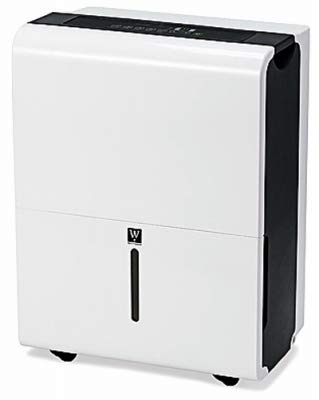
Figure 1: Homepointe MDUDP-50AEN1-BA9 Dehumidifier. A white Homepointe MDUDP-50AEN1-BA9 Dehumidifier with black accents, featuring a visible water level indicator on the front and caster wheels at the base.
Operating Instructions
Familiarize yourself with the control panel and operating modes.
Control Panel Overview
The control panel is located on the top of the unit and typically includes buttons for Power, Mode, Fan Speed, Timer, and Humidity Setting.
Turning On/Off
- Press the Power button to turn the unit on or off.
Setting Desired Humidity
- Press the Humidity button (often indicated by up/down arrows) to adjust the desired humidity level. The unit will operate until the set humidity is reached.
Operation Modes
- Continuous Mode: The unit runs continuously regardless of humidity level.
- Sleep Mode: Reduces fan speed and dims display lights for quieter operation.
- Refer to the control panel icons for specific mode selections.
Draining Water
The dehumidifier collects moisture in a removable water bucket. When the bucket is full, the unit will automatically shut off and an indicator light will illuminate.
- Carefully pull out the water bucket from the front of the unit.
- Empty the collected water.
- Slide the empty bucket back into the unit until it clicks into place. The unit will resume operation.
For continuous drainage, connect a standard garden hose (not included) to the continuous drain port located at the back of the unit. Ensure the hose is sloped downwards to allow gravity drainage.
Maintenance
Regular maintenance ensures optimal performance and extends the lifespan of your dehumidifier.
Cleaning the Air Filter
The air filter should be cleaned every two weeks or more frequently depending on usage and air quality.
- Turn off and unplug the dehumidifier.
- Locate and remove the air filter (typically on the back or side of the unit).
- Wash the filter with warm, soapy water. Rinse thoroughly.
- Allow the filter to air dry completely before reinserting it. Do not use a dryer or direct heat.
Cleaning the Unit Exterior
- Wipe the exterior with a soft, damp cloth.
- Do not use harsh chemicals, abrasives, or solvents.
Storage
If storing the unit for an extended period:
- Empty and clean the water bucket.
- Clean the air filter.
- Allow the unit to dry for 24 hours before storing to prevent mold or mildew.
- Store in a cool, dry place, preferably in its original packaging.
Troubleshooting
Before contacting customer service, please refer to the following troubleshooting guide.
| Problem | Possible Cause | Solution |
|---|---|---|
| Dehumidifier does not turn on. | No power; Water bucket full or improperly installed; Power button not pressed. | Check power cord connection; Empty and re-seat water bucket; Press the Power button. |
| Unit runs but does not dehumidify. | Air filter clogged; Room temperature too low; Humidity setting too high. | Clean the air filter; Ensure room temperature is above 41°F (5°C); Lower the humidity setting. |
| Unit is noisy. | Unit not on a level surface; Air filter clogged; Fan obstruction. | Place on a level surface; Clean the air filter; Check for obstructions around fan. |
| Water leaks from unit. | Water bucket improperly seated; Continuous drain hose not connected properly or clogged. | Re-seat water bucket; Check continuous drain hose connection and ensure it's not blocked. |
Specifications
| Attribute | Detail |
|---|---|
| Brand | Homepointe |
| Model Number | MDUDP-50AEN1-BA9 |
| Floor Area Coverage | 4500 Square Feet |
| Dehumidification Capacity | 50 Pints per Day |
| Water Tank Volume | 50 Pints |
| Wattage | 621 watts |
| Operation Mode | Sleep |
| Recommended Use | Residential |
| Material | Plastic, Metal |
| Item Weight | 43.65 Pounds (19.8 kg) |
| Product Dimensions (L x W x H) | 17.1 x 13.2 x 26.2 inches (43.4 x 33.5 x 66.5 cm) |
| UPC | 052088101520 |
| Manufacturer | MIDEA ELECTRIC TRADING (SINGAPORE) |
Warranty and Support
For warranty information and customer support, please refer to the warranty card included with your purchase or visit the official Homepointe website. Keep your proof of purchase for warranty claims.
For technical assistance or service inquiries, please contact Homepointe customer support directly.
Ask a question about this manual
Ask about setup, troubleshooting, compatibility, parts, safety, or missing instructions. Manuals+ will review the question and use this page’s manual context to help answer it.