1. Introduction
This manual provides comprehensive instructions for the safe and efficient use of your AKAI HA-TS50 50W Bluetooth Tower Speaker. Please read this manual thoroughly before operating the device and retain it for future reference.
2. Product Overview
The AKAI HA-TS50 is a 50W Bluetooth Tower Speaker designed to deliver a rich audio experience. It features a wooden cabinet, a subwoofer, echo sound control, and multiple connectivity options.
2.1. Included Components
- 1N Main unit (AKAI HA-TS50 Tower Speaker)
- 1N Remote Control
- 1N User Manual/Warranty Card
- 1N Audio Cable
2.2. Key Features
- Bluetooth 5.0 Connectivity: Offers stable wireless audio streaming up to 10 meters.
- 50 Watt RMS Audio Output: Delivers powerful sound with deep bass.
- Speaker Configuration: Equipped with a 5.25" woofer and dual 4"x2 speakers.
- Remote Control: Full-function infrared remote for convenient operation.
- Karaoke Support: Built-in microphone jack for karaoke functionality.
- Multiple Connectivity: Supports Bluetooth, USB, AUX, and MIC inputs.
- FM Radio: Integrated FM radio for listening to your favorite stations.
- LED Display: Modern LED display for mode, track, and volume status.
- Durable Design: Stylish floor-standing wooden cabinet.

This image displays the front view of the AKAI HA-TS50 Tower Speaker, showcasing its sleek black design, speaker grilles, control panel with LED display, and the included remote control.
This video provides a general overview of the AKAI HA-TS50 Tower Speaker, highlighting its design, sound capabilities, and various features.
3. Setup
Follow these steps to set up your AKAI HA-TS50 Tower Speaker:
- Unpacking: Carefully remove all components from the packaging. Ensure all included items are present.
- Placement: Place the speaker on a stable, flat surface. Ensure adequate ventilation around the unit.
- Power Connection: Connect the AC power cord to the speaker's power input and then to a standard 220~240V / 50-60Hz AC power outlet.
- Initial Power On: Switch on the power using the main power switch located at the rear of the speaker. The LED display on the front panel will illuminate.
- Audio Connections (Optional):
- AUX Input: To connect external audio devices (e.g., TV, PC, DVD player) using the provided audio cable, plug one end into the device's audio output and the other into the AUX input jacks (RCA L/R) on the rear of the speaker.
- Microphone Input: For karaoke, connect a wired microphone to the MIC input jack on the rear panel.

This image illustrates the simple setup process for the AKAI HA-TS50 speaker, highlighting its power requirements (220-240V AC) and compact dimensions (63cm height, 15cm width, 27cm depth).
4. Operating Instructions
4.1. Control Panel and Remote Control
The speaker can be operated using the control panel on the front or the included remote control. The remote control offers full functionality from a distance of 8-10 meters.
- Power Button: Turns the speaker on or off.
- Mode Button: Cycles through input modes (Bluetooth, USB, AUX, FM).
- Bass Knob: Adjusts the bass level.
- Volume Knob: Adjusts the master volume.
- PREV/NEXT Buttons: Skips tracks in USB/Bluetooth mode or tunes FM stations.
- PLAY/PAUSE/SCAN Button: Plays/pauses audio, or initiates FM auto-scan.
4.2. Bluetooth Mode
- Power on the speaker.
- Press the MODE button until "BT" appears on the LED display.
- On your Bluetooth-enabled device (smartphone, tablet, laptop), search for available Bluetooth devices.
- Select "AKAI HA-TS50" from the list to pair.
- Once paired, you can stream audio wirelessly. Adjust volume from both your device and the speaker.
4.3. USB Playback
- Insert a USB flash drive into the USB slot on the front panel.
- The speaker will automatically switch to USB mode and begin playing compatible audio files (MP3, WAV). If not, press the MODE button to select USB.
- Use the PREV/NEXT buttons to navigate tracks and the PLAY/PAUSE button for playback control.
4.4. AUX Input
- Connect your external audio device to the AUX input jacks on the rear panel using the audio cable.
- Press the MODE button until "AUX" appears on the LED display.
- Play audio from your connected device. Adjust volume using both the device and the speaker.
4.5. FM Radio
- Press the MODE button until "FM" appears on the LED display.
- To auto-scan and save available stations, press and hold the PLAY/PAUSE/SCAN button. The speaker will scan and store stations automatically.
- Use the PREV/NEXT buttons to switch between saved FM stations.
4.6. Karaoke Function
- Connect a wired microphone to the MIC input jack on the rear panel.
- Ensure an audio source (Bluetooth, USB, AUX) is playing.
- Adjust the microphone volume and echo effect using the dedicated controls on the speaker (if available) or the remote.
This video demonstrates the various features and connectivity options of the AKAI HA-TS50 Tower Speaker, including its control panel, USB slot, and remote control functionality. It also shows the speaker being used for karaoke and connected to a television.
5. Maintenance
- Cleaning: Use a soft, dry cloth to clean the speaker's exterior. Do not use abrasive cleaners, waxes, or solvents.
- Ventilation: Ensure the speaker's ventilation openings are not blocked to prevent overheating.
- Power Cord: Regularly check the power cord for any damage. If damaged, contact authorized service personnel.
- Storage: When not in use for extended periods, unplug the speaker and store it in a cool, dry place.
6. Troubleshooting
| Problem | Possible Cause | Solution |
|---|---|---|
| No power | Power cord not connected; Power switch off; Power outlet faulty. | Ensure power cord is securely connected. Turn on the power switch. Test the outlet with another device. |
| No sound | Volume too low; Incorrect input mode; Audio cable loose/damaged; Device volume low. | Increase speaker volume. Select correct input mode. Check audio cable connections. Increase volume on connected device. |
| Bluetooth pairing failure | Speaker not in BT mode; Device too far; Interference; Speaker already paired. | Ensure speaker is in BT mode. Move device closer. Turn off other Bluetooth devices. Disconnect from previous device. |
| USB not playing | USB drive not inserted correctly; Incompatible file format; USB drive faulty. | Reinsert USB drive. Ensure files are MP3/WAV. Try a different USB drive. |
7. Specifications
| Feature | Detail |
|---|---|
| Model Name | HA-TS50 |
| Output Power (RMS) | 50 Watts |
| Speaker Type | Subwoofer, Tower |
| Subwoofer Diameter | 5.25 Inches |
| Satellite Speaker Size | 4 Inches x 2 |
| Wireless Technology | Bluetooth 5.0 |
| Connectivity Options | Bluetooth, USB, AUX, MIC |
| Control Method | Remote, On-unit controls |
| Power Source | AC 220~240V / 50-60Hz |
| Product Dimensions (D x W x H) | 27D x 15W x 64.6H Centimeters |
| Item Weight | 6 Kilograms |
| Material | Wood |
| Frequency Response | 20 KHz |
| Audio Output Mode | Stereo |
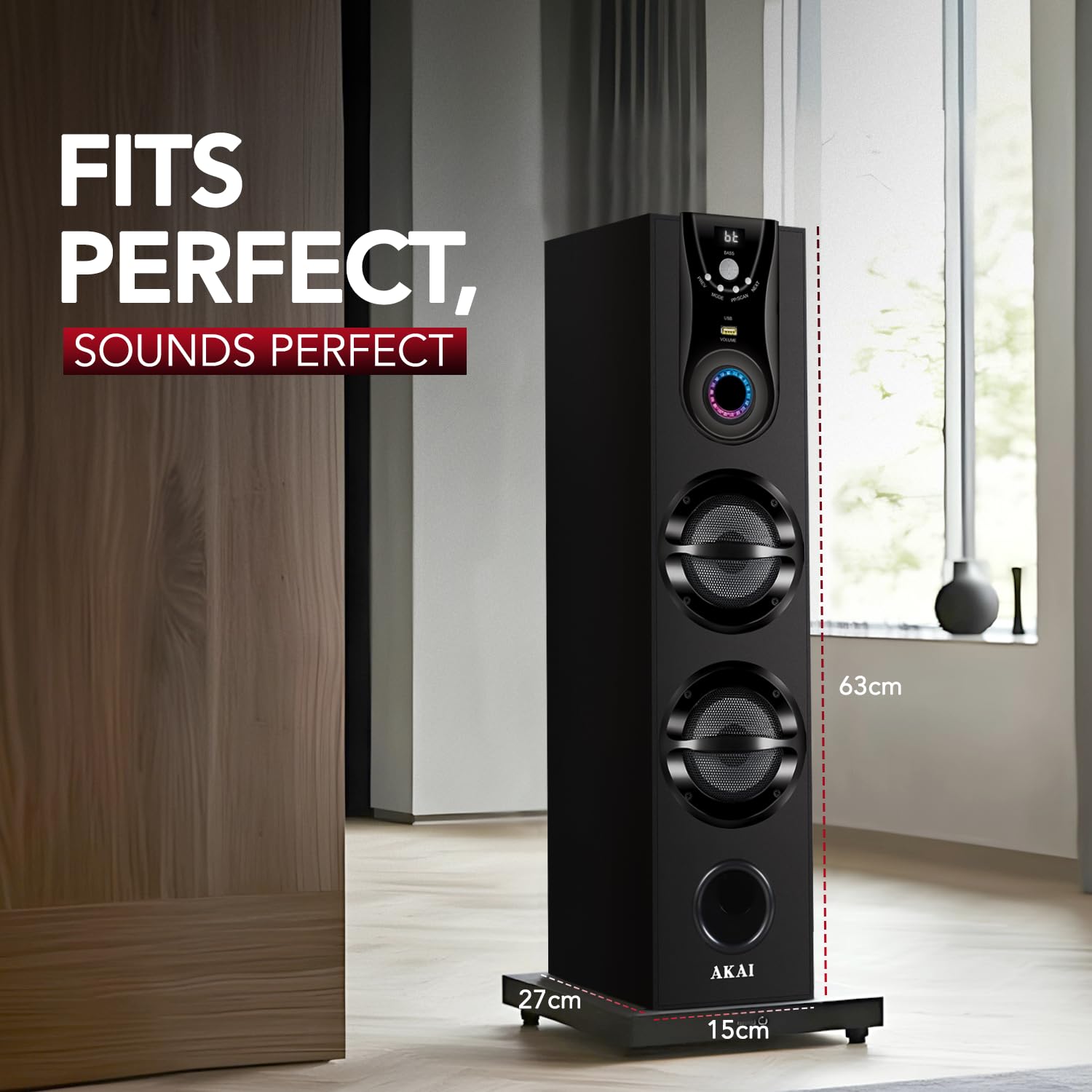
This image provides a visual representation of the AKAI HA-TS50 speaker's physical dimensions, indicating its height, width, and depth for proper placement consideration.
8. Warranty and Support
Your AKAI HA-TS50 Tower Speaker comes with a 1-year limited warranty from the date of purchase. This warranty covers manufacturing defects and workmanship under normal use.
For warranty claims, technical support, or service inquiries, please refer to the contact information provided on your warranty card or visit the official AKAI India website.
Service Centers: AKAI offers over 500 service centers across India. For specific service center locations, please contact AKAI customer support.
- Email: esales@akaiindia.in
- Toll-Free Numbers: +91 85448 40022, +91 85448 40033
This image displays a map of India with markers indicating the presence of over 500 AKAI service centers, along with contact details for support.


