
1. Product Overview
The Sovol SV-5W Laser Module is a high-performance engraving laser head kit designed for integration with various 3D printers and CNC engraving machines. It features a 40W input power with a 5W optical output, enabling precise and efficient engraving and cutting tasks.
Key Features:
- Wide Compatibility: Designed for use with Sovol SV01, SV02, SV03, Creality Ender-3, Ender-3 Pro, Ender-3 V2, Ender-5, Ender-5 Pro, and other compatible CNC engraving machines. Note: Not compatible with 3D printers using SKR boards.
- Ultra-fine Laser Head: Features a 0.4-0.5mm spot size and a 20mm fixed focal distance for high accuracy and faster engraving speeds. Capable of cutting 2mm thick wood, bread, acrylic, and glass in a single pass, and directly engraving coated or brushed stainless steel and ceramics.
- Eye Protection Design: Includes a laser protective cover that filters 97% of UV light, allowing observation of the engraving process without the need for additional goggles.
- Easy to Use: Simple installation process with no manual focus adjustment required.

Figure 1: Sovol SV-5W Laser Module demonstrating wide application compatibility with various 3D printers and CNC machines.

Figure 2: The Sovol Upgraded Laser Head Kit, highlighting the integrated eye protection cover for safety during operation.
2. Safety Precautions
- Always ensure the laser protective cover is in place during operation.
- Even with the protective cover, avoid direct eye exposure to the laser beam.
- Operate the laser module in a well-ventilated area to dissipate fumes from engraving/cutting.
- Keep flammable materials away from the working area.
- Do not leave the laser module unattended during operation.
- Ensure the power is disconnected before performing any maintenance or adjustments.
3. Package Contents
Verify that all items are present in the package:

Figure 3: Contents of the Sovol SV-5W Laser Module package, including the laser head, goggles, wooden board, clamping module, fixed deck, wire, and guide book.
- Laser Head
- Goggles (for additional protection, though integrated cover is present)
- Wooden Board (sample material)
- Clamping Module
- Fixed Deck
- Wire (connection cable)
- Guide Book (this manual)
4. Setup & Installation
This guide provides general installation steps. Specifics may vary slightly depending on your 3D printer or CNC machine model. This guide is an example for using the laser kit on a 3D printer.
4.1 Choosing the Correct Bracket
Two different brackets are provided for compatibility with various 3D printer models:
- Bracket 1: Suitable for Sovol SV02, Ender 3, Ender 3 Pro, Ender 3 V2, Ender 5, Ender 5 Pro.
- Bracket 2: Suitable for Sovol SV01, SV03.
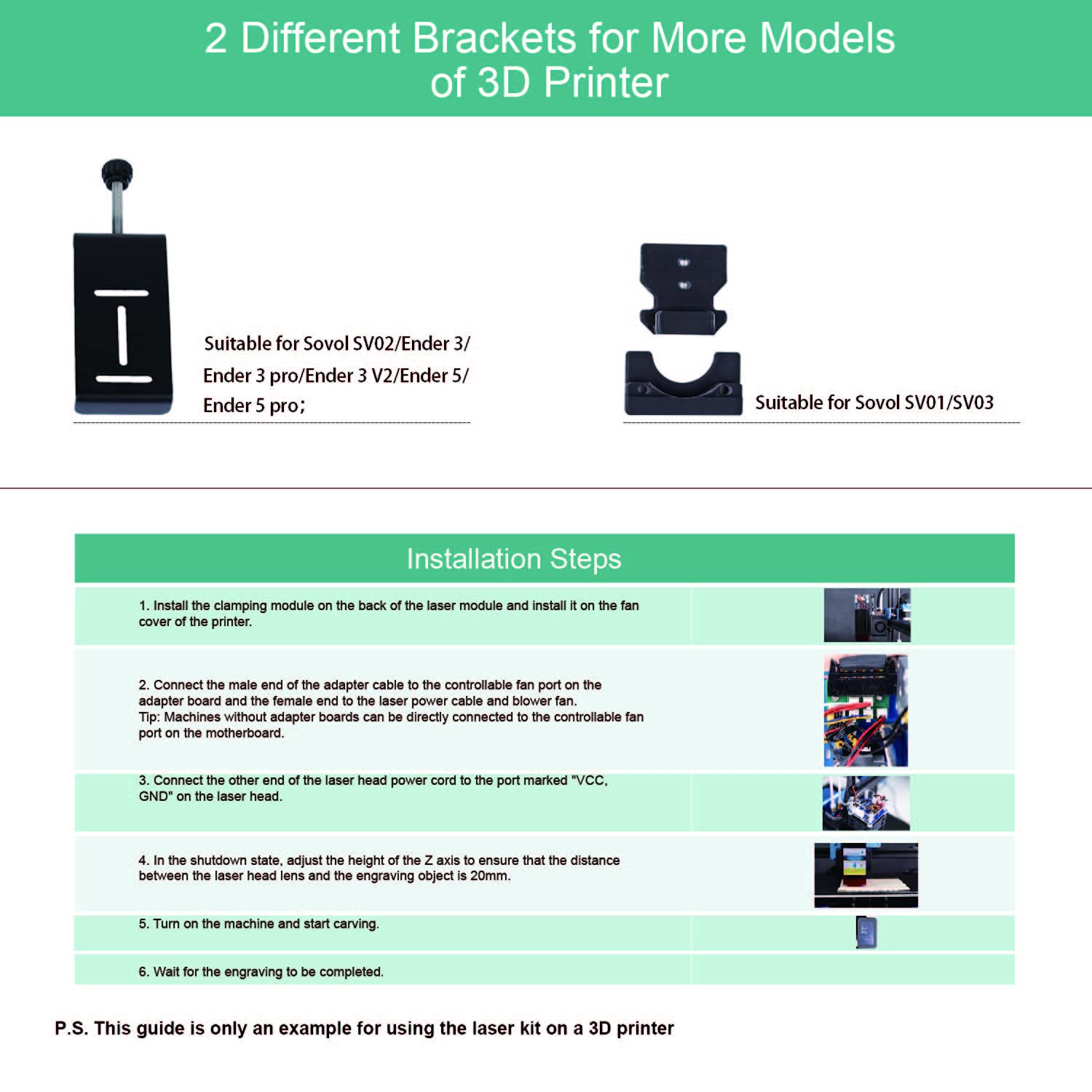
Figure 4: Different mounting brackets provided for compatibility with various 3D printer models.
4.2 Installation Steps
- Install the clamping module on the back of the laser module. Then, install the entire assembly onto the fan cover of your 3D printer.
- Connect the male end of the adapter cable to the controllable fan port on the adapter board. Connect the female end to the laser power cable and blower fan. Tip: Machines without adapter boards can be directly connected to the controllable fan port on the motherboard.
- Connect the other end of the laser head power cord to the port marked "VCC, GND" on the laser head.
- In the shutdown state, adjust the height of the Z-axis to ensure that the distance between the laser head lens and the engraving object is 20mm. This is the fixed focal distance.
- Turn on the machine and start carving.
- Wait for the engraving to be completed.
Firmware Update: Depending on your 3D printer model, you may need to flash the firmware accordingly to enable laser functionality. Refer to your 3D printer's documentation or Sovol support for specific firmware instructions.
5. Operation
Once the laser module is installed and the software is prepared, you can begin engraving or cutting. Ensure the material is properly secured and the focal distance is set to 20mm.
5.1 Engraving Examples

Figure 5: Example of a detailed wooden insect model created with the laser module.
Figure 6: Example of a wooden dragon model engraved using the laser module.
Figure 7: Example of an image engraved onto a wooden surface.
6. Compatible Materials
The Sovol SV-5W Laser Module can engrave and cut a variety of materials:

Figure 8: Visual representation of materials compatible with the laser module for engraving and cutting.
- Kraft paper
- Coated Metal
- Paper
- Acrylic
- Glass
- Plywood (for cutting)
- Leather
- Cork
- Bread
- Stainless Steel (most types, except mirror stainless steel)
- Wood
- Ceramics
7. Software
To prepare your designs for engraving, you will need appropriate software.
7.1 Recommended Software: CrealityWorkshop
- Download and install CrealityWorkshop from the SOVOL Official website.
- Open the application, import your image, and set up the engraving parameters.
- Save the generated file to an SD card for transfer to your machine.
7.2 Advanced Application: Inkscape
Inkscape is a free vector design software that can be used for laser engraving extensions. Visit the Inkscape website or YouTube channel for more instructions on its use with laser engraving.
8. Maintenance
To ensure optimal performance and longevity of your laser module:
- Lens Cleaning: It is recommended to clean the laser lens occasionally to maintain laser efficiency. Always cut off the power to the device before cleaning.
- General Cleaning: Keep the module free from dust and debris. Use a soft, dry cloth for cleaning.
9. Troubleshooting
If you encounter issues with your Sovol SV-5W Laser Module, consider the following:
- Laser Not Firing:
- Check all cable connections to ensure they are secure.
- Verify that the laser module is correctly wired to the motherboard's fan port (VCC, GND).
- Confirm that the correct firmware is installed on your 3D printer/CNC machine.
- Ensure the software parameters are correctly set for laser operation.
- Poor Engraving/Cutting Quality:
- Check the focal distance (20mm) between the laser lens and the material.
- Clean the laser lens as described in the Maintenance section.
- Adjust power and speed settings in your engraving software for the specific material.
- Ensure the material is flat and securely held.
- Module Not Recognized:
- Confirm compatibility with your 3D printer/CNC machine (e.g., not compatible with SKR boards).
- Recheck all electrical connections.
- Ensure necessary drivers or firmware updates are applied.
10. Specifications
| Feature | Detail |
|---|---|
| Optical Power Output | 5W |
| Electric Power Input | 40W |
| Input Voltage | 24V |
| Focal Length | 20mm (Fixed) |
| Wave Length | 445±5nm |
| Spot Size | 0.4-0.5mm |
| Compatible Devices | Sovol SV01/SV02/SV03, Creality Ender-3/Ender-3 Pro/Ender-3 V2/Ender-5/Ender-5 Pro, CNC Engraving Machines |
| Material | Stainless Steel, Wood, Acrylic, Glass, Stone |
| Item Weight | 508 g |
| Package Dimensions | 20.6 x 13.79 x 9.19 cm |
11. Customer Support
For any questions, suggestions, or technical assistance regarding your Sovol SV-5W Laser Module, please feel free to contact our customer support team. Our professional engineer team is available to assist you.
Please refer to the official Sovol website for contact information and further resources.
