
MARS HYDRO Smart Grow Light-FC-8000
Contents
MARS HYDRO FC8000 LED Grow Light Instruction Manual
Model: Smart Grow Light-FC-8000 | Brand: MARS HYDRO
1. Setup and Installation
The MARS HYDRO FC8000 LED Grow Light is designed for easy assembly and installation. Follow these steps to set up your grow light system.
1.1 Unboxing and Component Check
Carefully unbox all components and verify against the packing list. The FC8000 features a folding design for convenient setup.

Figure 1: Overview of the MARS HYDRO FC8000 LED Grow Light and its included components, such as the light bars, LED driver, and hanging accessories.
1.2 Assembly of Light Bars and Driver
The light bars connect to the main frame, and the driver can be mounted directly on the fixture or remotely. The driver includes ports for daisy-chaining multiple units.

Figure 2: Detailed view of the FC8000's driver and connection points, highlighting its modular design and daisy-chain capability.
Video 1: This video demonstrates the dimming and installation process for the MARS HYDRO FC8000 LED Grow Light, including assembly of the light bars and driver.
2. Operating Instructions
The FC8000 offers versatile control options for optimizing your plant's growth cycle.
2.1 Dimming Control
The light can be dimmed manually via the integrated controller or automatically through the MARS HYDRO Smartphone APP (iConnectu Controller sold separately). This allows precise adjustment of light intensity to match specific growth stages.

Figure 3: The smartphone application interface for controlling the dimming and scheduling of the FC8000 grow light.
Video 2: This video provides a comprehensive guide on operating the MARS HYDRO APP for smart control of your grow light.
2.2 Full Spectrum Output
The FC8000 utilizes Samsung LM301H EVO LEDs, providing a full spectrum (660-665nm, 2800-3000K warm white, and 4800-5000K white) suitable for all plant growth phases, from seedling to flowering.
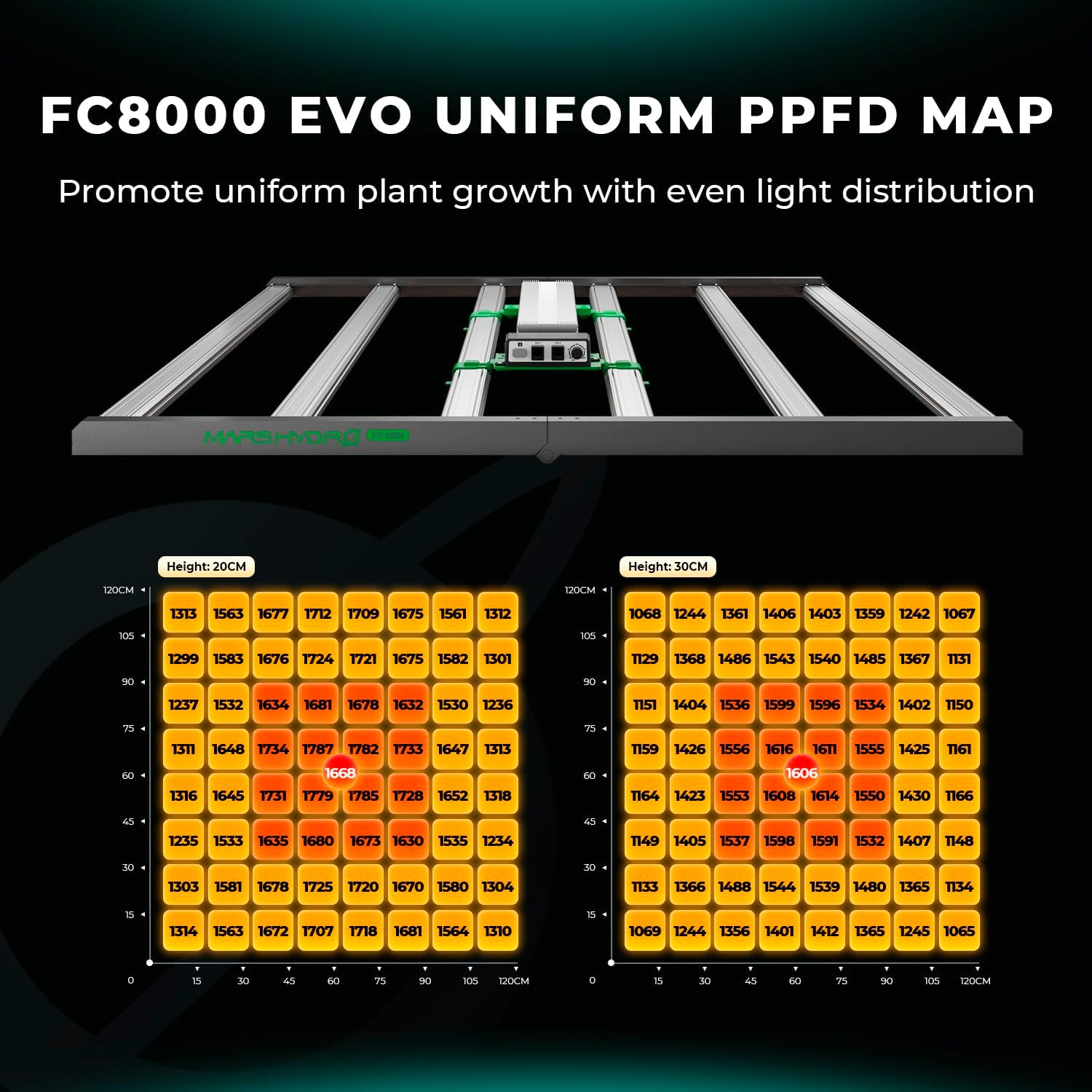
Figure 4: Spectral distribution chart of the FC8000, showing the optimized full spectrum for various plant growth stages.
3. Maintenance
Proper maintenance ensures the longevity and optimal performance of your grow light.
3.1 Heat Dissipation
The bar-style aluminum heatsink is designed for efficient heat dissipation, maintaining optimal temperatures for the growing space. Ensure adequate airflow around the fixture.
Figure 5: Illustration of the efficient heat dissipation mechanism within the FC8000's design.
3.2 Cleaning
Periodically clean the light bars with a soft, dry cloth to remove dust and debris, ensuring maximum light output. Do not use abrasive cleaners or immerse the unit in water.
4. Troubleshooting
Refer to these common issues and solutions before contacting support.
4.1 Light Not Turning On
- Check power connections: Ensure the power cord is securely plugged into both the fixture and a working outlet.
- Verify dimmer setting: Confirm the dimmer knob on the driver is not set to "OFF" or minimum.
- Inspect daisy-chain connections: If multiple lights are chained, ensure all connections are secure.
4.2 Uneven Light Distribution
- Adjust hanging height: Ensure the light is hung at the recommended height for your grow space (e.g., 5x5ft grow tent).
- Check for obstructions: Remove any objects blocking light from reaching certain areas of the canopy.

Figure 6: PPFD map illustrating the uniform light distribution of the FC8000 across a 5x5ft grow area.
5. Specifications
| Feature | Detail |
|---|---|
| Brand | MARS HYDRO |
| Model Number | Smart Grow Light-FC-8000 |
| Power Consumption | 800W (approx.) |
| LED Type | Samsung LM301H EVO Diodes |
| PPE | 2.95 µmol/j (overall), 3.14 µmol/j (per diode) |
| Spectrum | Full Spectrum (660-665nm, 2800-3000K, 4800-5000K) |
| Coverage Area | Ideal for 5x5ft Grow Tent |
| Heat Dissipation | Bar-style aluminum heatsink |
| Control | Manual dimming, MARS HYDRO APP control (iConnectu Controller sold separately) |
| Daisy Chain | Up to 100 FC8000 units |
| Dimensions | 46.65"L x 26.57"W x 5.31"H |
| Item Weight | 27 Pounds |
| Certifications | DLC, ETL |
6. Warranty and Support
MARS HYDRO stands behind the quality of its products. For specific warranty details and support, please refer to the official MARS HYDRO website or contact their customer service.
- For product support and inquiries, visit the official MARS HYDRO Store.
- Protection plans are available for extended coverage.
Documents and downloads
Ask a question about this manual
Ask about setup, troubleshooting, compatibility, parts, safety, or missing instructions. Manuals+ will review the question and use this page’s manual context to help answer it.