
1. Introduction
Welcome to the TOPENS A5131 Single Swing Gate Opener user manual. This guide provides detailed instructions for the installation, operation, and maintenance of your automatic gate system. The A5131 is designed for medium-duty single swing gates up to 16 feet in length or 550 pounds in weight, offering reliable and convenient access control for residential and commercial applications.

This image illustrates the gate capability of the TOPENS A5131, showing the maximum weight capacity for various gate lengths. It also highlights key features such as self-closing setting, soft start & stop, obstacle adjusting, and TOPENS advanced security code.
2. Safety Information
General Safety Precautions
- Read all instructions carefully before installation and operation.
- Ensure the gate area is clear of obstructions before operating.
- Do not allow children or pets near the gate during operation.
- Only qualified personnel should perform electrical connections.
- Disconnect power before any service or maintenance.
- Keep remote controls out of reach of children.
- Use the manual release key in case of power failure.
Electrical Safety
- Ensure proper grounding.
- Protect wiring from sharp edges and moving parts.
- Do not operate with damaged cords or plugs.
3. Package Contents
The TOPENS A5131 Single Swing Gate Opener package includes the following components:
- 1 x Swing Gate Opener Arm
- 1 x UPS01 Uninterrupted Power Supply (Control Box)
- 2 x M12 Remote Controls
- 1 x Manual Release Key
- 1 x Full Set of Required Installation Hardware (brackets, bolts, etc.)
- 1 x User Manual (this document)

This image displays the complete contents of the TOPENS A5131 Single Swing Gate Opener package, including the main gate opener arm, the UPS01 control box, two remote controls, and various installation accessories.
4. Product Overview
The TOPENS A5131 system consists of a robust linear actuator (gate opener arm) and a versatile UPS01 control unit. The system is designed for durability and ease of use, incorporating advanced features for safety and convenience.
Key Components
- Gate Opener Arm: Houses the 24VDC 50W motor and mechanical components for gate movement.
- UPS01 Control Box: Manages power, controls gate operation, and integrates with accessories. It supports AC power, battery backup, and solar charging.
- Remote Controls: Two M12 remotes are included for wireless operation.
- Manual Release Key: Allows for manual gate operation during power outages.

This detailed diagram illustrates the internal components of the TOPENS A5131 gate opener arm, highlighting the powerful motor, reliable electromagnetism limit switch, and the manual release key mechanism. It also shows the UPS01 Uninterrupted Power Supply and the M12 remote controls.
5. Installation
Proper installation is crucial for the optimal performance and safety of your gate opener. Follow these general guidelines. Refer to the detailed diagrams for specific measurements and mounting positions.
Mounting the Gate Opener
The gate opener can be installed in either pull-to-open (gate swings inwards) or push-to-open (gate swings outwards) configurations.
- Determine the optimal mounting points on your gate and post.
- Securely attach the front and rear mounting brackets.
- Attach the gate opener arm to the brackets.
- Ensure the arm is level and has a smooth range of motion.
Electrical Connections
The UPS01 control box offers flexible power options.
- Power Mode 1 (AC Electricity Only): Connect the UPS01 directly to a 100-240VAC power source.
- Power Mode 2 (AC Electricity and Back-up Batteries): Connect the UPS01 to AC power and two 12V automotive/marine batteries (not included) for backup.
- Power Mode 3 (Solar Panels and Batteries): Connect solar panels (not included) and two 12V batteries (not included) to the UPS01.
- Power Mode 4 (AC Electricity, Solar Panels, and Back-up Batteries): Combine all power sources for maximum reliability.

This image displays four different power mode configurations for the TOPENS A5131 gate opener, illustrating how to connect AC electricity, 12V automotive batteries, and solar panels (optional) to the UPS01 control box.
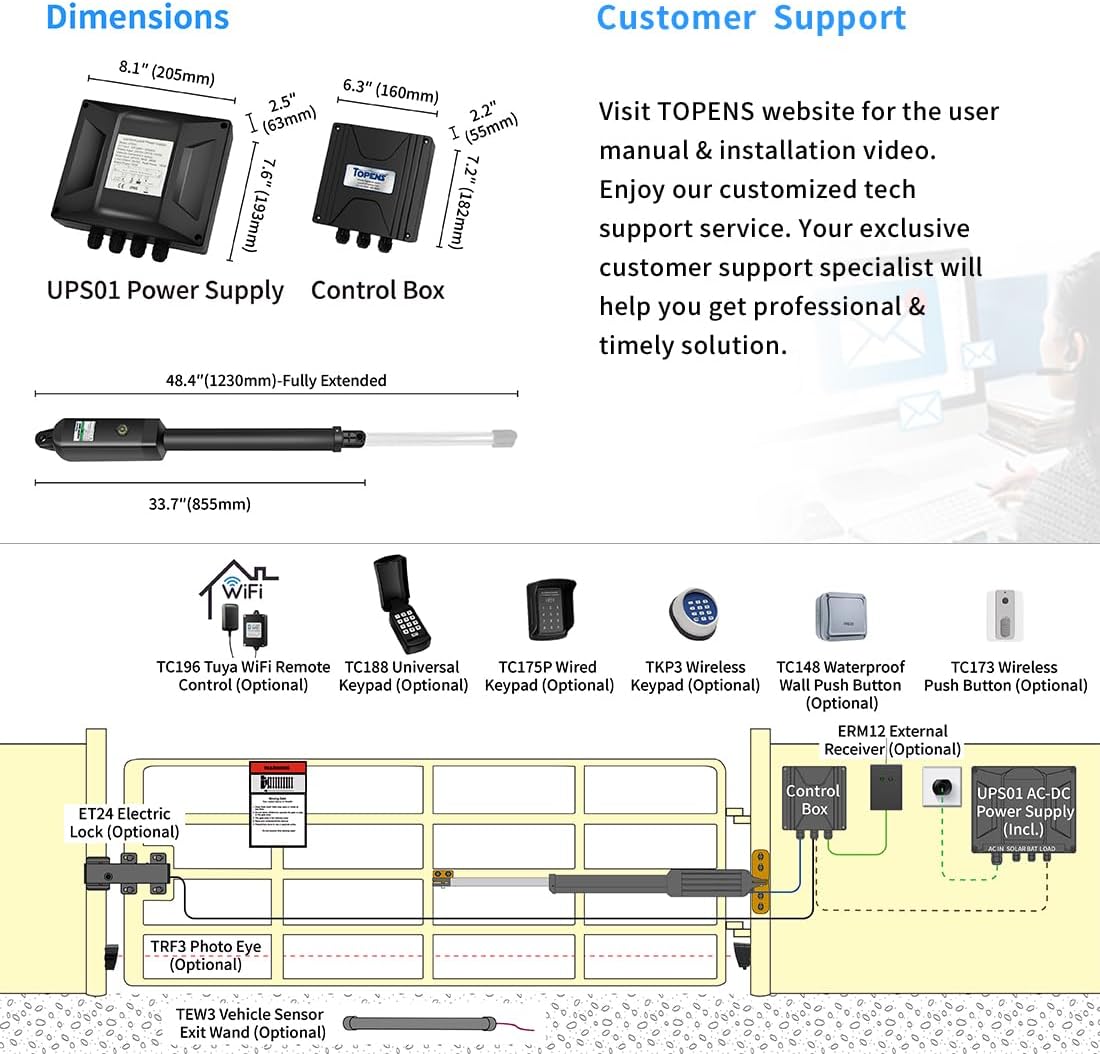
This image provides dimensional measurements for the UPS01 power supply, control box, and the fully extended gate opener arm. It also includes a system diagram showing how the main components and optional accessories like electric locks, photo eyes, and keypads connect to the system.
6. Setup
Limit Switch Adjustment
The electromagnetism limit switch needs to be adjusted to define the open and close positions of the gate. Follow the instructions in the detailed manual for precise adjustment.
Remote Control Pairing
The included M12 remote controls are pre-programmed. To add additional remotes or re-pair existing ones, refer to the specific pairing procedure outlined in the full user manual.
Auto-Close Function
The system can be configured to automatically close the gate after a set delay. This feature enhances security.
7. Operating Instructions
Once installed and set up, operating your TOPENS A5131 gate opener is simple.
Using the Remote Control
Press the designated button on your M12 remote control to open or close the gate. A single press will initiate the movement. Pressing again during operation will stop the gate.
Safety Features
- Obstacle Detection: The gate will stop and reverse if an obstruction is detected during opening or closing.
- Soft Start & Soft Stop: This feature ensures smooth gate movement at the beginning and end of cycles, reducing wear on the motor and gate hardware.

This image depicts a user operating the TOPENS A5131 gate opener with a remote control from inside a vehicle, demonstrating the convenience of automatic gate operation.
8. Maintenance
Regular maintenance ensures the longevity and reliable operation of your TOPENS A5131 gate opener.
- Monthly: Inspect the gate and hinges for proper alignment and lubrication. Clear any debris from the gate's path.
- Quarterly: Check all electrical connections for tightness and signs of corrosion. Test the safety reversal mechanism.
- Annually: Lubricate moving parts of the gate and opener arm as recommended. Inspect the power supply and battery (if used) for optimal performance.
For detailed maintenance procedures, consult the comprehensive user manual.
9. Troubleshooting
This section provides solutions for common issues you might encounter.
| Problem | Possible Cause | Solution |
|---|---|---|
| Gate does not respond to remote. | Dead remote battery, remote out of range, power outage, loose wiring. | Replace remote battery, move closer to gate, check power supply, inspect wiring connections. |
| Gate stops unexpectedly. | Obstruction detected, limit switch issue, motor overheating. | Clear path, check limit switch settings, allow motor to cool. |
| Gate opens/closes partially. | Incorrect limit switch setting, low power. | Re-adjust limit switches, check power supply and battery charge. |
For more complex issues, please contact TOPENS customer support.
10. Specifications
Technical specifications for the TOPENS A5131 Single Swing Gate Opener.
| Feature | Detail |
|---|---|
| Model | A5131 |
| Max Gate Length | 16 ft (4.8 m) |
| Max Gate Weight | 550 lbs (250 kg) |
| Motor Voltage | 24 VDC |
| Motor Wattage | 50 Watt-hours |
| Power Source | AC/DC (100-240VAC, 24V Battery, Solar Compatible) |
| Item Weight | 24.3 pounds (11 kg) |
| Product Dimensions | 33.66 x 3.31 x 4.09 inches (85.5 x 8.4 x 10.4 cm) |
| Included Remotes | 2 x M12 Remote Controls |
| Operating Temperature | 0°F to 120°F (-17°C to 49°C) |
11. Warranty and Support
TOPENS provides a 12-month warranty for the A5131 Single Swing Gate Opener, covering defects in materials and workmanship from the date of purchase.
For technical assistance, warranty claims, or any questions regarding your TOPENS product, please visit the official TOPENS website or contact their customer support team.
Contact Information:
- Website: www.topens.com
- Email: support@topens.com

This image shows a customer support representative assisting a user, symbolizing the professional and timely support offered by TOPENS.


