
Introduction
This manual provides essential instructions for the installation, operation, and maintenance of your Heng Long Receiver 6.0. This component is designed as a replacement motherboard/driving controller for Heng Long TK-6 2.4 GHz Version 6.0 RC tank models. Please read this manual thoroughly before installation and use to ensure proper function and longevity of the product.
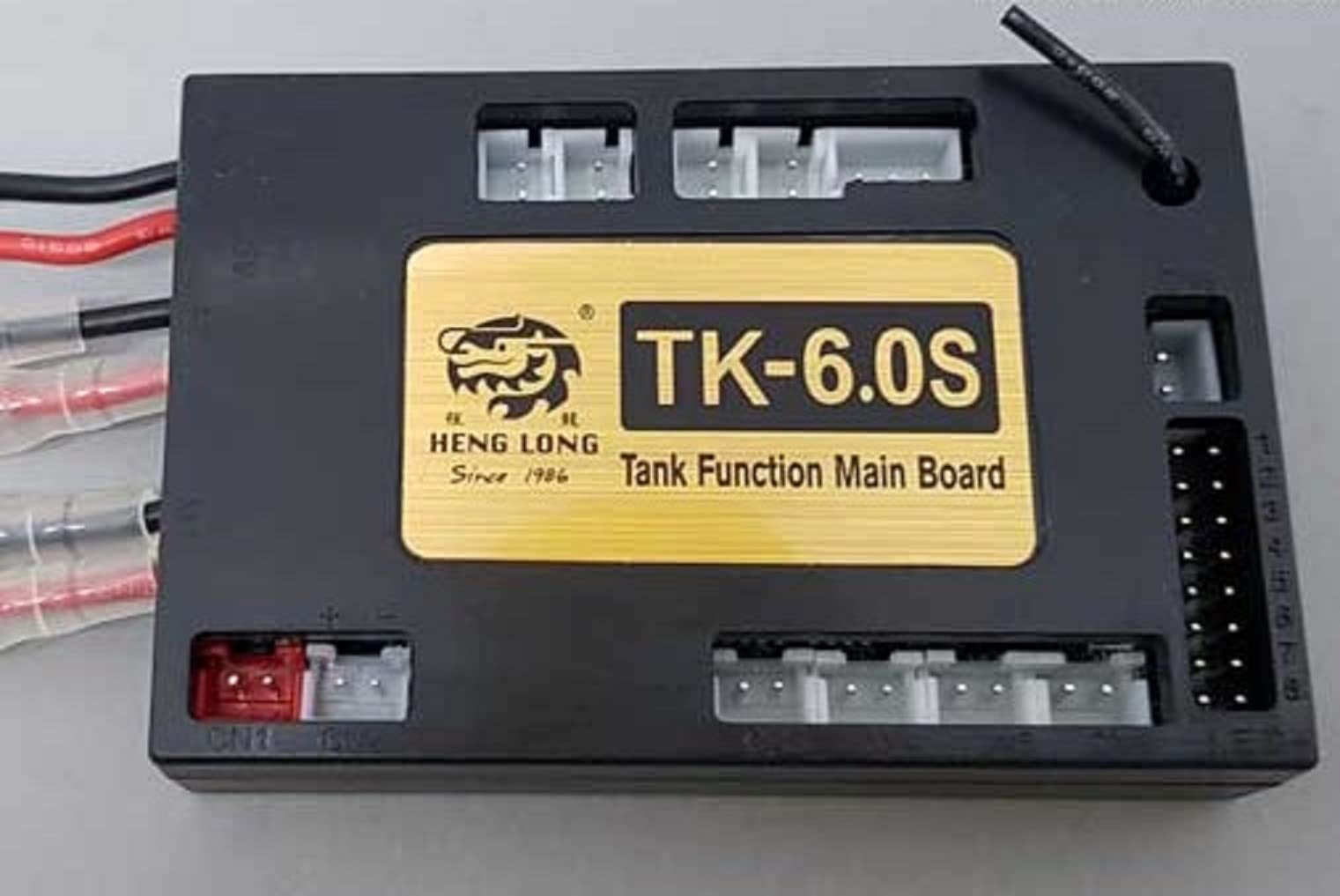
Image: The Heng Long Receiver 6.0 module, showing its compact design and multiple connection points for various tank components.
Setup and Installation
1. Package Contents
- Heng Long Receiver 6.0 module (1 unit)
- Note: Additional cables or accessories may be included depending on the specific product variant.
2. Compatibility
This receiver is specifically designed for Heng Long RC tank models utilizing the TK-6 motherboard/driving controller system, operating on a 2.4 GHz frequency, and running Version 6.0 firmware. Ensure your RC tank model meets these specifications for proper compatibility.
3. Installation Steps
- Power Disconnection: Before beginning installation, ensure the RC tank's power source is completely disconnected to prevent electrical damage or injury.
- Access the Main Board: Carefully open the RC tank's chassis to access the existing motherboard/driving controller. Refer to your specific tank model's manual for instructions on accessing internal components.
- Disconnect Old Receiver: Note the connections of all wires to the old receiver module. Take photos if necessary for reference. Carefully disconnect all wires, including power, motor, speaker, and other accessory connections.
- Install New Receiver: Position the new Heng Long Receiver 6.0 module in the designated slot. Ensure it is securely mounted to prevent movement during operation.
- Reconnect Wires: Reconnect all wires to the corresponding ports on the new Receiver 6.0 module. Pay close attention to polarity and correct port assignment. Incorrect connections can damage the receiver or other tank components.
- Secure Chassis: Once all connections are verified, carefully close and secure the RC tank's chassis.
- Initial Power-Up: Reconnect the tank's power source. Observe for any unusual behavior, smoke, or burning smells. If any issues arise, immediately disconnect power and re-check all connections.
Important: If you are unsure about any step, consult a qualified technician or refer to detailed online resources specific to your Heng Long tank model.
Operating Instructions
1. Powering On
- Ensure the remote control is powered on first.
- Connect the battery to the RC tank. The receiver will power on and attempt to establish a connection with the remote control.
2. Pairing/Binding (if required)
Most Heng Long 2.4 GHz systems are pre-bound. If your tank does not respond to the remote control after power-up, you may need to re-bind the receiver to the transmitter. Refer to your specific remote control and tank model's manual for the binding procedure. Typically, this involves pressing a bind button on the receiver while powering it on, then initiating a bind sequence on the transmitter.
3. Indicator Lights
The receiver module may feature one or more LED indicator lights. These lights typically provide status information:
- Solid Light: Indicates a successful connection with the remote control.
- Flashing Light: May indicate searching for a signal, binding mode, or an error. Consult your tank's main manual for specific LED codes.
4. Basic Functionality
Once successfully connected, the receiver processes signals from your 2.4 GHz remote control, translating them into commands for the tank's motors, turret, cannon, and other functions. Test all functions (forward, reverse, turning, turret rotation, cannon firing, sound effects) to ensure proper operation.
Maintenance
1. Cleaning
- Keep the receiver module free from dust, dirt, and moisture.
- Use a soft, dry brush or compressed air to gently clean the board and connectors.
- Avoid using liquid cleaners directly on the electronic components.
2. Storage
- Store the receiver in a cool, dry place away from direct sunlight and extreme temperatures.
- If removed from the tank, store it in an anti-static bag to protect against electrostatic discharge.
3. Environmental Considerations
- Avoid operating the RC tank in wet or excessively dusty conditions, as this can damage the receiver and other electronics.
- Protect the module from physical impact.
Troubleshooting
| Problem | Possible Cause | Solution |
|---|---|---|
| Tank does not respond to remote control. |
|
|
| Intermittent control or signal loss. |
|
|
| Specific tank functions (e.g., turret, sound) not working. |
|
|
If problems persist after attempting these solutions, contact Heng Long customer support or a qualified RC technician.
Specifications
- Model: Receiver 6.0
- Compatibility: Heng Long RC Tank models with TK-6 motherboard/driving controller, 2.4 GHz, Version 6.0
- Power Source: Battery-powered (via tank's main battery)
- Operating Mode: Push (signal reception)
- Brand: HENG LONG
- ASIN: B099Q68JKL
- GTIN/UPC: 715235759585
Warranty Information
Heng Long products are manufactured to high-quality standards. This receiver module is covered by the manufacturer's standard warranty against defects in materials and workmanship. The warranty period and terms may vary by region and retailer. Please retain your proof of purchase for warranty claims. Damage resulting from improper installation, misuse, modification, or accident is not covered under warranty.
Customer Support
For technical assistance, troubleshooting beyond this manual, or warranty inquiries, please contact your retailer or the official Heng Long customer support channels. Refer to the packaging or the official Heng Long website for the most current contact information.