
Makita DCF301Z
Makita DCF301Z 18V LXT® Lithium-Ion Cordless 13" Fan Instruction Manual
Model: DCF301Z | Brand: Makita
Introduction
The Makita DCF301Z 18V LXT® Lithium-Ion Cordless 13" Fan is a portable and powerful solution designed for various environments, including job sites and home use. It provides efficient air circulation and cooling, operating on both 18V LXT Lithium-Ion batteries (sold separately) or AC power (adapter included). This manual provides essential information for the safe and effective operation, maintenance, and troubleshooting of your fan.

Figure 1: Makita DCF301Z 18V LXT® Lithium-Ion Cordless 13" Fan.
Safety Instructions
Always observe basic safety precautions when using electrical appliances to reduce the risk of fire, electric shock, and personal injury.
- Read all instructions: Before operating the fan, read and understand all safety warnings and instructions.
- Power Source: Use only the specified power source (18V LXT batteries or AC adapter TE00000170).
- Avoid Water: Do not expose the fan to rain or wet conditions. Do not use near water.
- Keep Clear: Keep fingers, hair, and loose clothing away from moving parts.
- Stable Surface: Always place the fan on a stable, flat surface to prevent tipping.
- Ventilation: Ensure proper ventilation around the fan during operation.
- Unplug When Not In Use: Disconnect from power source when not in use, before cleaning, or performing maintenance.
- California Proposition 65 Warning: This product may contain chemicals known to the State of California to cause cancer and birth defects or other reproductive harm.
Package Contents
Verify that all items are present upon unpacking:
- Makita DCF301Z 18V LXT® Lithium-Ion Cordless 13" Fan (Tool Only)
- AC Adapter (TE00000170)
Note: Battery and charger are not included and must be purchased separately.
Setup
Powering the Fan
The DCF301Z fan can be powered by either an 18V LXT Lithium-Ion battery or the included AC adapter.
- Using an 18V LXT Battery:
- Ensure the battery is fully charged.
- Align the battery with the battery slot on the fan base and slide it in until it clicks into place.

Figure 2: Side view showing the battery slot.
- Using the AC Adapter:
- Plug the AC adapter into the fan's power input port.
- Plug the other end of the AC adapter into a standard electrical outlet.

Figure 3: Fan connected via AC adapter.
Positioning the Fan
The fan can be placed on a flat surface or mounted on a tripod (GM00002073, sold separately) for elevated air circulation.

Figure 4: Fan mounted on a tripod (tripod sold separately).
Operating Instructions
The fan features intuitive controls for speed, oscillation, and timer functions.
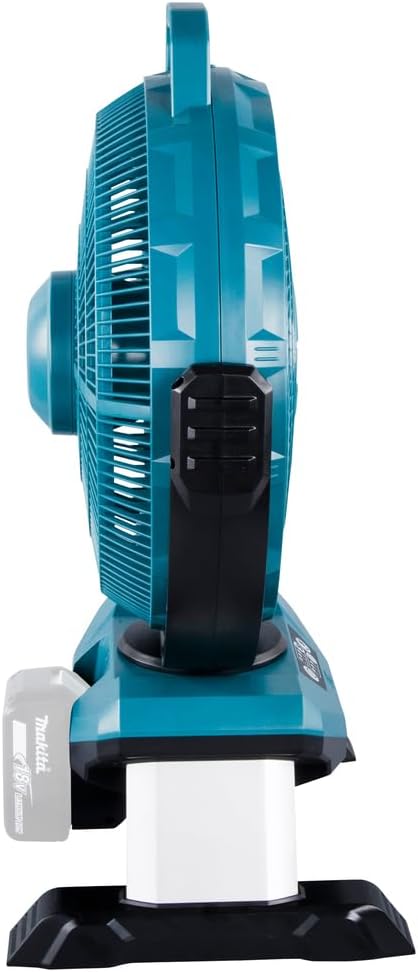
Figure 5: Control panel with power, speed, oscillation, and timer buttons.
- Power On/Off: Press the power button (⏻) to turn the fan on or off.
- Adjusting Fan Speed: The fan has three speed settings: Low, Medium, and High. Press the speed button repeatedly to cycle through the settings. The current speed setting is indicated by LED lights.
- Low: Quiet operation, suitable for extended use.
- Medium: Balanced airflow and noise.
- High: Delivers powerful airflow up to 740 CFM.
- Oscillation Function: Press the oscillation button (↔) to activate or deactivate the 45° right and left oscillation. This helps distribute air across a wider area.
- Tilt Adjustment: Manually adjust the fan head's vertical angle to direct airflow precisely where needed.
- Timer Function: Use the timer button (🕒) to set the fan to automatically turn off after a specified duration (e.g., 1, 2, or 4 hours).
Battery Run Time
When powered by an 18V LXT 6.0Ah Battery (BL1860B), the fan can provide up to 14 hours of continuous run time on the Low speed setting.
Video 1: Product Overview of the Makita DCF301Z Portable Fan, demonstrating its features including power options, speed settings, oscillation, and portability. This video is provided by the seller.
Maintenance
Regular maintenance ensures optimal performance and longevity of your fan.
- Cleaning:
- Always unplug the fan or remove the battery before cleaning.
- Wipe the exterior surfaces with a soft, damp cloth. Do not use abrasive cleaners or solvents.
- The fan is designed for easy cleaning. Refer to the user guide for instructions on how to safely remove the front grille for blade cleaning if necessary.
- Storage:
- Store the fan in a cool, dry place away from direct sunlight and moisture.
- If storing for an extended period, remove the battery.
Troubleshooting
If you encounter issues with your fan, refer to the following common problems and solutions:
| Problem | Possible Cause | Solution |
|---|---|---|
| Fan does not turn on. | No power supply; Battery not inserted correctly or discharged; AC adapter not properly connected. | Ensure AC adapter is securely plugged in or battery is fully charged and properly inserted. |
| Weak airflow. | Fan speed set too low; Obstruction in front or back of fan; Dirty blades. | Increase fan speed; Remove any obstructions; Clean fan blades and grille. |
| Fan makes unusual noise. | Loose parts; Obstruction hitting blades; Fan not on a stable surface. | Check for loose components; Remove any foreign objects; Place fan on a stable, flat surface. |
| Oscillation not working. | Oscillation function not activated; Mechanical issue. | Press the oscillation button; If issue persists, contact customer support. |
If the problem persists after attempting these solutions, please contact Makita customer support.
Specifications
- Brand: Makita
- Model Name: DCF301Z
- Power Source: Battery Powered (18V LXT Lithium-Ion) or AC Power (TE00000170 adapter)
- Voltage: 18 Volts
- Air Flow Capacity: Up to 740 CFM (Cubic Feet Per Minute) on High setting
- Noise Level: 52 dB
- Number of Speed Levels: 3 (High/Medium/Low)
- Oscillation: 45° right and left
- Product Dimensions (DxWxH): 10.59" x 17.64" x 24.09"
- Item Weight: 8.36 pounds (3.8 Kilograms)
- Blade Length: 13 Inches
- Included Components: Tool Only (battery and charger not included); AC Adapter (TE00000170)
- Approximate Run Time (with 6.0Ah battery): Up to 14 hours on Low speed
- Indoor/Outdoor Usage: Outdoor
Warranty and Support
The Makita DCF301Z 18V LXT® Lithium-Ion Cordless 13" Fan comes with a 3-year limited warranty from the date of original purchase. This warranty covers defects in materials and workmanship.
For warranty claims, technical support, or service inquiries, please contact Makita customer service or visit their official website. Keep your proof of purchase for warranty validation.
For a detailed user guide, you can download the PDF version here.
Related documentsDCF301Z


Ask a question about this manual
Ask about setup, troubleshooting, compatibility, parts, safety, or missing instructions. Manuals+ will review the question and use this page’s manual context to help answer it.