1. Product Overview
The Podofo Wireless AHD Reversing Camera System provides a reliable and clear view for various vehicles, enhancing safety during reversing and driving. This system features a 7-inch HD monitor and two IP69 waterproof cameras, utilizing a stable digital signal for clear transmission.

Image 1.1: The Podofo Wireless AHD Reversing Camera System, showing the 7-inch monitor and two wireless cameras with antennas.
Key Features:
- Wireless AHD Connection: Simplifies installation by eliminating complex wiring between cameras and monitor.
- 7-inch HD Monitor: Provides a clear and adequately sized display for various vehicle models.
- Stable Digital Signal: Ensures reliable transmission with minimal interference, with a range of up to 50m in open areas.
- Dual Camera Input & Split Screen: Supports up to two cameras simultaneously, allowing for a split-screen view to monitor multiple angles.
- IP69 Waterproof Cameras: Designed for durability and safe operation in various weather conditions, including rain and snow.
- Adjustable Reversing Line & Night Vision: Features customizable reversing guidelines and supports night vision for low-light conditions.
- Flexible Camera Design: Cameras can be rotated 360° for optimal viewing angles. Includes a sunshade for the monitor.
2. Package Contents
Please check the package contents upon unboxing to ensure all components are present.

Image 2.1: Detailed view of the package contents, including the monitor, two cameras, power cables, accessories, sunshade, monitor bases, antenna heads, and user manual.
- 7-inch HD Monitor
- Wireless AHD Cameras (x2)
- Power Cables for Cameras (x2)
- Power Cable for Monitor (with car charger adapter)
- Monitor Bases (various types)
- Antenna Heads
- Sunshade for Monitor
- Mounting Accessories (screws, brackets)
- User Manual (this document)
3. Installation Guide
Follow these steps for proper installation of your Podofo Wireless AHD Reversing Camera System.

Image 3.1: Step-by-step installation diagram for the camera and monitor, including wiring connections.
3.1. Camera Installation
- Choose Camera Location: Select a suitable location at the rear of your vehicle for the camera, ensuring a clear view and protection from physical damage. For a second camera, choose a location that provides the desired additional view (e.g., front, side, or inside a trailer).
- Mount the Camera: Securely attach the camera using the provided mounting accessories. Ensure the camera is oriented correctly.
- Wire the Camera:
- Connect the red wire of the camera's power cable to the positive (+) terminal of your vehicle's reverse light (or another suitable 12V-36V power source that activates when needed).
- Connect the black wire of the camera's power cable to the negative (-) terminal or a reliable ground point on your vehicle's chassis.
Note: For continuous power (e.g., for a front camera or constant monitoring), connect to a constant 12V-36V power source. Ensure proper insulation for all connections.
3.2. Monitor Installation
- Choose Monitor Location: Mount the 7-inch monitor on your dashboard or windshield using the provided monitor base. Ensure it does not obstruct your view while driving.
- Connect Monitor Power:
- Option A (Cigarette Lighter): Plug the monitor's power cable directly into your vehicle's 12V-36V cigarette lighter socket.
- Option B (Hardwire): Connect the monitor's power cable (red wire to positive, black wire to negative) to a suitable 12V-36V power source in your vehicle's electrical system.
- Attach Antennas: Screw the provided antennas onto the monitor and cameras.
3.3. Initial Setup and Pairing
- Power On: Start your vehicle and ensure power is supplied to both the cameras and the monitor.
- Pairing: The system is typically pre-paired. If no image appears, or if you are adding a new camera, navigate to the "Setup" menu on the monitor. Follow the on-screen instructions to complete the pairing process. This usually involves selecting a channel and initiating pairing mode on the monitor, then ensuring the camera is powered on.
4. Operating Instructions
Understand how to use the monitor and camera features for optimal performance.
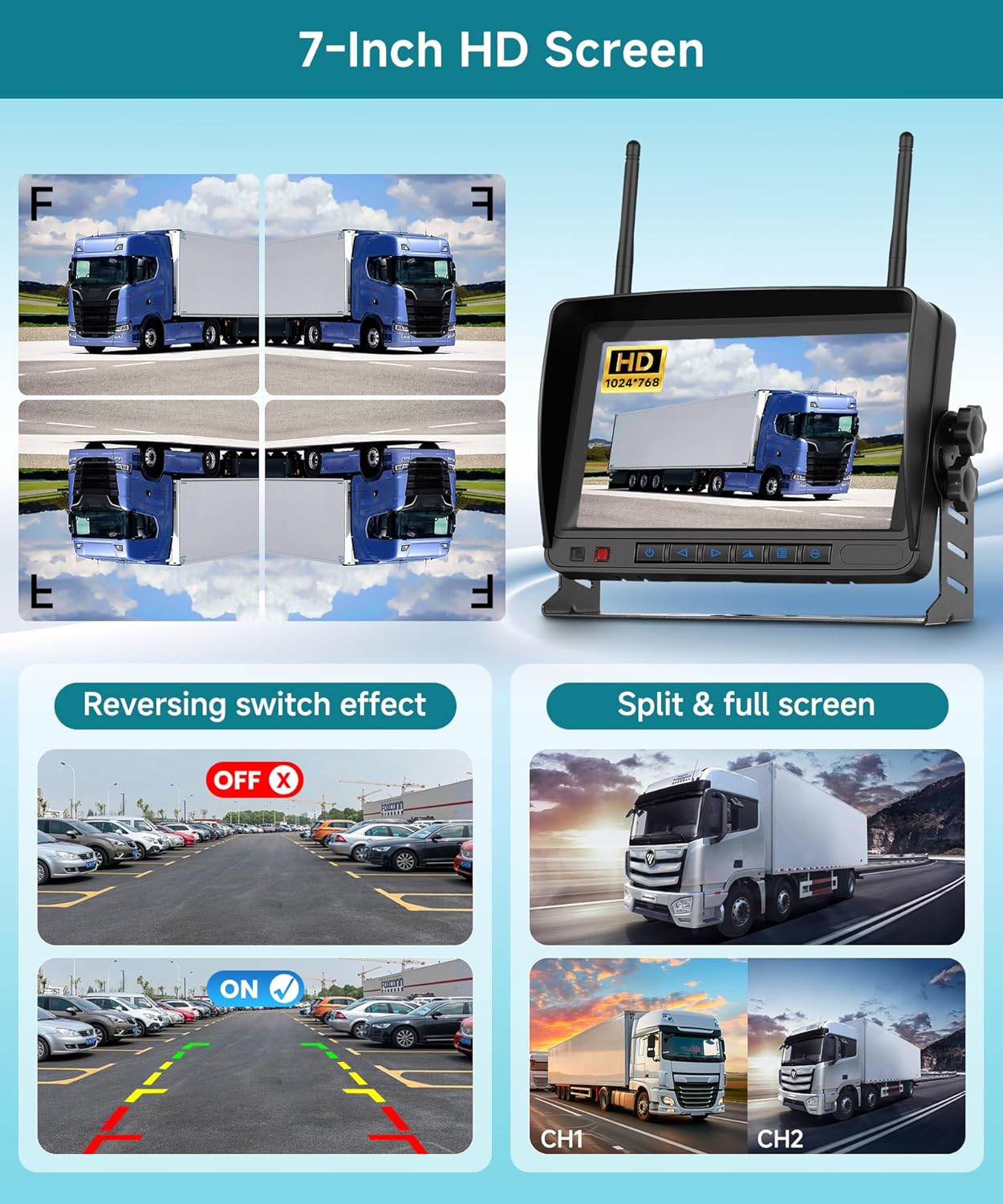
Image 4.1: The 7-inch HD monitor showing options for reversing guidelines and split-screen viewing.
4.1. Monitor Functions
- Power Button: Turns the monitor on/off.
- Menu Button: Accesses the system settings.
- Navigation Buttons (Up/Down/Left/Right): Used to navigate through menu options and adjust settings.
- OK/Confirm Button: Confirms selections in the menu.
- Channel Switch Button: Cycles between camera views (CH1, CH2, etc.) or activates split-screen mode.
4.2. Display Modes

Image 4.2: Comparison of full-screen and split-screen display modes on the monitor.
- Full Screen: Displays the view from a single selected camera.
- Split Screen: Displays views from two cameras simultaneously. Use the channel switch button to toggle between full screen and split screen, or to select which camera is displayed in full screen.
4.3. Image Settings
- Reversing Guidelines:

Image 4.3: The monitor displaying the reversing guidelines in both ON and OFF states.
You can enable or disable the reversing guidelines through the "System" menu. The last button in the menu typically serves as the "Confirm" button for this setting.
- Image Flip (Mirror/Normal):

Image 4.4: The monitor demonstrating the difference between normal and mirror image views.
The monitor supports image flip, allowing you to switch between normal and mirror views. This is useful for front cameras or specific mounting orientations.
- Brightness and Saturation: Adjust these settings in the monitor's menu to optimize display quality based on ambient light conditions.
4.4. Night Vision

Image 4.5: The camera's performance in both daytime and nighttime conditions, highlighting its night vision capability.
The cameras are equipped with night vision capabilities to provide clear images in low-light conditions. Note that the night vision mode typically displays a monochrome (black and white) view, not color.
4.5. Looping Video Recording (Optional)

Image 4.6: The monitor indicating support for looping video recording via an SD card (not included).
The monitor supports looping video recording. To utilize this feature, insert a compatible SD card (up to 128GB, not included) into the designated slot on the monitor. The system will automatically record footage, overwriting the oldest files when the card is full.
5. Maintenance
Regular maintenance ensures the longevity and optimal performance of your camera system.
- Cleaning the Camera Lens: Periodically clean the camera lens with a soft, damp cloth to remove dirt, dust, or water spots that may obstruct the view. Avoid abrasive cleaners.
- Cleaning the Monitor Screen: Use a soft, lint-free cloth to clean the monitor screen. For stubborn smudges, a screen cleaner designed for electronics can be used sparingly.
- Check Connections: Occasionally inspect all wiring connections to ensure they are secure and free from corrosion or damage.
- Antenna Care: Ensure antennas are securely attached and not bent or damaged, as this can affect signal strength.
- Weather Protection: While cameras are IP69 waterproof, extreme weather conditions (e.g., prolonged exposure to direct sunlight in very hot climates, or severe ice buildup) should be considered for overall system longevity.
6. Troubleshooting
If you encounter issues with your system, refer to the following common problems and solutions.
| Problem | Possible Cause | Solution |
|---|---|---|
| No image on monitor / "No Signal" message |
|
|
| Image flickering or unstable |
|
|
| Poor image quality (blurry, dark) |
|
|
| Reversing guidelines not appearing/incorrect |
|
|
If the problem persists after trying these solutions, please contact Podofo customer support for further assistance.
7. Specifications
| Feature | Detail |
|---|---|
| Brand | Podofo |
| Screen Size | 7 Inches |
| Compatible Devices | Monitor |
| Display Technology | LCD |
| Installation Type | Surface Mount |
| Video Recording Resolution | 1080p |
| Voltage | 12V-36V DC |
| Optical Sensor Technology | CMOS |
| Lens Type | Wide Angle |
| Real View Angle | 140 Degrees |
| Waterproof Rating | IP69 (Cameras) |
8. Warranty and Support
Your Podofo Wireless AHD Reversing Camera System comes with a manufacturer's warranty and dedicated support.
- Manufacturer's Warranty: This product is covered by a 2-year warranty from the date of purchase. Please retain your proof of purchase for warranty claims.
- Customer Support: For technical assistance, troubleshooting beyond this manual, or warranty inquiries, please contact Podofo electronic customer service. Refer to the contact information provided with your product packaging or visit the official Podofo website.