1. Introduction
This manual provides essential instructions for setting up, operating, maintaining, and troubleshooting your realme DIZO Star 300 feature phone. Please read this manual carefully to ensure proper use and to maximize the lifespan of your device.
2. Product Overview
The DIZO Star 300 is a basic mobile phone designed for essential communication and entertainment. It features a compact design, a long-lasting battery, and several useful functions.
Key Features:
- 1.8-inch Display
- 2550 mAh Battery
- 32 MB RAM
- Expandable Memory up to 64 GB
- Human Interface Input: Keypad
- VGA Rear Camera
- FM Radio & MP3 Player
- Built-in Torch
- Large Storage for Contacts and Messages
Product Views:
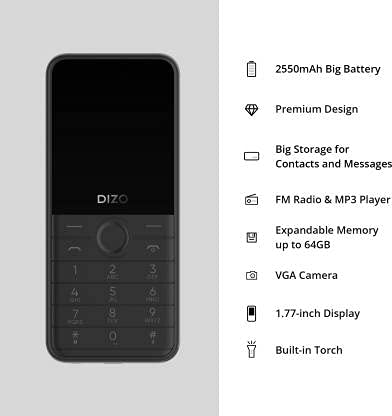
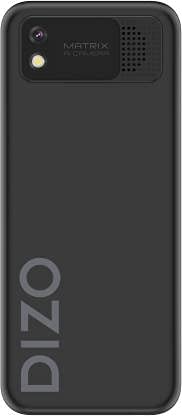

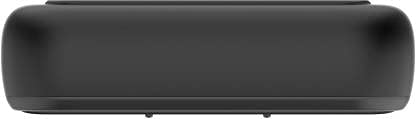
Product Videos:
DIZO Star 300 Overview
This video provides a general overview of the DIZO Star 300 phone, highlighting its design and key features such as the 1.8-inch display, 2550 mAh battery, 32 MB RAM, and multimedia capabilities.
DIZO Star 300 User Interaction
This video demonstrates basic user interaction with the DIZO Star 300, including navigating menus and using the keypad.
3. Setup
3.1 Installing the SIM Card and Memory Card
- Carefully remove the back cover of the phone.
- If the battery is installed, remove it by gently lifting it from the designated slot.
- Insert your SIM card(s) into the SIM card slot(s) with the gold contacts facing down. Ensure they are securely seated.
- If using an external memory card (up to 64GB), insert it into the microSD card slot.
- Insert the battery, aligning the contacts correctly.
- Replace the back cover until it clicks into place.
3.2 Charging the Battery
- Connect the charger to the charging port on your phone.
- Plug the charger into a power outlet.
- The battery indicator on the screen will show the charging status.
- Once fully charged, disconnect the charger from the phone and the power outlet.
3.3 Powering On/Off
- To power on: Press and hold the Power/End Call button until the screen lights up.
- To power off: Press and hold the Power/End Call button until the power-off options appear, then select 'Power off'.
4. Operating Instructions
4.1 Basic Navigation
- Use the navigation keys (up, down, left, right) to move through menus.
- Press the center key (OK/Select) to confirm a selection.
- Press the 'Back' or 'Clear' key to return to the previous screen or delete characters.
4.2 Making and Receiving Calls
- To make a call: Enter the phone number using the keypad and press the Call button (green receiver icon).
- To answer a call: Press the Call button when the phone rings.
- To end a call: Press the End Call button (red receiver icon).
4.3 Messaging
- Navigate to the 'Messaging' menu.
- Select 'Write message' to compose a new SMS.
- Enter the recipient's number or select from contacts.
- Type your message using the keypad.
- Press 'Send' to transmit the message.
4.4 FM Radio and MP3 Player
- To use FM Radio: Connect earphones (acting as an antenna) and navigate to the 'FM Radio' application.
- To use MP3 Player: Ensure you have MP3 files stored on your memory card. Navigate to the 'MP3 Player' application to browse and play your music.
4.5 Using the Camera
- Navigate to the 'Camera' application.
- Frame your shot using the display.
- Press the center key to capture a photo.
4.6 Built-in Torch
- The torch function can typically be activated or deactivated through the phone's menu or by a long press on a specific key (refer to on-screen prompts).
5. Maintenance
- Cleaning: Use a soft, dry cloth to clean the phone's surface. Avoid using liquid cleaners or abrasive materials.
- Battery Care: Do not expose the battery to extreme temperatures. Avoid overcharging or completely draining the battery frequently to prolong its life.
- Storage: Store the phone in a cool, dry place away from direct sunlight and moisture when not in use for extended periods.
- Software Updates: Periodically check for any available software updates to ensure optimal performance and security.
6. Troubleshooting
If you encounter issues with your DIZO Star 300, refer to the following common solutions:
- Phone not turning on: Ensure the battery is charged and correctly inserted. Try connecting the charger to see if it powers on.
- No network signal: Check if the SIM card is properly inserted. Ensure you are in an area with network coverage.
- Battery not charging: Verify the charger is working and properly connected to both the phone and the power outlet. Check for any damage to the charging cable or port.
- Keypad unresponsive: Restart the phone. If the issue persists, contact customer support.
- Sound issues: Check volume settings. Ensure the speaker is not obstructed.
For issues not covered here, please contact DIZO customer support.
7. Specifications
| Feature | Detail |
|---|---|
| Model Name | Star 300 |
| Brand | realme |
| Manufacturer | DIZO |
| Color | Black |
| Screen Size | 1.8 Inches |
| Battery Capacity | 2550 mAh |
| RAM | 32 MB |
| Expandable Memory | Up to 64 GB |
| Human Interface Input | Keypad |
| Camera | VGA Rear Camera |
| Features | FM Radio, MP3 Player, Built-in Torch |
| Item Weight | 220 g |
| ASIN | B099MXZ3MM |
| Date First Available | 16 July 2021 |
8. Warranty and Support
The realme DIZO Star 300 is manufactured by DIZO. For warranty information, service, or technical support, please refer to the warranty card included with your product or visit the official DIZO or realme support website. Keep your purchase receipt as proof of purchase for warranty claims.


