
1. Introduction
The XPCLEOYZ 60W Moving Head Light is a professional stage lighting fixture designed for various events such as weddings, DJ parties, and stage performances. It features 8 gobos, 8 colors, and 11 DMX channels, along with sound-activated modes, providing dynamic and vibrant lighting effects.
2. Safety Information
Please observe the following safety precautions to prevent electric shock, fire, or injury:
- Ensure the power supply voltage matches the product's requirements (100-240V AC, 50/60Hz).
- Always disconnect power before cleaning, servicing, or moving the fixture.
- Do not operate the fixture if the power cord is damaged.
- Keep the fixture away from rain, moisture, and extreme temperatures.
- Ensure proper ventilation around the unit to prevent overheating.
- Avoid direct eye exposure to the light source.
- Installation should be performed by qualified personnel.
3. Package Contents
Upon unpacking, please verify that all items listed below are included and in good condition:
- XPCLEOYZ 60W Moving Head Light (2 units)
- Power Cable
- User Manual
- Mounting Bracket (if included)

Image: Two XPCLEOYZ 60W Moving Head Lights, showing their compact design and display panel.
4. Product Features
- 60W LED Light Source: Provides high brightness for impactful lighting effects.
- 8 Gobos & 8 Colors: Offers a variety of patterns and vibrant color options.
- 11 DMX Channels: Allows for precise control via DMX 512 protocol.
- Sound Activated Mode: Lights react to music for dynamic shows.
- Compact Design: Easy to transport and set up.
- Multiple Mounting Options: Can be wall-mounted or floor-mounted.
5. Setup
5.1 Mounting
The fixture can be mounted on a truss, wall, or placed on a flat surface. Ensure the mounting surface or structure can support the weight of the fixture. Use appropriate clamps and safety cables for overhead installations.
- Wall Mount: Securely attach the mounting bracket to a sturdy wall using appropriate hardware.
- Floor Mount: Place the fixture on a stable, level surface, ensuring it will not be easily knocked over.
5.2 Connections
Connect the power cable to a suitable power outlet. For DMX control, connect a DMX cable from your DMX controller to the DMX IN port of the first fixture. For multiple fixtures, daisy-chain them by connecting the DMX OUT of the first fixture to the DMX IN of the next, and so on.

Image: Various angles of the moving head light, highlighting the DMX IN/OUT ports and power input on the rear panel.
6. Operating Instructions
6.1 Control Panel
The fixture features a digital display and control buttons (MENU, UP, DOWN, ENTER) for navigating settings and modes. A built-in microphone (MIC) is used for sound-activated modes.
- MENU: Press to cycle through main menu options.
- UP/DOWN: Use to navigate within menus or adjust values.
- ENTER: Confirm selection or save changes.
6.2 DMX Control
Set the DMX address for each fixture using the control panel. Refer to the DMX channel chart (usually provided in a separate DMX manual or appendix) for specific functions controlled by each channel (e.g., Pan, Tilt, Dimmer, Strobe, Gobo, Color).
6.3 Operating Modes
- DMX Mode: For professional control using a DMX controller.
- Sound Active Mode: The fixture reacts to ambient sound via its built-in microphone.
- Auto Mode: Pre-programmed light shows run automatically.
- Master/Slave Mode: Link multiple fixtures to synchronize their operation. Set one as "Master" and others as "Slave".
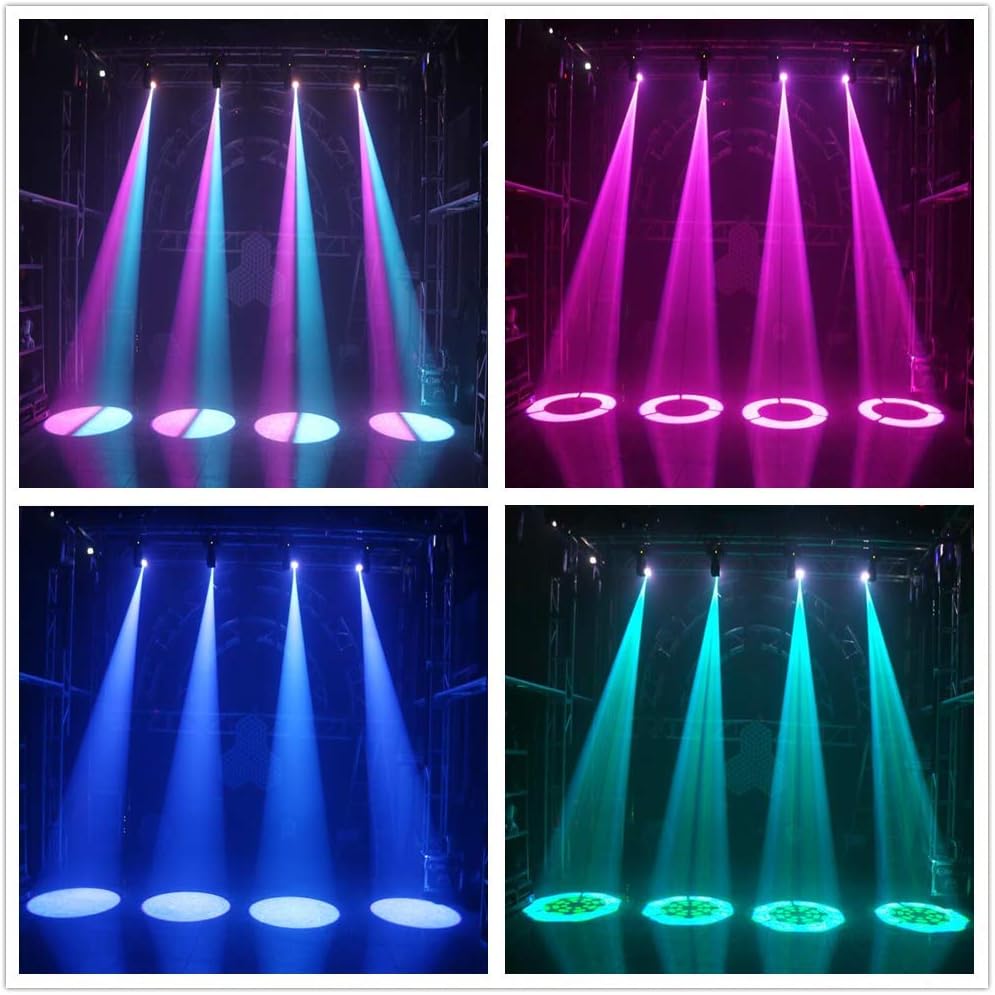
Image: Example of the moving head lights projecting vibrant blue and pink light patterns on a stage, demonstrating color and gobo capabilities.

Image: Another example showing the lights projecting white and blue patterns, highlighting the clarity and intensity of the beams.

Image: A grid of four images showing the lights projecting red, green, blue, and orange patterns, showcasing the full color spectrum available.
7. Maintenance
Regular maintenance ensures optimal performance and extends the lifespan of your fixture.
- Cleaning: Periodically clean the lens and exterior with a soft, lint-free cloth. Do not use abrasive cleaners.
- Ventilation: Ensure ventilation openings are clear of dust and debris.
- Inspection: Regularly check power cables, DMX cables, and mounting hardware for any signs of damage or wear.
- Storage: When not in use, store the fixture in a dry, dust-free environment.
8. Troubleshooting
| Problem | Possible Cause | Solution |
|---|---|---|
| Fixture does not power on. | No power supply; damaged power cable. | Check power connection; replace power cable. |
| No DMX control. | Incorrect DMX address; faulty DMX cable; DMX controller issue. | Verify DMX address; check/replace DMX cables; test DMX controller. |
| Light output is dim or inconsistent. | Overheating; dirty lens; LED issue. | Ensure proper ventilation; clean lens; contact support if LED issue persists. |
| Moving head not responding. | Motor issue; DMX signal problem. | Check DMX connection; power cycle the unit. |
9. Specifications
| Feature | Detail |
|---|---|
| Brand | XPC |
| Model Number | 60W+LED-02A |
| Light Source Type | LED |
| Wattage | 60 Watts |
| Color | Black |
| Material | Plastic, Metal |
| Product Dimensions (Approx.) | 15.5 cm (W) x 14.5 cm (D) x 27.5 cm (H) / 6.1" x 5.7" x 10.8" (Note: Larger dimensions like 25"x20"x55" found in some listings may refer to packaging.) |
| Item Weight | 6.61 Pounds |
| DMX Channels | 11 Channels |
| Gobos | 8 Gobos |
| Colors | 8 Colors |
| Mounting Type | Wall Mount, Floor Mount |
| UPC | 765546094578 |

Image: Dimensional diagram of the moving head light, indicating approximate measurements of 15.5cm (width), 14.5cm (depth), and 27.5cm (height). Note: The 25x20x55 inches from product dimensions seems to be package size, not unit size, based on this image.
10. Warranty and Support
XPCLEOYZ products are designed for reliability and performance. For warranty information, technical support, or service inquiries, please refer to the contact details provided with your purchase or visit the official XPCLEOYZ website. Please retain your proof of purchase for warranty claims.