1. Setup and Assembly
The GYMAX Foldable Treadmill features an integrated design that simplifies the assembly process. While some minor assembly is required, the overall setup is straightforward.
Unpacking and Placement
- Carefully remove all components from the packaging. Ensure all parts listed in the included user manual are present.
- Place the treadmill on a flat, stable surface. Ensure there is adequate clear space around the treadmill for safe operation, at least 2 meters behind and 0.6 meters on each side.
- Verify that the power outlet is easily accessible and meets the electrical requirements for the treadmill.
Unfolding the Treadmill
The treadmill is designed for easy folding and unfolding. To unfold, gently lower the running deck until it locks into place. The soft drop system assists in this process.

This image illustrates the treadmill's space-saving design when folded vertically and its flexible wheels for convenient relocation. The top panel shows the treadmill folded against a wall, while the bottom panel shows a user easily moving the unfolded treadmill using its built-in wheels.
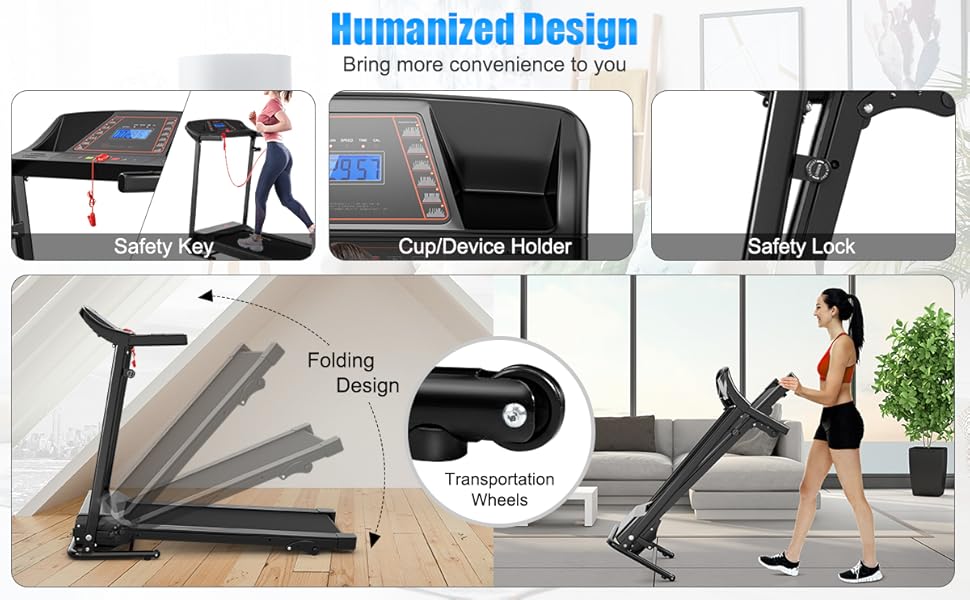
This image highlights key design elements for user convenience and safety. It shows the safety key mechanism, a built-in cup/device holder, the safety lock for secure folding, the overall folding mechanism, and the transportation wheels that facilitate easy movement of the treadmill.
2. Operating Instructions
The GYMAX Foldable Treadmill offers various features to customize your workout experience. Familiarize yourself with the control panel and safety features before beginning any exercise.
Control Panel and Display
The LCD monitor provides real-time feedback on your workout. It displays metrics such as time, speed, and calories burned. The control panel includes buttons for starting/stopping, adjusting speed, and selecting preset programs.

This image provides a detailed view of the treadmill's console, featuring the LCD screen that shows workout data like distance, speed, time, and calories. Below the screen are control buttons for speed adjustment, mode selection, start/stop, and program selection, centered around a prominent red safety key slot.
This image focuses on the treadmill's user interface, displaying the LCD screen with digital readouts for workout metrics. Surrounding the screen are clearly labeled buttons for controlling speed, selecting workout modes, initiating and stopping the treadmill, and choosing from preset programs.
Speed Adjustment
The treadmill offers speed levels ranging from 0.5 to 6.5 MPH. Use the speed adjustment buttons on the control panel to increase or decrease your pace according to your workout needs.
Manual Incline Levels
The incline degree of this treadmill can be manually adjusted in 3 levels. Adjusting the incline can help increase calorie burn and improve workout efficiency. To change the incline, stop the treadmill and manually adjust the incline pin located near the base of the running deck.

This image demonstrates the treadmill's manual incline adjustment feature, showing three distinct incline settings (1.41°, 2.59°, and 3.89°) that allow users to vary the intensity of their workouts. A close-up of the adjustment mechanism is also provided.

This image visually explains the three manual incline levels available on the treadmill, encouraging users to challenge themselves. It shows how adjusting a pin allows for different intensities, categorized as 'Keep Fit', 'Burn Calories', and 'Challenge Yourself', with corresponding visuals of people exercising at varying efforts.
Preset Programs
The treadmill includes 12 preset programs (P1-P12) designed to help you achieve specific workout goals. Select a program from the control panel to automatically adjust speed and intensity throughout your exercise session.
Heart Rate Monitoring
The pulse sensors on the handrails allow you to track your heart rate simply by gripping them. This feature helps you monitor your cardiovascular performance during your workout.

This image depicts a user gripping the treadmill's handrails, illustrating how the built-in sensors monitor and display real-time heart rate on the console. Red pulsating circles indicate the active heart rate detection areas on the handles.

This close-up image highlights the heart rate sensor integrated into the treadmill's handle. Blue wave icons emanate from the sensor, visually representing its function in detecting and transmitting the user's pulse.
Safety Features
- Safety Lock: The treadmill is equipped with a safety lock (safety key) that must be in place for the treadmill to operate. In case of an emergency, pulling the safety key will immediately stop the treadmill.
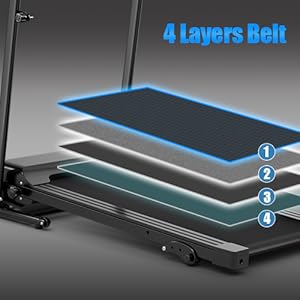
- Running Belt: The wide and anti-slip running belt provides a stable and secure surface for your workout.
- Cushioning Design: The cushioning on both sides of the treadmill reduces noise and vibration, protecting your floor and providing a more comfortable experience.

This image shows a woman actively running on the GYMAX Foldable Treadmill, illustrating the product in its intended use. The safety key is visibly attached to her clothing, emphasizing the importance of this safety feature during operation.
3. Maintenance
Regular maintenance ensures the longevity and optimal performance of your GYMAX Foldable Treadmill.
Cleaning
- General Cleaning: Wipe down the treadmill frame, console, and running belt with a damp cloth after each use to remove sweat and dust. Avoid using abrasive cleaners or solvents.
- Under the Belt: Periodically vacuum or wipe under the running belt to remove any accumulated dust or debris.
Lubrication
Refer to the specific user manual included with your treadmill for detailed instructions on running belt lubrication. Proper lubrication is crucial for smooth operation and to prevent premature wear of the belt and motor.
Inspection
- Regularly check all bolts and nuts to ensure they are securely tightened.
- Inspect the power cord for any damage or fraying. If damage is found, discontinue use and contact customer support.
- Ensure the running belt is centered and properly tensioned. Adjust if necessary according to the included manual.
4. Troubleshooting
This section addresses common issues you might encounter with your GYMAX Foldable Treadmill. For problems not listed here, or if solutions do not resolve the issue, please contact customer support.
Common Issues and Solutions
| Problem | Possible Cause | Solution |
|---|---|---|
| Treadmill does not start. | Power cord not plugged in; Safety key not in place; Power switch off. | Ensure power cord is securely plugged into a working outlet. Insert the safety key fully into its slot. Turn the power switch to the 'ON' position. |
| Running belt slips or hesitates. | Belt tension too loose; Belt needs lubrication. | Adjust belt tension according to the user manual. Apply silicone lubricant to the running deck as per instructions. |
| Unusual noise during operation. | Loose components; Motor issue; Belt friction. | Check and tighten all visible bolts and screws. Ensure the treadmill is on a level surface. If noise persists, contact customer support. |
| Display not working correctly. | Loose cable connection; Console malfunction. | Check all cable connections to the console. If the issue persists, contact customer support. |
5. Specifications
Detailed technical specifications for the GYMAX Foldable Treadmill.

This image provides a visual representation of the treadmill's dimensions when fully assembled (52"L x 25"W x 44"H) and when folded for storage (23"L x 25"W x 48"H), including the running deck dimensions (40"L x 15"W).
| Feature | Specification |
|---|---|
| Brand | GYMAX |
| Model Name | Foldable Treadmill |
| Product Dimensions (Unfolded) | 52"D x 25"W x 44"H |
| Folded Size | 23"L x 25"W x 48"H |
| Item Weight | 61 Pounds |
| Material | Metal |
| Maximum Speed | 6.5 Miles per Hour |
| Minimum Speed | 0.5 Miles per Hour |
| Maximum Incline Percentage | 3 (Manual Levels) |
| Maximum Horsepower | 2.25 Horsepower |
| Maximum Weight Recommendation | 220 Pounds |
| Deck Length | 41 Inches |
| Deck Width | 15 Inches |
| Number of Programs | 12 Preset Programs |
| Display Type | LCD |
| Power Source | Electric (Power cord) |
| Input Power | 220 Watts |
| Included Components | Treadmill, User Manual |
| Metrics Measured | Speed, Calories Burned, Heart Rate, Time |
6. Warranty and Support
Warranty Information
The GYMAX Foldable Treadmill comes with a 3-month warranty. Please retain your proof of purchase for any warranty claims.
Customer Support
For technical assistance, parts replacement, or any questions regarding your treadmill, please contact GYMAX customer support. Refer to the contact information provided in your product packaging or on the official GYMAX website.