1. Introduction
Thank you for choosing the RAVPower RP-PB165 Portable Power Bank. This ultra-slim 10000mAh external battery pack is designed to provide reliable and quick charging for your mobile devices, including iPhones, Samsung Galaxy phones, and more. Its lightweight and compact design makes it an ideal companion for travel and daily use. This manual will guide you through the setup, operation, and maintenance of your new power bank.
- Portable Charger: Compact and easy to carry.
- Unique and fashionable design: Sleek black finish.
- Made of high quality material: Durable construction.
- Suitable weight: Only 232g for easy portability.
- Compatible with multiple devices: Charges a wide range of smartphones and tablets.
2. Safety Information
Please read all safety instructions carefully before using this product. Failure to follow these instructions may result in fire, electric shock, or damage to the product or property.
- Do not expose the power bank to extreme temperatures (hot or cold), direct sunlight, or humid environments.
- Do not disassemble, open, or attempt to repair the power bank yourself.
- Keep the power bank away from water and other liquids.
- Do not drop, puncture, or apply strong impact to the power bank.
- Use only original or certified cables for charging the power bank and your devices.
- Keep out of reach of children.
- Dispose of the power bank according to local regulations. Do not dispose of it with household waste.
3. Package Contents
Please check the package contents upon opening:
- 1 x RAVPower RP-PB165 Portable Power Bank
- 1 x Micro-USB Charging Cable
- 1 x User Manual
4. Product Overview

Figure 4.1: RAVPower Power Bank RP-PB165, showing its sleek black design and LED indicators.

Figure 4.2: Image showing the slim profile of the RAVPower power bank, easily fitting into a pocket, emphasizing its portability.
The RP-PB165 features a minimalist design with essential ports and indicators for ease of use.
- Power Button: Press once to check battery level or initiate charging.
- LED Indicators: Four blue LED lights indicate the remaining battery capacity (each light represents approximately 25% charge).
- USB-A Output Ports: Two standard USB ports for charging your devices.
- Micro-USB Input Port: For recharging the power bank itself.

Figure 4.3: Diagram illustrating the TUV Certified iSmart Charging Technology with overcharge, overcurrent, and overvoltage protection, ensuring safe charging.
5. Setup: Charging the Power Bank
Before first use, fully charge your RAVPower power bank. It is recommended to fully charge and discharge the power bank at least once every three months to maintain battery health.
- Connect the Micro-USB end of the provided charging cable to the Micro-USB input port on the power bank.
- Connect the USB-A end of the cable to a USB wall charger (not included) or a computer's USB port.
- The LED indicators will light up and blink, indicating that the power bank is charging. All four LEDs will remain solid when fully charged.

Figure 5.1: The RAVPower power bank connected to a wall adapter for recharging, highlighting its 2.1A input for faster charging, typically taking 5-6 hours for a full charge.
6. Operating Instructions: Charging Your Devices
The RAVPower RP-PB165 can charge two devices simultaneously.
- Connect your device's charging cable to one of the USB-A output ports on the power bank.
- Connect the other end of the cable to your device.
- The power bank will automatically begin charging your device. The LED indicators will show the remaining battery level.
- To stop charging, simply disconnect your device.
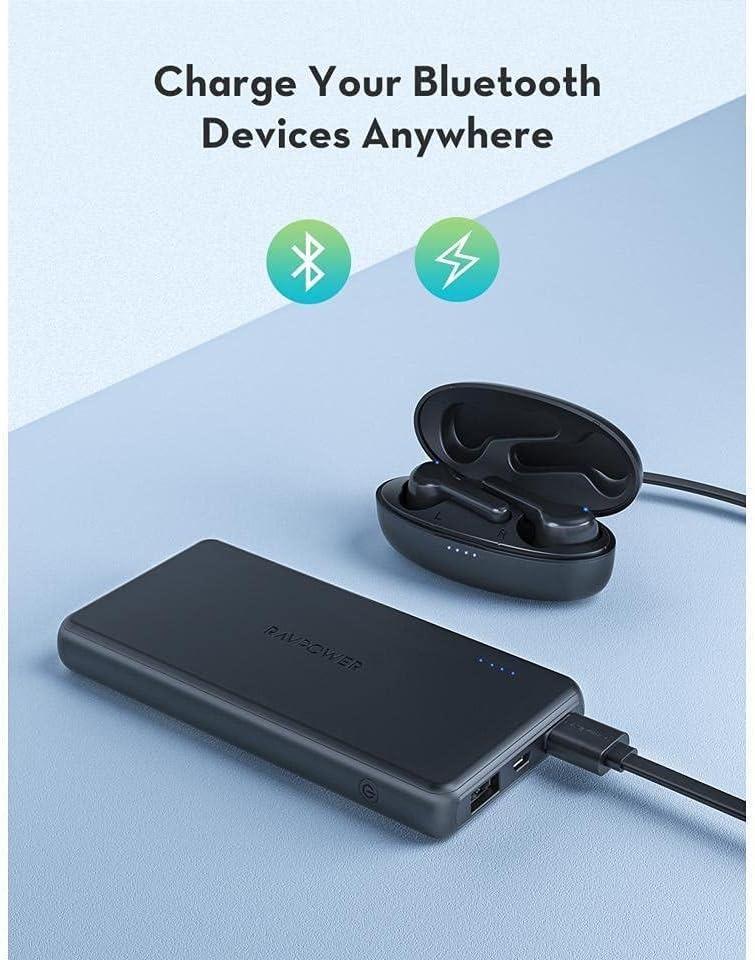
Figure 6.1: The power bank charging a pair of wireless earbuds, demonstrating its capability to charge various Bluetooth devices and other small electronics.
7. Maintenance
Proper maintenance ensures the longevity of your power bank:
- Cleaning: Use a dry, soft cloth to clean the surface of the power bank. Do not use harsh chemicals or abrasive materials.
- Storage: Store the power bank in a cool, dry place away from direct sunlight and extreme temperatures.
- Battery Health: For optimal battery life, avoid completely draining the power bank frequently. Recharge it when the battery level is low.
8. Troubleshooting
If you encounter issues with your RAVPower power bank, refer to the following common solutions:
| Problem | Possible Cause | Solution |
|---|---|---|
| Power bank not charging | Loose cable connection, faulty cable/adapter, power bank fully charged. | Ensure cables are securely connected. Try a different cable or wall adapter. Check LED indicators; if all are solid, it's fully charged. |
| Device not charging from power bank | Power bank battery empty, loose cable connection, incompatible device, faulty device cable. | Recharge the power bank. Ensure cable is securely connected to both power bank and device. Try a different device or cable. |
| Slow charging | Using a low-power adapter/cable, device's charging input limit. | Use a 5V/2.1A wall adapter for faster power bank charging. Ensure your device's cable is not damaged. |
| LED indicators not working | Power bank is off, internal issue. | Press the power button to activate the indicators. If still unresponsive, contact customer support. |
9. Specifications
| Feature | Detail |
|---|---|
| Model Number | RP-PB165 |
| Battery Capacity | 10000mAh / 37Wh |
| Battery Cell Composition | Lithium Ion |
| Input | 5V / 2.1A (Micro-USB) |
| Output | 5V / 2.1A (Total Max) |
| Dimensions | Approximately 13.89 cm x 6.91 cm x 1.5 cm (5.47 in x 2.72 in x 0.59 in) |
| Weight | 232g (0.51 lbs) |
| Color | Black |
| Special Features | Slim, Fast Charging (for power bank recharge) |
10. Warranty and Customer Support
RAVPower products come with a standard warranty. For detailed warranty information, please refer to the warranty card included in your package or visit the official RAVPower website. If you have any questions, concerns, or require technical assistance, please contact RAVPower customer support through the contact information provided on our official website or your purchase platform.
Please have your model number (RP-PB165) and proof of purchase ready when contacting support.


