
DUFA DF-9021-0F
DUFA Elements Series DF-9021-0F Watch
Instruction Manual
1. Introduction
Thank you for purchasing the DUFA Elements Series DF-9021-0F wristwatch. This manual provides detailed instructions for the proper setup, operation, and maintenance of your new timepiece. Please read this manual thoroughly to ensure optimal performance and longevity of your watch.
The DUFA brand, originating from German clockmaking in the 1920s, is renowned for its functional beauty and minimalist design, reflecting a rich history and modern aesthetic. Your DF-9021-0F model embodies this heritage, offering precision and timeless style.
2. Product Overview and Components
Familiarize yourself with the various parts of your DUFA DF-9021-0F watch.
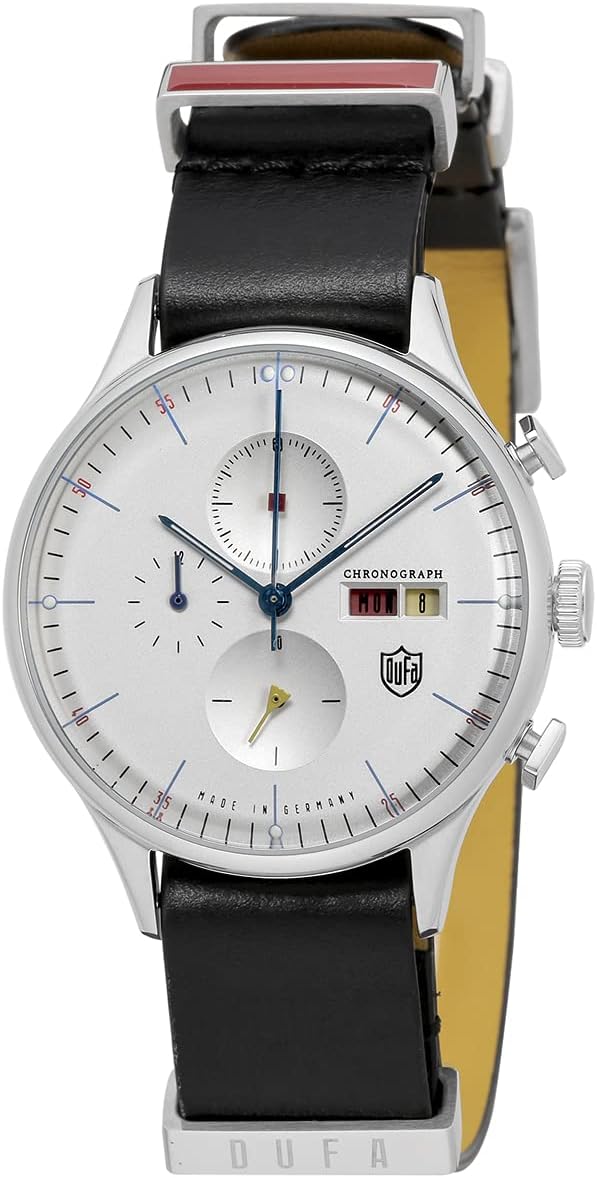
Figure 2.1: Front view of the watch, showcasing the white dial, chronograph sub-dials, and black leather strap.

Figure 2.2: Angled view of the watch face, showing the intricate details of the dial and hands.

Figure 2.3: Side view of the watch, illustrating the crown and the two chronograph pushers.

Figure 2.4: Back view of the watch case, featuring engravings such as "BAUHAUS", "MADE IN GERMANY", and "3 ATM".

Figure 2.5: Detail of the watch strap and buckle, with the DUFA logo prominently displayed on the buckle.

Figure 2.6: An additional black NATO style strap, offering an alternative wearing option.

Figure 2.7: The watch presented in its elegant white packaging box, alongside the additional strap.

Figure 2.8: The watch displayed with the black NATO strap, showcasing its versatile style.

Figure 2.9: The watch as it appears when worn on a wrist, demonstrating its size and fit.
3. Setup
3.1 Setting the Time and Date
- Pull out the crown: Gently pull the crown (located on the right side of the watch case, see Figure 2.3) to position 2 (first click) for date adjustment, or position 3 (second click) for time adjustment.
- Set the Date: If setting the date, turn the crown clockwise or counter-clockwise until the correct date appears in the date window. Avoid setting the date between 9 PM and 3 AM, as this can damage the movement.
- Set the Time: If setting the time, turn the crown to move the hour and minute hands. Ensure you set the correct AM/PM by observing the date change (the date will change at midnight).
- Push in the crown: Once the time and date are set, push the crown back into position 1 (normal position) to start the watch.
3.2 Adjusting the Strap
The watch comes with a leather strap and an additional NATO strap. To adjust the leather strap, simply use the buckle to find a comfortable fit. For the NATO strap, thread it through the spring bars and adjust for a snug fit on your wrist.
4. Operating the Chronograph
Your DUFA DF-9021-0F features a chronograph function for measuring elapsed time.
- Start: Press the upper pusher (button above the crown, see Figure 2.3) to start the chronograph. The central second hand will begin to move.
- Stop: Press the upper pusher again to stop the chronograph. The central second hand will stop, indicating the elapsed time.
- Reset: Press the lower pusher (button below the crown, see Figure 2.3) to reset the chronograph. The central second hand and sub-dials will return to their zero positions.
Note: The sub-dials typically measure minutes and hours for the chronograph function. Refer to the dial markings for specific measurements.
5. Maintenance
5.1 Water Resistance
This watch is designed for "Daily life waterproof" (3 ATM / 30 meters). This means it is resistant to splashes, rain, and brief immersion in water, but it is not suitable for swimming, showering, or diving. Avoid operating the crown or pushers when the watch is wet.
5.2 Cleaning
To maintain the appearance of your watch, wipe the case and crystal with a soft, dry cloth. For the leather strap, avoid prolonged exposure to water and direct sunlight. For the NATO strap, it can be gently hand-washed with mild soap and water, then air-dried.
5.3 Battery Replacement
The watch is powered by a quartz movement and requires a battery. When the second hand begins to skip or the watch stops, it indicates a low battery. Battery replacement should be performed by a qualified watchmaker to ensure proper sealing and function.
5.4 Storage
When not wearing your watch for extended periods, store it in a cool, dry place away from direct sunlight, extreme temperatures, and strong magnetic fields. The original watch box (Figure 2.7) is ideal for storage.
6. Troubleshooting
- Watch not running:
- Check if the crown is fully pushed in (position 1).
- The battery may be depleted. Refer to Section 5.3 for battery replacement.
- Time is inaccurate:
- Reset the time as described in Section 3.1.
- Exposure to strong magnetic fields can affect accuracy. If suspected, consult a watchmaker for demagnetization.
- Chronograph hands do not reset to zero:
- This may require a chronograph hand alignment procedure, which varies by movement. It is recommended to consult a professional watchmaker for this adjustment.
7. Specifications
| Feature | Detail |
|---|---|
| Model Number | DF-9021-0F |
| Case Size (Length x Width) | Approx. 38mm x 38mm |
| Wrist Size | Approx. 12cm x 22cm |
| Water Resistance | Daily life waterproof (3 ATM / 30 meters) |
| Item Shape | Round |
| Package Dimensions | 29 x 13 x 4.6 cm; 61 g |
| Manufacturer | DUFA |
| ASIN | B099KMSMVN |
| Department | Men's |
| Release Date | September 15, 2021 |
8. Warranty and Support
Your DUFA watch is covered by a manufacturer's warranty against defects in materials and workmanship. Please refer to the warranty card included with your purchase for specific terms and conditions, including the warranty period.
For technical support, service, or warranty claims, please contact DUFA customer service or an authorized service center. Contact information can typically be found on the warranty card or the official DUFA website.
Please retain your proof of purchase for warranty purposes.
Related documentsDF-9021-0F


Ask a question about this manual
Ask about setup, troubleshooting, compatibility, parts, safety, or missing instructions. Manuals+ will review the question and use this page’s manual context to help answer it.