
Moukey MTs8-2
Moukey MTs8-2 Portable PA System User Manual
Model: MTs8-2 | Brand: Moukey
1. Introduction
Thank you for choosing the Moukey MTs8-2 Portable PA System. This manual provides essential information for the safe and efficient operation of your device. Please read it thoroughly before use and retain it for future reference. The MTs8-2 is a versatile portable speaker system designed for various applications, including parties, karaoke, lectures, and outdoor events, featuring an 8-inch subwoofer, 1-inch tweeter, wireless microphone, and multiple connectivity options.
2. Important Safety Information
- Power Source: Use only the specified power adapter. Ensure the voltage is compatible before connecting.
- Water and Moisture: Do not expose the unit to rain or moisture. Keep liquids away from the device.
- Ventilation: Do not block ventilation openings. Ensure adequate airflow around the unit.
- Heat: Keep the unit away from heat sources such as radiators, heat registers, stoves, or other apparatus that produce heat.
- Cleaning: Disconnect from power before cleaning. Use a dry, soft cloth. Do not use liquid cleaners or aerosols.
- Servicing: Do not attempt to service this product yourself. Refer all servicing to qualified service personnel.
- Placement: Place the unit on a stable, flat surface to prevent it from falling.
- Children: Keep out of reach of children. Small parts may pose a choking hazard.
3. Package Contents
Please check that all items listed below are included in your package:
- Moukey MTs8-2 Portable PA System
- Wireless Microphone
- Remote Control
- Power Adapter
- User Manual (this document)

Image: Moukey MTs8-2 speaker, wireless microphone, and remote control.
4. Product Overview
4.1 Main Features
- 80-watt 8-inch subwoofer and 1-inch tweeter for omni-directional stereo sound.
- Built-in Bluetooth 5.0 for wireless audio streaming.
- TWS (True Wireless Stereo) function for connecting two MTs8-2 units.
- Supports USB, TF-card, AUX input, and FM radio.
- Integrated recording function.
- Portable design with pull rod and wheels for easy transport.
- Rechargeable battery for extended use.
- Includes wireless microphone and remote control.
4.2 Control Panel and Connections
Familiarize yourself with the control panel for optimal operation.

Image: Detailed diagram of the MTs8-2 control panel, highlighting various inputs and controls.
- MIC IN: 6.35mm input for wired microphone.
- ECHO: Rotary knob to adjust microphone echo effect.
- M.VOL: Rotary knob to adjust microphone volume.
- LINE IN: 3.5mm auxiliary input for external audio devices.
- TF: Slot for Micro TF-card playback.
- USB: Port for USB flash drive playback.
- POWER/Volume: Rotary knob to turn the unit ON/OFF and adjust master volume.
- DC 9V IN: Power input for charging and operating the unit.
- LED Display: Shows current mode, track information, and battery status.
- Mode Button: Switches between Bluetooth, FM, AUX, USB, and TF modes.
- Play/Pause/TWS Button: Controls playback; long press for TWS pairing.
- Previous/Next Track Buttons: Navigates tracks in media playback modes.
- REC Button: Initiates recording function.
5. Setup
5.1 Charging the Speaker
- Connect the provided power adapter to the "DC 9V IN" port on the speaker.
- Plug the adapter into a standard wall outlet.
- The LED display will indicate charging status. Allow several hours for a full charge before first use.
5.2 Wireless Microphone Setup
The included wireless microphone is pre-paired with the speaker. Simply insert batteries (not included) into the microphone and power it on. It should automatically connect to the speaker.
5.3 Initial Power On
Rotate the "POWER/Volume" knob clockwise to turn on the speaker. The LED display will light up, indicating the current mode.
6. Operating Instructions
6.1 Power On/Off and Volume Control
- To power on, rotate the "POWER/Volume" knob clockwise.
- To power off, rotate the "POWER/Volume" knob counter-clockwise until it clicks.
- Adjust the master volume by rotating the "POWER/Volume" knob.
6.2 Mode Selection
Press the "Mode" button on the control panel or remote control to cycle through available modes: Bluetooth, FM Radio, AUX, USB, and TF Card.
6.3 Bluetooth Pairing
- Turn on the speaker and switch to Bluetooth mode (the LED display will show "BLUE").
- Enable Bluetooth on your device (smartphone, tablet, etc.) and search for "MTs8-2".
- Select "MTs8-2" from the list of available devices to pair. A confirmation sound will indicate successful pairing.
- You can now stream audio wirelessly from your device to the speaker.

Image: Visual representation of a successful Bluetooth connection between a smartphone and the MTs8-2 speaker.
6.4 TWS (True Wireless Stereo) Function
The TWS function allows you to connect two MTs8-2 speakers wirelessly for a stereo sound experience.
- Ensure both MTs8-2 speakers are powered on and in Bluetooth mode, without being connected to any other device.
- On one of the speakers, long-press the "Play/Pause/TWS" button. You will hear a prompt indicating TWS pairing mode.
- The two speakers will automatically search and connect to each other. A confirmation sound will indicate successful TWS pairing.
- Once paired, connect your Bluetooth device to one of the MTs8-2 speakers as described in Section 6.3. Audio will now play through both speakers in stereo.
6.5 USB/TF Card Playback
- Insert a USB flash drive or TF card (up to 32GB) containing MP3 audio files into the respective port/slot.
- The speaker will automatically switch to USB or TF mode and begin playback. If not, press the "Mode" button to select the correct mode.
- Use the "Play/Pause", "Previous", and "Next" buttons to control playback.
6.6 AUX Input
- Connect an external audio device (e.g., MP3 player, laptop) to the "LINE IN" port using a 3.5mm audio cable (not included).
- Press the "Mode" button to select AUX mode.
- Control playback and volume from your connected device.
6.7 FM Radio
- Press the "Mode" button to select FM Radio mode.
- Long-press the "Play/Pause" button to automatically scan and save available FM stations.
- Use the "Previous" and "Next" buttons to navigate through saved stations.
6.8 Microphone Usage and Recording
- Wireless Microphone: Ensure the wireless microphone is powered on and connected. Adjust its volume using the "M.VOL" knob and echo effect using the "ECHO" knob.
- Wired Microphone: Connect a wired microphone (not included) to the "MIC IN" port. Adjust its volume and echo as above.
- Recording: Insert a USB flash drive or TF card. Press the "REC" button to start recording microphone input. Press "REC" again to stop recording. Recorded files will be saved to the USB drive/TF card.
7. Maintenance
- Cleaning: Disconnect the speaker from the power source before cleaning. Use a soft, dry cloth to wipe the exterior. Do not use abrasive cleaners, waxes, or solvents.
- Storage: When not in use for extended periods, store the speaker in a cool, dry place, away from direct sunlight and extreme temperatures.
- Battery Care: To prolong battery life, avoid fully discharging the battery frequently. Charge the unit regularly, even if not in use, to maintain battery health.
- Transportation: Utilize the integrated pull rod and wheels for easy transportation. Avoid dropping or subjecting the unit to strong impacts.

Image: The MTs8-2 speaker being transported using its built-in handle and wheels, demonstrating its portability.
8. Troubleshooting
| Problem | Possible Cause | Solution |
|---|---|---|
| No power | Battery is depleted; Power adapter not connected or faulty. | Charge the speaker using the provided power adapter. Ensure the adapter is securely connected to both the speaker and a working power outlet. |
| No sound | Volume too low; Incorrect mode selected; Device not paired (Bluetooth); Cable not connected (AUX). | Increase the master volume. Ensure the correct input mode is selected. Re-pair your Bluetooth device. Check AUX cable connection. |
| Bluetooth not connecting | Speaker not in Bluetooth mode; Device too far; Interference; Speaker already connected to another device. | Ensure speaker is in Bluetooth mode. Move device closer to speaker. Disconnect from other Bluetooth devices. Try restarting both speaker and device. |
| Microphone not working | Microphone not powered on; Batteries depleted (wireless mic); Mic volume too low; Incorrect input. | Ensure microphone is powered on and has fresh batteries. Increase "M.VOL" knob. Check if wired mic is securely plugged into "MIC IN". |
| TWS pairing failed | Speakers already connected to other devices; Not in Bluetooth mode. | Ensure both speakers are in Bluetooth mode and not connected to any other device. Try repeating the TWS pairing process. |
9. Specifications
| Feature | Detail |
|---|---|
| Model | MTs8-2 |
| Output Power | 80 Watts |
| Speaker Configuration | 8-inch Subwoofer, 1-inch Tweeter |
| Connectivity | Bluetooth 5.0, AUX (3.5mm), USB, TF Card, FM Radio |
| Microphone Input | 6.35mm (for wired mic), Wireless Microphone support |
| TWS Function | Yes |
| Recording Function | Yes |
| Power Source | Battery Powered (Rechargeable), DC 9V In |
| Material | Plastic |
| Dimensions (L x W x H) | 28.5 x 23.5 x 48 cm (11.2 x 9.25 x 18.9 inches) |
| Weight | 4.3 kg (9.5 lbs) |
| Color | Black |
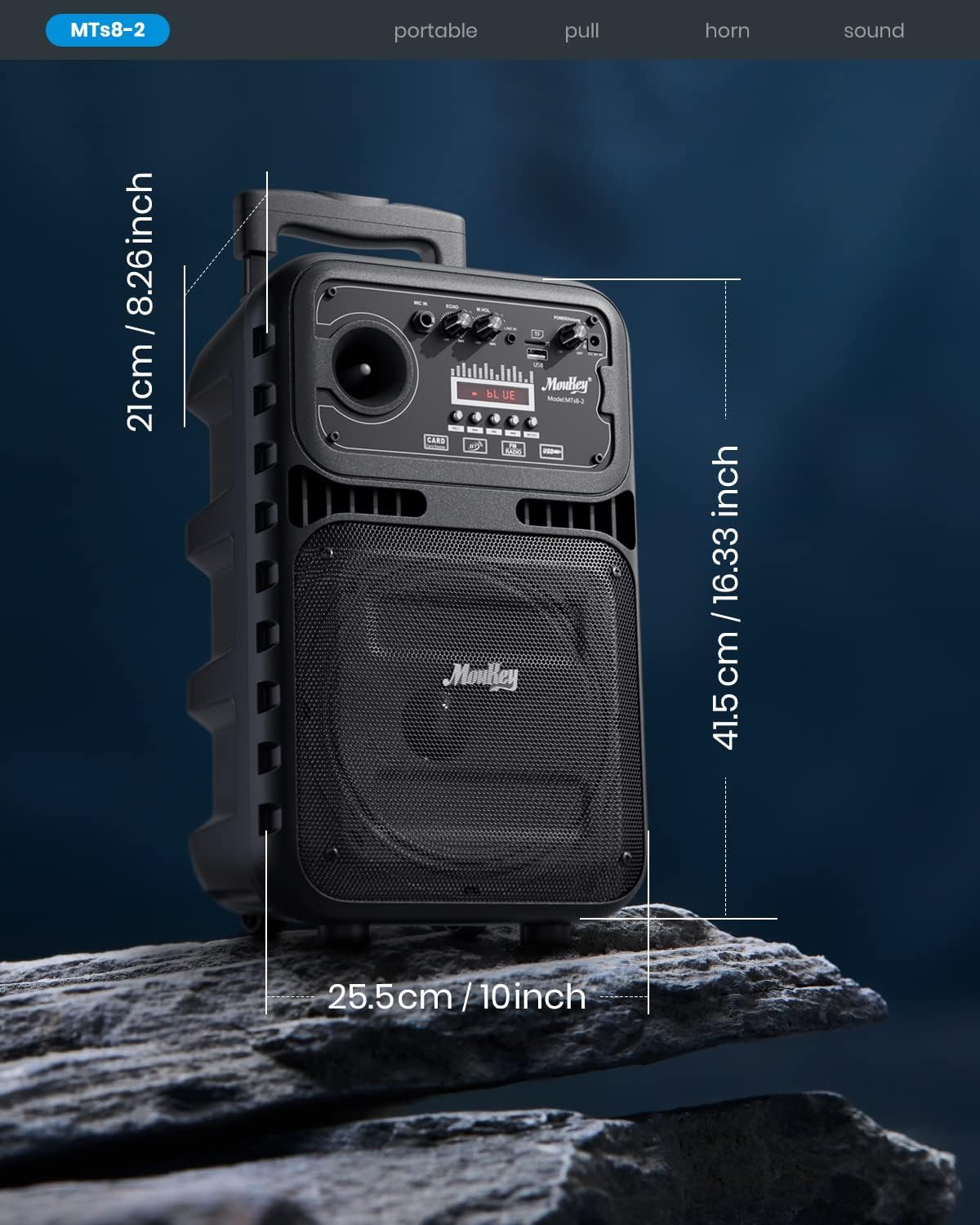
Image: Dimensions of the Moukey MTs8-2 Portable PA System.

Image: Internal components of the speaker, highlighting the 8-inch subwoofer and 1-inch tweeter.
10. Warranty and Support
Moukey products are designed and manufactured to the highest quality standards. For warranty information, technical support, or customer service inquiries, please refer to the warranty card included with your product or visit the official Moukey website. Please retain your proof of purchase for warranty claims.
Online Support: For additional resources and FAQs, please visit the Moukey Store on Amazon.
Related documentsMTs8-2


Ask a question about this manual
Ask about setup, troubleshooting, compatibility, parts, safety, or missing instructions. Manuals+ will review the question and use this page’s manual context to help answer it.