
1. Introduction
This manual provides instructions for the ZOHAN 033 Bluetooth 5.0 AM/FM Radio Headphones and the ZOHAN EM030 Kids Ear Protection Safety Ear Muffs. Please read this manual thoroughly before using the products to ensure proper operation and safety.

Figure 1.1: ZOHAN 033 Bluetooth AM/FM Radio Headphones (black) and ZOHAN EM030 Kids Ear Protection Muffs (galaxy pattern).
2. Safety Information
Hearing protection devices reduce noise exposure but do not eliminate all sound. Always ensure the product is worn correctly for optimal protection.
- ZOHAN 033 Headphones: Certified with NRR 25dB / SNR 30dB, meeting ANSI S3.19-1974 and CE EN 352-1 standards.
- ZOHAN EM030 Kids Muffs: NRR 22dB. These muffs reduce noise that might be harmful to children. For example, if the environmental noise level is 92dBA, the noise level entering the ear with these muffs is approximately 70dBA.
- Ensure a proper seal around the ears for effective noise reduction.
- Keep products away from water and extreme temperatures.
- The EM030 kids muffs are designed without metal parts to prevent potential injury to children.

Figure 2.1: Illustration of noise reduction effectiveness for various activities and the 25dB NRR rating for the ZOHAN 033 headphones.
3. ZOHAN 033 Bluetooth AM/FM Radio Headphones
3.1 Product Features
- Bluetooth 5.0 Technology: Provides stable and quick connection with smartphones, MP3 players, iPads, PCs, and laptops.
- AM/FM Radio: Integrated radio tuner for listening to broadcasts.
- NRR 25dB / SNR 30dB: Certified hearing protection.
- Built-in Microphone: Enables hands-free calls.
- HIFI Sound: Offers clear audio quality.
- Long Battery Life: Rechargeable 2000mAh lithium-ion battery provides up to 48 hours in Bluetooth mode and up to 40 hours in AM/FM/AUX mode.
- Comfort Design: Ultra-padded and adjustable headband, skin-friendly leather pads, soft-padded replaceable ear cushions.
- Durable Construction: Strengthened antenna and reinforced volume control.
- Digital LCD Display: Shows current station and allows quick saving of favorite stations.

Figure 3.1: Detailed view of ZOHAN 033 headphones highlighting features like built-in battery, antenna, headband, ear cups, LCD display, and volume control.

Figure 3.2: Illustration of ZOHAN 033 comfort features including skin-friendly leather pads, soft-padded replaceable cushions, and lightweight design (0.82lb).
3.2 Setup and Charging
- Initial Charge: Before first use, fully charge the headphones. A full charge takes approximately 4 hours.
- Power On/Off: Press and hold the power button to turn the headphones on or off.
- Adjust Fit: Extend or retract the headband to ensure a comfortable and secure fit over your ears. The ear cups should fully cover your ears to create an effective seal.
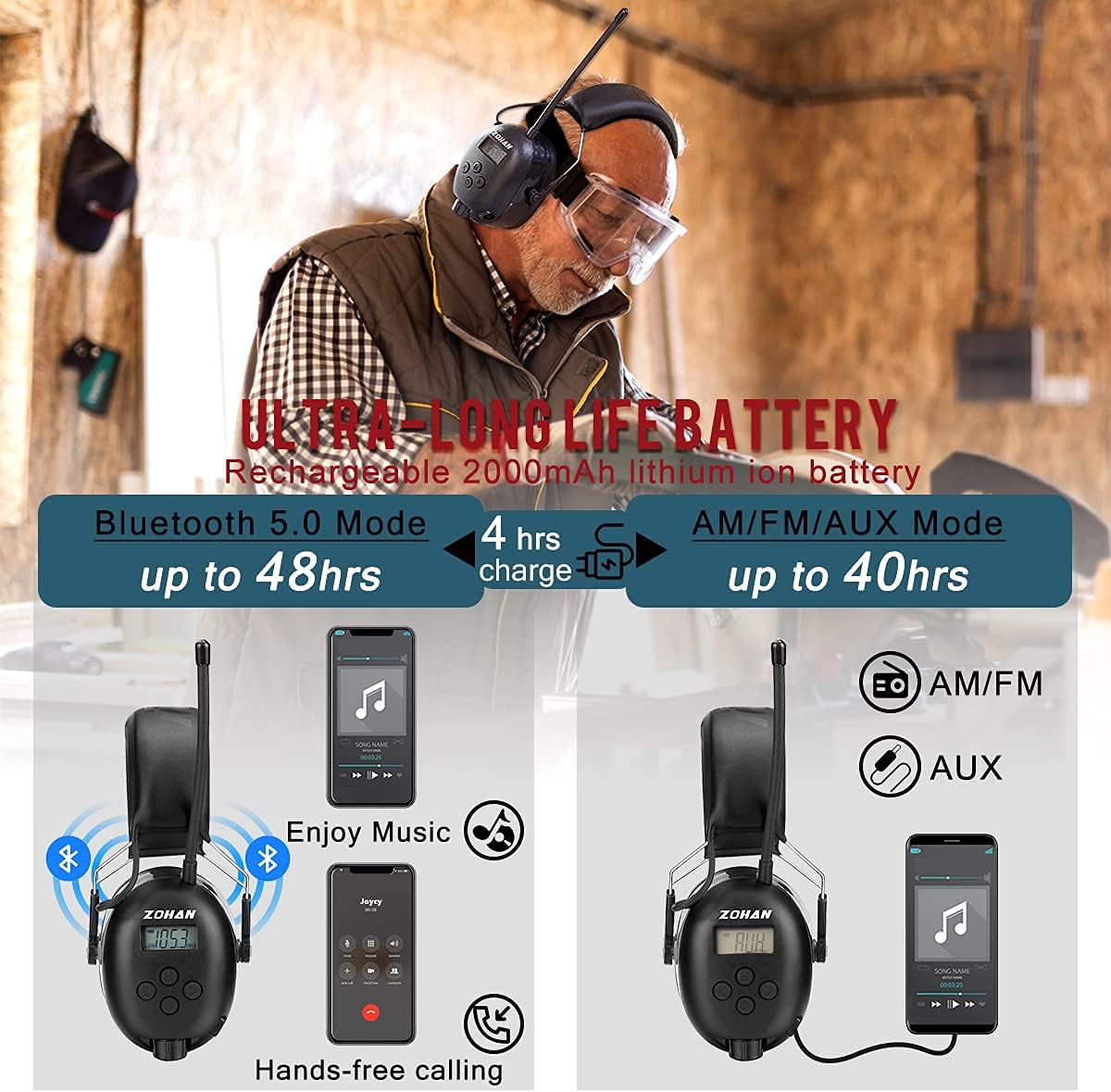
Figure 3.3: Battery life details for ZOHAN 033 headphones: up to 48 hours in Bluetooth mode, 40 hours in AM/FM/AUX mode, with a 4-hour charge time.
3.3 Operating Instructions
- Bluetooth Pairing:
- Turn on the ZOHAN 033 headphones.
- Activate Bluetooth on your device (smartphone, MP3 player, etc.).
- Search for "ZOHAN 033" in your device's Bluetooth settings and select it to pair.
- A confirmation sound will indicate successful pairing.
- AM/FM Radio:
- Press the 'M' (Mode) button to switch to AM or FM radio mode.
- Use the tuning buttons to scan for stations.
- The digital LCD display will show the current frequency.
- Press and hold tuning buttons to automatically scan and save stations.
- Volume Control: Use the dedicated volume buttons on the ear cup to adjust the listening volume.
- Hands-Free Calling: When connected via Bluetooth, use the multifunctional button to answer, end, or reject calls. The built-in microphone allows for clear communication.

Figure 3.4: A user wearing ZOHAN 033 headphones while mowing, demonstrating their use for music and communication in noisy environments.
4. ZOHAN EM030 Kids Ear Protection Muffs
4.1 Product Features
- NRR 22dB: Effective noise reduction for children.
- Child-Safe Design: No metal parts to prevent potential injury.
- Over-Ear Design: Provides comfort and a secure fit without swallow hazards.
- Adjustable Headband: Designed for children aged 6 months to young teens.

Figure 4.1: A child wearing ZOHAN EM030 ear muffs, illustrating their use for noise reduction with a 22dB NRR rating.
4.2 Adjustment and Fit
- Positioning: Place the ear muffs over the child's ears, ensuring the ear cups fully cover the ears.
- Headband Adjustment: To adjust the headband, gently hold the two parts of the headband (as shown in Figure 4.3) and slide them to fit the child's head size. Avoid pulling directly on the ear cups, as this may cause them to detach.
- Secure Fit: Ensure the headband is snug but comfortable, providing a good seal around the ears for optimal noise reduction.

Figure 4.2: Children of various ages wearing ZOHAN EM030 ear muffs, demonstrating the adjustable fit for ages 6 months to young teens.

Figure 4.3: Visual guide on how to properly adjust the ZOHAN EM030 ear muff headband by holding the headband parts, not the ear cups.
5. Maintenance
- Cleaning: Wipe the ear cups and headband with a soft, damp cloth. Do not use harsh chemicals or abrasive cleaners.
- Storage: Store the headphones and ear muffs in a clean, dry place away from direct sunlight and extreme temperatures.
- Ear Cushions: The ZOHAN 033 features snap-in replaceable foam ear cushions for easy maintenance. Replace them if they become worn or damaged to maintain optimal performance.
6. Troubleshooting
- No Power: Ensure the ZOHAN 033 headphones are fully charged. Connect to a power source and allow to charge for at least 30 minutes before attempting to power on.
- Bluetooth Not Connecting:
- Ensure the headphones are in Bluetooth pairing mode.
- Turn off and on your device's Bluetooth.
- Move the headphones closer to your device.
- Forget the device in your Bluetooth settings and attempt to re-pair.
- Poor Radio Reception:
- Extend the antenna fully.
- Move to an open area away from obstructions or interference.
- Rescan for stations.
- Ineffective Noise Reduction:
- Ensure the ear cups fully cover the ears and create a tight seal.
- Adjust the headband for a snug fit.
- Check if ear cushions are worn or damaged and replace if necessary (ZOHAN 033).
7. Specifications
| Feature | ZOHAN 033 Headphones | ZOHAN EM030 Kids Muffs |
|---|---|---|
| Noise Reduction Rating (NRR) | 25dB | 22dB |
| Signal-to-Noise Ratio (SNR) | 30dB | N/A |
| Bluetooth Version | 5.0 | N/A |
| Battery Capacity | 2000mAh Lithium-ion | N/A |
| Battery Life (Bluetooth) | Up to 48 hours | N/A |
| Battery Life (AM/FM/AUX) | Up to 40 hours | N/A |
| Charging Time | Approx. 4 hours | N/A |
| Certifications | ANSI S3.19-1974, CE EN 352-1 | CE EN 352-1, ANSI S3.19-1974 |
| Weight | Approx. 0.82 lb | N/A |
| Suitable Age Range | Adults | 6 months to young teens |
8. Warranty and Support
ZOHAN products are backed by a 1-YEAR-WARRANTY. Additionally, ZOHAN provides LIFE-TIME TECHNICAL SUPPORT for its products. If you have any questions, suggestions, or encounter any issues, please contact ZOHAN customer service for assistance.
9. Official Product Videos
No relevant official product videos from the seller were found for embedding in this manual.