
Retevis FA9144AX4
Retevis RT15 Walkie Talkie Instruction Manual
Model: FA9144AX4
1. Introduction
The Retevis RT15 is a compact and durable two-way radio designed for clear and reliable communication. Ideal for various applications such as camping, skiing, neighborhood communication, and community use, these mini walkie-talkies offer long-range capabilities and convenient USB charging. They are built to withstand daily use and are compatible with all 16-channel FRS walkie-talkies from Retevis, including the RT22 model.
2. Package Contents
Upon opening your Retevis RT15 package, you should find the following items:
- 4 x Retevis RT15 Walkie Talkies
- 4 x 1000 mAh Lithium-Ion Batteries
- 4 x USB Charging Cables
- 4 x Belt Clips
- 1 x User Manual

Figure 2.1: Package contents of the Retevis RT15 walkie talkie set.
3. Product Overview
Familiarize yourself with the components and controls of your Retevis RT15 walkie talkie:

Figure 3.1: Retevis RT15 Walkie Talkie Components.
- Indicator Light: Shows status (e.g., charging, transmitting, receiving).
- Power Button: Turns the device on/off.
- CH+ / CH- Buttons: Adjusts the communication channel.
- PTT (Push-to-Talk) Button: Press and hold to transmit your voice.
- Volume + / Volume - Buttons: Adjusts the speaker volume.
- Mini USB Interface: For charging the device.
4. Setup
4.1 Battery Installation
The Retevis RT15 walkie talkie comes with a 1000 mAh rechargeable Lithium-Ion battery. To install the battery:
- Ensure the walkie talkie is powered off.
- Remove the battery cover on the back of the unit.
- Insert the battery into the compartment, ensuring the contacts align correctly.
- Replace the battery cover until it clicks securely into place.
4.2 Charging the Battery
The RT15 features a convenient mini USB interface for charging. A full charge provides approximately 10-12 hours of continuous use.
- Connect the mini USB charging cable to the walkie talkie's USB port.
- Connect the other end of the cable to a compatible USB power adapter or computer USB port.
- The indicator light will show charging status (refer to manual for specific light indications).
- When the battery is low, the device will voice prompt "Please charge the battery".
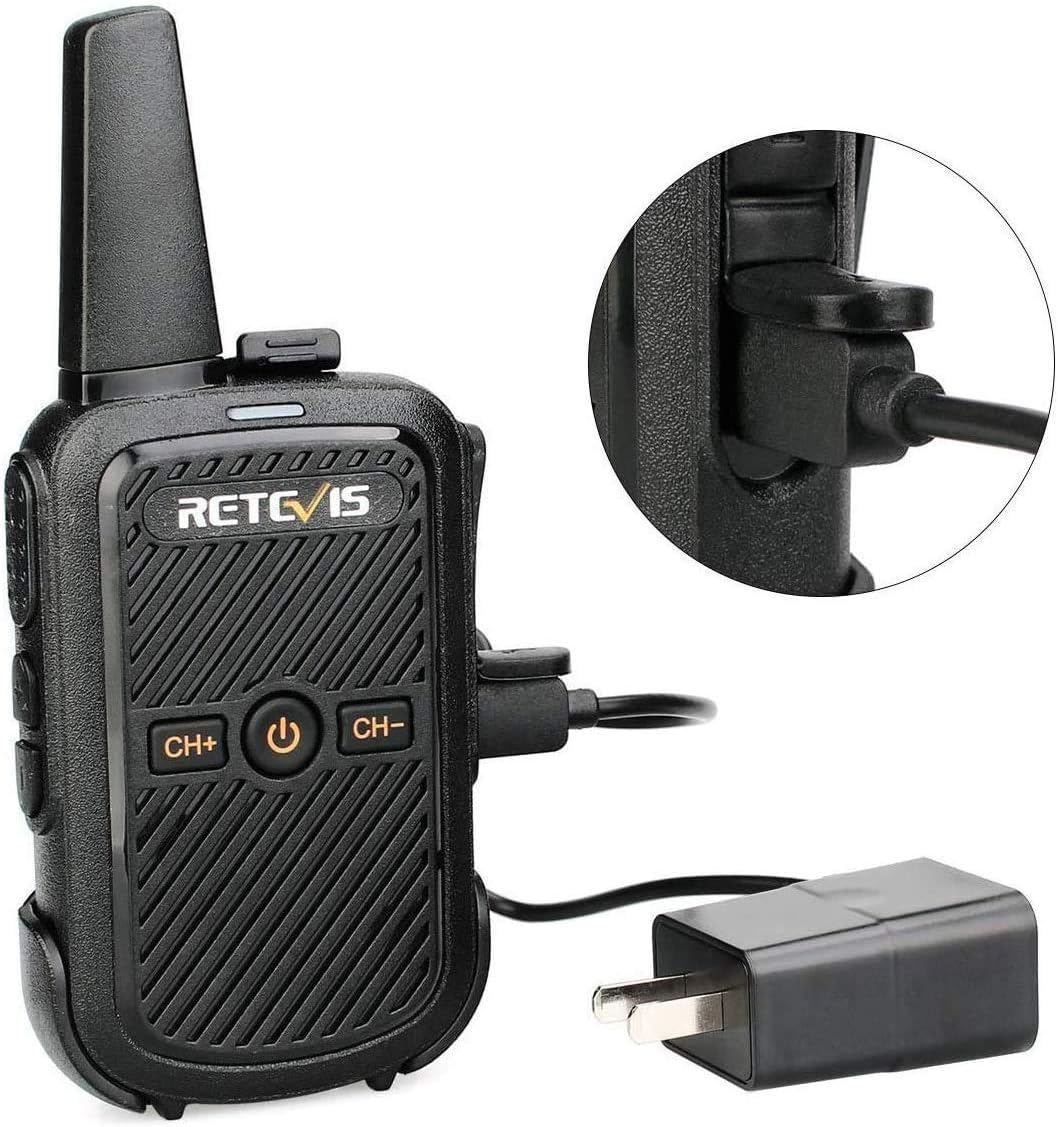
Figure 4.1: USB Charging of Retevis RT15.
5. Operating Instructions
5.1 Power On/Off
Press and hold the Power button (center button) until the device powers on or off.
5.2 Channel Selection
Use the CH+ and CH- buttons to select one of the 16 available FRS channels. Ensure all radios you wish to communicate with are on the same channel.
5.3 Keypad Lock/Unlock
To prevent accidental changes to settings, you can lock the keypad:
Video 5.1: Demonstrates how to lock and unlock the keypad on the Retevis RT15 walkie talkie by pressing and holding the CH+ and CH- buttons simultaneously.
In any channel, press and hold the CH+ and CH- buttons at the same time to lock the buttons. Repeat the same step to turn off the key lock.
5.4 Changing Language
The language of the walkie talkie's voice prompts can be changed:
Video 5.2: Instructions on how to switch the language of the Retevis RT15 walkie talkie. This involves turning to channel 16, turning off the device, then pressing the CH+ and power buttons simultaneously to turn it back on.
To change the language: First, turn the channel knob to channel 16. Then, turn the walkie talkie off. While holding down the CH+ button, press the Power button to turn the walkie talkie back on. This will cycle through available languages.
5.5 VOX Function (Hands-Free Operation)
The VOX (Voice Operated Exchange) function allows for hands-free transmission. When activated, the radio will transmit automatically when it detects your voice, without needing to press the PTT button.
Video 5.3: Guide on how to use the VOX function for hands-free operation on the Retevis RT15. Note that VOX activation requires computer settings, but once activated, it can be toggled on/off via a hotkey.
Please note: VOX function activation requires computer settings. After activation, it can be directly turned on or off by a hotkey combination (refer to the video for demonstration).
5.6 Adjusting Volume
The updated RT15 walkie talkie allows you to adjust both the key volume (button press sounds) and call volume simultaneously.
Video 5.4: An introduction to the updated RT15 walkie talkie, demonstrating how to adjust key volume and call volume simultaneously.
Use the Volume + and Volume - buttons on the side of the radio to increase or decrease the volume. The device features squelch technology to reduce ambient noise, ensuring clear reception and transmission.
6. Radio Range Information
The effective range of a two-way radio is influenced by several factors, including radio power (watts), radio signal type, horizon distance, atmospheric conditions, antenna quality, and terrain/obstacles.
Video 6.1: Explains the truth about two-way radio range and factors affecting it, such as terrain, obstacles, and radio horizon.
6.1 Factors Affecting Range
- Terrain and Obstacles: Mountains, buildings, and dense foliage can block radio signals, significantly reducing range.
- Radio Horizon: Radio waves travel in a line of sight. The curvature of the Earth creates a "radio horizon" beyond which signals cannot travel directly.
- Power Output: Higher wattage generally means greater range.
- Antenna: A high-gain antenna can improve signal reception and transmission.
- Atmospheric Conditions: Weather can sometimes affect radio wave propagation.
6.2 Typical Range for FRS Radios (RT15)
The Retevis RT15 operates on the FRS (Family Radio Service) band, which is license-free and typically has a maximum power of 2W. Expected ranges are:
- Urban Area: 1-2 miles (due to buildings and interference).
- Suburbs Area: 1-2 miles.
- Flat Open Terrain: 1-2 miles.
- Indoor Coverage: Up to 25 floors or 300,000 sq.ft.
Note: Actual distance may vary significantly based on environmental conditions.
6.3 How to Extend Further Distance
- Increase Transmission Power: In theory, if the transmission power is doubled, the communication distance can be expanded to approximately 1.4 times the original distance.
- Improve Receiving Sensitivity: Adjust the squelch threshold of the walkie-talkie and use a high-gain antenna to correspondingly improve the receiving sensitivity of the walkie-talkie.
- Higher Location: Keep launching from a higher location (e.g., hilltop, upper floor of a building).
- Keep Battery Charged: Ensure your battery is fully charged for optimal performance.
7. Maintenance
- Keep the walkie talkie clean by wiping it with a soft, damp cloth. Avoid harsh chemicals.
- Do not expose the device to extreme temperatures, direct sunlight, or excessive moisture. The RT15 is not water resistant.
- Store the walkie talkie in a cool, dry place when not in use.
- Charge the battery regularly, even if not in frequent use, to maintain battery health.
8. Troubleshooting
| Problem | Possible Cause | Solution |
|---|---|---|
| No power | Battery low or not installed correctly. | Charge battery or re-install battery. |
| Cannot communicate with other radios | Different channels or privacy codes. Out of range. | Ensure all radios are on the same channel. Move closer to other radios. |
| Poor audio quality / Static | Weak signal. Interference. | Move to a higher location or closer to the other radio. Check for sources of interference. |
| Battery drains quickly | Old battery. Frequent transmission. | Replace battery if old. Reduce transmission time. |
9. Specifications
| Feature | Detail |
|---|---|
| Brand | Retevis |
| Model Number | FA9144AX4 |
| Item Weight | 3.84 ounces |
| Product Dimensions | 5.3 x 2.3 x 0.8 inches |
| Batteries | 4 Lithium Ion batteries required (included) |
| Color | Black |
| Number of Channels | 16 |
| Frequency Range | FRS |
| Voltage | 3.7 Volts |
| Water Resistance Level | Not Water Resistant |
| Country of Origin | China |
10. Warranty and Support
Retevis provides a 2-year warranty for the radio body and a 1-year warranty for accessories. Additionally, there is a 30-day no-reason return policy.
Beyond the warranty period, maintenance services are still offered, though buyers are required to cover associated costs. For any inquiries or support, please contact Retevis through Amazon, and they aim to reply within 12 hours.
FCC ID: 2ASNSRT15. Our walkie talkies meet FCC rule part 95.
Related documentsFA9144AX4


Ask a question about this manual
Ask about setup, troubleshooting, compatibility, parts, safety, or missing instructions. Manuals+ will review the question and use this page’s manual context to help answer it.