
1. Introduction
The ELITUN KJ130 Home Air Purifier is designed to provide cleaner, healthier air in your living spaces. Featuring advanced filtration technology, it effectively removes airborne particles, odors, and pollutants, creating a more comfortable environment. This manual provides detailed instructions for setup, operation, maintenance, and troubleshooting to ensure optimal performance of your air purifier.

Figure 1: ELITUN KJ130 Home Air Purifier
The ELITUN KJ130 air purifier is equipped with a multi-layer filtration system, including an H13 True HEPA filter and a Cold Catalyst filter, to capture a wide range of airborne contaminants. Its quiet operation and smart features make it ideal for various rooms, from bedrooms to offices.
2. Safety Information
Please read all safety instructions carefully before using the appliance. Failure to comply may result in electric shock, fire, or serious injury.
- Always place the air purifier on a firm, level surface.
- Do not block air inlets or outlets. Maintain at least 15 cm (6 inches) clearance from walls and other objects.
- Do not immerse the appliance in water or other liquids.
- Unplug the air purifier before cleaning or performing any maintenance.
- Keep out of reach of children and pets.
- This product is CARB Certified, FCC certified, and ETL listed, ensuring compliance with stringent safety and quality standards.
3. Product Overview
The ELITUN KJ130 air purifier incorporates advanced features for superior air quality:
- H13 True HEPA Filter: Captures up to 99.97% of airborne particles as small as 0.1 microns, including smoke, pet dander, pollen, and dust.
- Cold Catalyst Filter: Decomposes gaseous pollutants and odors, providing long-term effectiveness and environmental friendliness.
- Quiet Operation: Operates at a low noise level of 25dB in sleep mode, ensuring a peaceful environment.
- Air Quality Sensor: Provides real-time air quality feedback via a brightly colored LED display.
- Smart Panel: Features intuitive touch controls for various settings, including timer, fan speeds, auto mode, and child lock.
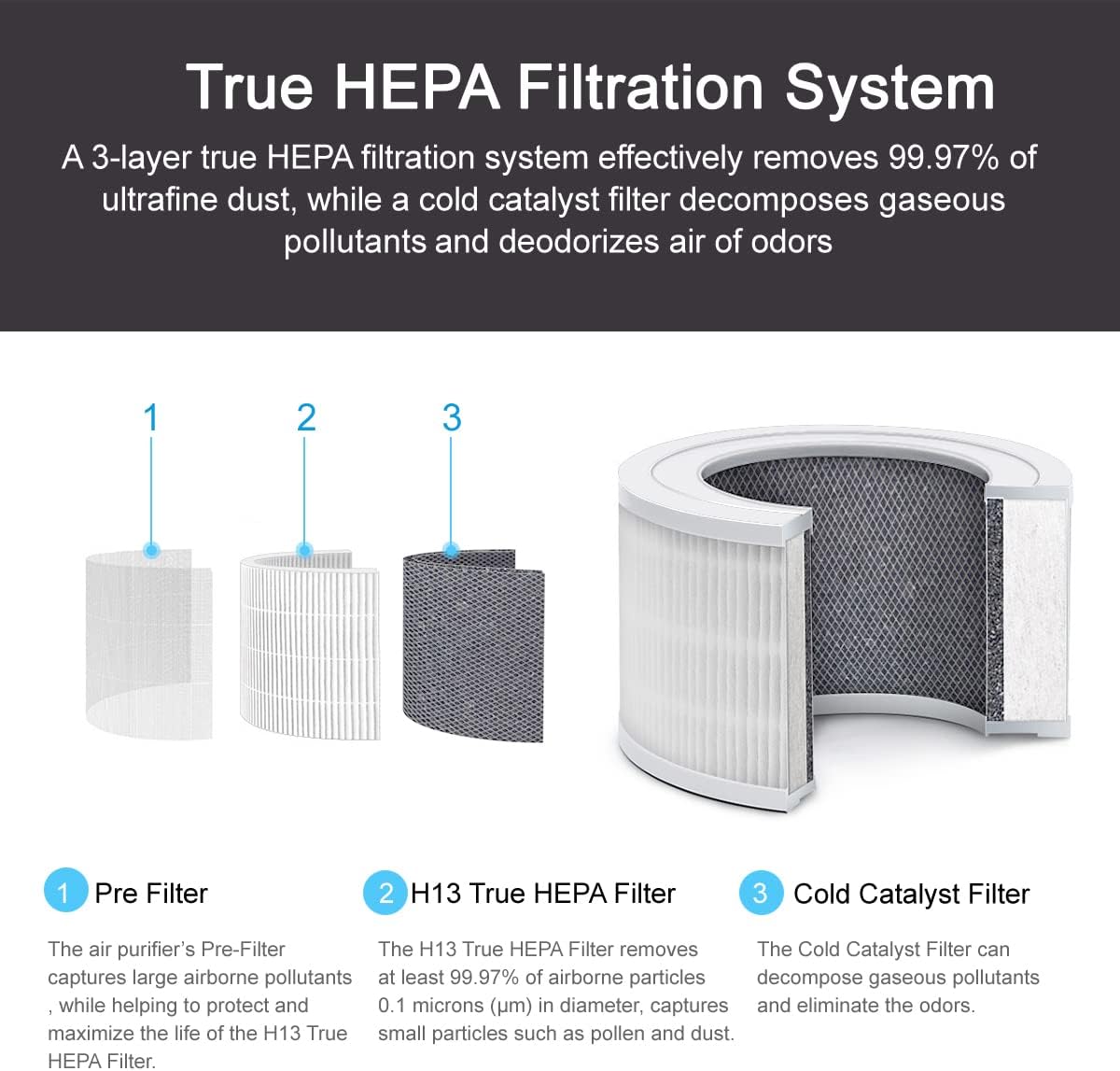
Figure 2: 3-Layer True HEPA Filtration System

Figure 3: Certified HEPA Filtration Effectiveness

Figure 4: Smart Control Panel Features

Figure 5: Air Quality Sensor Feedback

Figure 6: Quiet Operation in Sleep Mode (25dB)

Figure 7: Product Dimensions (7.87"D x 7.87"W x 12.2"H)
4. Setup
4.1 Unboxing
- Carefully open the product packaging.
- Remove the air purifier and all accessories from the box.
- Check for any damage during transit. If damaged, contact customer support.
4.2 Filter Installation
Before first use, the filter must be removed from its protective packaging and installed correctly.
- Turn the air purifier upside down.
- Twist the base cover counter-clockwise to unlock and remove it.
- Carefully remove the filter, which is typically sealed in plastic.
- Remove all plastic packaging from the filter.
- Insert the unwrapped filter back into the air purifier.
- Replace the base cover and twist clockwise to lock it securely.
- Place the air purifier upright on a stable surface.
Video 1: KJ130 Air Purifier Using Guide. This video demonstrates the unboxing process and how to properly install the filter before first use.
5. Operating Instructions
Familiarize yourself with the control panel on top of the air purifier to operate its various functions.
5.1 Power On/Off
- Plug the power adapter into the air purifier and then into a wall outlet.
- Press the Power button on the control panel to turn the unit on or off.
5.2 Sleep Mode
- Press the Sleep Mode button to activate sleep mode. In this mode, the fan speed will be set to the lowest setting, and all panel LED lights will turn off to ensure a quiet and dark environment for undisturbed sleep.
- Press any button to exit sleep mode.
5.3 Timer Function
- Press the Timer button to set the operating time. Each press cycles through 1 to 12 hours.
- The unit will automatically turn off once the set time has elapsed.
5.4 Fan Speed Adjustment
- Press the Fan Speed button to cycle through 5 different fan speeds.
- Higher fan speeds provide faster air purification.
5.5 Auto Mode
- Press the Auto Mode button to activate automatic operation.
- In Auto Mode, the air purifier uses its air quality sensor to detect the current air quality and automatically adjusts the fan speed accordingly.
5.6 Child Lock
- To activate the Child Lock, press and hold the Child Lock button for 3 seconds. This will disable all other buttons on the control panel.
- To deactivate the Child Lock, press and hold the Child Lock button again for 3 seconds.
6. Maintenance
Regular maintenance ensures the longevity and efficiency of your ELITUN air purifier.
6.1 Filter Replacement
The air purifier is equipped with a filter life time indicator that will alert you when it's time to replace the filter. Typically, filters should be replaced every 6-8 months, depending on usage and air quality.
- Unplug the air purifier from the power outlet.
- Turn the unit upside down and unlock the base cover by twisting it counter-clockwise.
- Remove the old filter.
- Dispose of the old filter properly.
- Unpack the new filter and insert it into the air purifier.
- Replace the base cover and twist clockwise to lock it securely.
- Plug the air purifier back in. The filter replacement indicator should reset automatically. If not, consult the troubleshooting section.
6.2 Cleaning the Exterior
- Wipe the exterior of the air purifier with a soft, dry cloth.
- Do not use abrasive cleaners or solvents.
7. Troubleshooting
If you encounter issues with your air purifier, refer to the following common problems and solutions:
| Problem | Possible Cause | Solution |
|---|---|---|
| Air purifier does not turn on. | Not plugged in; power outage; filter not installed correctly. | Check power connection; ensure filter is unwrapped and base cover is locked. |
| Reduced airflow or poor purification. | Clogged filter; blocked air inlets/outlets. | Replace filter; ensure no obstructions around the unit. |
| Unusual noise. | Filter not seated properly; foreign object inside. | Reinstall filter; check for and remove any foreign objects. |
| Air quality indicator always red/bad. | High pollution level; sensor dirty. | Increase fan speed; gently clean the air quality sensor area with a dry cotton swab. |
If the problem persists after trying these solutions, please contact ELITUN customer support.
8. Specifications
- Model Number: KJ130
- Product Dimensions: 7.87 x 7.87 x 12.2 inches (7.87"D x 7.87"W x 12.2"H)
- Weight: 4.62 Pounds
- Color: DarkGrey
- Floor Area Coverage: 430 Square Feet
- Filter Type: H13 True HEPA, Cold Catalyst
- Noise Level (Sleep Mode): 25dB
- Certifications: CARB Certified, ETL Certified, FCC Certified
- Manufacturer: ZHONGSHAN SCIEN TOP APPLIANCE CO.,LTD.
9. Warranty and Support
ELITUN products come with a standard manufacturer's warranty. For specific warranty details, registration, or technical support, please refer to the warranty card included in your product packaging or visit the official ELITUN website. You may also contact ELITUN customer service directly for assistance with product inquiries, troubleshooting, or replacement parts.