Introduction
This manual provides detailed instructions for the safe and efficient use of your iHome XT-45 True Wireless Earbuds. Please read this manual thoroughly before operating the device and retain it for future reference.
The iHome XT-45 True Wireless Earbuds offer a seamless audio experience with Bluetooth 5.0 connectivity, intuitive touch controls, and a portable charging case. Designed for comfort and convenience, these earbuds are suitable for various activities, including travel.

Figure 1: iHome XT-45 True Wireless Earbuds and Charging Case
The image displays the iHome XT-45 True Wireless Earbuds, black in color, resting within their open charging case. The case features a digital display indicating battery levels. The earbuds themselves are compact with a rounded tip design, ready for use.
What's in the Box
Ensure all items are present upon unboxing:
- XT-45 True Wireless Earbuds
- Charging Travel Case with Display
- 8 Ear Cushions in 3 Sizes (2 small, 2 large, 4 medium)
- USB Charging Cable (USB-C)
- Instruction Manual (this document)
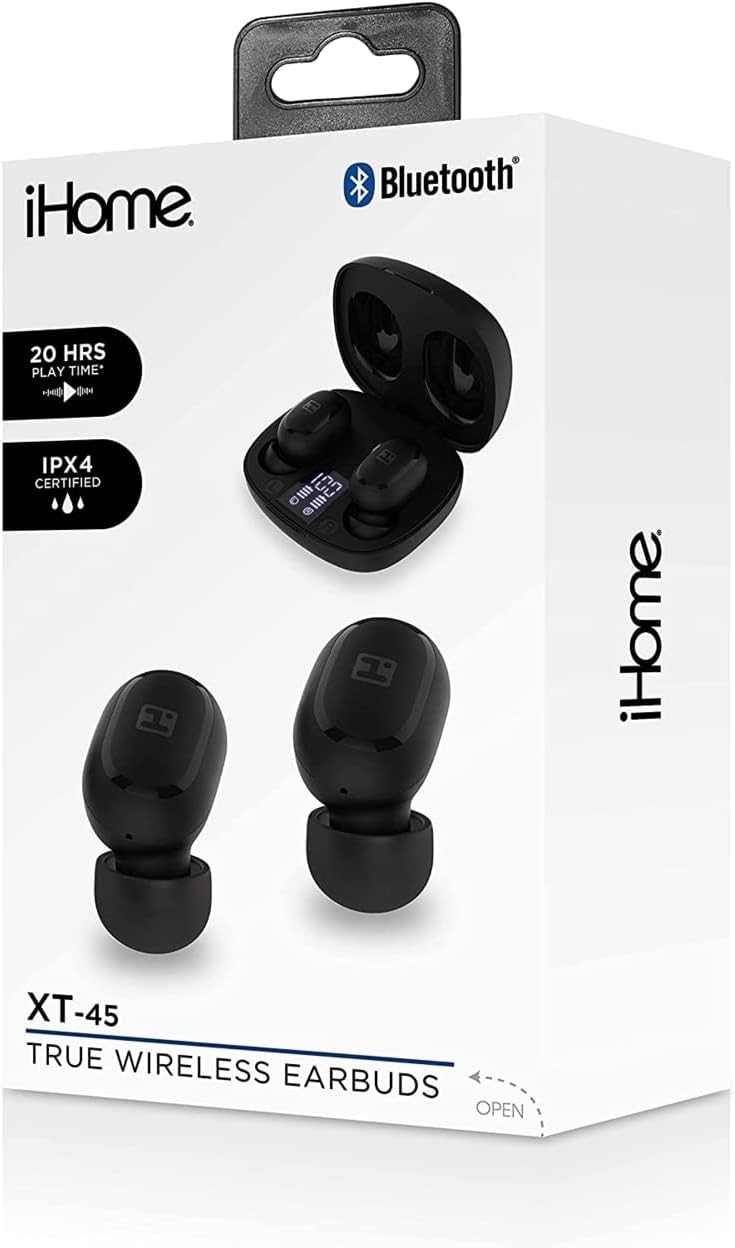
Figure 2: iHome XT-45 Product Packaging
This image shows the retail box for the iHome XT-45 True Wireless Earbuds. The box highlights features such as "20 HRS PLAY TIME" and "IPX4 CERTIFIED", along with a visual of the earbuds and charging case.
Setup
1. Charging the Earbuds and Case
Before first use, fully charge the earbuds and the charging case.
- Place the earbuds into the charging case. Ensure they are correctly seated; magnetic contacts will hold them in place.
- Connect the provided USB-C charging cable to the charging port on the case and plug the other end into a USB power source (e.g., computer, wall adapter).
- The case display will show the charging status. A full charge for both the case and earbuds takes approximately 1.5 hours.
- The case battery capacity is 300mAh, and each earbud has a 40mAh battery.
2. Pairing with a Bluetooth Device
The iHome XT-45 earbuds use Bluetooth 5.0 for stable connectivity up to 33 feet.
- Open the charging case. The earbuds will automatically enter pairing mode.
- On your device (smartphone, tablet, laptop), navigate to the Bluetooth settings.
- Search for available devices and select "iHome XT-45" from the list.
- Once connected, your device will indicate successful pairing.
- The earbuds will automatically reconnect to the last paired device when removed from the case, if Bluetooth is enabled on the device.
3. Fitting the Earbuds
Proper fit is crucial for sound quality and comfort. The package includes 8 ear cushions in 3 sizes (small, medium, large).
- Select the ear cushion size that provides a snug and comfortable seal in your ear canal.
- Gently insert each earbud into your ear, twisting slightly until it feels secure.
- Adjust as needed to ensure the best audio experience and to prevent them from falling out during movement.

Figure 3: Earbud Placement
This close-up image illustrates an iHome XT-45 earbud, black in color, properly seated within the ear canal. The earbud's design is shown to fit snugly, ensuring optimal sound delivery and comfort.
Operating Instructions
The iHome XT-45 earbuds feature intuitive touch controls for various functions.
Touch Controls
- Play/Pause: Single tap on either earbud.
- Next Track: Double tap on the right earbud.
- Previous Track: Double tap on the left earbud.
- Volume Up: Triple tap on the right earbud.
- Volume Down: Triple tap on the left earbud.
- Answer/End Call: Single tap on either earbud during an incoming call or active call.
- Reject Call: Press and hold either earbud for 2 seconds during an incoming call.
- Activate Voice Assistant: Press and hold either earbud for 3 seconds.
Power On/Off
- Power On: The earbuds automatically power on when removed from the charging case.
- Power Off: The earbuds automatically power off when placed back into the charging case and the lid is closed.

Figure 4: Key Features Overview
This graphic provides a summary of the iHome XT-45 True Wireless Earbuds' main features. It highlights "EXTENDED PLAY TIME" (20 hours), "DEEP RICH SOUND", "BLUETOOTH MIC+CONTROLS", a "RECHARGEABLE CASE" with LED display, and a "STREAMLINED DESIGN" for portability. Package contents and contact information are also listed.
Maintenance
To ensure the longevity and optimal performance of your iHome XT-45 earbuds, follow these maintenance guidelines:
- Cleaning: Regularly clean the earbuds and charging case with a soft, dry, lint-free cloth. Do not use abrasive cleaners, alcohol, or chemical solvents.
- Ear Cushions: Remove and clean the ear cushions periodically. They can be gently washed with mild soap and water, then thoroughly dried before reattaching.
- Charging Contacts: Ensure the charging contacts on both the earbuds and inside the case are clean and free of debris to maintain proper charging.
- Storage: When not in use, store the earbuds in their charging case to protect them from dust and damage. Store in a cool, dry place away from extreme temperatures.
- Water Resistance: The product is not water resistant. Avoid exposure to water or excessive moisture.
Troubleshooting
If you encounter issues with your iHome XT-45 earbuds, refer to the following common solutions:
- Earbuds not pairing:
- Ensure both earbuds are fully charged.
- Turn off Bluetooth on your device, then turn it back on.
- Forget "iHome XT-45" from your device's Bluetooth list and attempt to pair again.
- Place earbuds back in the case, close the lid, wait a few seconds, then open to re-initiate pairing mode.
- Only one earbud working:
- Ensure both earbuds are charged.
- Place both earbuds back in the charging case, close the lid, and then remove them simultaneously. This often re-syncs them.
- Try resetting the earbuds (refer to the full manual if a specific reset procedure is available, otherwise, the above steps usually suffice).
- Earbuds not charging:
- Check the USB-C cable and power adapter for damage.
- Ensure the charging contacts on the earbuds and case are clean and free of obstructions.
- Verify the charging case itself has power (check its display).
- Poor sound quality or low volume:
- Adjust the volume on both your device and using the earbud touch controls.
- Ensure the ear cushions provide a good seal in your ear. Try different sizes.
- Clean the earbud speaker grilles.
- Move closer to your paired device to avoid interference or exceeding the 33-foot range.
Specifications
| Model Name | HM-AU-BE-206-BK |
| Bluetooth Version | 5.0 |
| Working Distance | Up to 33 feet (10 meters) |
| Speaker Size | 6mm |
| Frequency Response | 20Hz - 20kHz |
| Sensitivity | -90dB |
| Earbud Battery | 2 x 40mAh |
| Case Battery | 300mAh |
| Earbuds Charge Time | 1.5 hours |
| Case Charge Time | 1.5 hours |
| Earbud Playtime | Up to 4 hours (at medium volume) |
| Charging Connector | USB-C |
| Control Type | Touch Control, Volume Control |
| Microphone | Built-in Microphone Included |
| Water Resistance Level | Not Water Resistant |
| Dimensions (Package) | 7.17 x 3.74 x 2.05 inches |
| Item Weight | 7 ounces (0.2 Kilograms) |
Product Overview Video
Video 1: iHome XT-45 True Wireless Earbuds Overview
This video provides a visual overview of the iHome XT-45 True Wireless Earbuds. It showcases the earbuds and their charging case, highlighting key features such as Bluetooth 5.0, touch controls, USB-C charging, and the included ear cushions. The video demonstrates the product's design, functionality, and portability, emphasizing its suitability for daily use and travel. It also mentions the working distance, frequency response, speaker size, and sensitivity for clear audio reproduction.
Warranty and Support
For warranty information and customer support, please refer to the official iHome website or contact their customer service department. Keep your proof of purchase for any warranty claims.
Manufacturer: iHome
For further assistance, visit the iHome Store on Amazon.


