
LELO INA Wave 2 (Model 8489)
LELO INA Wave 2 G-Spot and Clitoral Vibrator Instruction Manual
Model: INA Wave 2 (8489)
Product Overview
The LELO INA Wave 2 is a sophisticated G-spot and clitoral vibrator designed for enhanced pleasure. It features innovative Wavemotion Technology and 12 distinct vibration settings, offering a wide range of sensations. Crafted from body-safe silicone, this device is fully waterproof and rechargeable for convenience and hygiene.
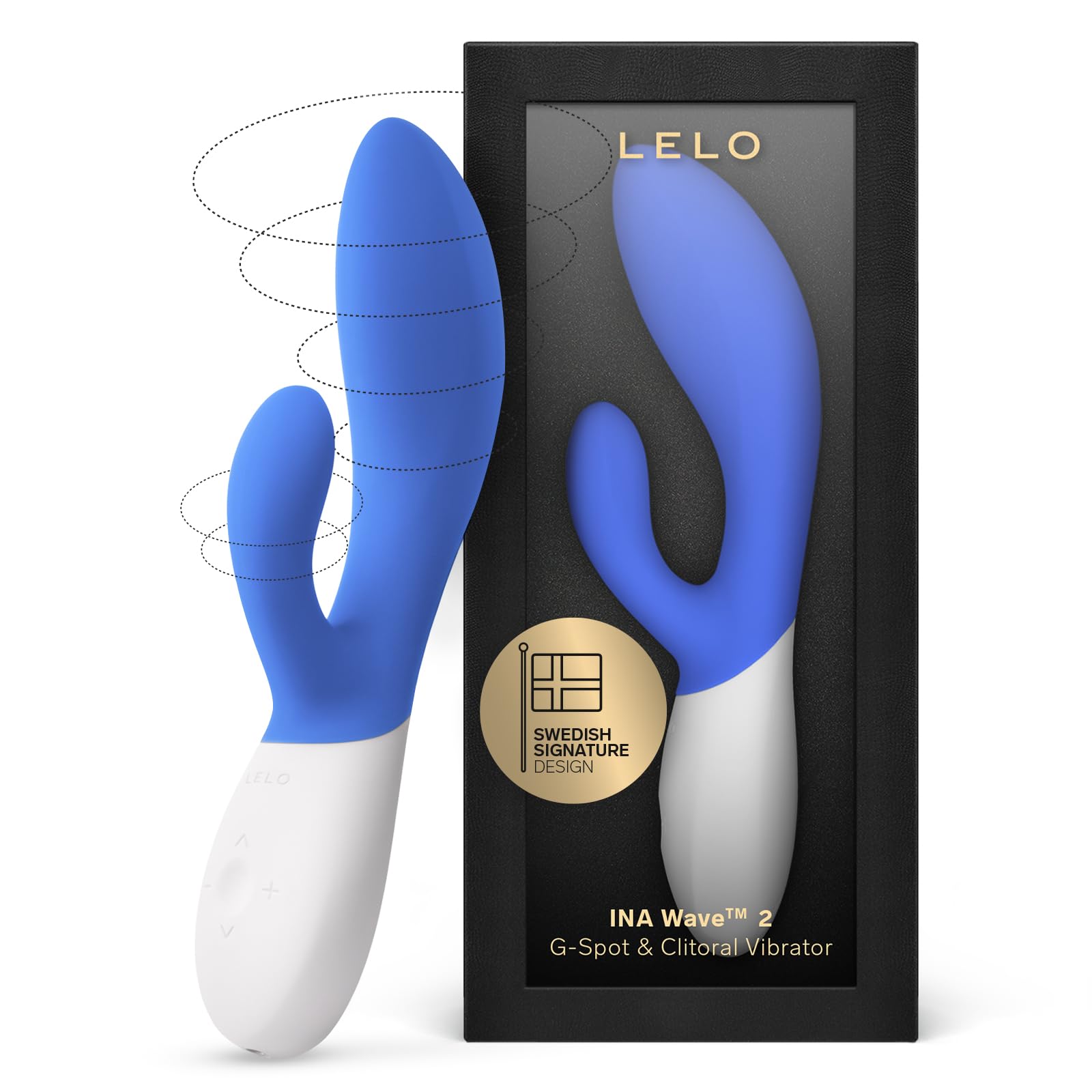
Image: LELO INA Wave 2 Vibrator, showcasing its ergonomic design and dual stimulators.
Getting Started
Package Contents
Before using your LELO INA Wave 2, please ensure all items are present in the package:
- INA Wave 2 G-Spot and Clitoral Vibrator
- USB Charging Cable
- Satin Storage Pouch
- Instruction Manual
- Warranty Registration Card
- LELO Personal Moisturizer Sachet (5ml)

Image: All items included in the LELO INA Wave 2 product packaging.
Initial Charging
Your LELO INA Wave 2 arrives partially charged. For optimal performance, fully charge the device before its first use. Connect the provided USB charging cable to the charging port located at the base of the device. Plug the other end into a USB power adapter or computer USB port. The indicator light will blink while charging and remain solid when fully charged. A full charge typically takes approximately 2 hours.
First Use Preparation
Before initial use and after each use, clean the device thoroughly with LELO Toy Cleaner or warm water and mild soap. Rinse well and pat dry with a lint-free cloth. Always use a water-based lubricant with your LELO INA Wave 2.
Operation
Controls
The LELO INA Wave 2 features a simple 3-button interface:
- Center Button: Press and hold to turn ON/OFF. Press briefly to cycle through vibration modes.
- '+' Button: Increase vibration intensity.
- '-' Button: Decrease vibration intensity.

Image: The LELO INA Wave 2's control panel with power and intensity buttons.
Vibration Settings and Wavemotion Technology
The INA Wave 2 offers 12 distinct vibration settings, ranging from gentle pulses to powerful waves. The unique Wavemotion Technology simulates a finger-like motion, providing a deep and satisfying internal massage, while the external stimulator targets the clitoris for comprehensive pleasure.

Image: Diagram highlighting the Wavemotion Technology and increased power of the INA Wave 2.
Travel Lock
To activate or deactivate the travel lock, press and hold the '+' and '-' buttons simultaneously until the indicator light flashes. This prevents accidental activation during travel or storage.
Care and Maintenance
Cleaning
The LELO INA Wave 2 is 100% waterproof, making cleaning simple and hygienic. Wash the device thoroughly with warm water and a mild, antibacterial soap or a specialized toy cleaner after each use. Rinse thoroughly to remove all soap residue and pat dry with a soft, lint-free cloth or towel. Avoid using cleaners containing alcohol, petroleum, or acetone, as these can damage the silicone.
Storage
Store your LELO INA Wave 2 in its provided satin pouch in a dust-free environment, away from direct sunlight and extreme temperatures. Avoid storing it with other toys made of different materials to prevent potential damage or reactions.
Lubricant Compatibility
Always use a water-based lubricant with your LELO INA Wave 2. Oil-based, silicone-based, or petroleum-based lubricants can degrade the silicone material over time, leading to damage and reduced lifespan of the product.
Troubleshooting
If you encounter any issues with your LELO INA Wave 2, please refer to the following common solutions:
- Device not turning on: Ensure the device is fully charged. If it still doesn't turn on, try activating the travel lock (hold '+' and '-' simultaneously) and then deactivating it.
- Weak vibrations: The battery might be low. Recharge the device fully.
- Charging issues: Ensure the USB cable is securely connected to both the device and the power source. Try a different USB port or power adapter.
- Buttons unresponsive: The travel lock might be active. Deactivate it by holding '+' and '-' simultaneously.
If these steps do not resolve the issue, please contact LELO Customer Support for further assistance.
Product Specifications
| Feature | Detail |
|---|---|
| Model Name | INA Wave 2 |
| Item Model Number | 8489 |
| Material | Body-safe Silicone, ABS Plastic |
| Dimensions | 7.87 x 2.56 x 1.77 inches |
| Weight | 6.21 ounces |
| Battery | 1 Lithium Polymer (included) |
| Charging | USB Rechargeable |
| Waterproof | Yes, 100% waterproof |
| Vibration Settings | 12 |
| Technology | Wavemotion Technology |
Warranty and Support
Warranty Information
LELO offers a 1-year warranty from the date of original purchase against defects due to faulty workmanship or materials. Additionally, a 10-year quality guarantee is provided, ensuring the product's quality and performance over an extended period. Please retain your proof of purchase for warranty claims.
Customer Support
For product registration, warranty claims, or any technical assistance, please visit the official LELO website or refer to the contact information provided on your warranty registration card. You can also find FAQs and support resources on their website.
Note: Statements regarding dietary supplements have not been evaluated by the FDA and are not intended to diagnose, treat, cure, or prevent any disease or health condition.
Related documentsINA Wave 2 (Model 8489)


Ask a question about this manual
Ask about setup, troubleshooting, compatibility, parts, safety, or missing instructions. Manuals+ will review the question and use this page’s manual context to help answer it.