Introduction
Welcome to the user manual for your BRONDI Amico Flip 4G+ mobile phone. This device combines the classic flip phone design with modern smartphone capabilities, featuring 4G+ LTE connectivity and the Android 8.1 operating system. It is equipped with a 3.5-inch HVGA display and a 2 MP autofocus camera. This manual provides essential information to help you set up, operate, maintain, and troubleshoot your new phone.
Please read this manual carefully to ensure proper use and to maximize the performance and lifespan of your device.
Package Contents
Ensure all items are present in the package before proceeding with setup.
- BRONDI Amico Flip 4G+ Mobile Phone
- AC Charger
- USB Type-C Cable
- Lithium-ion Battery
- Charging Dock
- Wired Earphones

Image: All components included in the BRONDI Amico Flip 4G+ package.
Setup
1. Battery and SIM Card Installation
- Open the back cover: Gently remove the back cover of the phone.
- Insert the SIM card: Locate the SIM card slot(s). Insert your Nano-SIM card(s) into the designated slot(s) with the gold contacts facing down, ensuring it clicks into place.
- Insert the battery: Place the Lithium-ion battery into the battery compartment, aligning the contacts.
- Replace the back cover: Securely attach the back cover until it clicks into place.
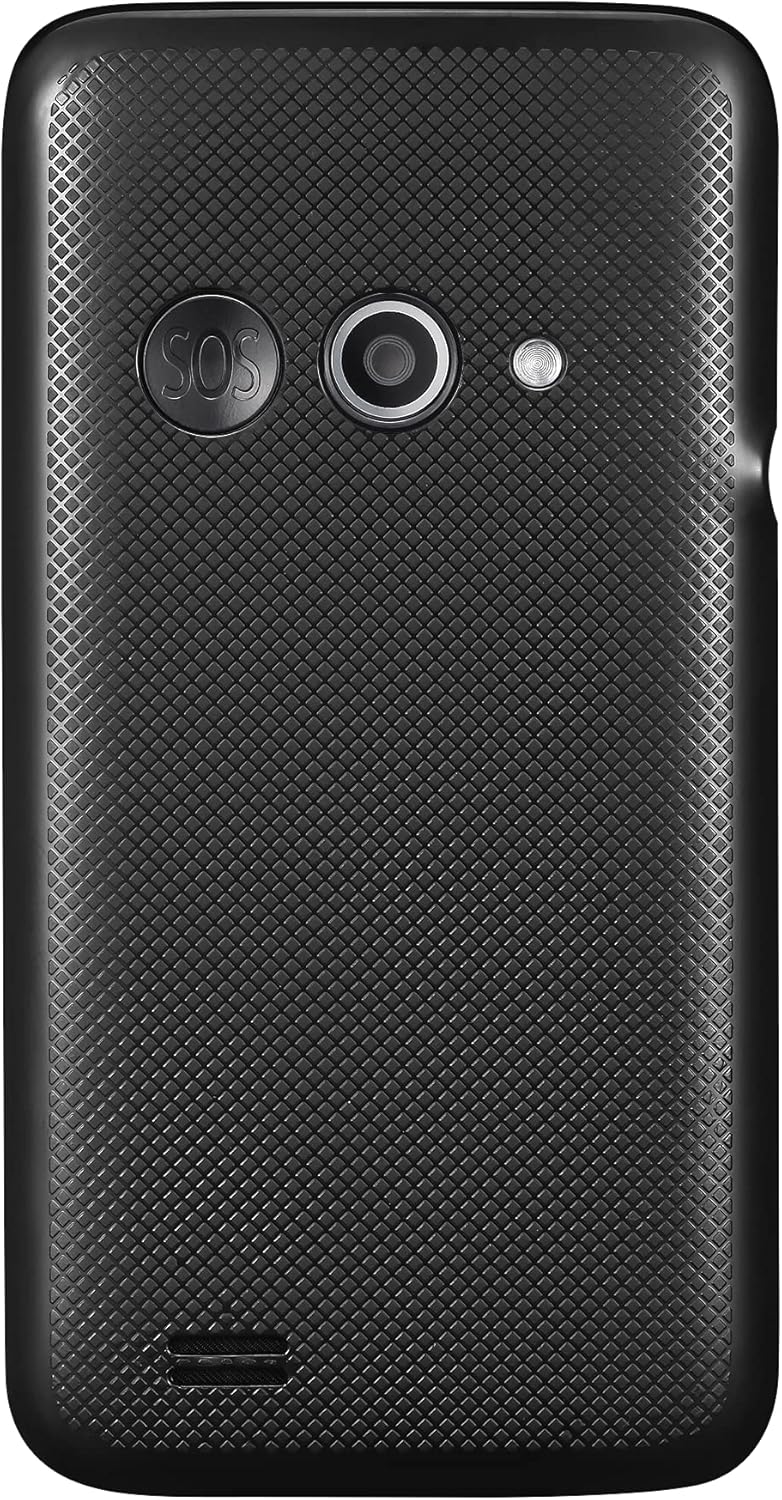
Image: Rear view of the phone, indicating the area where the back cover is removed for battery and SIM installation.
2. Initial Charging
Before first use, fully charge the phone's battery.
- Using the AC Charger: Connect the USB Type-C cable to the phone's charging port and the other end to the AC charger. Plug the charger into a wall outlet.
- Using the Charging Dock: Place the phone into the charging dock. Ensure the dock is connected to the AC charger and plugged into a wall outlet. The phone will indicate charging status.

Image: The BRONDI Amico Flip 4G+ phone charging in its dedicated dock.
3. Powering On/Off
- To Power On: Press and hold the Power/End Call button (usually red) until the screen lights up.
- To Power Off: Press and hold the Power/End Call button, then select "Power Off" from the options on the screen.
Operating Instructions
Basic Navigation
The BRONDI Amico Flip 4G+ features a main display and a physical keypad for navigation.

Image: The BRONDI Amico Flip 4G+ in open position, displaying the screen and keypad.
- Flip Open/Close: Open the phone to answer calls or use functions. Close it to end calls or put it in standby.
- Navigation Keys: Use the directional pad (up, down, left, right) and the central OK button to navigate menus and select options.
- Keypad: Dial numbers, type messages, and access shortcuts using the numeric and function keys.
- Volume Buttons: Located on the side of the phone, use these to adjust call volume, media volume, or ringer volume.

Image: Side view of the phone highlighting the volume control buttons.
Making and Receiving Calls
- To Make a Call: Open the phone, dial the number using the keypad, and press the Green Call button.
- To Answer a Call: Open the phone or press the Green Call button when the phone rings.
- To End a Call: Close the phone or press the Red End Call button.
Messaging
Access the messaging application from the main menu to send and receive SMS/MMS messages.
Camera Usage
The phone is equipped with a 2 MP autofocus camera.
- Open the phone and navigate to the Camera application.
- Frame your shot using the display.
- Press the designated camera button or the OK button to capture the image.
Connectivity (Wi-Fi, LTE)
Access network settings to connect to Wi-Fi networks or manage your 4G+ LTE mobile data connection.
- Wi-Fi: Go to Settings > Network & Internet > Wi-Fi to turn Wi-Fi on/off and connect to available networks.
- Mobile Data: Go to Settings > Network & Internet > Mobile network to enable/disable mobile data and configure data roaming.
Maintenance
Cleaning the Device
- Use a soft, dry, lint-free cloth to clean the phone's screen and body.
- Avoid using harsh chemicals, cleaning sprays, or abrasive materials.
- Keep the charging port and speaker grilles free from dust and debris.
Battery Care
- Avoid exposing the battery to extreme temperatures.
- Do not puncture or damage the battery.
- If the battery is removable, ensure it is correctly installed.
- For optimal battery life, avoid frequently discharging the battery completely or keeping it at 100% charge for extended periods.
Software Updates
Periodically check for software updates to ensure your phone has the latest features and security enhancements. Go to Settings > System > Advanced > System update.
Troubleshooting
| Problem | Possible Solution |
|---|---|
| Phone does not turn on | Ensure the battery is charged. Connect the phone to the charger and try again. Verify the battery is correctly installed. |
| No network signal | Check if the SIM card is properly inserted. Ensure mobile data is enabled in settings. Try restarting the phone. Contact your service provider if the issue persists. |
| Cannot make/receive calls | Check network signal strength. Ensure your SIM card is active and has credit/plan. Verify call barring settings. |
| Charging issues | Ensure the charger and cable are securely connected. Try a different outlet or charger. Clean the charging port for any debris. |
| Phone is slow or unresponsive | Close unnecessary applications. Clear cache. Restart the phone. If issues persist, consider a factory reset (back up data first). |
Factory Reset
A factory reset will erase all data from your phone and restore it to its original factory settings. Back up all important data before proceeding.
- Go to Settings > System > Advanced > Reset options.
- Select Erase all data (factory reset).
- Confirm your choice and follow the on-screen prompts.
Specifications
| Feature | Detail |
|---|---|
| Brand | BRONDI |
| Model Name | Amico Flip 4G+ |
| Operating System | Android 8.1 |
| Screen Size | 3.5 Inches |
| Display Resolution | 480 x 320 (HVGA) |
| Internal Storage | 64 GB |
| Rear Camera | 2 Megapixels, Autofocus |
| Cellular Technology | LTE (4G+) |
| Wireless Connectivity | Wi-Fi |
| Connector Type | USB Type-C |
| Battery Composition | Lithium-ion |
| Color | Black |
Warranty and Support
Warranty Information
For detailed warranty information, please refer to the warranty card included with your product or visit the official BRONDI website. Keep your proof of purchase for warranty claims.
Customer Support
If you encounter any issues not covered in this manual or require further assistance, please contact BRONDI customer support or the retailer from whom you purchased the device. Contact details can typically be found on the BRONDI website or in the product packaging.


