Introduction
This manual provides detailed instructions for the DollaTek TDA7850 2.1 Channel Class AB Audio Amplifier Board. This amplifier is designed for audio enthusiasts and DIY projects, offering a powerful 2x80W stereo output and a 1x120W pure bass output, suitable for 2-8 ohm speakers. It operates on a DC 9-18V power supply and features robust protection mechanisms.

Figure 1: Top view of the DollaTek TDA7850 amplifier board, showing the main components and heatsink.
Setup Instructions
Follow these steps to correctly set up your DollaTek TDA7850 amplifier board.
1. Power Supply Connection
- The amplifier requires a DC 9-18V power supply. Ensure your power supply provides stable voltage within this range.
- Connect the positive (+) terminal of your power supply to the "DC 9-18V +" terminal on the board and the negative (-) terminal to the "DC 9-18V -" terminal.
- The board includes power input reverse protection, short circuit protection, overcurrent protection, and overheating protection. However, always double-check polarity before powering on.
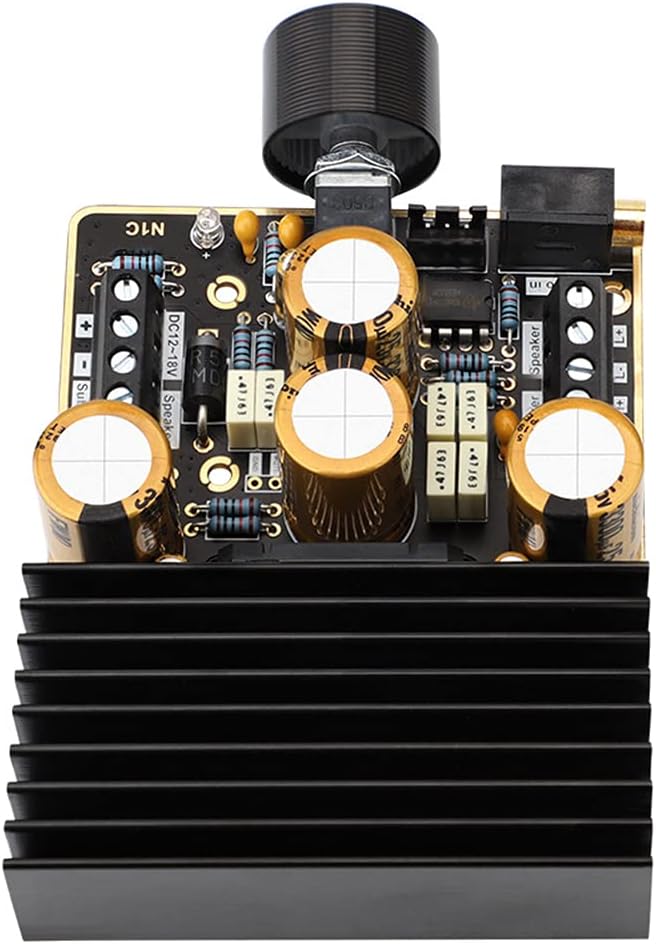
Figure 2: Close-up view of the amplifier board, highlighting the power input and speaker output terminals.
2. Speaker Connection
- The amplifier supports 2/4/6/8 ohm speakers.
- Stereo Speakers: Connect your left channel speaker to the "L+" and "L-" terminals and your right channel speaker to the "R+" and "R-" terminals. Each stereo channel provides up to 80W (at 18V/4 ohm).
- Subwoofer: Connect your subwoofer to the "Sub+" and "Sub-" terminals. The subwoofer channel provides up to 120W (at 18V/2 ohm).
- Ensure correct polarity for all speaker connections to avoid phase issues.
3. Audio Input Connection
- The board supports two input modes:
- 3.5mm Audio Cable Input: Connect your audio source (e.g., smartphone, MP3 player, PC) using a standard 3.5mm stereo audio cable to the designated "Audio In" jack.
- 3P2.54mm Terminal Input: For custom installations, you can use the 3-pin 2.54mm terminal for audio input. Ensure correct left, right, and ground connections.

Figure 3: Angled view of the amplifier board, showing the 3.5mm audio input jack and the volume potentiometer.
Operating Instructions
Once all connections are securely made, you can begin operating your amplifier board.
- Power On: Apply power to the DC 9-18V input terminals. The board does not have a separate power switch; it powers on when voltage is applied.
- Volume Adjustment: Use the integrated potentiometer knob to adjust the overall volume level. Turn clockwise to increase volume and counter-clockwise to decrease.
- Audio Playback: Start playing audio from your connected source. The amplifier will output sound through the connected stereo speakers and subwoofer.
- Power Off: Disconnect the power supply from the DC 9-18V input terminals to power off the amplifier.
Maintenance
To ensure the longevity and optimal performance of your DollaTek TDA7850 amplifier board, follow these simple maintenance guidelines:
- Keep Clean: Regularly clean the board with a soft, dry cloth to remove dust. Avoid using liquids or harsh chemicals.
- Ventilation: Ensure adequate airflow around the heatsink to prevent overheating, especially during prolonged high-power operation. Do not obstruct the heatsink.
- Environmental Conditions: Operate the board in a dry environment, away from moisture, extreme temperatures, and direct sunlight.
- Connection Integrity: Periodically check all wire connections for tightness and corrosion. Loose connections can lead to poor performance or damage.
Troubleshooting
If you encounter issues with your amplifier board, refer to the following common problems and solutions:
- No Sound Output:
- Verify the power supply is connected correctly and providing DC 9-18V.
- Check all speaker connections for correct polarity and secure contact.
- Ensure the audio input cable is securely connected to both the amplifier and the audio source.
- Confirm the audio source is playing and its volume is turned up.
- Adjust the amplifier's volume potentiometer.
- Distorted Sound:
- Reduce the input volume from your audio source.
- Ensure speaker impedance matches the amplifier's supported range (2-8 ohms).
- Check for loose or damaged speaker wires.
- Verify the power supply is stable and not fluctuating. Insufficient power can cause distortion at higher volumes.
- Overheating:
- Ensure the heatsink is not obstructed and has adequate ventilation.
- Reduce the output volume or operating time if the board consistently overheats.
- Verify speaker impedance is within the recommended range. Using speakers with too low impedance can cause excessive heat.
- Power Protection Activated (No Power/Sound):
- If the board suddenly stops working, one of its protection functions (reverse protection, short circuit, overcurrent, overheating) may have activated.
- Disconnect power immediately.
- Check for any short circuits in wiring (especially speaker wires).
- Allow the board to cool down if overheating was suspected.
- Reconnect power after resolving the issue.
Specifications
| Feature | Description |
|---|---|
| Product Category | Class AB 2.1 Channel Power Amplifier |
| Working Voltage | DC 9-18V |
| Output Power (Stereo) | Max 2 x 80W (18V/4 ohm) |
| Output Power (Pure Bass) | Max 1 x 120W (18V/2 ohm) |
| Speaker Impedance | 2/4/6/8 ohm |
| Input Mode | 3.5mm Audio Cable Input or 3P2.54mm Terminal Input |
| Protection Functions | Power input reverse protection, Short circuit protection, Overcurrent protection, Overheating protection |
| PCB Dimensions (L x W) | 72.36mm x 66.65mm |
| Overall Dimensions (L x W x H) | 72.36mm x 96mm x 27mm (including heatsink) |
| Potentiometer Handle Opening | 7mm |
| Mounting Hole Spacing | 25.4mm x 48.26mm (compatible with Bluetooth module spacing) |
| Mounting Hole Size | M3 |
| Key Components | 4 x 3300uF professional audio filter capacitors, Automotive grade power amplifier core, High-grade pure black gold double-layer PCB |
| Item Weight | 6.3 ounces |
| ASIN | B099DSN1LQ |

Figure 4: Technical drawing showing the dimensions of the DollaTek TDA7850 amplifier board.
Warranty Information
Specific warranty details for the DollaTek TDA7850 amplifier board may vary by retailer or region. Please refer to the purchase documentation or contact your seller for precise warranty terms and conditions. Generally, products are covered against manufacturing defects for a limited period from the date of purchase.
Customer Support
For technical assistance, troubleshooting beyond this manual, or inquiries regarding your DollaTek TDA7850 amplifier board, please contact your point of purchase or the manufacturer directly. Provide your product model number (TDA7850) and a detailed description of the issue for efficient support.
Manufacturer: DollaTek
For general inquiries, you may visit the DollaTek brand page on Amazon.

