Introduction
The ikbc CD108 V2 is a full-size mechanical keyboard designed for both Windows and Mac users, featuring Cherry MX Red switches and durable Mistel PBT double-shot keycaps. This manual provides essential information for setting up, operating, maintaining, and troubleshooting your keyboard to ensure optimal performance and longevity.
Package Contents

Image: Contents of the ikbc CD108 V2 keyboard package, including the keyboard, keycap puller, USB cable, and user manual.
Please verify that all items listed below are included in your package:
- ikbc CD108 V2 Mechanical Keyboard
- Keycap Puller
- USB Cable
- User Manual
- Free Keyset of RGBY modifiers (12 pieces)
Setup

Image: Top-down view of the ikbc CD108 V2 keyboard, showcasing its full layout and retro color scheme.
- Unpack the Keyboard: Carefully remove the keyboard and all accessories from the packaging.
- Connect to Computer: Plug the USB cable from the keyboard into an available USB port on your computer (desktop or laptop). The keyboard is wired and does not require batteries.
- Adjust Keyboard Feet: The ikbc CD108 V2 features 3 levels of adjustable feet. Extend the feet at the rear of the keyboard to your preferred typing angle for ergonomic comfort.
- Initial Driver Installation: Your operating system (Windows or macOS) should automatically detect and install the necessary drivers. No additional software is typically required for basic functionality.
- Mac Compatibility Note: While fully compatible with Windows, the CD108 V2 is partially compatible with Mac. To optimize functionality on macOS, you may need to go to System Settings > Keyboard > Modifier Keys and switch the "Option" key to "Command" and vice-versa to match standard Mac keyboard layouts.
Operating the Keyboard

Image: Angled view of the ikbc CD108 V2 keyboard, highlighting its ergonomic design and keycap profile.
Key Features
- Cherry MX Red Switches: This keyboard is equipped with Cherry MX Red mechanical switches. These are linear switches, meaning they have a smooth, consistent keystroke without a tactile bump or audible click. They are favored for gaming due to their light actuation force and rapid response, allowing for quick, successive key presses.
- Mistel PBT Double-Shot Keycaps: The keycaps are made from durable PBT plastic using a double-shot molding process. This ensures that the legends will not fade over time and provides excellent touch, abrasion resistance, and oil resistance. The retro color scheme combines beige and dark grey-green tones.
- Full N-Key Rollover (NKRO) and Anti-Ghosting: The keyboard supports 100% anti-ghosting with full key rollover via USB, ensuring that every key press is registered accurately, even during rapid typing or complex gaming sequences.
- Lockable Win Key: A dedicated function allows you to disable the Windows key to prevent accidental presses during gaming sessions.
- Multimedia Keys: Convenient multimedia functions are integrated, including volume up, volume down, mute, and a dedicated calculator key. These are typically accessed via the Fn key combined with specific function keys.
- Cable Management: The keyboard features a 3-way direction management system for the USB cable, allowing you to route the cable neatly to the left, right, or center.
Using the RGBY Modifier Keyset
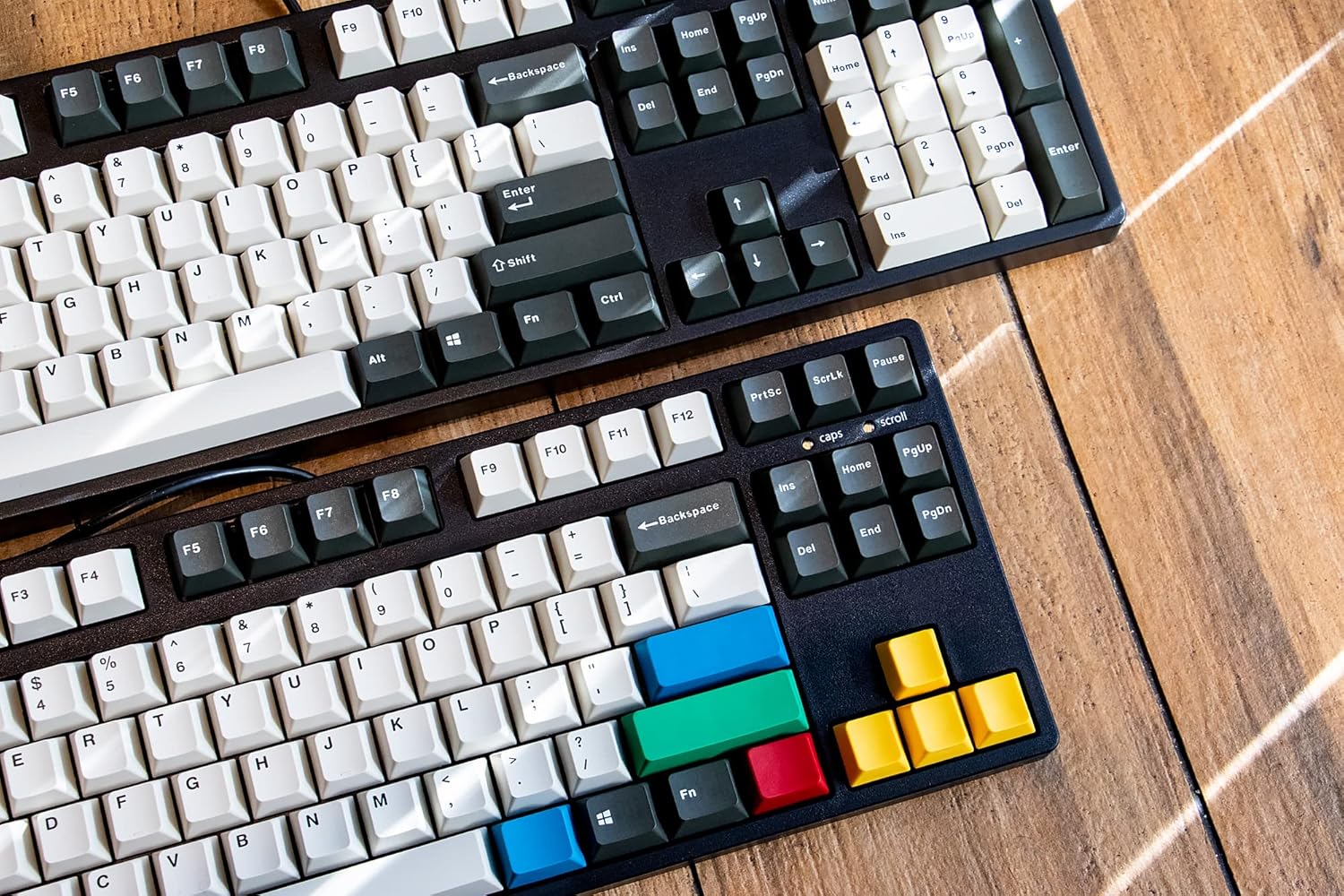
Image: Two ikbc keyboards, one showcasing the standard keycaps and the other with the included RGBY modifier keycaps installed.
Your keyboard comes with a free set of RGBY (Red, Green, Blue, Yellow) modifier keycaps. You can use the included keycap puller to replace certain keys (e.g., Esc, Enter, arrow keys, etc.) with these colorful alternatives to personalize your keyboard's appearance.
- Gently use the keycap puller to remove the desired keycap from the keyboard.
- Align the new RGBY keycap with the switch stem and press down firmly until it clicks into place.
Maintenance
Proper maintenance will extend the life and preserve the appearance of your ikbc CD108 V2 keyboard.
- Regular Cleaning: Use a can of compressed air to blow out dust and debris from between the keycaps. For surface cleaning, wipe the keycaps and case with a soft, slightly damp cloth. Avoid using harsh chemicals or abrasive materials.
- Keycap Cleaning: For deeper cleaning of keycaps, you can remove them using the provided keycap puller and wash them gently with mild soap and water. Ensure they are completely dry before reattaching them to the keyboard.
- Cable Care: Avoid sharp bends or excessive pulling on the USB cable to prevent damage. Utilize the integrated cable management channels to keep the cable tidy and protected.
Troubleshooting
This section addresses common issues you might encounter with your ikbc CD108 V2 keyboard.
- Keyboard Not Responding:
- Ensure the USB cable is securely plugged into both the keyboard and the computer.
- Try plugging the keyboard into a different USB port on your computer.
- Restart your computer.
- Specific Keys Not Working:
- The switches on this keyboard are soldered and not hot-swappable. If a specific key is not registering, ensure no debris is lodged under the keycap. Carefully remove the keycap with the puller and inspect the switch. If the issue persists, it may indicate a hardware fault.
- Spacebar or Other Large Keys Feel Stuck/Wobbly:
- This can sometimes be due to stabilizer issues. Ensure the keycap is properly seated on both the switch stem and the stabilizer stems.
- Minor variations in stabilizer performance can occur. If it significantly impacts usability, contact customer support.
- Metallic "Springy" Echo Sound:
- Some mechanical keyboards, especially those with linear switches, can exhibit a subtle metallic
Related Documents - CD108V2-RO-RD

iKBC CD Series Mechanical Keyboard User Manual
User manual for the iKBC CD Series mechanical keyboards, including models CD87 and CD108. Details product features, included accessories, specifications, and main functions.
Bluonics Domestic RO Unit Installation and Maintenance Manual
This manual provides comprehensive instructions for the installation and maintenance of the Bluonics Domestic RO Unit, a 5-stage reverse osmosis filtration system. It covers system components, troubleshooting, and operational guidelines to ensure optimal performance and water quality.
Condair ML RO 100-1500 Series: Installation and Operation Manual
Comprehensive installation and operation manual for the Condair ML RO 100-1500 series reverse osmosis systems. Covers setup, maintenance, safety, and product specifications.
Nortec ML RO 100-1500 Series: Installation and Operation Manual
Comprehensive guide for installing and operating Nortec's ML RO 100-1500 series reverse osmosis systems. Covers product overview, technical specifications, safety, maintenance, and troubleshooting.
Condair ML RO 100-1500 Series: Installation and Operation Manual
Comprehensive installation and operation manual for the Condair ML RO 100-1500 series reverse osmosis systems. Covers product overview, installation, commissioning, operation, maintenance, and troubleshooting for reliable water purification.
- Some mechanical keyboards, especially those with linear switches, can exhibit a subtle metallic