
Introduction
Thank you for purchasing the iHome XT-59 True Wireless Earbuds. This manual provides essential information for setting up, operating, and maintaining your earbuds to ensure optimal performance and longevity. Please read this manual thoroughly before use and retain it for future reference.
Safety Information
- Do not expose the earbuds or charging case to extreme temperatures, direct sunlight, or excessive moisture.
- Avoid dropping or subjecting the device to strong impacts.
- Do not disassemble or attempt to repair the earbuds or charging case yourself. This will void the warranty.
- Keep out of reach of children and pets.
- Use only the provided charging cable or a certified equivalent.
- Prolonged listening at high volume levels may cause hearing damage. Adjust volume to a safe level.
Package Contents
- iHome XT-59 True Wireless Earbuds (L & R)
- Portable Charging Case
- USB Charging Cable
- User Manual
Product Overview
The iHome XT-59 earbuds are designed for comfortable and secure fit, featuring touch controls for easy operation. The compact charging case provides extended battery life and convenient storage.
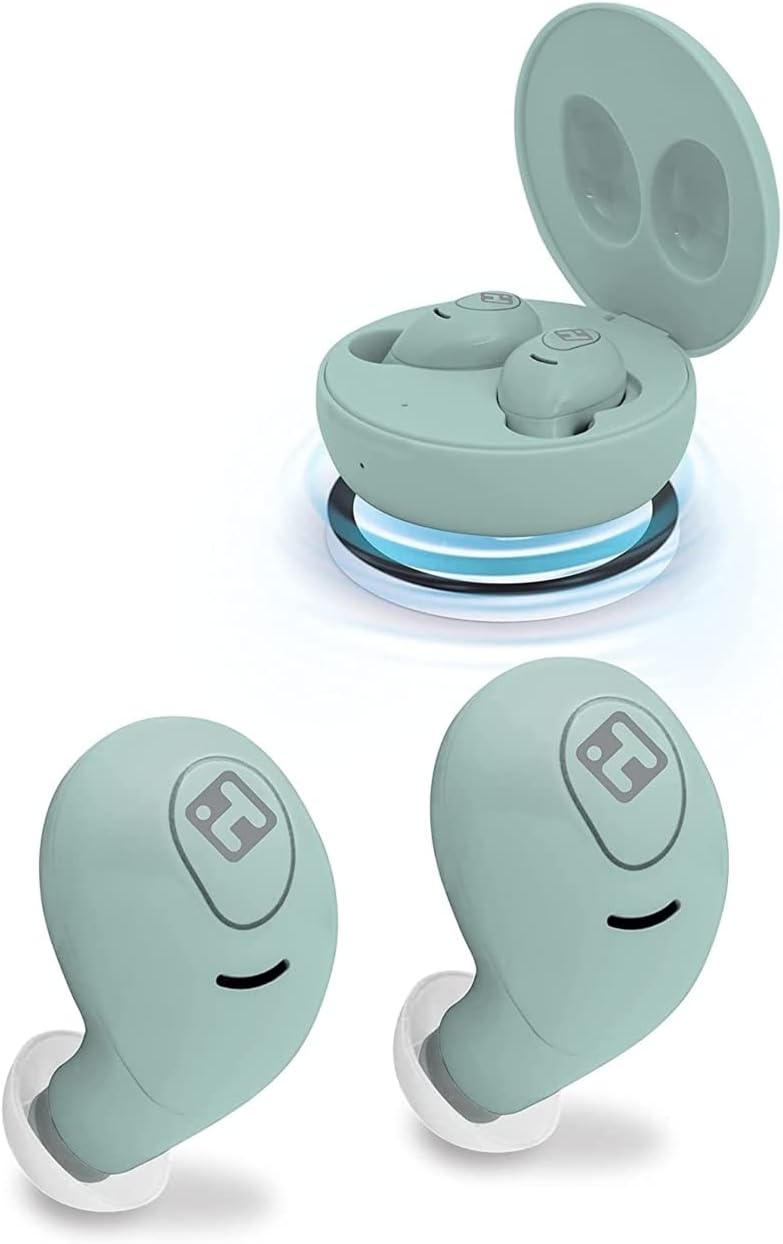
Image: iHome XT-59 True Wireless Earbuds shown with their open charging case, and two individual earbuds displayed below. The earbuds and case are a mint green color.
Earbud Components:
- Touch Control Area: For managing playback, calls, and voice assistant.
- Microphone: For hands-free calling.
- LED Indicator: Shows pairing status and battery level.
- Charging Contacts: For charging within the case.
Charging Case Components:
- Earbud Charging Slots: Securely holds and charges earbuds.
- Charging Port: For connecting the USB charging cable.
- LED Indicator: Shows case battery status.
Setup
1. Charging the Earbuds and Case
- Initial Charge: Before first use, fully charge the earbuds and charging case. Place the earbuds into the charging case.
- Charge Case: Connect the USB charging cable to the charging port on the case and plug the other end into a USB power adapter (not included) or a computer's USB port.
- The LED indicator on the case will show charging status. Once fully charged, the indicator will change or turn off.
- The earbuds will charge automatically when placed in the case, provided the case has power.
2. Pairing with a Bluetooth Device
- Power On: Open the charging case. The earbuds will automatically power on and enter pairing mode. The LED indicator on one earbud will flash, indicating it's ready to pair.
- Activate Bluetooth: On your device (smartphone, tablet, etc.), go to the Bluetooth settings and ensure Bluetooth is enabled.
- Select Device: Look for "iHome XT-59" in the list of available Bluetooth devices and select it.
- Confirmation: Once successfully paired, the earbud LED indicator will stop flashing, and you may hear an audible confirmation.
- Automatic Reconnection: After initial pairing, the earbuds will automatically connect to the last paired device when removed from the case, if Bluetooth is enabled on the device.
Operating
Touch Controls
The iHome XT-59 earbuds feature intuitive touch controls on each earbud. The functions may vary slightly depending on your device and application.
| Action | Function |
|---|---|
| Single Tap (L or R) | Play/Pause Music, Answer/End Call |
| Double Tap (Right Earbud) | Next Track |
| Double Tap (Left Earbud) | Previous Track |
| Triple Tap (L or R) | Activate Voice Assistant (Siri, Google Assistant) |
| Press and Hold (2 seconds) | Reject Incoming Call |
Making and Receiving Calls
- Answering a Call: Single tap either earbud.
- Ending a Call: Single tap either earbud.
- Rejecting a Call: Press and hold either earbud for 2 seconds.
- Voice Assistant: Triple tap either earbud to activate your device's voice assistant for hands-free dialing.
Maintenance
- Cleaning: Use a soft, dry, lint-free cloth to clean the earbuds and charging case. Do not use abrasive cleaners or solvents.
- Ear Tips: Regularly remove and clean the silicone ear tips with a damp cloth and mild soap, then dry thoroughly before reattaching.
- Storage: When not in use, store the earbuds in their charging case to protect them and keep them charged. Store in a cool, dry place.
- Water Resistance: The earbuds are water resistant, but not waterproof. Do not submerge them in water. Dry them thoroughly if they get wet.
Troubleshooting
| Problem | Solution |
|---|---|
| Earbuds not pairing/connecting |
|
| Only one earbud playing audio |
|
| No sound |
|
| Charging case not charging |
|
Specifications
| Feature | Detail |
|---|---|
| Model Name | XT-59 |
| Connectivity Technology | Wireless (Bluetooth) |
| Wireless Communication Technology | Bluetooth |
| Control Method | Touch |
| Water Resistance Level | Water Resistant |
| Battery Life | Up to 25 Hours (with charging case) |
| Material | Silicone, Plastic |
| Ear Placement | In Ear |
| Form Factor | In Ear |
| Noise Control | Sound Isolation |
| UPC | 805112064625 |
Warranty and Support
iHome products are designed with quality and performance in mind. For warranty information, technical support, or customer service inquiries, please refer to the warranty card included with your product or visit the official iHome website. Keep your proof of purchase for warranty claims.
Website: www.ihomeaudio.com


