
GPEESTRAC HSP-B3
Contents
GPEESTRAC HSP-B3 Bluetooth Headset User Manual
Model: HSP-B3
Brand: GPEESTRAC
Introduction
Thank you for choosing the GPEESTRAC HSP-B3 Active Noise Cancelling Bluetooth Headset. This manual provides detailed instructions on how to set up, operate, maintain, and troubleshoot your new headset. Please read this manual carefully before use to ensure optimal performance and longevity of your device.

Image: The GPEESTRAC HSP-B3 Bluetooth Headset, showcasing its sleek black design and ergonomic ear hook.
Setup Guide
1. Charging the Headset
Before first use, fully charge the headset. The HSP-B3 features a magnetic charging connection.
- Connect the charging cable to the headset's magnetic port and a USB power source.
- A red indicator light will typically show during charging.
- Charging time is approximately 10 minutes for quick use, or up to 2 hours for a full charge, providing up to 13 hours of talk time or 240 hours of standby.

Image: An illustration depicting the headset being charged, highlighting its ultra-long battery life capabilities.
2. Pairing with Devices
The HSP-B3 uses Bluetooth v5.0 for stable connections and can pair with up to two devices simultaneously.
- Ensure the headset is charged and powered off.
- Press and hold the multi-function button until the indicator light flashes blue and red, indicating pairing mode.
- On your device (smartphone, laptop, tablet, gaming console, smart speaker), enable Bluetooth and search for "HSP-B3" in the list of available devices.
- Select "HSP-B3" to connect. Once connected, the indicator light will typically turn solid blue or flash slowly.
- To pair a second device, disable Bluetooth on the first device, put the headset back into pairing mode, and connect the second device. Then, re-enable Bluetooth on the first device; the headset should automatically reconnect to both.

Image: An illustration showing the headset's ability to pair with two devices simultaneously, allowing seamless switching between work and personal calls.
3. Wearing the Headset
The HSP-B3 is designed for comfort and can be worn on either ear.
- The ear hook design ensures a secure fit.
- The microphone boom can rotate 270 degrees and adjust 180 degrees to optimize microphone positioning for clear voice capture.
- Adjust the headset until it feels comfortable and the microphone is positioned towards your mouth.
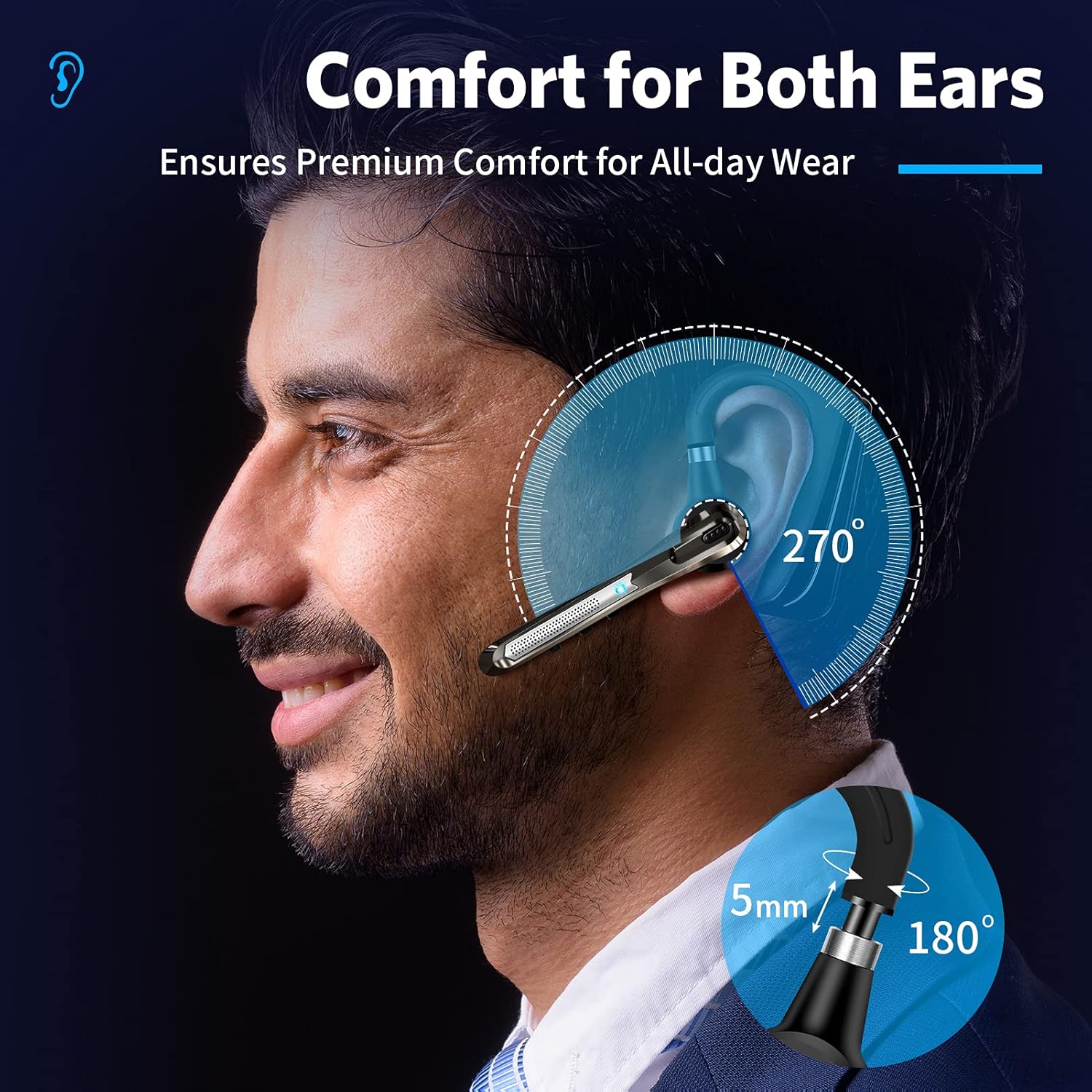
Image: A diagram illustrating the 270-degree rotation and 180-degree adjustment of the headset for optimal comfort and fit on either ear.
Operating Instructions
1. Basic Controls
The headset features touch controls for various functions.
| Action | Function |
|---|---|
| Power On/Off | Press and hold the multi-function button. |
| Play/Pause Music | Single tap the multi-function button. |
| Volume Up/Down | Use the dedicated volume buttons. |
| Next/Previous Track | Long press the volume up/down buttons (functionality may vary by device). |
2. Call Management
The HSP-B3 is equipped with Active Noise Cancellation (ANC) and ENC + CVC 8.0 Dual Noise Reduction technology to eliminate up to 96% of disruptive background noise, ensuring clear conversations.
- Answer/End Call: Single tap the multi-function button.
- Reject Call: Press and hold the multi-function button.
- Mute/Unmute: During an incoming call, a short press can be used as a mute button.

Image: An illustration detailing the ENC + CVC 8.0 Dual Noise Reduction technology, showing how main and secondary microphones work to collect voice and reduce noise.

Image: A visual representation of the headset blocking 96% of noise during calls, ensuring clear conversations even in noisy environments.
3. Voice Assistant Activation
The headset supports activation of your device's voice assistant (Siri or Google Assistant).
- Activate Voice Assistant: Double-tap the multi-function button to activate Siri or Google Assistant on your connected device.

Image: An illustration showing the headset's capability to activate Siri or Google Assistant on connected smartphones.
Maintenance
Proper care will extend the life of your GPEESTRAC HSP-B3 headset.
- Cleaning: Use a soft, dry cloth to wipe the headset. Do not use harsh chemicals or abrasive materials.
- Storage: Store the headset in a cool, dry place away from direct sunlight and extreme temperatures.
- Avoid Water: The headset is not waterproof. Avoid exposure to water or excessive moisture.
- Charging: Always use the provided charging cable. Do not attempt to force the magnetic connection.
Troubleshooting
If you encounter issues with your headset, refer to the following common solutions:
| Problem | Solution |
|---|---|
| Headset does not power on. | Ensure the headset is fully charged. Connect to a power source and check the charging indicator. |
| Cannot pair with device. | Ensure the headset is in pairing mode (flashing blue/red). Turn off and on Bluetooth on your device. Move the headset closer to the device. Clear previous Bluetooth connections on your device. |
| No sound or low volume. | Check the volume levels on both the headset and your connected device. Ensure the headset is properly connected. Try reconnecting the Bluetooth. |
| Call quality is poor. | Ensure the microphone is positioned correctly. Move away from sources of strong electromagnetic interference. Check network signal strength on your phone. |
| Headset disconnects frequently. | Ensure the headset is within the 10-meter Bluetooth range of your device. Avoid obstacles between the headset and device. Ensure the headset is sufficiently charged. |
Specifications
| Feature | Detail |
|---|---|
| Model Name | HSP-B3 |
| Connectivity Technology | Wireless, Bluetooth v5.0 |
| Wireless Communication Technology | Bluetooth |
| Material | Silicone, Plastic |
| Specific Uses For Product | Business |
| Charging Time | 10 minutes (quick charge) |
| Compatible Devices | Smartphones, Laptops, Tablets, Gaming Consoles, Smart Speakers |
| Control Type | Media Control |
| Control Method | Touch |
| Battery Life | 13 Hours (Talk Time) |
| Standby Time | 240 Hours |
| Bluetooth Range | 10 Meters |
| Bluetooth Version | 5.0 |
| Earpiece Shape | Hook |
| Noise Control | Active Noise Cancellation (ENC + CVC 8.0 Dual Noise Reduction) |
| Color | Gray |
| Item Weight | 3.2 ounces |
| UPC | 755419179266 |
Warranty Information
GPEESTRAC products are manufactured to the highest quality standards. For specific warranty terms and conditions, please refer to the warranty card included with your purchase or visit the official GPEESTRAC website. Keep your proof of purchase for warranty claims.
Customer Support
For further assistance, technical support, or inquiries regarding your GPEESTRAC HSP-B3 headset, please contact GPEESTRAC customer service through the following channels:
- Visit the official GPEESTRAC website: GPEESTRAC Store on Amazon
- Refer to the contact information provided in your product packaging.
Documents and downloads
Ask a question about this manual
Ask about setup, troubleshooting, compatibility, parts, safety, or missing instructions. Manuals+ will review the question and use this page’s manual context to help answer it.