
1. Introduction
The Havells 16A Wi-Fi Smart Plug is designed to provide intelligent control and energy monitoring for your home appliances. This device allows you to manage large appliances such as geysers, air conditioners, and heaters remotely via a smartphone application or voice commands, enhancing convenience and promoting energy efficiency.

Image 1.1: Havells 16A Wi-Fi Smart Plug with its retail packaging.
2. Product Overview
The Havells 16A Wi-Fi Smart Plug is a compact, white device designed for seamless integration into your home. It features a standard Type G plug for India, capable of handling up to 16 Amps, making it suitable for high-power appliances. The plug connects directly to your 2.4 GHz Wi-Fi network, eliminating the need for an additional hub.

Image 2.1: Close-up view of the Havells 16A Wi-Fi Smart Plug, highlighting its design and plug pins.
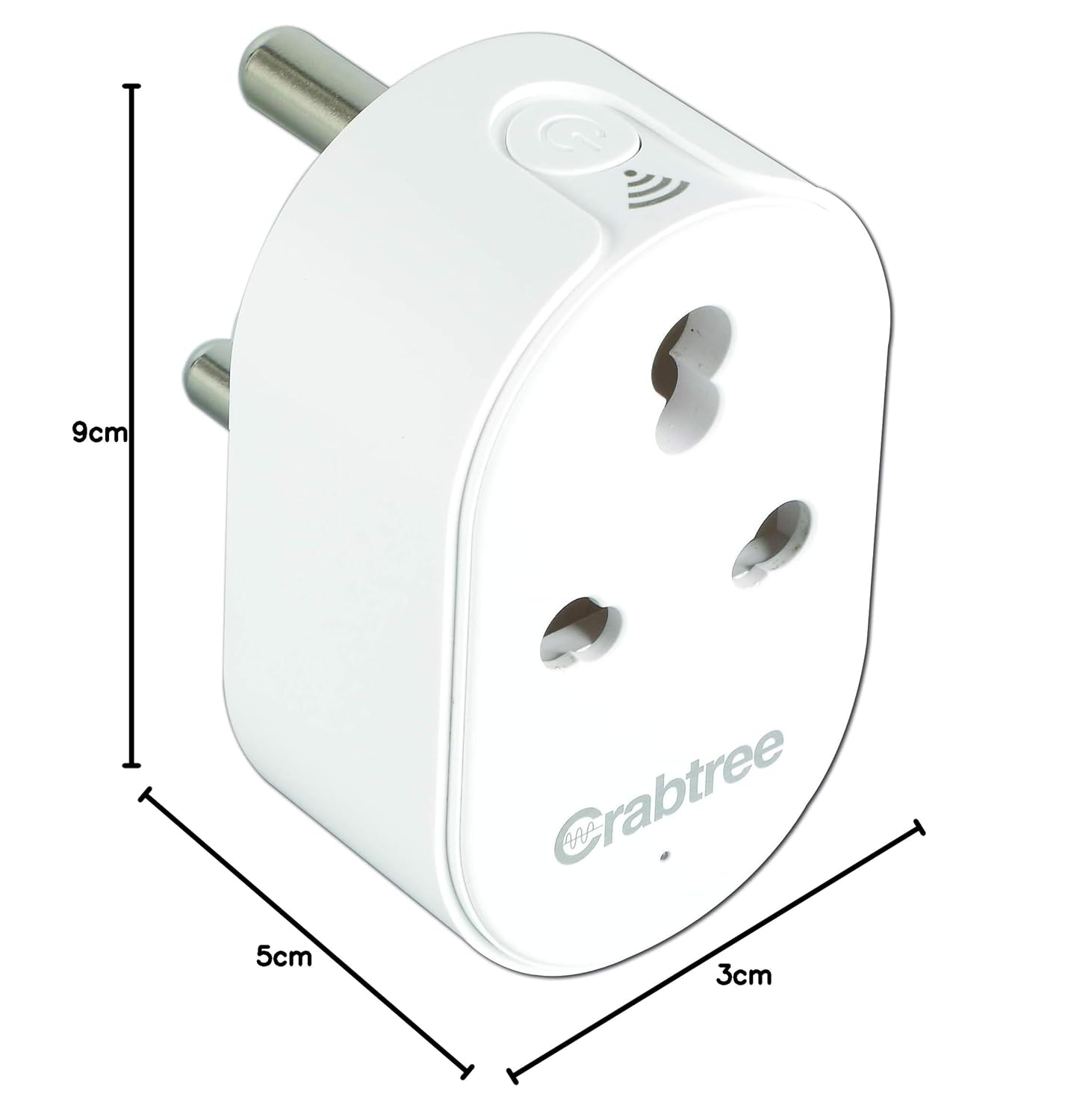
Image 2.2: Product dimensions showing the compact size of the smart plug (approximately 5.3 x 3.4 x 8.5 cm).
3. Package Contents
Upon opening the package, you should find the following items:
- 1 Unit Havells 16A Wi-Fi Smart Plug
- 1 Unit Instruction Manual
4. Safety Information
Please read and understand all safety instructions before using the device. Failure to follow these instructions may result in electric shock, fire, or other hazards.
- Ensure the smart plug is used within its specified electrical ratings (16A, 220-240V AC).
- Do not disassemble or modify the device.
- Keep the device away from water, moisture, and high temperatures.
- Do not plug in appliances that exceed the maximum load of 16A.
- For indoor use only.
5. Setup and Installation
Follow these steps to set up your Havells 16A Wi-Fi Smart Plug:
5.1. App Download and Account Creation
The Havells 16A Wi-Fi Smart Plug operates with the Havells DigiTap mobile application, available for both Android and iOS devices.

Image 5.1: Download the Havells DigiTap app from your device's app store.
- Download the Havells DigiTap App from the Google Play Store or Apple App Store.
- Open the app and follow the on-screen instructions to create a new account or log in if you already have one.
5.2. Device Pairing
To pair your smart plug with the DigiTap app:
- Plug the Havells 16A Wi-Fi Smart Plug into a power outlet.
- Open the DigiTap app and select 'Add Device'.
- Follow the app's instructions to reset the device (usually by holding the power button for a few seconds until the indicator light blinks rapidly).
- Enter your 2.4 GHz Wi-Fi network password when prompted. The smart plug does not support 5 GHz Wi-Fi networks.
- The app will then connect to and configure your smart plug. Once connected, you can rename the device for easy identification.
Video 5.2: Step-by-step guide on installing the Havells DigiTap App, signing up, and adding a device.
5.3. Physical Installation
Once paired, the smart plug is ready for use. Simply plug your desired appliance into the smart plug.

Image 5.3: The smart plug can connect to various appliances, making them smart-controlled.
6. Operation
Control your appliances with ease using the Havells DigiTap app or voice commands.
6.1. Basic On/Off Control
You can switch your connected appliance on or off directly from the DigiTap app, or by pressing the physical button on the smart plug.
6.2. Scheduling
Set daily or weekly schedules for your appliances to turn on or off automatically. This feature helps automate your routines and save energy.
Video 6.2: Instructions on how to set timers and schedules for your smart plug using the DigiTap app.
6.3. Energy Monitoring
The DigiTap app provides real-time energy consumption data for connected appliances. This allows you to monitor usage, identify high-consumption devices, and make informed decisions to conserve energy.
Video 6.3: Demonstration of monitoring energy consumption patterns through the Havells DigiTap app.
6.4. Voice Control Integration
The smart plug is compatible with Amazon Alexa and Google Assistant. Link your DigiTap account to your voice assistant for hands-free control.
- For Alexa: Open the Alexa app, go to 'Skills & Games', search for 'Havells DigiTap', enable the skill, and link your account. Then, ask Alexa to discover devices.
- For Google Assistant: Open the Google Home app, tap 'Add', then 'Set up device', and search for 'Havells DigiTap' to link your account.
Video 6.4: Guide to integrating the smart plug with Amazon Alexa for voice control.

Image 6.4.1: Smart plug controlling an air conditioner, enabling remote and voice commands.

Image 6.4.2: Smart plug controlling a geyser, allowing for scheduled heating and remote activation.
7. Maintenance
To ensure optimal performance and longevity of your Havells 16A Wi-Fi Smart Plug:
- Keep the device clean and free from dust. Use a dry, soft cloth for cleaning.
- Avoid exposing the device to extreme temperatures or direct sunlight.
- Regularly check for firmware updates through the DigiTap app to ensure you have the latest features and security enhancements.
- Ensure the plug is securely seated in the wall socket and the appliance plug is securely inserted into the smart plug.
8. Troubleshooting
If you encounter issues with your smart plug, refer to the following common problems and solutions:
- Device not connecting to Wi-Fi: Ensure your Wi-Fi network is 2.4 GHz. Verify the Wi-Fi password. Try resetting the smart plug and re-pairing it. Ensure the smart plug is within range of your Wi-Fi router.
- App crashes or unresponsiveness: Ensure your DigiTap app is updated to the latest version. Try restarting the app or your smartphone. If issues persist, reinstall the app.
- Voice control not working: Confirm that your DigiTap account is correctly linked to Alexa or Google Assistant. Ensure your voice assistant device is online and properly configured. Try rediscovering devices in the Alexa or Google Home app.
- Appliance not turning on/off: Check if the smart plug has power (indicator light should be on). Ensure the appliance is properly plugged into the smart plug and is functioning correctly when plugged directly into a wall socket. Verify the schedule or manual command in the app.
- Timer resets after power failure: This smart plug does not have an internal battery to maintain time during a power outage. Schedules will resume once power is restored and the device reconnects to Wi-Fi.
9. Specifications
| Feature | Specification |
|---|---|
| Brand | Havells |
| Model Number | ACST161603 |
| Amperage | 16 Amps |
| Input Voltage | AC 220-240V |
| Max Load | 16A |
| Connectivity | 2.4 GHz Wi-Fi (IEEE 802.11 b/g/n) |
| Plug Type | Type G |
| Material | Plastic |
| Color | White |
| Product Dimensions (LxWxH) | 5.3 x 3.4 x 8.5 cm |
| Item Weight | 140 g |
| Country of Origin | India |
10. Warranty and Support
For warranty information and customer support, please contact Havells India Ltd. directly.
- Manufacturer: Havells India Ltd.
- Address: QRG Tower, Sector 126, Noida-201304, India
- Email: customercare@havells.com
- Customer Care Number: 08045 77 1313


