
1. Introduction
Thank you for choosing the HYCHIKA 800W Jigsaw. This manual provides essential information for the safe and effective operation, maintenance, and troubleshooting of your new power tool. Please read these instructions carefully before use and keep them for future reference.
2. Safety Instructions
Always follow basic safety precautions to reduce the risk of fire, electric shock, and personal injury.
- Work Area Safety: Keep the work area clean and well-lit. Do not operate power tools in explosive atmospheres, such as in the presence of flammable liquids, gases, or dust.
- Electrical Safety: Power tool plugs must match the outlet. Never modify the plug. Avoid body contact with earthed or grounded surfaces. Do not expose power tools to rain or wet conditions.
- Personal Safety: Always wear eye protection, hearing protection, and a dust mask when operating the jigsaw. Dress properly; avoid loose clothing or jewelry. Secure long hair.
- Tool Use and Care: Do not force the power tool. Use the correct power tool for your application. Disconnect the plug from the power source before making any adjustments, changing accessories, or storing power tools.
- Kickback Prevention: Always hold the jigsaw firmly with both hands. Ensure the workpiece is securely clamped.
3. Product Overview
The HYCHIKA 800W Jigsaw is designed for versatile cutting tasks in various materials. Familiarize yourself with its components:

Image 3.1: Overview of the HYCHIKA 800W Jigsaw with key components labeled. Labels include: Speed adjustment wheel, Lock button, Trigger switch, Laser On/Off switch, Dust extraction port, Safety guard, Quick-release chuck, Lever for changing cutting action, and Guide ruler fixator.
Key Features:
- 800W Motor: Powerful pure copper motor for efficient cutting of wood (up to 110mm) and metal (up to 10mm).
- 7 Variable Speeds: Adjustable speeds (0-3000 RPM) to match the cutting requirements of different materials.
- 4 Orbital Settings: Adjust the blade's orbital action for faster cutting or smoother finishes.
- Adjustable Bevel Cut: The aluminum base plate allows for bevel cuts up to ±45° for angled cuts.
- Tool-Free Blade Change: Quick and easy blade replacement without additional tools.
- Laser Guide & Parallel Guide: Integrated laser for precise straight cuts and a parallel guide for consistent cut widths.
- Dust Extraction System: Helps keep the work area clean by connecting to a vacuum cleaner.
- Lock-on Switch: For continuous operation and reduced user fatigue during extended use.
4. Setup
4.1 Installing the Saw Blade
- Ensure the jigsaw is unplugged from the power source.
- Locate the quick-release chuck (blade clamp) at the front of the tool.
- Push the quick-release lever to open the blade clamp.
- Insert the saw blade into the clamp with the teeth facing forward. Ensure the blade is fully seated.
- Release the quick-release lever to secure the blade. Gently pull on the blade to confirm it is firmly held.

Image 4.1: Illustration of the tool-free blade change system, showing how to insert and secure a saw blade.
4.2 Adjusting the Bevel Angle
The base plate can be tilted for angled cuts up to ±45°.
- Unplug the jigsaw.
- Loosen the two screws on the base plate using the provided hex key.
- Tilt the base plate to the desired angle (indicated by markings).
- Once the desired angle is set, firmly tighten the two screws to secure the base plate.

Image 4.2: Steps for adjusting the bevel angle of the base plate using a hex key.
4.3 Connecting Dust Extraction
Attach a suitable vacuum cleaner hose to the dust extraction port at the rear of the jigsaw to minimize dust during operation.
5. Operating Instructions
5.1 Powering On/Off
- To start the jigsaw, press the trigger switch.
- For continuous operation, press the lock button while the trigger is pressed. Release the trigger to engage the lock.
- To stop the jigsaw from continuous operation, press the trigger switch again.

Image 5.1: Demonstrates the switch lock button and the laser guide in operation.
5.2 Adjusting Speed and Orbital Action
Select the appropriate speed and orbital setting based on the material and desired cut quality.
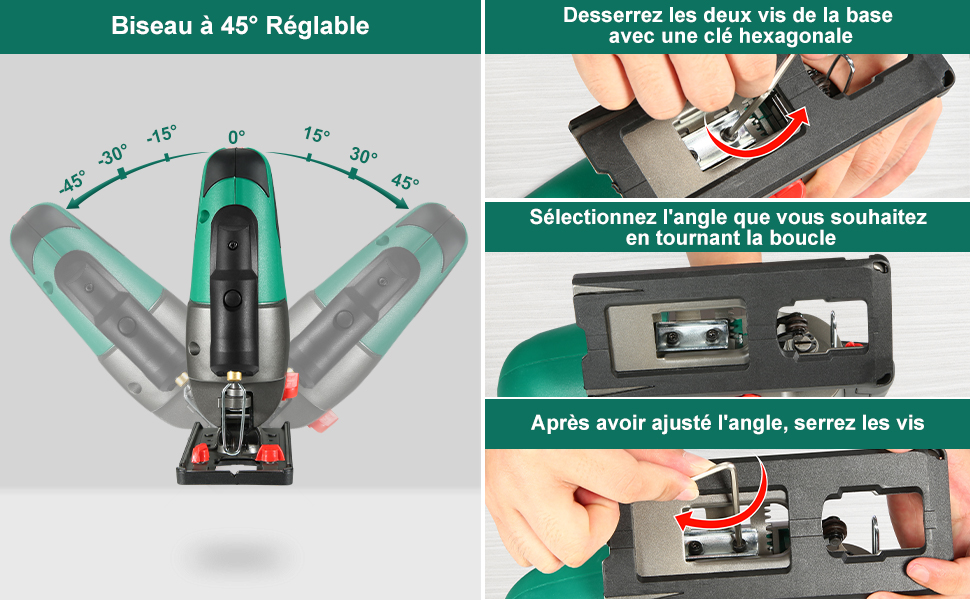
Image 5.2: Details the 7 variable speed settings and 4 orbital action positions. Speed recommendations are provided for plastic (MIN-4), steel plate (2-3), stainless steel plate (3-4), wood (5-MAX), and aluminum (3-MAX). Orbital positions are: 0 for straight cuts, 1 for small curves, 2 for medium curves, and 3 for large curves.
- Speed Adjustment: Use the speed adjustment wheel to set the desired strokes per minute (SPM). Higher speeds are generally for faster cuts in softer materials, while lower speeds are for harder materials or finer finishes.
- Orbital Action: The orbital action lever allows you to choose from 4 settings (0-3).
- Position 0 (Straight Cut): No orbital action, for fine, precise cuts in all materials.
- Position 1 (Small Curves): Slight orbital action for cutting small curves.
- Position 2 (Medium Curves): Moderate orbital action for cutting medium curves.
- Position 3 (Large Curves): Maximum orbital action for fast, aggressive cuts in wood and softer materials.
5.3 Using the Laser Guide and Parallel Guide
- Laser Guide: Activate the laser by pressing the Laser On/Off switch. Align the laser line with your cutting line for improved accuracy.
- Parallel Guide: Insert the parallel guide into the designated slot on the base plate. Adjust it to the desired cutting width and tighten the fixator screw to secure it. This helps maintain a consistent distance from the edge of the workpiece.
5.4 Cutting Different Materials
The HYCHIKA 800W Jigsaw is suitable for cutting various materials, including wood, metal, PVC, and aluminum.

Image 5.3: Examples of the jigsaw being used to cut hardwood, metal, PVC, and aluminum, demonstrating its versatility.
- Always use the correct blade type for the material being cut (e.g., metal blades for metal, wood blades for wood).
- Ensure the workpiece is securely clamped to prevent movement during cutting.
- Allow the blade to reach full speed before engaging with the workpiece.
- Apply steady, even pressure. Do not force the tool.
6. Maintenance
Regular maintenance ensures the longevity and safe operation of your jigsaw.
- Cleaning: Keep the ventilation openings clear and clean. Regularly clean the tool housing with a soft, damp cloth. Do not use solvents.
- Blade Replacement: Replace dull or damaged blades promptly to ensure efficient and safe cutting.
- Cord Inspection: Periodically inspect the power cord for damage. If damaged, have it repaired by a qualified technician.
- Storage: Store the jigsaw in a dry, secure place, out of reach of children.
7. Troubleshooting
| Problem | Possible Cause | Solution |
|---|---|---|
| Jigsaw does not start | No power supply; Damaged power cord; Faulty switch | Check power outlet and cord; Contact service center if cord or switch is faulty. |
| Blade not cutting efficiently | Dull or incorrect blade; Incorrect speed/orbital setting | Replace blade; Use appropriate blade for material; Adjust speed and orbital setting. |
| Excessive vibration | Loose blade; Damaged blade; Worn internal components | Ensure blade is securely installed; Replace damaged blade; Contact service center. |
| Inaccurate cuts | Loose base plate; Incorrect laser alignment; Unstable workpiece | Tighten base plate screws; Check laser alignment; Secure workpiece firmly. |
8. Specifications
| Feature | Specification |
|---|---|
| Manufacturer | HYCHIKA BETTER TOOLS FOR BETTER LIFE |
| Model Number | M1Q-DU16-80 (E0075EU) |
| Power | 800 Watts |
| Voltage | 230 Volts |
| Speed (No Load) | 0-3000 RPM |
| Max. Cutting Depth (Wood) | 110 mm |
| Max. Cutting Depth (Metal) | 10 mm |
| Bevel Angle | ±45° |
| Orbital Settings | 4 Positions (0-3) |
| Blade Type | T-shank |
| Power Cord Length | 2 Meters |
| Product Dimensions (L x W x H) | 30 x 9 x 25.5 cm |
| Weight | 2.48 Kilograms |
| Included Components | 1x HYCHIKA Electric Saw, 6x Saw Blades, 1x Guide Rule, 1x Allen Key, 1x Dust Exhaust Pipe, 1x Instruction Manual |
| Certification | CE |
9. Warranty and Support
9.1 Warranty Information
This HYCHIKA 800W Jigsaw comes with a 2-year warranty on spare parts, covering manufacturing defects and material faults under normal use. Please retain your proof of purchase for warranty claims.
9.2 Customer Support
For technical assistance, warranty claims, or general inquiries, please contact HYCHIKA customer support through the retailer where the product was purchased or visit the official HYCHIKA website for contact information.

