
1. Introduction
Thank you for choosing the Amplim Baby Food Maker. This multifunctional appliance is designed to simplify the process of preparing healthy, homemade meals for infants and toddlers. It integrates 11 functions in one machine, including steaming, blending, chopping, pureeing, juicing, reheating, defrosting, sterilizing, and bottle warming. This manual provides essential information for safe and efficient operation, maintenance, and troubleshooting.

Figure 1: Amplim Baby Food Maker and included accessories.
2. Important Safety Precautions
Please read all instructions carefully before using the appliance. Keep this manual for future reference. This product is BPA free, tested lead, phthalates, and cadmium free, meeting U.S. Consumer Product Safety Improvement Act (CPSIA), CPC (Children Product Certificate), FCC, and ETL certifications. It features built-in overheat protection for safe operation.
- Always ensure the unit is unplugged before cleaning or assembly/disassembly.
- Do not immerse the main unit in water or other liquids.
- Keep hands and utensils out of the blending jar during operation to prevent injury.
- Ensure all parts are correctly assembled and locked in place before use.
- Use only purified or soft water for steaming and sterilizing functions.
- Exercise caution when handling hot steam or hot components after operation.
3. Parts and Components
Familiarize yourself with the various parts of your Amplim Baby Food Maker:
- Main Unit: Houses the motor, control panel, and water tank.
- Blending Jar: Transparent container for blending and chopping.
- Chopping Blade: Stainless steel blade for processing food.
- Steamer Baskets (2): For steaming different food items simultaneously.
- Lid: Covers the blending jar during operation.
- Water Tank: Stainless steel tank for steaming and sterilizing water.
- Control Panel: Digital display and touch buttons for various functions.
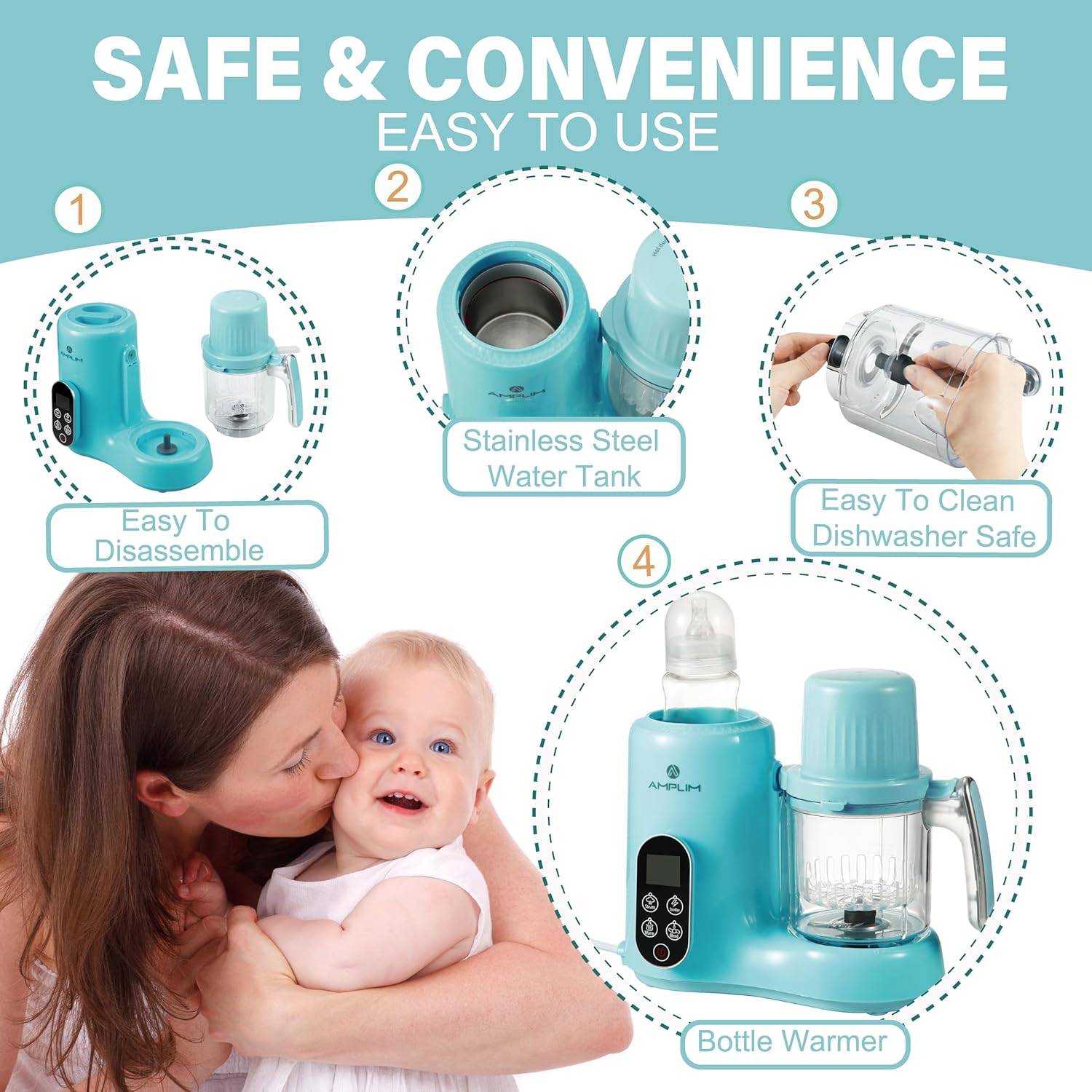
Figure 2: Key components of the Amplim Baby Food Maker.
4. Setup
Before first use, wash all removable parts (blending jar, chopping blade, steamer baskets, lid) with warm soapy water. Rinse thoroughly and dry. Ensure the main unit is placed on a stable, flat surface.
Initial Assembly:
- Place the chopping blade securely onto the spindle inside the blending jar.
- Align the blending jar with the base unit and twist clockwise until it locks into place.
- Place the lid onto the blending jar, ensuring it is properly sealed.
5. Operating Modes
The Amplim Baby Food Maker features a smart control system with 11 integrated functions. Use the control panel to select your desired mode.

Figure 3: Overview of the control panel and its functions.
5.1 Steaming
Add water to the stainless steel water tank (ensure it does not exceed the MAX line). Place chopped ingredients into the steamer basket(s) and insert into the blending jar. Select the 'Steam' function on the control panel. The machine will automatically steam the food to perfection, maintaining nutrients and freshness.

Figure 4: Examples of foods that can be steamed and processed.
5.2 Blending & Pureeing
After steaming, transfer the cooked food to the blending jar. Select the 'Blend' or 'Puree' function. The powerful motor and stainless steel blade will create a smooth consistency suitable for your baby's stage. You can adjust the blending time for desired texture.
Video 1: Demonstration of the pureeing function for baby food.
Video 2: Demonstration of the blending function for various ingredients.
5.3 Chopping & Grinding
For coarser textures or preparing ingredients like ground meat or finely chopped vegetables, use the 'Chop' or 'Grind' function. Place raw ingredients directly into the blending jar. This is ideal for preparing stage 2 or stage 3 foods.
Video 3: Demonstration of the chopping function for ingredients like onions.
Video 4: Demonstration of the grinding function for various food items.
5.4 Bottle Warming
The unit can also warm baby bottles. Fill the water tank with 2 oz of soft or purified water. Place the baby bottle into the water tank. Press the 'Warm' button on the control panel. The default warming time is 6.5 minutes.

Figure 5: Step-by-step guide for bottle warming.
Video 5: Visual guide on how to warm a baby bottle using the appliance.
6. Maintenance and Cleaning
Proper cleaning ensures the longevity and hygiene of your baby food maker. Buckets, cup, lid, and blade are dishwasher safe for easy care.
- Daily Cleaning: After each use, disassemble the blending jar, blade, and steamer baskets. Wash them with warm soapy water or place them in the dishwasher.
- Main Unit: Wipe the main unit with a damp cloth. Do not immerse it in water.
- Descaling: To remove mineral buildup in the water tank, use white vinegar or lemon juice. Fill the tank with a mixture of water and vinegar/lemon juice, run a steam cycle without food, then rinse thoroughly.
- Stains: Some foods, like carrots or pumpkins, may stain the buckets or cup. This is normal and does not affect performance.
Sterilizing
The appliance can also sterilize baby bottles and accessories. Place clean, disassembled bottle parts into the steamer basket. Add water to the tank and select the 'Sterilize' function.
Video 6: Demonstration of the sterilizing function for baby items.
7. Troubleshooting
If you encounter any issues with your Amplim Baby Food Maker, refer to the common problems and solutions below:
| Problem | Possible Cause | Solution |
|---|---|---|
| Unit does not turn on. | Not plugged in; power button not pressed. | Ensure unit is securely plugged into a working outlet. Press the power button. |
| Steaming function not working. | Insufficient water in tank; tank is scaled. | Add water to the tank. Perform descaling procedure. |
| Blending/Chopping not effective. | Lid not properly secured; too much food; food too hard. | Ensure lid is locked. Reduce food quantity. Cut food into smaller pieces. |
| E1 error message. | Indicates a specific internal error. | Unplug the unit, wait 5 minutes, then plug back in. If error persists, contact customer support. |
8. Specifications
| Feature | Detail |
|---|---|
| Brand | Amplim |
| Model Name | Amplim Baby Food Maker |
| Model Number | 151A |
| Product Dimensions | 7.05"D x 13.44"W x 9.5"H |
| Item Weight | 4.91 pounds |
| Color | Blue |
| Power Source | AC |
| Blade Material | Stainless Steel |
| Number of Speeds | 11 (functions) |
| Care Instructions | Dishwasher Safe (removable parts) |
| UPC | 810477023811 |
9. Warranty and Support
Amplim products are designed for quality and reliability. For specific warranty details and customer support, please refer to the warranty card included in your product packaging or visit the official Amplim website. As a trusted American company, Amplim ensures products are 100% factory tested and meet USA regulations.
For further assistance, you may contact Amplim customer service through their official channels. Support small businesses by choosing Amplim.