
1. Introduction
This manual provides essential information for the proper installation, operation, and maintenance of your Kidde KN-COSM-IBA Hardwired Combination Smoke and Carbon Monoxide Alarm. This device is designed to provide early warning of both smoke and carbon monoxide hazards within your home. It features ionization sensing technology for smoke detection, electrochemical sensing for carbon monoxide, a voice alert system, and a battery backup for continuous protection during power outages. For your safety, please read this manual thoroughly before installation and keep it for future reference.

Figure 1: Key features of the Kidde KN-COSM-IBA Combination Alarm, including voice alerts, smoke and CO detection, ionization sensor technology, test/hush button, whole home interconnection, UL certification, and hardwired power with AA battery backup.
Key Features:
- Dual Protection: Detects both smoke (ionization sensor) and carbon monoxide (electrochemical sensor) in one unit.
- Voice Alerts: Clearly announces "Fire! Fire!", "Warning! Carbon Monoxide!", or "Low Battery!"
- Hardwired with Battery Backup: Operates on 120VAC household current with two AA batteries for continuous protection during power outages.
- Interconnectable: Can be linked with up to 24 Kidde devices (maximum 18 initiating devices) for whole-home alert.
- Test/Hush Feature: Allows for easy testing of alarm functions and temporarily silences nuisance alarms for approximately 9 minutes.
- Tamper-Resistant Lock: Deters unauthorized removal of the unit from its mounting bracket.
- UL Certified: Meets UL 2034 and UL217 standards for safety.
2. Important Safety Information
WARNING: This unit is designed to detect smoke and carbon monoxide. It cannot prevent fire or carbon monoxide poisoning. Proper installation, testing, and maintenance are crucial for its effective operation. Read and understand all instructions before use.
General Safety Guidelines:
- Read All Instructions: Before installing or operating this alarm, carefully read and understand all instructions provided in this manual and any included documentation.
- Regular Testing: Test the alarm weekly to ensure proper operation. Refer to the "Operating Instructions" section for details.
- Placement: Install alarms on every level of your home, inside each bedroom, and outside each sleeping area. Avoid placing alarms in kitchens, bathrooms, garages, or near vents where false alarms are common or where performance may be compromised.
- Power Source: Ensure the alarm is connected to a continuous 120VAC power supply and that the battery backup is always installed and functional.
- End of Life: Replace the alarm unit 10 years after the manufacturing date.
- Professional Installation: If you are unsure about any part of the installation process, consult a qualified electrician.
Additional Resources:
For detailed installation and user guidelines, please refer to the official PDF documents:
3. Package Contents
Verify that all items are present in the package before beginning installation:
- Kidde KN-COSM-IBA Combination Smoke & Carbon Monoxide Alarm Unit
- Mounting Bracket
- Wiring Harness with Quick Connect Plug
- Two (2) AA Batteries
- Mounting Screws and Wall Anchors
- User Manual (this document)
4. Setup and Installation
Before you begin: Turn off power to the circuit you will be working on at the main electrical panel. Failure to do so can result in electrical shock or injury.
4.1 Wiring Instructions
- Ensure power is off at the circuit breaker.
- Connect the wiring harness to your household wiring:
- Black wire to the hot (live) wire.
- White wire to the neutral wire.
- Orange wire to the interconnect wire (if interconnecting multiple alarms).
- Secure wire connections with wire nuts.
4.2 Battery Installation
The alarm requires two AA batteries for backup power. The front-load battery door makes replacement easy.
- Open the battery compartment door located on the front of the alarm unit.
- Insert the two AA batteries, matching the positive (+) and negative (-) terminals as indicated inside the compartment.
- Close the battery compartment door securely.
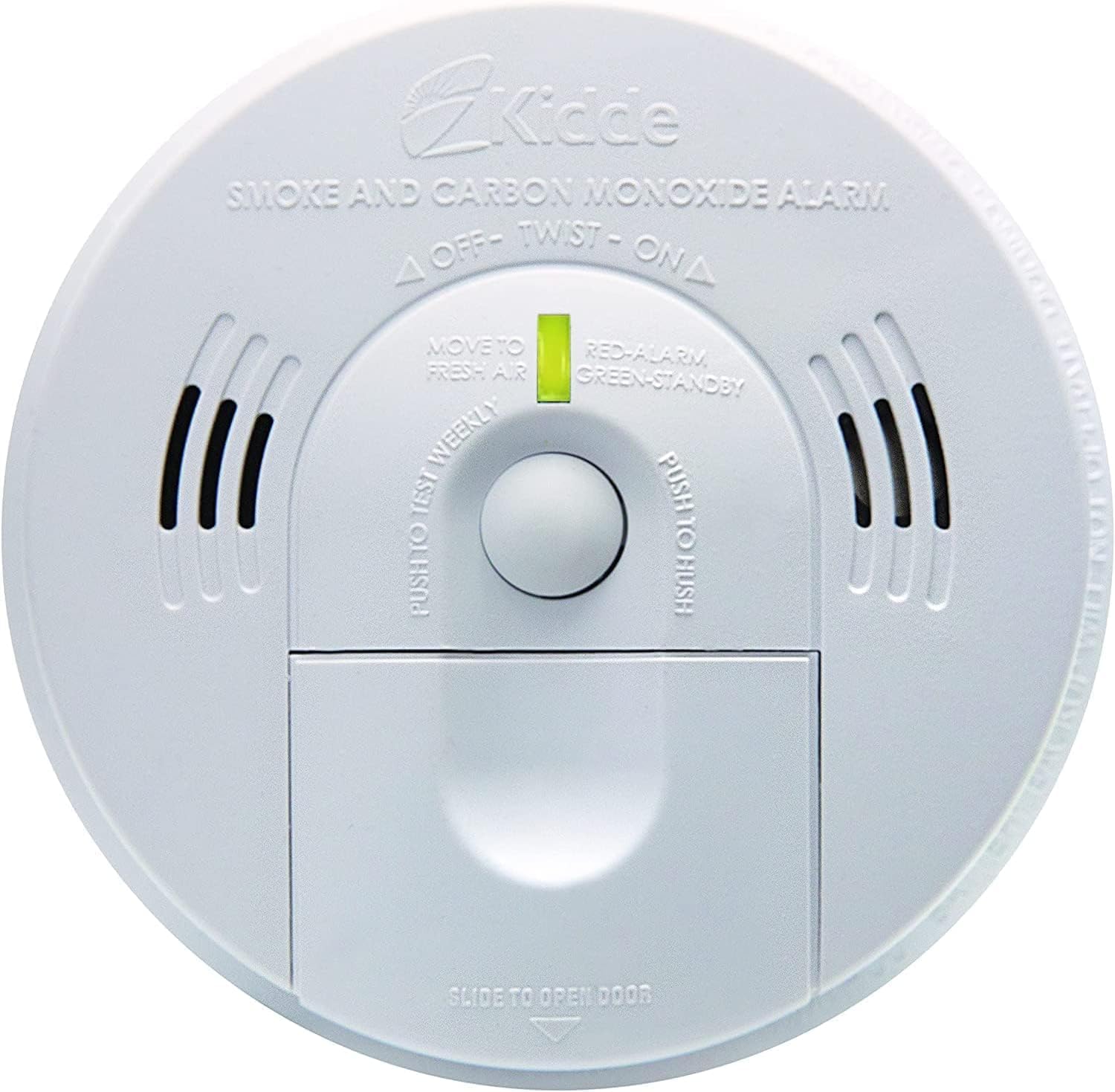
Figure 2: Hands demonstrating the installation of AA batteries into the front-load battery compartment of the Kidde alarm.
4.3 Mounting the Alarm
- Attach the mounting bracket to the ceiling or wall using the provided screws and anchors. Ensure the bracket is firmly secured.
- Plug the wiring harness quick connect into the back of the alarm unit.
- Align the alarm unit with the mounting bracket and twist clockwise until it locks into place.

Figure 3: A person installing the Kidde combination alarm onto a ceiling-mounted bracket.
4.4 Interconnecting Multiple Alarms
This alarm can be interconnected with other compatible Kidde alarms. When one interconnected alarm senses a hazard, all interconnected alarms will sound.
- Connect the orange interconnect wire from each alarm's wiring harness to the interconnect wire in your household wiring.
- A maximum of 24 Kidde devices can be interconnected. Of these, no more than 18 can be initiating devices (smoke, CO, heat alarms).

Figure 4: Illustration of how multiple Kidde alarms can be interconnected to provide whole-home protection.
4.5 Power On and Test
- Restore power to the circuit at the main electrical panel.
- The green LED on the alarm should illuminate, indicating AC power is present.
- Press and hold the Test/Hush button for a few seconds until the alarm sounds and the voice alerts are heard. This confirms proper operation.
5. Operating Instructions
5.1 Normal Operation
During normal operation, the green LED will be steadily lit, indicating that the alarm is receiving AC power. The red LED will flash approximately once every 30-40 seconds, indicating normal operation and that the alarm is monitoring for smoke and CO.

Figure 5: Close-up view of the Kidde alarm's front face, showing the Test/Hush button and LED indicator.
5.2 Alarm Conditions and Voice Alerts
- Smoke Alarm: If smoke is detected, the alarm will sound three long beeps, followed by the voice message "Fire! Fire!". The red LED will flash rapidly.
- Carbon Monoxide Alarm: If carbon monoxide is detected, the alarm will sound four quick beeps, followed by the voice message "Warning! Carbon Monoxide!". The red LED will flash rapidly.
- Low Battery: If the batteries are low, the alarm will chirp once every 60 seconds, accompanied by the voice message "Low Battery!". Replace batteries immediately.
- Malfunction/End of Life: The alarm will chirp every 30 seconds if there is a malfunction or if the unit has reached its end of life. Replace the unit.
5.3 Test/Hush Button
- Test: Press and hold the Test/Hush button for a few seconds. The alarm will sound and announce "Fire! Fire!" and "Warning! Carbon Monoxide!" to confirm all functions are working.
- Hush: In case of a nuisance alarm (e.g., from cooking smoke), press the Test/Hush button. This will silence the alarm for approximately 9 minutes. The green LED will flash every 2 seconds during Hush mode. The alarm will automatically reset after 9 minutes.
5.4 Tamper-Resistant Lock
The alarm features a tamper-resistant lock to prevent unauthorized removal from the mounting bracket. To engage or disengage this feature, refer to the detailed instructions in the full installation manual. A small screwdriver is typically required to manipulate the lock tab.

Figure 6: The tamper-resistant lock feature on the Kidde alarm, designed to prevent easy removal.
6. Maintenance
Regular maintenance ensures your alarm functions correctly and provides reliable protection.
6.1 Weekly Testing
Test your alarm weekly by pressing and holding the Test/Hush button until the alarm sounds and voice alerts are heard. If the alarm does not sound, check the power supply and batteries, then retest. If it still fails, replace the unit.
6.2 Battery Replacement
Replace the two AA batteries at least once a year, or immediately when the "Low Battery!" voice alert is announced. Use only recommended alkaline batteries (e.g., Duracell MN1500, E91; Energizer E91).
- Open the front-load battery door.
- Remove the old batteries.
- Insert new AA batteries, observing polarity.
- Close the battery door securely.
- Test the alarm after battery replacement.
6.3 Cleaning Your Alarm
Clean your alarm at least once a month to remove dust and debris that could interfere with its operation.
- Use a soft brush attachment on your vacuum cleaner to gently vacuum around the alarm's vents and openings.
- Do NOT use cleaning solvents or sprays directly on the alarm.
- Do NOT paint the alarm.
6.4 End of Life Replacement
The Kidde KN-COSM-IBA alarm has a 10-year operational life. After 10 years from the manufacturing date (found on the back of the unit), the alarm will indicate its end of life with a specific chirp pattern. Replace the entire alarm unit immediately.
7. Troubleshooting
If your alarm is not functioning as expected, refer to the table below for common issues and solutions.
| Problem | Indication | Solution |
|---|---|---|
| Alarm does not sound during test | No sound, no LED activity | Check AC power, ensure batteries are installed correctly. Replace unit if problem persists. |
| Alarm chirps every 60 seconds | "Low Battery!" voice alert | Replace both AA batteries immediately. |
| Alarm chirps every 30 seconds | No voice alert, or specific malfunction code | Unit malfunction or end of life. Replace the alarm unit. |
| Nuisance alarms | Alarm sounds without apparent smoke/CO | Press Hush button. Clean alarm. Relocate if near cooking appliances or high humidity. |
| Green LED off | No AC power indicator | Check circuit breaker, wiring connections. |
8. Specifications
Detailed technical specifications for the Kidde KN-COSM-IBA Combination Smoke & Carbon Monoxide Alarm.
| Feature | Specification |
|---|---|
| Model Number | KN-COSM-IBA (Mfr Part Number: 900-0114A) |
| Power Source | 120VAC, 60Hz with 2-AA Battery Backup |
| Smoke Sensor Type | Ionization |
| CO Sensor Type | Electrochemical |
| Alarm Loudness | 85 dB at 10 feet |
| Operating Temperature | 40°F (4.4°C) to 100°F (37.8°C) |
| Operating Humidity | 10% to 95% relative humidity, non-condensing |
| Dimensions (D x W x H) | 1.8" x 5.6" x 5.6" |
| Interconnection Limit | Up to 24 Kidde devices (max 18 initiating) |
| Certifications | UL 2034, UL217 |
| Warranty | 10-year limited |

Figure 7: Dimensions of the Kidde KN-COSM-IBA alarm: 5.6 inches in diameter and 1.8 inches in depth.
9. Warranty Information
The Kidde KN-COSM-IBA Combination Smoke & Carbon Monoxide Alarm comes with a 10-year limited warranty from the date of purchase. This warranty covers defects in materials and workmanship under normal use and service. For full warranty terms and conditions, please refer to the documentation included with your product or visit the official Kidde website. Keep your proof of purchase for warranty claims.
10. Customer Support
If you have any questions about the installation, operation, or maintenance of your Kidde alarm, or if you require technical assistance, please contact Kidde Customer Service. Refer to the contact information provided in your product packaging or visit the official Kidde website for the most up-to-date support details.
Kidde Website: www.kidde.com