
TACK EMS01A
TACK Miter Saw User Manual
Model: EMS01A | Brand: TACK
1. Introduction
Thank you for choosing the TACK EMS01A Miter Saw. This powerful and versatile tool is designed for precise cutting of various materials, including wood, soft metal, and plastic. Featuring a dual-speed motor, laser guide, and adjustable cutting capacities, it is suitable for both professional and DIY projects. Please read this manual thoroughly before operation to ensure safe and efficient use of your new miter saw.
2. Safety Instructions
Always follow basic safety precautions to reduce the risk of fire, electric shock, and personal injury. Keep this manual for future reference.
- Read the Manual: Familiarize yourself with all controls and operations before using the saw.
- Wear Personal Protective Equipment (PPE): Always wear safety glasses, hearing protection, and a dust mask. Use gloves when handling blades.
- Work Area: Keep your work area clean, well-lit, and free of clutter. Do not operate in explosive atmospheres, such as in the presence of flammable liquids, gases, or dust.
- Electrical Safety: Ensure the power supply matches the saw's requirements. Do not expose power tools to rain or wet conditions. Avoid body contact with earthed or grounded surfaces.
- Secure Workpiece: Always clamp the workpiece firmly before cutting. Never hold it by hand.
- Blade Guard: Ensure the blade guard is always in place and functioning correctly. Never bypass safety features.
- Disconnect Power: Always disconnect the saw from the power supply before making any adjustments, changing accessories, or performing maintenance.
- Double Safety Switch: The saw is equipped with a double safety switch to prevent accidental startup. Always engage both parts of the switch to operate.
3. Package Contents
Carefully unpack your TACK Miter Saw and check for the following components:
- 1x TACK EMS01A Miter Saw
- 1x Dust Bag
- 1x TCT Blade (40 teeth, 255mm diameter)
- 2x Hex Wrenches
- 2x Side Supports
- 1x Clamping Device
- 2x Carbon Brushes
- 1x User Manual
- 1x Warranty Card
4. Product Overview
Familiarize yourself with the main parts of your miter saw:
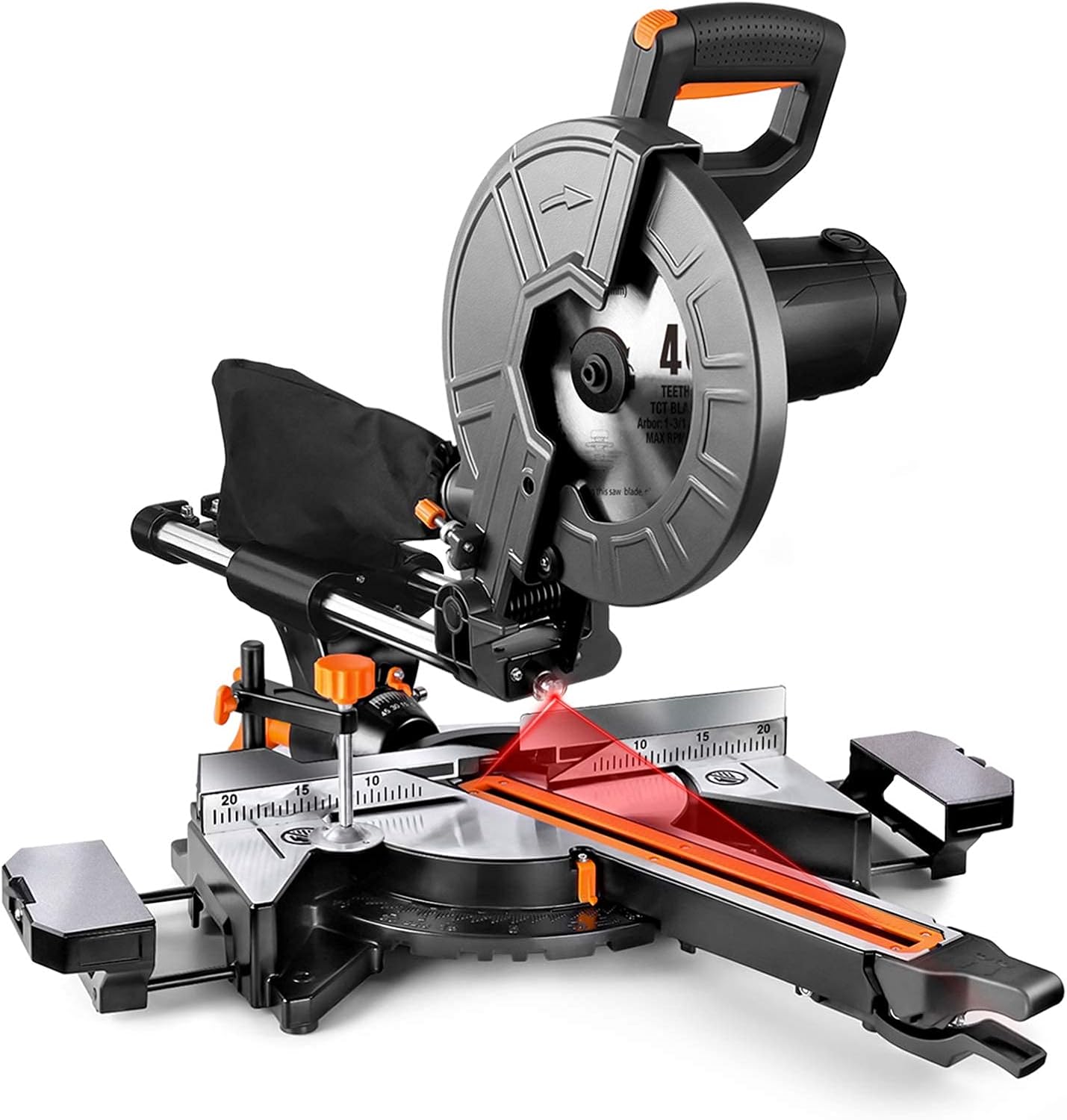
Figure 4.1: Overall view of the TACK EMS01A Miter Saw.

Figure 4.2: Key components including the metal blade guard, ergonomic handle, dust collection bag, and double safety switch.
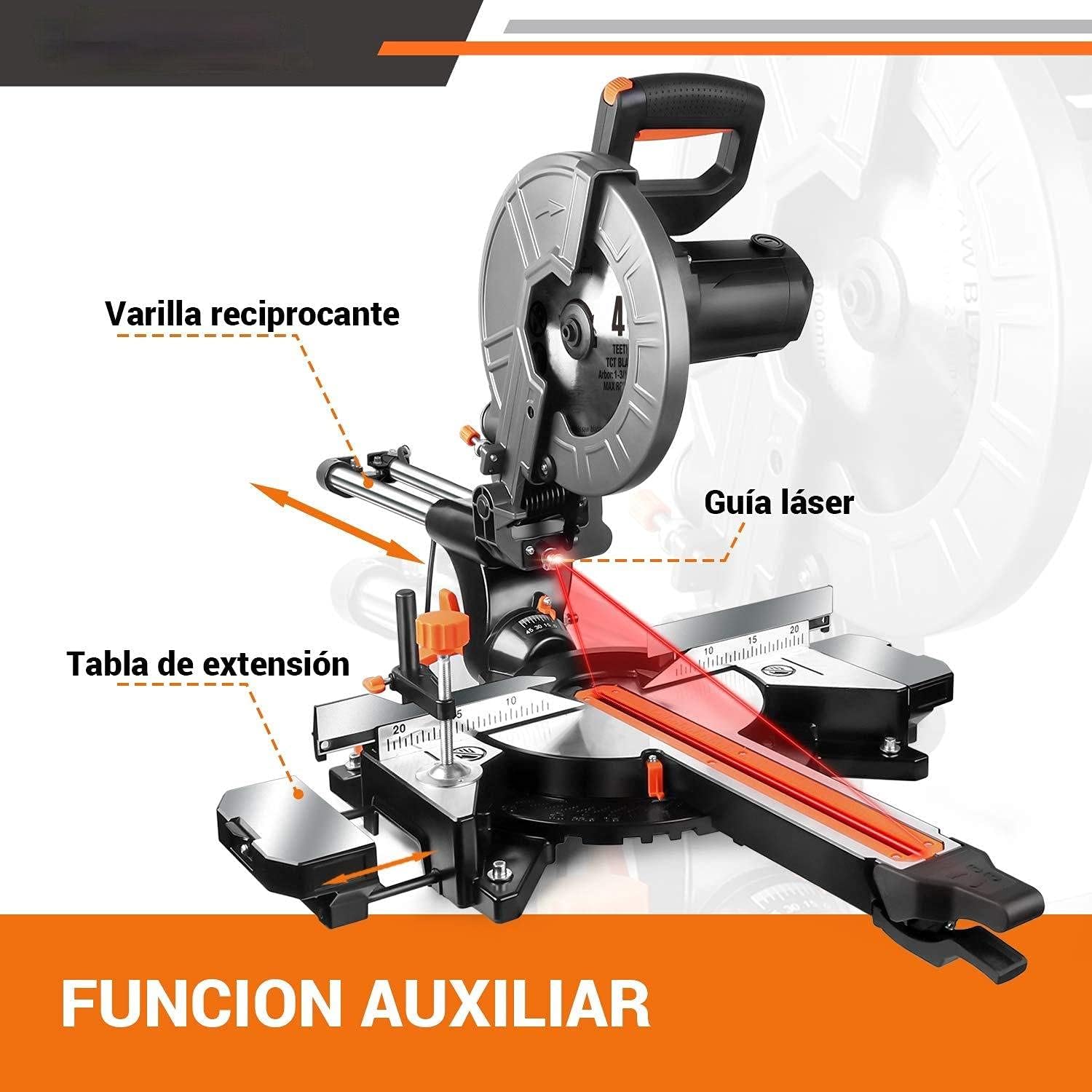
Figure 4.3: Auxiliary functions: reciprocating rod, laser guide, and extension table.

Figure 4.4: Clamping device, rear fence, and key specifications.
5. Setup
5.1 Blade Installation
- Ensure the saw is unplugged from the power source.
- Lift the blade guard.
- Use the provided hex wrench to loosen the blade retaining bolt.
- Carefully remove the old blade (if applicable) and install the new 255mm blade, ensuring the teeth are pointing in the correct direction (indicated by an arrow on the blade and saw).
- Tighten the blade retaining bolt securely.
- Lower the blade guard.
5.2 Dust Bag Attachment
Attach the dust bag to the dust port located at the rear of the blade housing. Ensure it is securely fastened to effectively collect sawdust and debris.
5.3 Extension Table Adjustment
The saw features extended platforms on both sides. Adjust these tables as needed to support longer workpieces, ensuring stability during cuts.
6. Operating Instructions
6.1 Powering On/Off
To turn on the saw, press the double safety switch. To turn off, release the switch. The saw will stop automatically.
6.2 Adjusting Speed
The TACK EMS01A Miter Saw offers dual speed settings for optimal cutting performance on different materials:
- 3200 RPM: Ideal for cutting soft metals and plastics.
- 4500 RPM: Recommended for cutting wood.
Refer to the speed selector switch on the saw to choose the appropriate speed for your material.

Figure 6.1: Dual speed control for different materials.
6.3 Using the Laser Guide
The integrated red laser guide provides a precise cutting line, allowing for accurate alignment of your workpiece. Activate the laser guide before making a cut to ensure precision.
6.4 Miter and Bevel Cuts
The saw allows for versatile cutting angles:
- Miter Angle: Adjustable from 45° left to 45° right, with positive stops at 0°, 15°, 22.5°, 30°, and 45°.
- Bevel Angle: The saw head can tilt 45° to the left for bevel cuts.
Adjust the miter and bevel settings using the appropriate levers and scales on the saw base and head.

Figure 6.2: Demonstrating miter cutting capacity.
6.5 Cutting Capacity
The maximum cutting capacities are as follows:
| Miter Angle | Bevel Angle | Cutting Capacity (Height x Width) |
|---|---|---|
| 0° | 0° | H90mm x W340mm |
| 0° | 45° | H45mm x W340mm |
| 45° | 0° | H90mm x W240mm |
| 45° | 45° | H45mm x W240mm |
6.6 Dust Collection
The saw is equipped with a dust collection port and includes a dust bag. For improved health and easier cleanup, ensure the dust bag is attached or connect the port to an external dust extraction system.

Figure 6.3: Dust collection port in use.
7. Maintenance
Regular maintenance ensures the longevity and optimal performance of your miter saw.
- Cleaning: After each use, unplug the saw and clean off sawdust and debris from the motor vents, blade area, and table using a brush or compressed air.
- Blade Inspection: Regularly inspect the blade for sharpness and damage. Replace dull or damaged blades promptly.
- Carbon Brushes: The saw comes with spare carbon brushes. If the motor performance decreases or sparks excessively, the carbon brushes may need replacement. Refer to the saw's specific instructions for accessing and replacing them.
- Lubrication: Periodically lubricate moving parts as indicated in the saw's design to ensure smooth operation.
- Cord Inspection: Check the power cord for any signs of damage. Do not use the saw if the cord is damaged.
8. Troubleshooting
If you encounter issues with your TACK Miter Saw, refer to the following common problems and solutions:
- Saw does not start:
- Check if the saw is properly plugged into a working power outlet.
- Ensure the double safety switch is fully engaged.
- Check for tripped circuit breakers.
- Inspect carbon brushes for wear.
- Cuts are not accurate:
- Verify that the workpiece is securely clamped.
- Check if the blade is sharp and correctly installed.
- Ensure miter and bevel angle settings are locked in place.
- Calibrate the laser guide if necessary.
- Excessive vibration or noise:
- Check if the blade is securely fastened and not warped.
- Ensure all mounting bolts are tight.
- Inspect for any loose components.
If the problem persists after troubleshooting, please contact customer support.
9. Technical Specifications
| Specification | Value |
|---|---|
| Model | EMS01A |
| Power | 2000 W |
| Voltage | 230 V |
| Speed | 3200 RPM / 4500 RPM (Dual Speed) |
| Blade Diameter | 255 mm (10 inches) |
| Power Cord Length | 2 meters |
| Product Dimensions | 78 x 58 x 45 cm |
| Product Weight | 15.8 kg |
| Material | Metal and Plastic |
| Blade Material | Stainless Steel |
10. Warranty and Support
This TACK Miter Saw comes with a 24-month warranty from the date of purchase. If you encounter any quality issues during the warranty period, please contact our customer service team. We are committed to responding to your inquiries within 24 hours.
For any questions regarding the product, setup, operation, or troubleshooting, please do not hesitate to reach out to us. Your satisfaction is our priority.
Related documentsEMS01A

Ask a question about this manual
Ask about setup, troubleshooting, compatibility, parts, safety, or missing instructions. Manuals+ will review the question and use this page’s manual context to help answer it.