
1. Introduction
This manual provides detailed instructions for the installation, operation, and maintenance of your Symphony SY-V3080BT 7.2 Inch Touch Screen Car Multimedia Player. Please read this manual thoroughly before using the product to ensure proper operation and to prevent damage.
2. Safety Information
- Always operate the device in a safe manner, ensuring it does not distract you from driving.
- Do not attempt to disassemble or modify the unit. This may cause damage and void the warranty.
- Ensure all wiring connections are secure and properly insulated to prevent short circuits.
- Consult a professional for installation if you are unsure about any steps.
- Keep the unit away from water and excessive moisture.
3. Package Contents
Verify that all items are present in the package:
- Symphony SY-V3080BT Car Multimedia Player Unit
- Remote Control
- Power and Speaker Wiring Harness
- Mounting Hardware (brackets, screws)
- User Manual (this document)
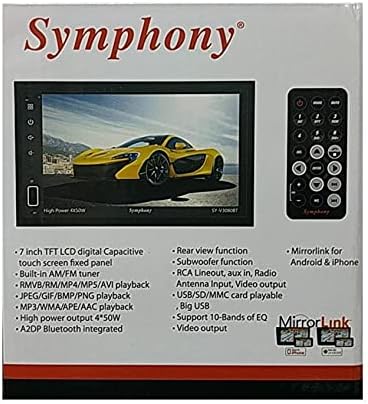
Image: The product packaging for the Symphony SY-V3080BT, highlighting key features such as 7-inch TFT LCD, AM/FM tuner, various playback formats, Bluetooth, and MirrorLink. A remote control is also visible.
4. Setup and Installation
4.1 Wiring Connections
Before installation, ensure the vehicle's battery is disconnected. Connect the wiring harness to the corresponding ports on the back of the unit and to your vehicle's wiring system. Pay close attention to power, ground, speaker, and accessory wire connections.
- Power (Yellow): Connect to constant 12V power.
- Accessory (Red): Connect to switched 12V power (ignition).
- Ground (Black): Connect to a solid chassis ground point.
- Speaker Wires: Connect to your vehicle's speakers, ensuring correct polarity.
- Antenna Input: Connect your car's radio antenna.
- RCA Lineout: For connecting external amplifiers.
- Video Output: For connecting external displays.
- Rear View Camera Input: Connect a compatible rear view camera (if applicable).

Image: Rear view of the Symphony SY-V3080BT car multimedia player, showing various input and output ports for power, speakers, antenna, and auxiliary connections.
4.2 Mounting the Unit
Secure the unit into the vehicle's dashboard using the provided mounting brackets and screws. Ensure the unit is firmly in place and does not obstruct any vehicle controls.
4.3 Initial Power-On
After all connections are made and the unit is mounted, reconnect the vehicle's battery. Turn on the vehicle's ignition. The unit should power on. Follow any on-screen prompts for initial setup.
5. Operating Instructions
5.1 Basic Controls
- Power Button: Press to turn the unit on/off.
- Volume Control: Use the on-screen controls or remote to adjust volume.
- Menu/Home Button: Returns to the main menu or home screen.
- Touch Screen: Navigate menus and select functions by touching the screen.
5.2 Media Playback (DVD/USB/SD)
- DVD Playback: Insert a DVD disc into the slot. The unit will automatically detect and begin playback.
- USB Playback: Insert a USB drive into the USB port. Select the USB source from the main menu to browse and play media files (MP3, MPEG4, RMVB, etc.).
- SD Card Playback: Insert an SD card into the SD card slot. Select the SD source from the main menu to browse and play media files.
5.3 Radio (AM/FM Tuner)
Select the Radio function from the main menu. Use the on-screen controls to scan for stations, save presets, and switch between AM and FM bands.
5.4 Bluetooth Connectivity
To pair your mobile device:
- Enable Bluetooth on your mobile device.
- On the SY-V3080BT, select the Bluetooth function.
- Search for available devices on your mobile phone and select 'SY-V3080BT'.
- Confirm the pairing code if prompted.
Once paired, you can make/receive calls and stream audio (A2DP) wirelessly.
5.5 MirrorLink (Android & iPhone)
The MirrorLink feature allows you to mirror your smartphone's screen onto the unit's display. Connect your Android or iPhone device via USB. Follow the on-screen instructions on both the unit and your phone to establish the connection. This enables on-screen control of compatible smartphone applications.
5.6 Rear View Function
If a rear view camera is connected, the display will automatically switch to the camera feed when the vehicle is put into reverse gear.
5.7 Audio Settings
Access the audio settings menu to adjust equalizer (EQ) presets or custom settings (supports 10-bands of EQ), balance, fader, and subwoofer output.
6. Maintenance
6.1 Cleaning the Unit
Use a soft, dry cloth to clean the unit's screen and exterior. For stubborn marks, slightly dampen the cloth with water. Do not use abrasive cleaners or solvents.
6.2 General Care
Avoid exposing the unit to extreme temperatures, direct sunlight for prolonged periods, or excessive dust. Ensure proper ventilation around the unit.
7. Troubleshooting
If you encounter issues with your SY-V3080BT, refer to the following common problems and solutions:
| Problem | Possible Cause | Solution |
|---|---|---|
| No power | Incorrect wiring, blown fuse, vehicle battery issue. | Check power and ground connections. Inspect vehicle fuses. Ensure vehicle battery is charged. |
| No sound | Speaker wires disconnected, volume too low, incorrect audio source. | Verify speaker connections. Increase volume. Select correct audio source. Check audio settings. |
| Touch screen unresponsive | System error, temporary glitch. | Restart the unit (turn off and on vehicle ignition). If issue persists, consult support. |
| Bluetooth connection fails | Device not in pairing mode, interference, incorrect pairing process. | Ensure both devices are in pairing mode. Delete previous pairings and try again. Move closer to the unit. |
| DVD/USB/SD not playing | Incompatible file format, damaged media, incorrect source selected. | Check media for damage. Ensure files are in supported formats (MP3, MPEG4, RMVB, etc.). Select correct source. |
If the problem persists after trying these solutions, please contact Symphony customer support.
8. Specifications
- Model: SY-V3080BT
- Screen Size: 7.2 Inch Touch Screen
- Resolution: 1920x1080
- Media Type: DVD, MP3, MPEG4, RMVB, USB, SD
- Tuner: AM/FM Tuner
- Connectivity: AUX, Bluetooth (A2DP), USB, SD Card
- Smartphone Integration: MirrorLink for Android & iPhone, On-Screen Control
- Audio Output Mode: Digital
- Supported Audio Format: Dolby Digital, DTS
- Power Output: High Power 4 x 50W
- Equalizer: Support 10-Bands of EQ
- Additional Features: Rear view function, RCA Lineout, Video output
- Item Weight: Approximately 904 g (0.9 Kilograms)
9. Warranty and Support
For warranty information, please refer to the warranty card included with your product or contact your retailer. For technical support or service inquiries, please contact Symphony customer service through their official channels.


