Introduction
This manual provides detailed instructions for the safe and effective use of your LEFEET Underwater Scooter S1 Pro. Please read this manual thoroughly before operating the device to ensure optimal performance and user safety. The LEFEET S1 Pro is a compact, modular underwater scooter designed to enhance your experience in various water sports, including diving, snorkeling, and swimming.
Package Contents
Verify that all items listed below are included in your package:
- S1 PRO Main Unit x 1
- Main Unit Cover x 1
- Remote Control x 1
- Handle x 2
- Handle Knob x 1
- Quick-Disassemble Screws x 2
- Handle Bracket x 1
- Battery x 1
- Battery Charger x 1
- Screw Driver x 1
- O-Ring (spare) x 1
- Remote Control Charge Cable x 1
- Lost-prevention Strap x 1
- Quality Certificate x 1
- User Manual x 1
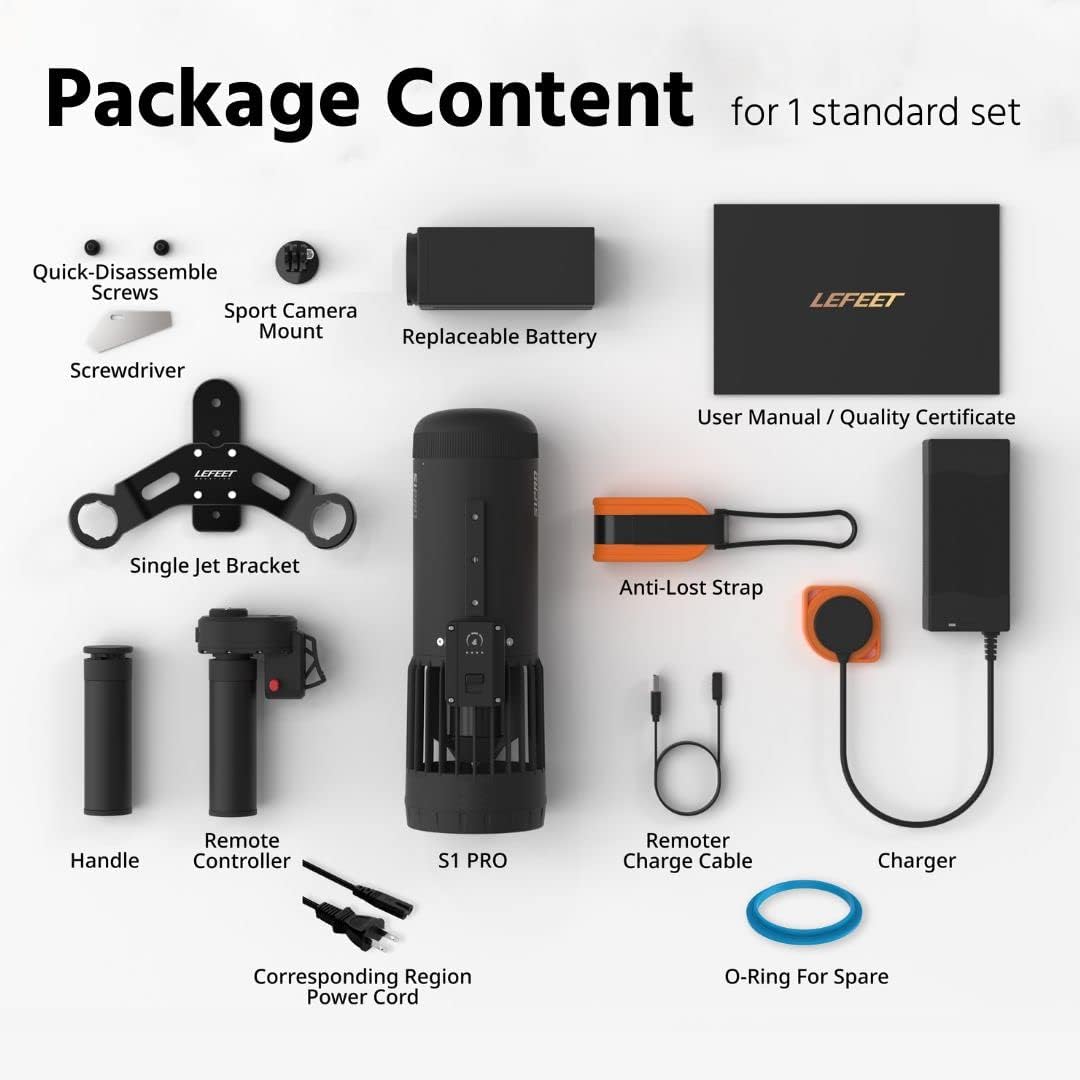
Image: All components included in the standard LEFEET S1 Pro package, laid out clearly.
Setup and Assembly
Follow these steps to assemble your LEFEET S1 Pro underwater scooter:
- Install the Battery: Ensure the battery is fully charged before first use. Open the main unit cover, insert the battery, and securely close the cover.
- Attach the Handle Bracket: Use the provided quick-disassemble screws to attach the handle bracket to the main unit.
- Attach Handles and Remote Control: Slide the handles onto the bracket. Attach the remote control to one of the handles, ensuring it is securely fastened.
- Charge the Remote Control: Connect the remote control to its charging cable. The remote control has a separate power source and needs to be charged independently.
- Perform Initial Pairing: After charging both the main unit and remote, power them on. The devices should automatically pair. Refer to the operating section for power-on instructions.

Image: The fully assembled LEFEET S1 Pro underwater scooter with handles and remote control attached.
Operating Instructions
The LEFEET S1 Pro features intuitive controls and multiple speed settings for various underwater activities.
Power On/Off and Speed Adjustment:
- Power On: Press and hold the power button on the main unit until the indicator lights illuminate. Similarly, power on the remote control.
- Speed Adjustment: The S1 Pro offers 3 speed modes. Press the speed adjustment button on the main unit or remote control to cycle through the available speeds. The indicator lights will show the current speed setting.
- Activation: Once powered on and paired, press the trigger on the remote control to activate the propeller. Release the trigger to stop.
Usage Modes:
The modular design of the S1 Pro allows for versatile use in various water environments:
- Snorkeling: Use the scooter to effortlessly glide across the water surface or just below, conserving energy and extending your exploration.
- Swimming: Enhance your swimming speed and endurance, making pool workouts or open water swims more dynamic.
- Deep Diving: Rated for depths up to 40 meters, the S1 Pro can assist divers in covering more ground underwater with less effort.
- Freediving & Teaching Mode: Its compact size and maneuverability make it suitable for freediving assistance or for instructors demonstrating techniques.

Image: The LEFEET S1 Pro being used for snorkeling, swimming, deep diving, and freediving, showcasing its versatility.
Performance:
- Thrust: Provides 8kg (18lbs) of thrust.
- Top Speed: Achieves a top speed of 1.8m/s (6ft/s).
- Battery Life (Single Charge): Up to 70 minutes.
- Depth Rating: Safe for use up to 40 meters (131 feet) depth.

Image: Visual representation of the LEFEET S1 Pro's speed capabilities, comparing it to fin kicking and leisure swimming.
Maintenance
Proper maintenance ensures the longevity and performance of your LEFEET S1 Pro.
- Rinsing: After each use, especially in saltwater, thoroughly rinse the entire unit with fresh water. This is crucial to prevent salt buildup and corrosion.
- Drying: Ensure the unit is completely dry before opening any compartments, especially the battery housing. Use a soft towel to dry the exterior.
- Battery Care: Store batteries in a cool, dry place. Avoid overcharging or completely draining the battery. If a battery shows signs of swelling, discontinue use immediately and dispose of it properly.
- O-Rings: Regularly inspect the O-rings for any signs of wear or damage. Replace them if necessary using the provided spare O-ring to maintain the waterproof seal.
Troubleshooting
If you encounter issues with your LEFEET S1 Pro, refer to the following common problems and solutions:
| Problem | Possible Cause | Solution |
|---|---|---|
| Device does not power on. | Low battery on main unit or remote. | Ensure both the main unit battery and remote control are fully charged. |
| Remote control does not pair. | Remote battery low; pairing issue. | Recharge the remote control. Power off and on both devices to re-initiate pairing. |
| Reduced thrust or performance. | Low battery; debris in propeller. | Charge the battery. Inspect the propeller for any obstructions and carefully remove them. |
| Battery swelling. | Defective battery; improper charging/storage. | Immediately discontinue use. Do not attempt to charge or use a swollen battery. Contact customer support for replacement and proper disposal instructions. |
If the problem persists after trying these solutions, please contact LEFEET customer support.
Specifications
| Feature | Detail |
|---|---|
| Brand | LEFEET |
| Model | S1-Pro |
| Color | Black |
| Material | Aluminum |
| Item Weight | 2.5 Kilograms |
| Max Depth Rating | 40 Meters |
| Max Speed | 1.8 m/s (6 ft/s) |
| Thrust | 8 kgf / 17.6 lbf |
| Battery Life (Single Charge) | Up to 70 minutes |
| Age Range (Description) | Adult |
| UPC | 780669529844 |
| Item Package Dimensions L x W x H | 15.39 x 12.48 x 6.46 inches |
Warranty Information
The LEFEET S1 Pro comes with a 1-year warranty from the date of purchase. This warranty covers manufacturing defects and malfunctions under normal use. Please retain your proof of purchase for warranty claims. For detailed warranty terms and conditions, refer to the Quality Certificate included in your package or contact LEFEET customer support.
Support and Contact
For further assistance, technical support, or inquiries, please use the following resources:
- Official User Guide (PDF): For the most comprehensive instructions and safety guidelines, please download the official PDF user guide: Download PDF User Guide
- LEFEET Brand Store: Explore other LEFEET products and accessories, and find additional support information: Visit LEFEET Store
- Customer Service: Refer to the contact information provided on your product packaging or the official LEFEET website for direct customer support.


