
Introduction
The Aquasonic Black Series PRO is an advanced ultra-whitening power toothbrush designed to provide a comprehensive oral care experience. It integrates cutting-edge technology with user-friendly features to ensure effective cleaning and improved oral hygiene.
What's in the Box
- 1 AquaSonic Black Series Pro Toothbrush
- 1 UV Sanitizing & Wireless Charging Dock
- 6 ProFlex brush heads
- 1 premium travel case
- Instruction and support contact manual

Figure 1: Aquasonic Black Series PRO Toothbrush with included accessories.
Setup
Initial Charging
Before first use, fully charge your Aquasonic Black Series PRO toothbrush. Place the toothbrush handle onto the UV Sanitizing & Wireless Charging Dock. The battery indicator light on the handle will illuminate to show charging status. A full charge typically takes several hours.
Attaching a Brush Head
Align the brush head with the metal shaft on the toothbrush handle. Gently push the brush head down until it clicks securely into place. Ensure it is firmly attached before use.
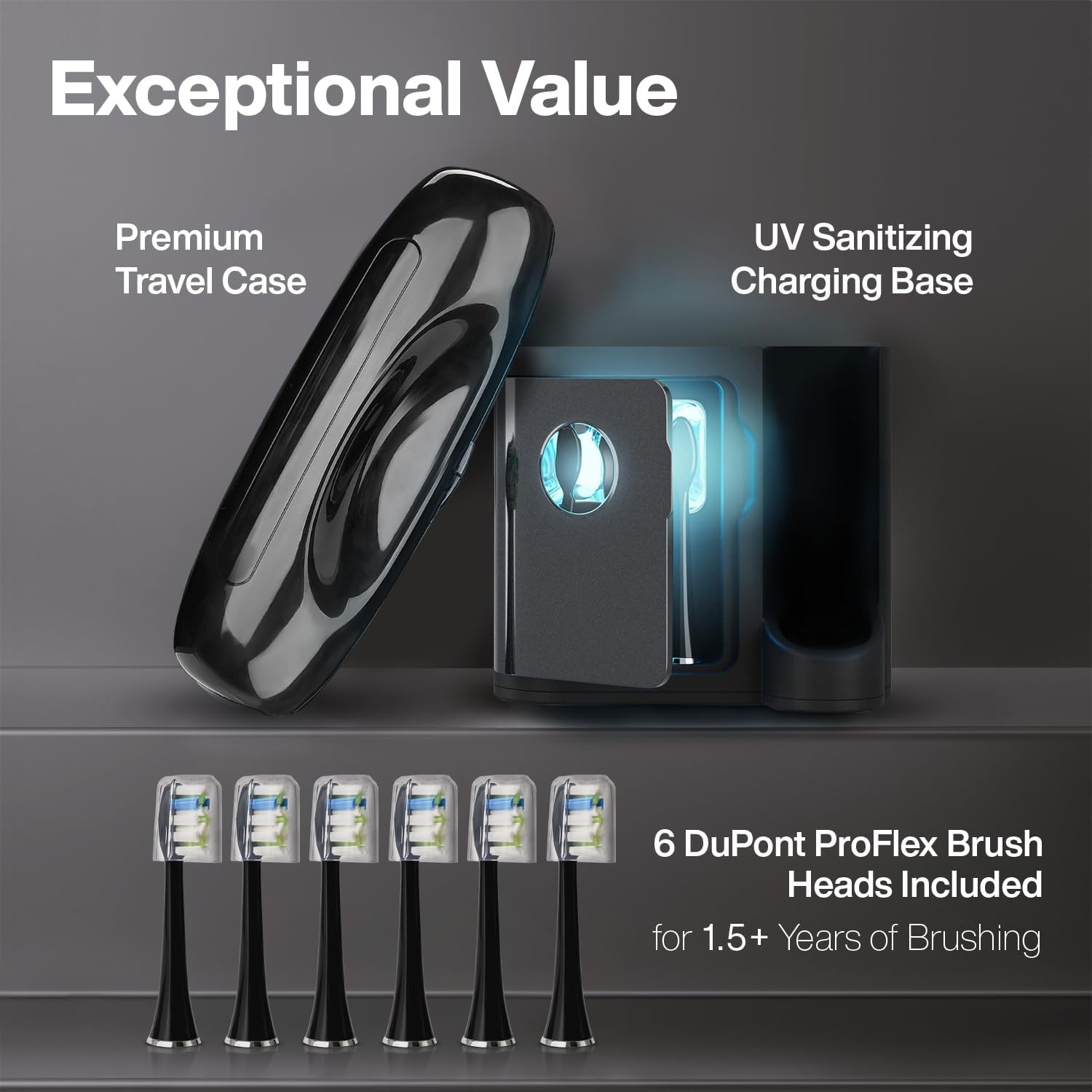
Figure 2: The UV Sanitizing & Wireless Charging Dock and premium travel case.
Operating Instructions
Brushing Modes
The Black Series PRO offers 5 unique brushing modes to cater to various oral care needs:
- Clean: Standard brushing mode for daily plaque removal.
- Soft: Gentle mode for sensitive teeth and gums.
- Whiten: Designed to help remove surface stains for brighter teeth.
- Massage: Delivers vibrating microbursts to gently stimulate gums.
- Deep Clean: Targets stubborn discoloration and leaves teeth feeling smoother.
To select a mode, press the mode button on the handle. The corresponding indicator light will illuminate.
Smart Timers
The toothbrush features built-in smart timers to guide efficient brushing:
- 30-Second Notification Timer: The brush will briefly pause every 30 seconds to signal when to move to the next quadrant of your mouth.
- 2-Minute Auto Timer: The brush will automatically shut off after 2 minutes of continuous use, indicating the completion of the dentist-recommended brushing time.

Figure 3: Internal view highlighting the 50,000 VPM motor and smart chip technology.

Figure 4: Detailed view of the 5 custom brushing modes on the toothbrush handle.
Maintenance
UV Sanitization
The UV Sanitizing Base uses auto-timed UV lights to kill 99.99% of germs on your brush heads after each brushing session. After use, rinse your brush head and place it in the designated slot within the UV sanitizing chamber on the charging dock. Close the lid to activate the UV light cycle.
Brush Head Replacement
It is recommended to replace your ProFlex brush head every 3 months, or sooner if the bristles appear frayed or worn. Each brush head is designed for approximately 3 months of use, providing over a year and a half of refills with the included 6 brush heads.

Figure 5: The UV Clean Technology in action within the charging dock.

Figure 6: Proper handling of the Aquasonic Black Series PRO Toothbrush.
Troubleshooting
Common Issues and Solutions
- Toothbrush not turning on: Ensure the toothbrush is fully charged. Place it on the charging dock and check the battery indicator light.
- Vibration feels weak: The battery may be low. Recharge the toothbrush. Also, ensure the brush head is securely attached.
- UV light not activating: Ensure the brush heads are correctly placed in the slots and the lid of the UV sanitizing chamber is fully closed.
- Brush head feels loose: Remove the brush head and reattach it, ensuring it clicks firmly into place. If the issue persists, replace the brush head.
Specifications
| Feature | Detail |
|---|---|
| Item Model Number | AQ2P |
| Package Dimensions | 9.53 x 9.33 x 3.5 inches; 2.69 Pounds |
| Batteries | 1 Lithium Ion batteries required. (included) |
| Manufacturer | AquaSonic |
| Brand | Aquasonic |
| Age Range (Description) | Adult |
| Special Feature | Rechargeable, Waterproof, Brushing Timer |
| Power Source | Battery Powered |
| Item Firmness Description | Medium |
Safety Information
For adult use only. Keep out of reach of children. Use UV sanitizing base properly as misuse may cause harm.
Warranty and Support
For warranty information or product support, please refer to the contact details provided in the included instruction manual or visit the official Aquasonic website.