
MAXXMEE B0992J7ZWY
MAXXMEE Cordless Vacuum Cleaner Plus
User Manual
Model: B0992J7ZWY
Introduction
Thank you for choosing the MAXXMEE Cordless Vacuum Cleaner Plus. This versatile appliance is designed for efficient cleaning of various surfaces in your home and car. It functions as both a powerful handheld vacuum and a convenient stick vacuum, featuring anti-hair technology and automatic suction power regulation for an optimal cleaning experience. Please read this manual thoroughly before first use to ensure safe and proper operation, maintenance, and troubleshooting.
Safety Instructions
- Always ensure the vacuum cleaner is switched off and unplugged before cleaning or performing maintenance.
- Do not use the appliance to vacuum water or other liquids, hot ashes, or sharp objects.
- Keep hair, loose clothing, fingers, and all parts of the body away from openings and moving parts.
- Do not operate the vacuum cleaner if it has been dropped, damaged, left outdoors, or dropped into water.
- Use only the original charger supplied with the appliance.
- Store the vacuum cleaner in a dry place, away from direct sunlight and extreme temperatures.
- This appliance is for household use only.
Package Contents
Please check the package contents upon unpacking. If any parts are missing or damaged, contact customer support.

Image: All components of the MAXXMEE Cordless Vacuum Cleaner Plus, including the main unit, extension tube, floor brush, crevice nozzle, combination nozzle, battery, and charger.
- Main Vacuum Unit (Handheld)
- Aluminum Extension Tube (extendable up to 80 cm)
- Anti-Hair Floor Brush
- Crevice Nozzle with LED Light
- Combination Nozzle
- Rechargeable Battery
- Charging Adapter
- User Manual (this document)
Product Overview
Familiarize yourself with the different parts of your MAXXMEE Cordless Vacuum Cleaner Plus.
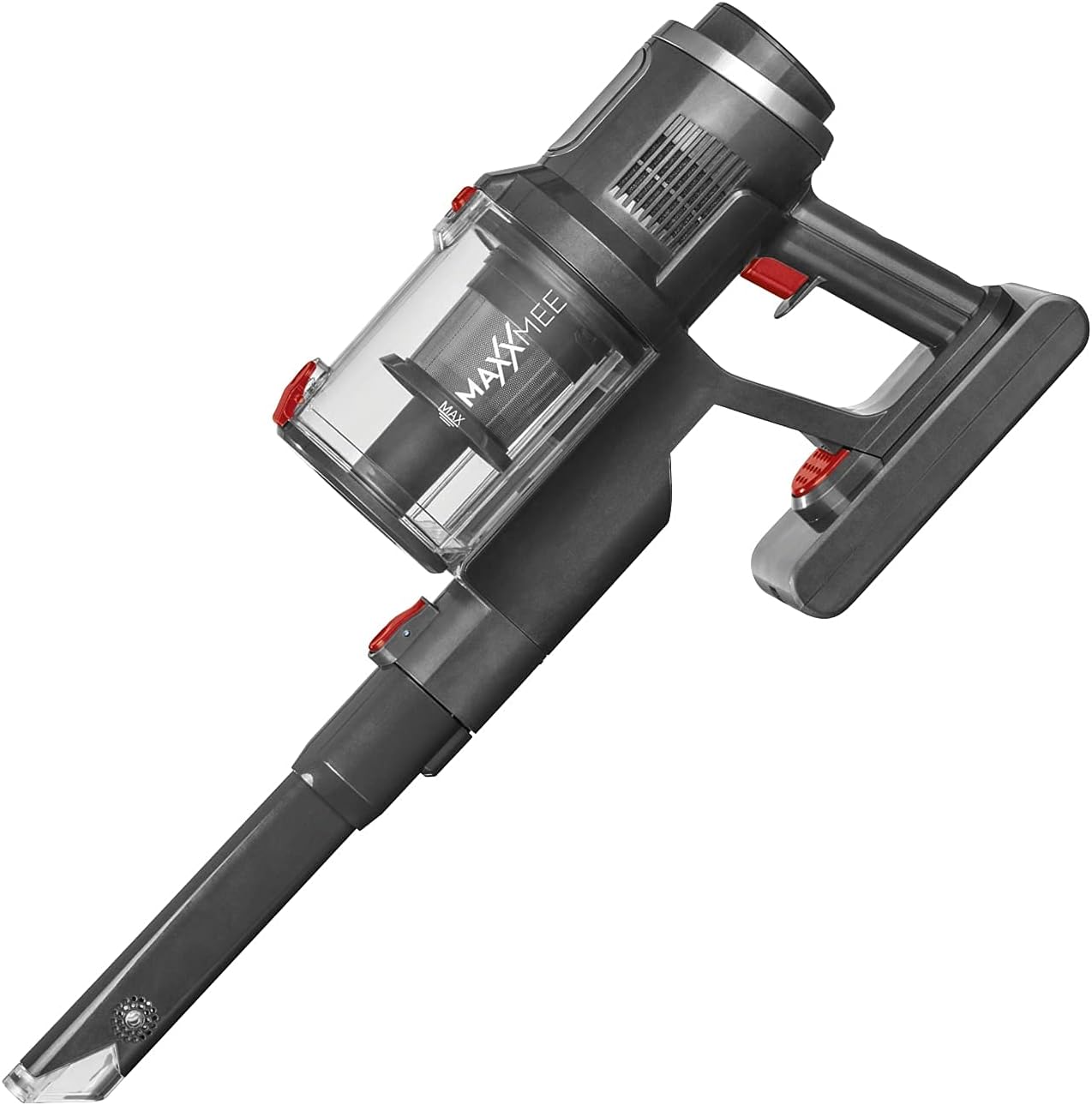
Image: The main handheld vacuum unit, showing the transparent dust bin, handle, and power buttons.

Image: A detailed view of the vacuum's digital display, indicating battery percentage, suction power levels (low, medium, high), and automatic mode.
- Main Unit: Contains the motor, dust bin, filter, and control panel.
- Dust Bin: Transparent, removable container for collected dust and debris.
- Digital Display: Shows battery level, suction mode, and automatic detection status.
- Extension Tube: Connects the main unit to the floor brush for stick vacuum use.
- Floor Brush: Equipped with a rotary brush and anti-hair technology for effective floor cleaning.
- Crevice Nozzle: Ideal for narrow spaces and corners, with an integrated LED light.
- Combination Nozzle: For upholstery, curtains, and other delicate surfaces.
Setup
1. Charging the Battery
- Before first use, fully charge the battery.
- Connect the charging adapter to the charging port on the battery or the main unit.
- Plug the adapter into a wall outlet. The display will indicate charging status.
- The display will show 100% when fully charged.
2. Assembling the Vacuum Cleaner

Image: A visual representation of how the handheld vacuum unit connects to the extension tube and floor brush to form the stick vacuum configuration.
- For Handheld Use: Attach the desired nozzle (crevice or combination) directly to the main vacuum unit. Ensure it clicks securely into place.
- For Stick Vacuum Use:
- Connect the aluminum extension tube to the main vacuum unit.
- Connect the anti-hair floor brush to the other end of the extension tube.
- Ensure all connections are firm and secure.
Operating Instructions
1. Powering On/Off
- Press the power button on the handle to turn the vacuum cleaner on.
- Press the power button again to turn it off.
2. Adjusting Suction Power

Image: This composite image illustrates the vacuum's features, including the rotating brush head for floor cleaning, the LED light on the crevice tool for dark areas, the handheld mode for upholstery, and the digital display for settings.
- The vacuum offers 3 different suction levels and an automatic mode.
- Use the mode selection button (usually near the display) to cycle through the suction levels (Low, Medium, High).
- Automatic Mode: Select "AUTO" on the display. The vacuum will automatically detect the level of dirt and adjust the suction power accordingly. This is indicated by color changes on the display.
3. Using Attachments
- Floor Brush: Best for hard floors and carpets. The anti-hair technology helps prevent hair tangles.
- Crevice Nozzle with LED Light: Ideal for tight spaces, corners, and under furniture. The LED light illuminates dark areas for better visibility.
- Combination Nozzle: Use the brush part for dusting and delicate surfaces, and the narrow part for general vacuuming of upholstery or car interiors.

Image: A user demonstrating the MAXXMEE Cordless Vacuum Cleaner Plus in its stick configuration, effectively cleaning a rug in a living room setting.
Maintenance
Regular maintenance ensures optimal performance and extends the life of your vacuum cleaner.
1. Emptying the Dust Bin
- The dust bin has a capacity of 600 ml. Empty it regularly, especially when it reaches the "MAX" line.
- Press the release button to detach the dust bin from the main unit.
- Open the bottom flap of the dust bin and empty the contents into a trash can.
- Reattach the dust bin securely.
2. Cleaning the Filter
- The vacuum uses an anti-allergen filter. It is recommended to clean the filter after every few uses, or when suction power decreases.
- Twist and pull out the filter assembly from the dust bin.
- Tap the filter gently to remove loose dust. For a deeper clean, rinse the filter under cold running water.
- Important: Ensure the filter is completely dry before reinserting it into the vacuum cleaner. This may take up to 24 hours.
3. Cleaning the Floor Brush
- Periodically check the rotary brush for tangled hair or debris.
- Most hair should be prevented by the anti-hair technology, but some may still accumulate.
- Remove the brush roll from the floor brush head (refer to diagrams in the physical manual if available for specific release mechanisms).
- Use scissors or a brush to remove any tangled hair or fibers.
- Reinsert the brush roll securely.
Troubleshooting
| Problem | Possible Cause | Solution |
|---|---|---|
| Vacuum not turning on. | Battery is not charged or not properly inserted. | Charge the battery fully. Ensure the battery is securely clicked into place. |
| Low suction power. | Dust bin is full. Filter is clogged. Nozzle/tube is blocked. | Empty the dust bin. Clean or replace the filter. Check for blockages in the nozzles, extension tube, and floor brush. |
| Floor brush not rotating. | Hair or debris tangled in the brush roll. Obstruction in the brush head. | Clean the brush roll. Remove any obstructions. |
| Vacuum stops suddenly during use. | Battery is depleted. Overheating protection activated. | Recharge the battery. Turn off the vacuum and let it cool down for at least 30 minutes before resuming use. |
Specifications
| Brand | MAXXMEE |
| Model | B0992J7ZWY |
| Product Dimensions (L x W x H) | 33 x 11 x 25 cm (main unit); 4 Kilograms (item weight) |
| Sound Level | 65 dB |
| Special Feature | Cordless, Automatic Suction Power Regulation, Anti-Hair Technology |
| Filter Type | Anti-Allergen |
| Dust Bin Capacity | 600 ml |
| Battery Life | Up to 60 minutes (depending on suction mode) |
| Manufacturer | DS Produkte |
Warranty and Support
For warranty information, technical support, or spare parts availability, please refer to the contact details provided with your purchase documentation or visit the official MAXXMEE website. Keep your proof of purchase for any warranty claims.
Ask a question about this manual
Ask about setup, troubleshooting, compatibility, parts, safety, or missing instructions. Manuals+ will review the question and use this page’s manual context to help answer it.