
Easytry123 RCS-3PSS4E, RCS-4PIS4E, RCS-BH80UA-WL, RCS-6MHVPUS4E, C2462R, SAP-KR74E, SAP-KR94EH, SAP-KR94E, SAP-XRV96EH
Easytry123 Replacement Remote Control User Manual
For Sanyo Room Air Conditioners: RCS-3PSS4E, RCS-4PIS4E, RCS-BH80UA-WL, RCS-6MHVPUS4E, C2462R, SAP-KR74E, SAP-KR94EH, SAP-KR94E, SAP-XRV96EH
Introduction
This manual provides instructions for the Easytry123 replacement remote control designed for various Sanyo Room Air Conditioner models. This remote offers essential functions for controlling your air conditioning unit. Please note that as a replacement unit, some advanced or specific functions of your original remote may not be supported. Refer to the compatible model list to ensure this remote is suitable for your air conditioner.
Important Note: This remote control requires 2 AAA batteries (not included) for operation. No programming is typically required; simply insert batteries and point towards your air conditioner unit.
Setup
1. Battery Installation
The remote control requires two (2) AAA batteries for operation. Ensure correct polarity when inserting the batteries.
- Locate the battery compartment on the back of the remote control.
- Slide the battery compartment cover downwards to open it.
- Insert two AAA batteries, matching the positive (+) and negative (-) terminals as indicated inside the compartment.
- Replace the battery compartment cover by sliding it back into place until it clicks securely.

Figure 1: Battery compartment on the back of the remote control.
2. Initial Use
Once batteries are installed, the remote control is ready for use. Point the remote control directly at the infrared receiver on your Sanyo air conditioner unit. There is typically no pairing or programming required for this replacement remote.
Operating Instructions
This section details the functions of the buttons on your remote control.
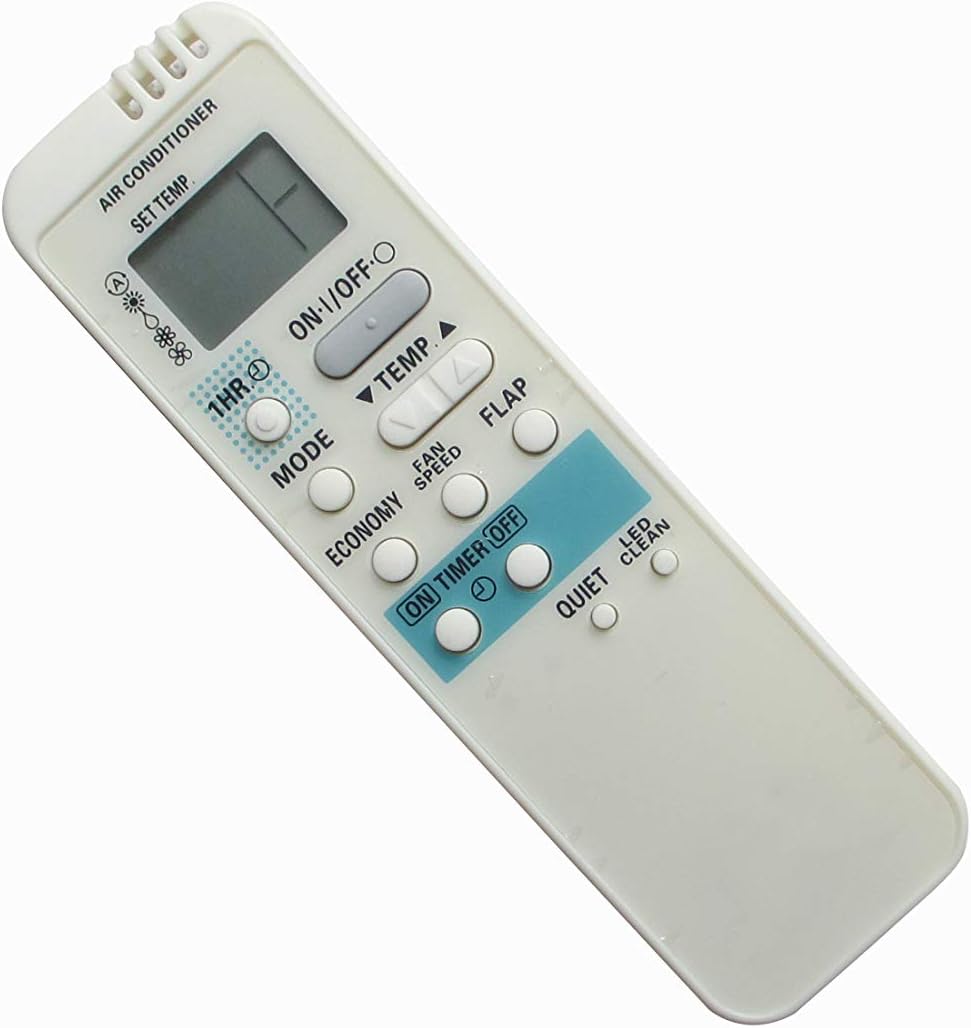
Figure 2: Front view of the remote control.
| Button | Function |
|---|---|
| ON/OFF | Powers the air conditioner unit on or off. |
| TEMP ▲ / ▼ | Adjusts the desired temperature setting up or down. |
| MODE | Cycles through operating modes (e.g., Cool, Dry, Fan, Heat - if supported by AC unit). |
| FAN SPEED | Adjusts the fan speed (e.g., Low, Medium, High, Auto). |
| FLAP | Controls the swing function of the air conditioner's louver/flap. |
| ECONOMY | Activates or deactivates the energy-saving mode. |
| ON TIMER / OFF TIMER | Sets a timer for the air conditioner to turn on or off automatically. (Specific timer setting instructions may vary by AC unit and are not directly controlled by this remote's simple buttons). |
| 1HR | Likely a quick timer setting, possibly for 1 hour operation or delay. |
| QUIET | Activates a quiet operation mode, reducing fan noise. |
| LED CLEAN | May activate a self-cleaning function or control an indicator light on the AC unit. |
Maintenance
Battery Replacement
Replace batteries when the remote control's range decreases or if the display becomes dim or unresponsive. Always replace both batteries at the same time with new AAA batteries.
Cleaning
Wipe the remote control with a soft, dry cloth. Do not use liquid cleaners or abrasive materials, as they may damage the remote's surface or internal components.
Storage
If the remote control will not be used for an extended period, remove the batteries to prevent leakage and potential damage to the remote.
Troubleshooting
- Remote not responding:
- Ensure the remote is pointed directly at the air conditioner's receiver.
- Check if the batteries are inserted correctly with the correct polarity.
- Replace old batteries with new ones.
- Ensure there are no obstructions between the remote and the air conditioner.
- Some functions not working:
- This is a replacement remote; some advanced or specific functions of your original Sanyo remote may not be supported.
- Verify that your air conditioner model is listed as compatible.
- Display is dim or blank:
- Replace the batteries.
Specifications
| Feature | Detail |
|---|---|
| Brand | Easytry123 |
| Compatible Devices | Sanyo Room Air Conditioners (Models: RCS-3PSS4E, RCS-4PIS4E, RCS-BH80UA-WL, RCS-6MHVPUS4E, C2462R, SAP-KR74E, SAP-KR94EH, SAP-KR94E, SAP-XRV96EH) |
| Connectivity Technology | Infrared |
| Controller Type | Button Control |
| Special Feature | Ergonomic design |
| Batteries Required | 2 x AAA (not included) |
Warranty and Support
As a replacement product, specific warranty details may vary. Please refer to the seller's return policy or contact the seller directly for warranty information and support regarding this product.
For general inquiries or issues, you may contact the manufacturer, Easytry123, through the platform where the product was purchased.
Ask a question about this manual
Ask about setup, troubleshooting, compatibility, parts, safety, or missing instructions. Manuals+ will review the question and use this page’s manual context to help answer it.