
Introduction
This manual provides essential information for the installation, operation, and maintenance of your Zalman GigaMax 700W 80 Plus Bronze ATX Power Supply. Please read this manual thoroughly before installation and keep it for future reference.
The Zalman GigaMax 700W power supply is designed for desktop PC systems, offering 700 Watts of stable power with 80 Plus Bronze efficiency. It features a 120mm silent fan for quiet operation and includes multiple protection circuits to safeguard your system components.
Safety Information
- Electrical Safety: Always disconnect the power cord from the wall outlet before installing, removing, or cleaning the power supply.
- Grounding: Ensure your system is properly grounded to prevent electrical hazards.
- Ventilation: Do not block the ventilation openings of the power supply. Ensure adequate airflow within your PC case.
- Moisture: Keep the power supply away from water, humidity, or any liquids.
- Opening the Unit: Do not open the power supply casing. High voltages are present inside, and opening the unit will void the warranty and poses a risk of electric shock.
- Temperature: Operate the power supply within the specified temperature range. Avoid extreme heat or cold.
Package Contents
Verify that all items are present in the package:
- Zalman GigaMax 700W Power Supply Unit
- AC Power Cord
- Mounting Screws
- Cable Ties
- User Manual (this document)

Image: Zalman GigaMax 700W Power Supply, user manual, cable ties, power cord, and screw set.
Setup and Installation
Follow these steps to install your power supply:
- Prepare Your System: Turn off your computer and disconnect the AC power cord from the wall outlet. Open your computer case.
- Remove Old PSU (if applicable): Disconnect all cables from your old power supply and remove it from the case.
- Install New PSU: Carefully place the Zalman GigaMax 700W power supply into the designated PSU bay in your computer case. Secure it with the provided mounting screws.
- Connect Mainboard Power: Connect the 20+4 pin mainboard power connector to your motherboard. Ensure it is firmly seated.
- Connect CPU Power: Connect the 4+4 pin CPU power connector to your motherboard's CPU power socket.
- Connect PCIe Power: For graphics cards requiring additional power, connect the 6+2 pin PCIe connectors. Use the appropriate number of connectors for your GPU.
- Connect SATA and Peripheral Power: Connect SATA power connectors to your storage drives (HDDs, SSDs) and optical drives. Use peripheral (Molex) connectors for other components as needed.
- Cable Management: Utilize the black sleeved cables and included cable ties to organize the cables within your case for improved airflow and aesthetics.
- Close Case and Connect AC Power: Close your computer case. Connect the AC power cord to the power supply and then to a wall outlet.
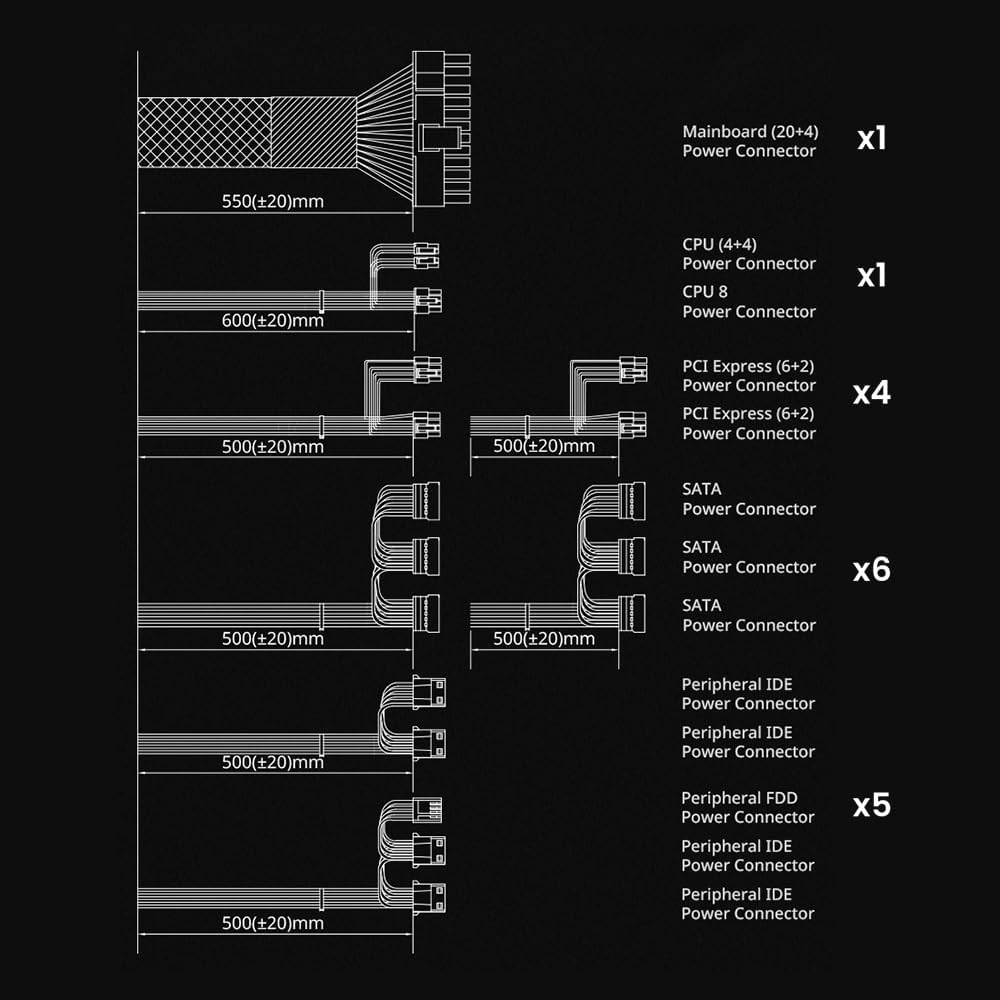
Image: Cable connection diagram showing lengths and types of connectors (Mainboard, CPU, PCI Express, SATA, Peripheral IDE).

Image: Detail of the black and flat sleeved cables for organized installation.
Operating Instructions
After successful installation, you can power on your system. The Zalman GigaMax 700W power supply is designed for efficient and stable operation.
- Power On: Flip the power switch on the back of the PSU to the 'I' (On) position. Then, press your computer's power button.
- Efficiency: The 80 Plus Bronze certification ensures up to 87% efficiency at 100% load (115-240VAC), minimizing wasted energy and heat generation.
- Stable Output: The Active PFC system provides a maximum power factor of 99%, contributing to consistent and stable energy delivery to your components.
- Quiet Operation: The integrated 120mm silent fan with a sleeved bearing operates quietly, maintaining optimal cooling without excessive noise.
Maintenance
Proper maintenance helps ensure the longevity and performance of your power supply:
- Dust Removal: Periodically clean the exterior of the power supply and the fan grille to prevent dust buildup, which can impede airflow and cooling. Use compressed air for best results, ensuring the system is powered off and unplugged.
- Environmental Conditions: Ensure the operating environment is clean, dry, and well-ventilated. Avoid placing the computer in areas with excessive dust, high humidity, or extreme temperatures.
- Cable Inspection: Occasionally check all power connections to ensure they are secure and free from damage.
Troubleshooting
If you encounter issues with your power supply, consider the following:
- No Power:
- Check if the AC power cord is securely connected to both the power supply and the wall outlet.
- Ensure the power switch on the PSU is in the 'I' (On) position.
- Verify that the mainboard and CPU power connectors are correctly and firmly seated.
- System Instability/Random Shutdowns:
- This could indicate an overloaded power supply or a component issue. Ensure your system's power requirements do not exceed the PSU's 700W capacity.
- The power supply features multiple protection circuits (OCP, OVP, OPP, OTP, UVP, SCP) that may trigger a shutdown to protect components. If this occurs frequently, consult a professional.
- Loud Fan Noise:
- While designed for quiet operation, excessive dust buildup can cause fan noise. Refer to the Maintenance section for cleaning instructions.

Image: Overview of the power supply's protection features: Over-Current Protection (OCP), Over-Power Protection (OPP), Over-Voltage Protection (OVP), Under-Voltage Protection (UVP), Over-Temperature Protection (OTP), and Short-Circuit Protection (SCP).
Specifications
| Model Number | ZM700-GVII-A |
| Brand | Zalman |
| Output Wattage | 700 Watts |
| Efficiency Certification | 80 Plus Bronze |
| Form Factor | ATX |
| Cooling Method | Air (120mm Silent Fan) |
| Product Dimensions (L x W x H) | 5.9 x 5.5 x 3.4 inches (150 x 140 x 86 mm) |
| Item Weight | 3.3 pounds |
| Compatible Devices | Desktop, PC, Windows |
| Connector Types | ATX, PCI Express, SATA, Peripheral IDE |
| Protection Features | OCP, OVP, OPP, OTP, UVP, SCP |
| Certifications | cTUVus, TUV, FCC, CB, CE certified, RoHS Compliant |

Image: Standard ATX size (140mm x 150mm x 86mm) for wide compatibility.
Warranty and Support
Your Zalman GigaMax 700W Power Supply is backed by a 5-Year Manufacturer Warranty. This warranty covers defects in materials and workmanship under normal use.
For warranty claims, technical support, or further inquiries, please contact Zalman customer service through their official website or the retailer where the product was purchased. Please have your product model number (ZM700-GVII-A) and proof of purchase ready when contacting support.

Image: Zalman 5 Year Warranty emblem.