1. Introduction
This manual provides instructions for the safe and effective use of the UNI-T UTi165A Thermal Imager. The UTi165A is designed for industrial temperature testing, offering reliable thermal imaging capabilities. Key features include:
- 2.8-inch TFT screen for clear display.
- Infrared resolution of 160x120 pixels.
- Temperature measurement range: -10℃ to 400℃.
- Buzzer and flashlight alarm functions.
- Automatic capture of high and low temperatures.
- 1/4-inch tripod mounting hole for stable measurements.
- IP65 rating and 2m drop proof for durability.
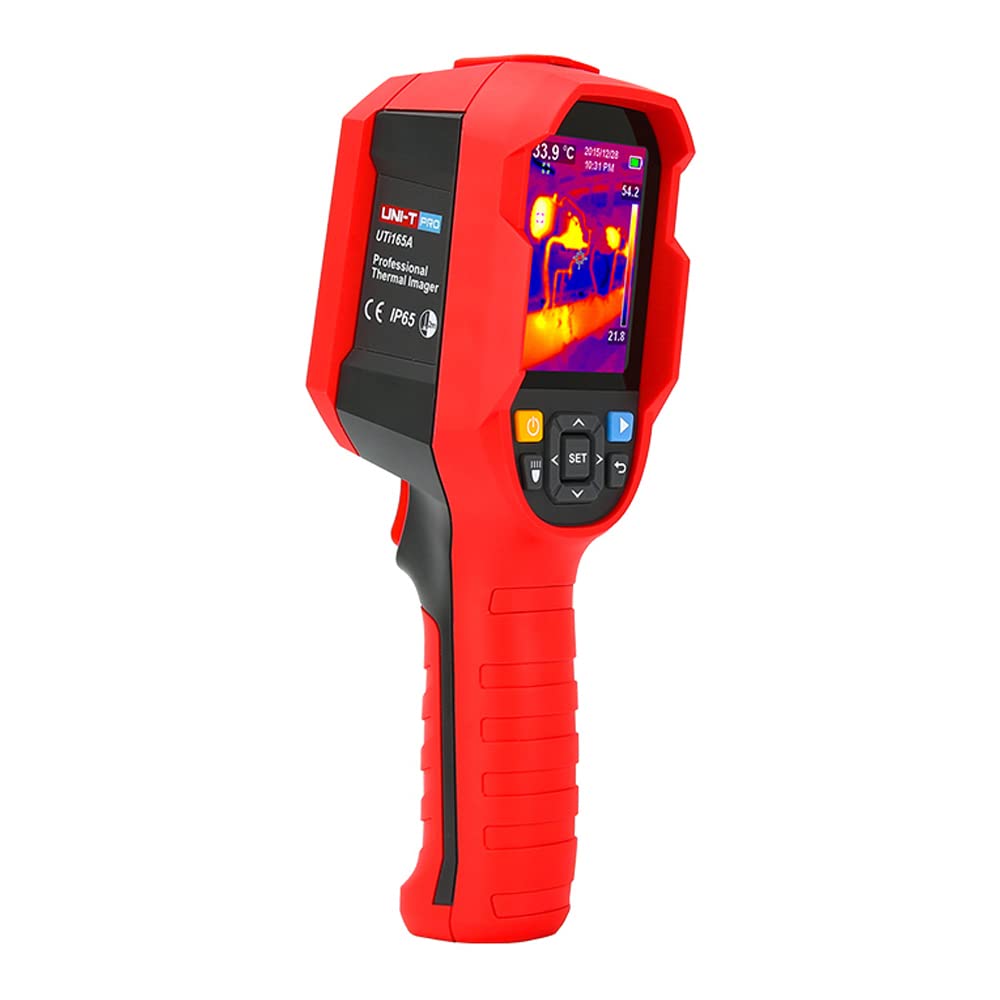
Figure 1: The UNI-T UTi165A Thermal Imager, a handheld device for temperature measurement.
2. Safety Information
Read all safety warnings and instructions before using this product. Failure to follow the warnings and instructions may result in electric shock, fire, or serious injury.
- Do not operate the device if it appears damaged or is not functioning properly.
- Do not point the imager directly at intense heat sources (e.g., the sun, lasers) as this may damage the detector.
- Use only specified accessories and replacement parts.
- Keep the device dry. Do not expose it to rain or moisture.
- Do not attempt to open or modify the device. Refer all servicing to qualified personnel.
- Observe all local safety regulations when working in industrial environments.
3. Product Overview
The UNI-T UTi165A Thermal Imager is a compact, handheld device designed for ease of use in various industrial applications. It features a clear display, intuitive controls, and a robust design.

Figure 2: A user holding the UTi165A Thermal Imager, demonstrating its ergonomic design and application in inspecting an electrical panel.
3.1 Components
- Infrared Lens: Captures thermal radiation.
- 2.8-inch TFT Display: Shows thermal images and measurement data.
- Control Buttons: Navigation, menu, and capture functions.
- Trigger: Activates measurement or image capture.
- USB Type-C Port: For charging and data transfer.
- Micro SD Card Slot: For storing images and data.
- Tripod Mount: 1/4-inch thread for mounting on a tripod.
4. Setup
4.1 Charging the Device
Before first use, fully charge the thermal imager. Connect the provided Type-C USB cable to the device's USB port and to a suitable USB power adapter (not included) or a computer USB port. The charging indicator will show the charging status.
4.2 Inserting the Micro SD Card
The device comes with a 16GB TF card for storage. Locate the Micro SD card slot, usually protected by a rubber cover. Insert the Micro SD card with the contacts facing down until it clicks into place. To remove, push the card gently until it springs out.
4.3 Powering On/Off
Press and hold the power button (usually located on the side or front panel) for a few seconds to turn the device on. The display will light up. To turn off, press and hold the power button again until the device shuts down.
5. Operating Instructions
5.1 Basic Measurement
Once powered on, the device will display a thermal image. Point the infrared lens towards the object you wish to measure. The temperature of the central spot or the hottest/coldest points will be displayed on the screen. The UTi165A measures temperatures from -10℃ to 400℃.

Figure 3: The UTi165A display showing a thermal image with temperature distribution and specific measurement points.
5.2 Menu Navigation
Use the navigation buttons (up, down, left, right, OK/SET) to access and navigate through the device's menu. The menu allows you to adjust settings such as:
- Palette: Change the color scheme of the thermal image (e.g., Iron, Rainbow, White Hot, Black Hot).
- Emissivity: Adjust for different material surfaces to ensure accurate temperature readings.
- Temperature Unit: Switch between Celsius (°C) and Fahrenheit (°F).
- High/Low Temperature Tracking: Enable or disable automatic tracking of the hottest and coldest spots.
- Alarm Settings: Configure buzzer/flashlight alarms for specific temperature thresholds.
5.3 Image Capture and Storage
To capture a thermal image, press the trigger or the designated capture button. The image will be saved to the inserted Micro SD card. You can review captured images through the gallery function in the menu.
6. Maintenance
6.1 Cleaning the Device
Wipe the device casing with a soft, damp cloth. Do not use abrasive cleaners or solvents. For the lens, use a specialized lens cleaning cloth and solution to avoid scratching. Ensure the device is powered off before cleaning.
6.2 Battery Care
To prolong battery life, avoid fully discharging the battery frequently. If storing the device for an extended period, charge the battery to approximately 50% and store it in a cool, dry place. Recharge every few months to prevent deep discharge.
6.3 Storage
Store the thermal imager in its original packaging or a protective case when not in use. Keep it away from extreme temperatures, high humidity, and direct sunlight.
7. Troubleshooting
| Problem | Possible Cause | Solution |
|---|---|---|
| Device does not power on. | Low battery; device malfunction. | Charge the battery. If problem persists, contact support. |
| Image is blurry or unclear. | Dirty lens; incorrect focus (if applicable); object too close/far. | Clean the lens. Ensure object is within measurement range. |
| Temperature readings are inaccurate. | Incorrect emissivity setting; environmental factors. | Adjust emissivity for the target material. Ensure stable measurement conditions. |
| Cannot save images. | Micro SD card full or not inserted correctly; card error. | Check Micro SD card insertion. Delete old files or replace card. Format card if necessary. |
8. Specifications
The following table outlines the key technical specifications for the UNI-T UTi165A Thermal Imager:

Figure 4: A comparison table showing specifications for different UNI-T thermal imager models. The UTi165A column provides detailed technical data.
| Feature | Specification (UTi165A) |
|---|---|
| Display | 2.8'' TFT screen |
| Infrared Resolution | 160x120 pixels |
| Temperature Range | -10℃~400℃ |
| Field of View (FOV) | 56°x 42° |
| Thermal Sensitivity (NETD) | 50 mK |
| Spatial Resolution (IFOV) | 6.1 mrad |
| Frame Rate | 9 Hz |
| Measurement Accuracy | ±2℃ or ±2% whichever is greater |
| Emissivity | Adjustable (0.01-1) |
| Focus | Focus free |
| Palettes | 5 |
| Display Modes | Thermal |
| Power | Li-ion battery (3.6V 5000mAh) |
| Product Net Weight | Around 910g |
| Product Size | 236mm x 75.5mm x 86mm |
| Protection | IP65, 2m drop proof |
| Standard Accessories | Manual, Type-C USB cable, 16GB TF card |
9. Warranty & Support
9.1 Warranty Information
UNI-T products are warranted against defects in materials and workmanship for a period specified at the time of purchase. This warranty does not cover damage caused by misuse, accident, unauthorized modification, or neglect. Please retain your proof of purchase for warranty claims.
9.2 Customer Support
For technical assistance, troubleshooting, or warranty service, please contact UNI-T customer support. Refer to the official UNI-T website or the packaging for the most current contact information.
Online Resources: www.uni-trend.com