
1. Introduction
Thank you for choosing the Sndway SW-DM60 Laser Distance Meter. This device is designed for precise and efficient distance measurements, offering various functions for professional and personal use. Please read this manual carefully before operating the device to ensure correct usage and to maximize its lifespan.
2. Safety Information
Warning: This product is a Class II laser product. Do not stare into the laser beam. Avoid direct eye exposure. Do not aim the laser at people or animals. Use only as described in this manual.
- Do not attempt to modify or disassemble the device.
- Keep the device out of reach of children.
- Avoid using the device in explosive environments or near flammable materials.
- Protect the device from extreme temperatures, moisture, and strong vibrations.
- Remove batteries if the device will not be used for an extended period.
3. Product Overview
The Sndway SW-DM60 is a compact and robust laser distance meter. It features a large LCD screen with backlight for clear readings in various lighting conditions.

Figure 3.1: Front view of the Sndway SW-DM60 Laser Distance Meter, showing the display, laser aperture, and control buttons.
The device is designed with a reinforced shell for durability in outdoor environments.

Figure 3.2: Size comparison of the Sndway SW-DM60 Laser Distance Meter, illustrating its compact dimensions (approximately 11 cm / 4.5 inches in length).
4. Setup
4.1 Battery Installation
The Sndway SW-DM60 requires two AAA batteries (not included) for operation.
- Locate the battery compartment on the back of the device.
- Slide the battery compartment cover downwards to open it.
- Insert two AAA batteries, ensuring correct polarity (+/-) as indicated inside the compartment.
- Close the battery compartment cover by sliding it back into place until it clicks securely.
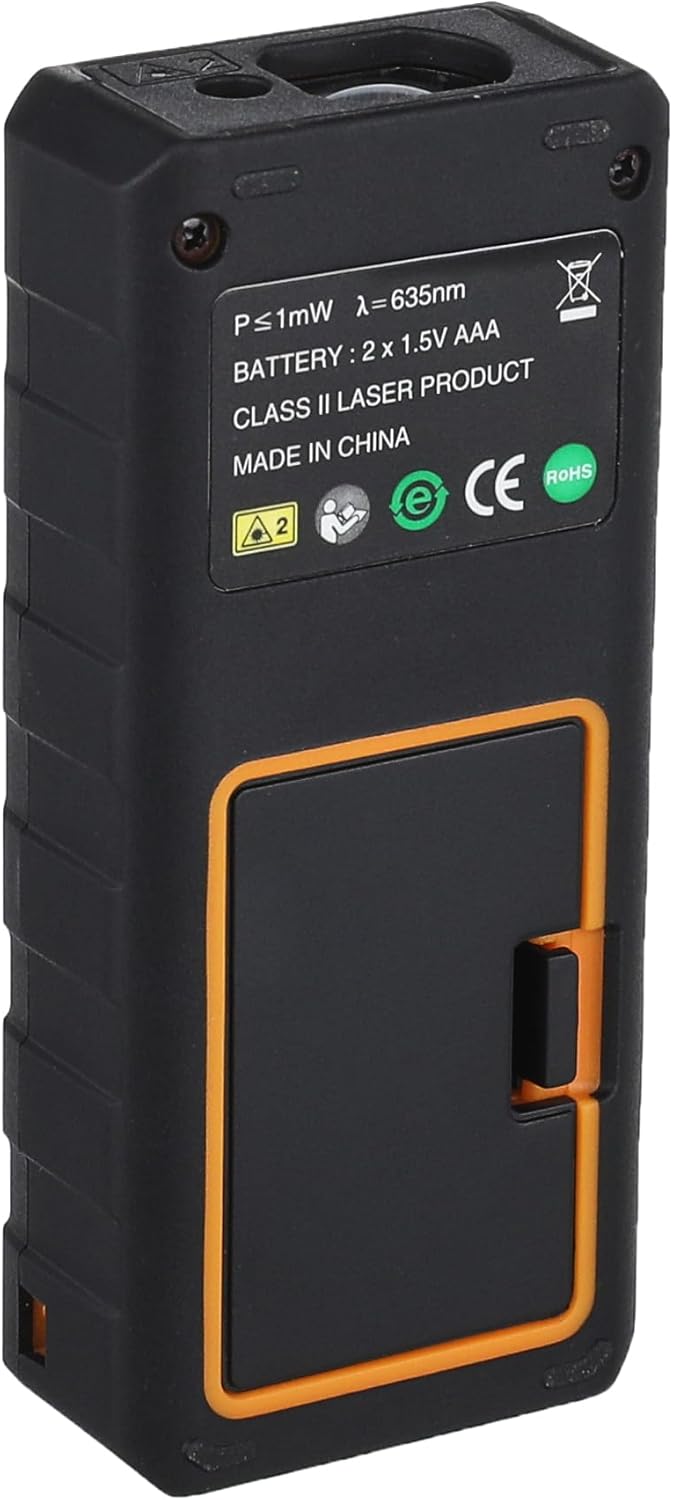
Figure 4.1: Back view of the Sndway SW-DM60 Laser Distance Meter, showing the battery compartment cover.
5. Operating Instructions
Familiarize yourself with the device's buttons and display before beginning measurements.

Figure 5.1: The Sndway SW-DM60 display showing various measurement results, including distance, area, and volume.
5.1 Power On/Off
- Power On: Press the READ button once to turn on the device. The laser will activate.
- Power Off: Press and hold the OFF/CLEAR button for a few seconds to turn off the device. The device will automatically power off after 150 seconds of inactivity.
5.2 Basic Measurement (Single Distance)
- Turn on the device.
- Aim the laser beam at the target point.
- Press the READ button once. The measured distance will be displayed on the screen.
5.3 Continuous Measurement
This mode allows for dynamic measurement, displaying the current distance as you move the device.
- Turn on the device.
- Press the measurement function button (often labeled with a square or multiple lines, refer to device specific icons) until the continuous measurement icon appears on the display.
- Move the device slowly. The display will update with real-time distance measurements.
- Press the READ button again to stop continuous measurement and hold the last value.
5.4 Area Measurement
- Press the measurement function button until the area measurement icon (typically a square) appears.
- Measure the first side (e.g., length) by pressing READ.
- Measure the second side (e.g., width) by pressing READ again.
- The device will automatically calculate and display the area.
5.5 Volume Measurement
- Press the measurement function button until the volume measurement icon (typically a cube) appears.
- Measure the length by pressing READ.
- Measure the width by pressing READ.
- Measure the height by pressing READ.
- The device will automatically calculate and display the volume.
5.6 Pythagorean Measurement
This function allows indirect measurement of height or distance using the Pythagorean theorem.
- Press the measurement function button until the Pythagorean measurement icon (typically a triangle) appears.
- Follow the on-screen prompts to measure the required sides (e.g., hypotenuse, base).
- The device will calculate and display the unknown side.
5.7 Add and Subtract Measurement
This function allows you to add or subtract measurement results.
- Perform a measurement.
- Press the '+' or '-' button.
- Perform the next measurement.
- The device will display the sum or difference.
5.8 Unit Conversion
The device supports unit selection among Meter (m), Inch (in), and Foot (ft).
- Press the 'UNIT' button (often labeled 'U' or with unit symbols) to cycle through the available units. The selected unit will be displayed on the screen.
5.9 Historical Data Record
The device can store up to 30 groups of measurement data.
- Press the 'History' or 'Memory' button (often labeled with a folder icon) to view previously stored measurements.
- Use the arrow buttons (if available) to navigate through the stored data.
6. Maintenance
- Cleaning: Use a soft, damp cloth to wipe the surface of the device. Do not use organic solvents or abrasive cleaning agents.
- Storage: If the device will not be used for an extended period, remove the batteries and store it in a cool, dry place, away from direct sunlight and extreme temperatures.
- Protection: Always keep the device in its fabric carrying pouch when not in use to protect it from dust and minor impacts.
7. Troubleshooting
| Problem | Possible Cause | Solution |
|---|---|---|
| Device does not power on | Low or dead batteries; Incorrect battery installation | Replace batteries; Check battery polarity |
| Inaccurate measurements | Unstable surface; Obstruction in laser path; Extreme environmental conditions | Ensure stable measurement; Clear laser path; Operate within specified temperature/humidity ranges |
| Display is dim or blank | Low batteries | Replace batteries |
| Laser not visible | Device not powered on; Laser malfunction | Press READ button; If problem persists, contact support |
8. Specifications
| Feature | Specification |
|---|---|
| Measuring Range | 0.05m - 60m |
| Measuring Accuracy | ±2mm |
| Measuring Unit | Meter (m) / Inch (in) / Foot (ft) |
| Laser Class | Class II, <1mW, 635nm |
| Historical Data Record | Up to 30 groups |
| Operating Temperature | 0°C - 40°C (32°F - 104°F) |
| Storage Temperature | -20°C - 60°C (-4°F - 140°F) |
| Storage Humidity | 20% - 80% RH |
| Auto Power Off | 150 seconds of inactivity |
| Power Supply | 2 x AAA Alkaline batteries (not included) |
| Product Weight | Approx. 93g (without batteries) |
| Material | Reinforced Plastic |
9. Warranty and Support
Information regarding product warranty and customer support was not provided in the available product data. Please refer to the packaging or contact the retailer/manufacturer directly for details on warranty coverage and technical assistance.


