
Introduction
This manual provides detailed instructions for the installation, operation, maintenance, and troubleshooting of your GIGABYTE GeForce RTX 3080 Vision OC 10G graphics card. This high-performance graphics card is designed for demanding visual tasks, powered by NVIDIA's Ampere architecture, featuring 2nd Generation RT Cores, 3rd Generation Tensor Cores, and 10GB GDDR6X memory. It incorporates the WINDFORCE 3X Cooling System for efficient thermal management and RGB Fusion 2.0 for customizable lighting.
Setup and Installation
1. System Requirements
- PCI Express-compliant motherboard with one dual-width x16 graphics slot.
- Minimum 750W power supply with two 8-pin PCIe power connectors.
- Microsoft Windows 10 64-bit or Linux 64-bit operating system.
- 32GB system memory recommended for optimal performance.
- Internet connection for driver download.
2. Package Contents
- GIGABYTE GeForce RTX 3080 Vision OC 10G Graphics Card
- User Manual (this document)
3. Physical Installation
- Prepare your system: Power off your computer and disconnect all cables. Open the computer case.
- Locate the PCIe slot: Identify an available PCI Express x16 slot on your motherboard.
- Remove slot covers: Remove the necessary expansion slot covers from the back of your computer case to accommodate the graphics card.
- Insert the graphics card: Carefully align the graphics card with the PCIe slot and press it firmly until it is securely seated. Ensure the retention clip on the PCIe slot locks into place.

Image: Front view of the GIGABYTE GeForce RTX 3080 Vision OC 10G Graphics Card, showcasing the triple WINDFORCE fans and the white/silver shroud design.
- Secure the card: Fasten the graphics card to the computer case using screws.
- Connect power cables: Connect the two 8-pin PCIe power connectors from your power supply to the corresponding ports on the graphics card. Ensure a firm connection.
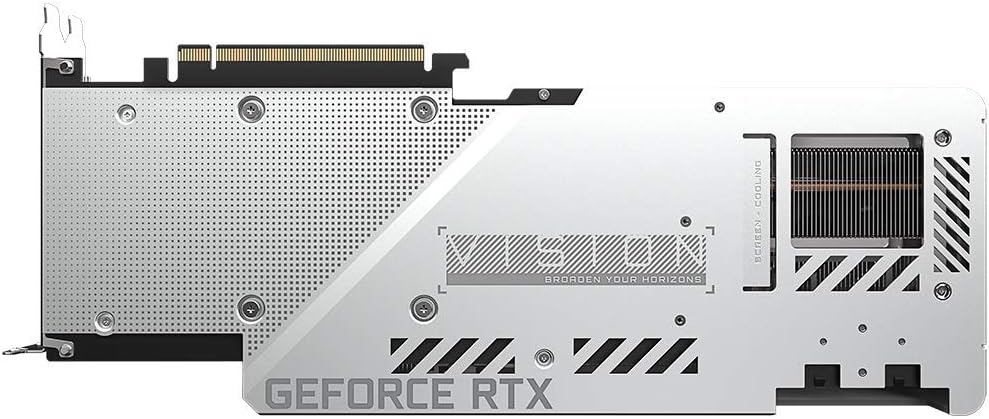
Image: Rear view of the GIGABYTE GeForce RTX 3080 Vision OC 10G Graphics Card, highlighting the protective metal backplate with ventilation cutouts and the GeForce RTX branding.
- Close the case: Replace the computer case cover and reconnect all cables.
- Connect display: Connect your monitor to one of the display outputs (HDMI or DisplayPort) on the graphics card.
Operating Instructions
1. Driver Installation
- Power on: Turn on your computer. The system may boot into a lower resolution or use a generic display driver.
- Download drivers: Visit the official GIGABYTE website (www.gigabyte.com) or NVIDIA's official website (www.nvidia.com/drivers).
- Select product: Navigate to the support section and locate the drivers for the GeForce RTX 3080 series.
- Install drivers: Download the latest recommended drivers and follow the on-screen instructions to complete the installation. A system restart may be required.
2. Software Configuration
- GIGABYTE Control Center / AORUS Engine: For advanced control over your graphics card, including fan speed adjustment, overclocking profiles, and RGB Fusion 2.0 lighting customization, download and install the GIGABYTE Control Center or AORUS Engine software from the GIGABYTE website.
- NVIDIA GeForce Experience: Install NVIDIA GeForce Experience for optimal game settings, driver updates, and access to features like ShadowPlay.
Maintenance
- Dust Removal: Regularly clean dust from the graphics card fans and heatsink using compressed air. Ensure the system is powered off and unplugged before cleaning.
- Fan Inspection: Periodically check the fans for any obstructions or unusual noises.
- Driver Updates: Keep your graphics drivers updated to ensure optimal performance and stability.
Troubleshooting
No Display Output
- Ensure the monitor cable is securely connected to the graphics card and the monitor.
- Verify that the graphics card is fully seated in the PCIe slot.
- Check that all required PCIe power connectors are securely attached to the graphics card.
- Test with a different display cable or monitor if possible.
System Instability or Crashes
- Ensure your power supply meets the minimum wattage requirement (750W).
- Update your graphics drivers to the latest version.
- Monitor GPU temperatures using software like GIGABYTE Control Center to check for overheating.
- Check for conflicts with other installed drivers or software.
Poor Performance
- Ensure drivers are correctly installed and up to date.
- Verify that the graphics card is running at its intended clock speeds (can be checked with monitoring software).
- Check background applications that might be consuming system resources.
- Ensure your system's BIOS/UEFI is updated.
Specifications
| Graphics Processing Unit | NVIDIA GeForce RTX 3080 |
| Video Memory | 10GB GDDR6X |
| Memory Interface | 320-bit |
| Boost Clock | 1800 MHz |
| Memory Speed | 19000 MHz |
| Output Ports | DisplayPort, HDMI |
| Max Digital Resolution | 7680x4320 (via DisplayPort 1.4a) |
| Multi-view | 4 |
| Card Dimensions (LxWxH) | 12.6 x 4.96 x 2.17 inches (320 x 126 x 55 mm) |
| Recommended PSU | 750W |
| Power Connectors | 2x 8-pin |
| PCI Express | 4.0 x16 |
| Model Number | GV-N3080VISION OC-10GD 2.0 |
Warranty Information
GIGABYTE products are covered by a limited warranty. The specific terms and duration of the warranty may vary by region and product. Please refer to the official GIGABYTE website or your product's packaging for detailed warranty information and registration procedures. Keep your proof of purchase for warranty claims.
Technical Support
For technical assistance, driver downloads, FAQs, and further support, please visit the official GIGABYTE support website:
You may also contact GIGABYTE customer service through the contact information provided on their website for your specific region.
