Introduction
This manual provides detailed instructions for the setup, operation, maintenance, and troubleshooting of your Ipega PG-9067 Dark Knight Wireless Bluetooth Controller. Please read this manual carefully before using the product to ensure proper functionality and to extend its lifespan.
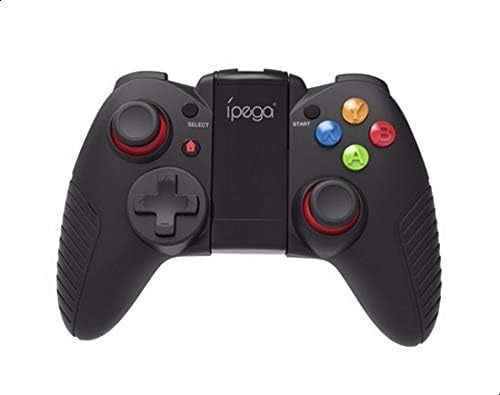
Figure 1: Front view of the Ipega PG-9067 Dark Knight Wireless Bluetooth Controller, showcasing its ergonomic design and button layout.
Setup
1. Charging the Controller
Before initial use, fully charge the controller. Connect the provided USB charging cable to the controller's charging port and to a USB power source (e.g., computer, USB wall adapter). The LED indicator will show charging status and turn off when fully charged.
2. Bluetooth Pairing with Android Devices
- Ensure the controller is powered off.
- Press and hold the HOME button and the A button simultaneously for approximately 3 seconds until the LED indicator flashes rapidly. This indicates the controller is in pairing mode.
- On your Android device (smartphone, tablet, Smart TV), navigate to the Bluetooth settings.
- Search for available devices. You should see 'PG-9067' or a similar name appear in the list.
- Select 'PG-9067' to initiate the pairing process. Once successfully paired, the LED indicator on the controller will stop flashing and remain solid.
- If pairing fails, turn off the controller and your device's Bluetooth, then repeat the steps.
3. Mounting a Smartphone
The controller features a telescopic stand designed to securely hold smartphones up to 6 inches in size. Gently extend the stand and place your smartphone into the holder, ensuring it is centered and stable.
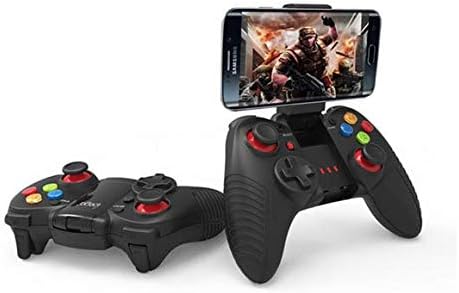
Figure 2: The Ipega PG-9067 controller with a smartphone securely mounted on its telescopic stand, ready for gameplay.
Operating Instructions
1. Power On/Off
- To power on: Press the HOME button. The controller will attempt to reconnect to the last paired device.
- To power off: Press and hold the HOME button for approximately 5 seconds until the LED indicator turns off.
2. Button Layout and Functions
The PG-9067 controller features a standard gamepad layout:
- Left Analog Stick / L3: Movement, camera control.
- D-Pad: Directional input.
- SELECT / BACK: Menu navigation, specific game functions.
- START: Pause, menu access.
- Right Analog Stick / R3: Camera control, specific game functions.
- Action Buttons (A, B, X, Y): Game-specific actions.
- Shoulder Buttons (L1, R1): Game-specific actions.
- Trigger Buttons (L2, R2): Analog input for precise control in supported games.
3. Game Compatibility
The controller is compatible with most Android games that support external gamepads. This includes titles such as Zombie, FC simulator, Shadow gun, Riptide GP, and Temple Run. For optimal performance, ensure your game supports gamepad input.
4. Power Saving Mode
The controller automatically enters power saving mode if it remains idle or loses connection for a few minutes. To reactivate, press the HOME button.
Maintenance
1. Cleaning
Use a soft, dry cloth to clean the surface of the controller. For stubborn dirt, a slightly damp cloth can be used, but ensure no moisture enters the device. Do not use harsh chemicals or abrasive cleaners.
2. Storage
Store the controller in a cool, dry place away from direct sunlight and extreme temperatures. Avoid placing heavy objects on the controller to prevent damage.
3. Battery Care
To prolong battery life, avoid fully discharging the controller frequently. If storing for an extended period, charge the battery to approximately 50% and recharge every few months.
Troubleshooting
| Problem | Possible Cause | Solution |
|---|---|---|
| Controller does not power on. | Battery is depleted. | Charge the controller for at least 30 minutes. |
| Cannot pair with device. | Controller not in pairing mode; Bluetooth interference; device Bluetooth off. | Ensure controller is in pairing mode (rapid flashing LED). Turn off and on device's Bluetooth. Move closer to the device. |
| Buttons or joysticks are unresponsive. | Connection issue; game incompatibility; low battery. | Reconnect the controller. Verify game supports gamepad input. Charge the controller. |
| Controller disconnects frequently. | Low battery; too far from device; interference. | Charge the controller. Stay within 6-8 meters of the device. Reduce wireless interference. |
Specifications
- Model: PG-9067
- Connectivity: Wireless Bluetooth
- Compatibility: Android smartphones, tablet PCs, Smart TVs, PCs
- Wireless Range: 6-8 meters
- Battery Life: Up to 20 hours (approximate)
- Smartphone Holder: Supports devices up to 6 inches
- Package Dimensions: 17.8 x 13.6 x 6.6 cm
- Weight: 294 g
Warranty and Support
For warranty information and technical support, please refer to the documentation provided with your purchase or contact your retailer. Keep your proof of purchase for any warranty claims.


