Introduction
The HUAYU K-1089E+L is a universal remote control designed for air conditioners. It features a large LCD display and a wide range of compatible brands, offering convenient control over various AC functions. This manual provides detailed instructions for setup, operation, and maintenance to ensure optimal performance.
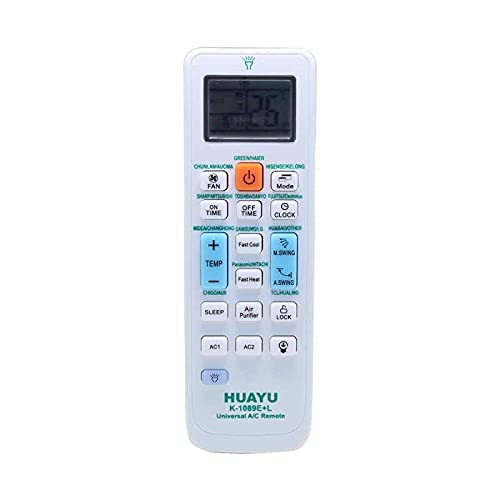
Image 1: HUAYU K-1089E+L Universal AC Remote Control, its retail packaging, and a wall-mounted holder. The remote features an LCD screen and various function buttons. The packaging lists compatible brands and product details.
Setup
1. Battery Installation
- Open the battery compartment cover on the back of the remote control.
- Insert two AAA batteries, ensuring the correct polarity (+ and -) as indicated inside the compartment.
- Close the battery compartment cover securely.
2. Programming the Remote Control
The remote can be programmed using either manual code entry or automatic search.
Method A: Manual Code Entry
- Locate the brand code for your air conditioner from the provided code list (usually found in the remote's packaging or a separate leaflet).
- Point the remote control towards your air conditioner.
- Press and hold the "SET" button (or a similar button like "BRAND" if available, referring to the image, there are two "BRAND" buttons, use either for programming) for approximately 3 seconds until the code on the LCD display starts flashing.
- Use the Temperature Up (TEMP+) or Temperature Down (TEMP-) buttons to input the 3-digit or 4-digit code for your AC brand.
- Once the correct code is displayed, press the "OK" button to confirm. The code will stop flashing.
- Test the remote by pressing the Power button. If the AC responds, the programming is successful. If not, repeat the process with the next code for your brand or try the automatic search method.
Method B: Automatic Search
- Ensure your air conditioner is powered on.
- Point the remote control towards your air conditioner.
- Press and hold the "SET" button (or "BRAND") for approximately 6 seconds until the code on the LCD display starts flashing and automatically cycles through codes.
- Observe your air conditioner. As soon as the AC responds (e.g., turns on, off, or changes mode), immediately release the "SET" or "BRAND" button.
- Press the "OK" button to confirm the code.
- Test all functions of the remote control. If some functions do not work correctly, the code might be partially compatible. Repeat the automatic search process to find a better code.
Operating Instructions
Familiarize yourself with the remote's buttons and their functions:
- Power Button (Orange): Turns the air conditioner on or off.
- Mode Button: Cycles through operating modes (e.g., Cool, Heat, Fan, Dry, Auto).
- FAN Button: Adjusts fan speed (e.g., Auto, Low, Medium, High).
- TEMP+ / TEMP- Buttons: Increases or decreases the desired temperature.
- CLOCK Button: Sets the current time.
- ON TIME / OFF TIME Buttons: Sets timers for the AC to turn on or off automatically.
- SWING Button (M.SWING): Controls the vertical louver movement for air distribution.
- LOCK Button: Locks the remote control settings to prevent accidental changes. Press and hold to activate/deactivate.
- Feel Cool / Feel Hot Buttons: May activate specific comfort modes or quick temperature adjustments.
- ACT / AC2 Buttons: These might be additional brand selection or function buttons depending on the specific AC model. Refer to your AC's manual if these are not immediately clear.
LCD Display
The LCD display shows the current operating status, including:
- Current temperature setting.
- Operating mode icon (e.g., snowflake for cool, sun for heat, fan icon).
- Fan speed indicator.
- Timer settings (if active).
- Clock time.
- Battery indicator (if supported).
Maintenance
Battery Replacement
Replace batteries when the remote's range decreases or the LCD display becomes dim. Always replace both batteries simultaneously with new ones of the same type (AAA). Do not mix old and new batteries or different types of batteries.
Cleaning
Wipe the remote control with a soft, dry cloth. Do not use liquid cleaners, abrasive cleaners, or chemical solvents, as these can damage the remote's surface or internal components.
Storage
If the remote control will not be used for an extended period, remove the batteries to prevent leakage and potential damage.
Troubleshooting
| Problem | Possible Cause | Solution |
|---|---|---|
| Remote not responding / AC not turning on. |
|
|
| Some functions not working. |
|
|
| LCD display is dim or blank. |
|
|
Specifications
- Model Number: K-1089E+L
- Brand: HUAYU
- Compatible Devices: Air Conditioner
- Connectivity Technology: Infrared
- Controller Type: Button Control
- Color: White
- Power Source: 2 x AAA Batteries (not included)
Warranty and Support
For warranty information, technical support, or further assistance, please refer to the product packaging or contact the HUAYU customer service directly. Keep your purchase receipt as proof of purchase.
You can often find contact details or support resources on the manufacturer's official website: www.huayu.cn (as seen on product packaging).


