Introduction
Thank you for choosing the SKMEI Model 1583 Digital Watch. This watch is designed for men, featuring a durable rubber strap and a digital display. It offers multiple functions including time, date, day, alarm, stopwatch, countdown timer, and an LED backlight. With its water resistance, it is suitable for swimming. Please read this manual carefully to understand the watch's functions and ensure proper use and maintenance.
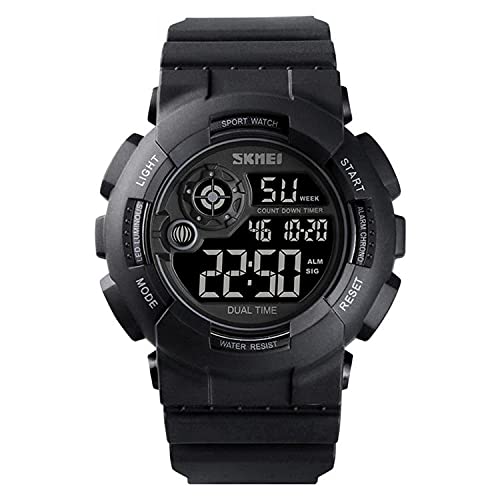
A front view of the SKMEI Model 1583 digital watch, showcasing its black rubber strap, round case, and digital display with multiple functions.
Button Functions
The SKMEI Model 1583 watch features four primary buttons:
- LIGHT: Activates the LED backlight.
- MODE: Cycles through different display modes (Time, Stopwatch, Alarm, Countdown, Dual Time).
- START: Used to start/stop functions in Stopwatch and Countdown modes, and to adjust values during setting.
- RESET: Used to reset functions in Stopwatch and Countdown modes, and to select items during setting.

An exploded view diagram showing various components of the SKMEI Model 1583 watch, including the watch case, dial, band, mirror, clasp, and back cover.
Setup
Setting Time and Date
- From the normal time display, press the MODE button three times to enter Time Setting mode. The seconds digits will flash.
- Press the RESET button to cycle through the setting items: Seconds → Hours → Minutes → Month → Date → Day of Week.
- While an item is flashing, press the START button to adjust the value. Hold START to rapidly advance the value.
- After setting all desired values, press the MODE button once to return to normal time display.
12/24 Hour Format
In normal time display mode, press the START button to toggle between 12-hour (AM/PM indicator) and 24-hour formats.
Operating Instructions
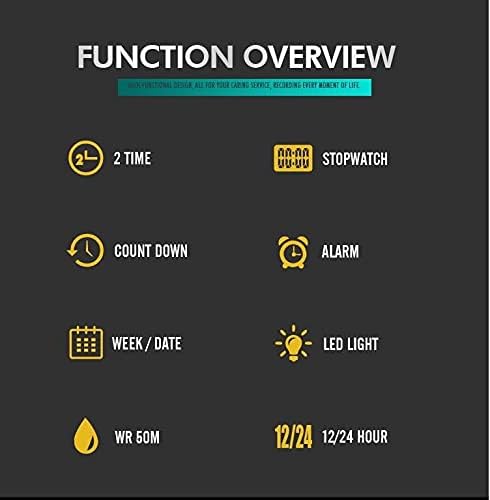
A graphic illustrating the key functions of the SKMEI Model 1583 watch, including 2 Time, Stopwatch, Countdown, Alarm, Week/Date, LED Light, and 12/24 Hour format, along with WR 50M water resistance.
Using the Stopwatch
- From normal time display, press MODE once to enter Stopwatch mode. The display will show '00:00:00'.
- Press START to begin timing.
- Press START again to pause timing.
- Press RESET while paused to reset the stopwatch to '00:00:00'.
- To resume timing after pausing, press START.
- Press MODE to exit Stopwatch mode.
Setting and Using the Alarm
- From normal time display, press MODE twice to enter Alarm mode. The alarm time will be displayed.
- Press RESET to select the hour or minute digits for adjustment. The selected digits will flash.
- Press START to adjust the flashing hour or minute. Hold START to rapidly advance the value.
- Press MODE to confirm the alarm time and exit Alarm setting mode.
- To turn the alarm ON/OFF, in Alarm mode, press START. An alarm icon will appear/disappear to indicate its status.
- When the alarm sounds, press any button to stop it.
Using the Countdown Timer
- From normal time display, press MODE four times to enter Countdown Timer mode.
- Press RESET to select the hour or minute digits for adjustment.
- Press START to adjust the flashing hour or minute.
- Once the desired countdown time is set, press START to begin the countdown.
- Press START again to pause the countdown. Press START to resume.
- Press RESET while paused to reset the countdown to its initial set time.
- When the countdown reaches zero, an alarm will sound. Press any button to stop it.
Dual Time Function
The Dual Time function allows you to keep track of a second time zone. To set:
- From normal time display, press MODE five times to enter Dual Time mode.
- Press RESET to select the hour or minute digits for adjustment.
- Press START to adjust the flashing hour or minute.
- Press MODE to confirm and exit Dual Time setting.
Using the Backlight
Press the LIGHT button at any time to illuminate the display for a few seconds, improving visibility in low-light conditions.

The SKMEI Model 1583 watch display with its green LED backlight illuminated, showing the time, day, and countdown timer.
Maintenance
- Cleaning: Wipe the watch regularly with a soft, dry cloth. For stubborn dirt, a slightly damp cloth can be used, followed by drying. Avoid harsh chemicals or abrasive materials.
- Water Resistance (WR 50M): This watch is water resistant up to 50 meters. It is suitable for swimming and showering. Do not press any buttons while the watch is submerged in water to prevent water ingress. Avoid exposing the watch to hot water or steam, as this can compromise the seals.
- Temperature: Avoid exposing the watch to extreme temperatures (hot or cold) for prolonged periods, as this can affect battery life and accuracy.
- Battery Replacement: When the display becomes dim or functions become erratic, the battery may need replacement. This should ideally be performed by a qualified watch technician to ensure water resistance is maintained.
Troubleshooting
- Display is blank: The battery may be depleted. Replace the battery.
- Incorrect time/date: Re-set the time and date following the instructions in the 'Setup' section. Ensure the 12/24 hour format is correctly selected.
- Buttons not responding: Ensure the watch is not in a locked mode (if applicable, though this model does not feature a lock). If the issue persists, a battery replacement might resolve it, or contact support.
- Water inside the watch: If you notice condensation or water inside the watch, stop using it immediately and have it inspected by a professional to prevent further damage.
Specifications
| Brand | SKMEI |
| Model Number | 1583 |
| Display Type | Digital |
| Movement | Quartz |
| Case Diameter | 45 millimeters |
| Case Material | Not specified (typically resin/plastic for digital sport watches) |
| Band Material Type | Rubber |
| Strap Type | Two Piece Strap |
| Clasp Type | Push Button Hidden Clasp |
| Dial Color | Black |
| Strap Color | Black |
| Watch Glass Material Type | Glass |
| Water Resistance | 50 Meters (WR 50M) |
| Functions | Time, Date, Day, Alarm, Stopwatch, Countdown Timer, Dual Time, LED Backlight, 12/24 Hour Format |
Warranty Information
This product is covered by a standard manufacturer's warranty against defects in materials and workmanship. Please retain your proof of purchase for warranty claims. The warranty does not cover damage caused by improper use, accidents, unauthorized repairs, or normal wear and tear. For specific warranty terms and conditions, please refer to the documentation provided at the time of purchase or contact your retailer.
Customer Support
If you encounter any issues not covered in this manual or require further assistance, please contact your retailer or the SKMEI customer service department. Contact information can typically be found on the product packaging or the official SKMEI website.


