1. Introduction
Thank you for purchasing the Asimom X1 Wireless Bluetooth Speaker. This X-shaped speaker combines high-fidelity audio with dynamic multi-color LED lighting and a unique fan feature designed to enhance your audio experience. This manual provides essential information for setup, operation, maintenance, and troubleshooting to ensure optimal performance of your device.
2. Package Contents
Please verify that all items are present in your package:
- Asimom X1 Wireless Bluetooth Speaker
- USB Charging Cable
- AUX Audio Cable
- User Manual

Image: The Asimom X1 speaker shown alongside its included USB charging cable and AUX audio cable.
3. Setup
3.1 Charging the Speaker
Before first use, fully charge the speaker. Connect the provided USB charging cable to the speaker's charging port and the other end to a USB power adapter (not included) or a computer's USB port. The LED indicator will show charging status.
3.2 Powering On/Off
- To Power On: Press and hold the Power button for 3 seconds.
- To Power Off: Press and hold the Power button for 3 seconds.
4. Operating Instructions
4.1 Bluetooth Pairing
- Ensure the speaker is powered on and in Bluetooth pairing mode (usually indicated by a blinking LED).
- On your device (smartphone, tablet, laptop), enable Bluetooth and search for available devices.
- Select "Asimom X1" from the list of devices.
- Once connected, the speaker will emit an audible confirmation, and the LED indicator will become solid.
4.2 Wired Connection (AUX)
For devices without Bluetooth, use the provided AUX audio cable. Connect one end to the speaker's AUX input port and the other end to your audio source's headphone jack.
4.3 LED Lighting Control
The Asimom X1 features 48 multi-color RGB lighting systems and 5 levels of intensity control. Use the dedicated lighting control buttons on the speaker to cycle through modes and adjust brightness.

Image: The Asimom X1 speaker illuminated with a vibrant rainbow LED display.

Image: The Asimom X1 speaker illuminated with a striking red LED display.

Image: The Asimom X1 speaker illuminated with a dynamic purple and blue LED display.
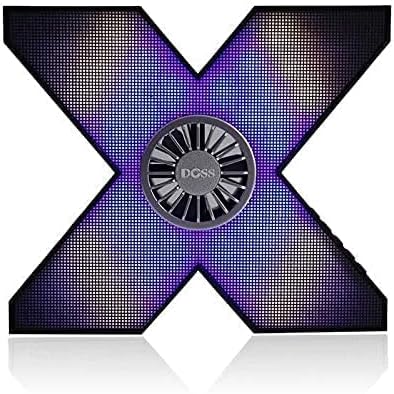
Image: The Asimom X1 speaker illuminated with a nuanced purple and blue LED display.
4.4 Fan Feature for Sound Simulation
The integrated fan in the center of the speaker is designed to create a vibration effect, simulating enhanced audio presence and bass. This feature operates automatically with audio playback.
4.5 Audio Playback
The Asimom X1 delivers very loud and professional pure stereo sound. Adjust volume using your connected device or the speaker's volume controls.
5. Maintenance
- Clean the speaker with a soft, dry cloth. Do not use abrasive cleaners or solvents.
- Avoid exposing the speaker to extreme temperatures, direct sunlight, or moisture.
- Store the speaker in a cool, dry place when not in use for extended periods.
- The speaker features a full metal body and a metal base with rubber supports for durability and stability.
6. Troubleshooting
| Problem | Possible Cause | Solution |
|---|---|---|
| Speaker does not power on. | Low battery. | Charge the speaker fully. |
| No sound. | Volume too low; not paired correctly; AUX cable loose. | Increase volume; re-pair Bluetooth; check AUX cable connection. |
| Bluetooth pairing fails. | Speaker too far from device; speaker not in pairing mode; interference. | Move speaker closer; ensure speaker is in pairing mode; turn off other Bluetooth devices. |
7. Specifications
| Feature | Detail |
|---|---|
| Model Number | X1 |
| Brand Name | Doss |
| Connectivity Technology | Wired/Wireless (Bluetooth) |
| Speaker Type | Bluetooth Speaker |
| Compatible Devices | All devices (iPhone, iPad, Laptops, Smartphones, TVs) |
| Input Type | AUX |
| Number of Pieces | 1 |
| External Product ID Type | EAN-13 |
| External Product ID | 6938546511985 |
| Output Power | 10 - 20 Watts |
| Item Weight | 1 Kilogram |
| Shape | X-shaped |
| Audio Output Mode | Stereo |
| Mounting Type | Tabletop |
| Special Features | Wireless, Bluetooth, Multi-color RGB LED Lighting (48 systems, 5 intensity levels), Fan for sound simulation, Full metal body, Metal base with rubber supports |
| Date First Available | July 7, 2021 |
8. Warranty and Support
For warranty information and technical support, please refer to the documentation provided with your purchase or contact the manufacturer, Doss, directly. Keep your proof of purchase for any warranty claims.


